




Blogs
MacBook Air vs MacBook Pro — Which Do You Actually Need?

MacBook Air vs MacBook Pro: Which One Should You Choose?
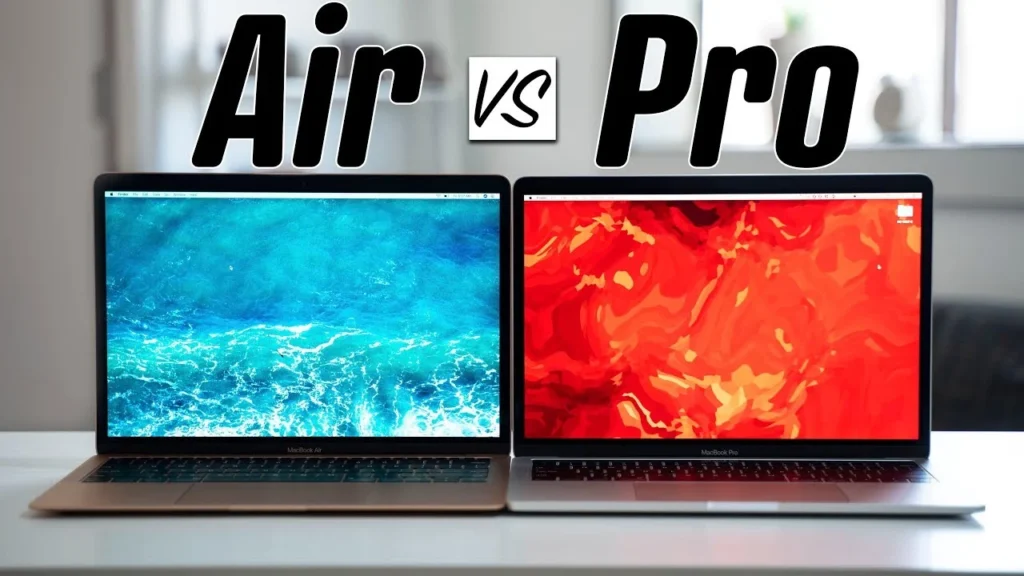
Most users can remain happy with MacBook Air. It is lighter, fanless, cheaper than Pro series. It can perfectly get coding, everyday productivity tools, light creative work without breaking sweat. MacBook Pro with its active cooling, is meant for users doing sustained video editing, 3D rendering heavy code compilation.
Table of Contents
- Air vs Pro — What’s Actually Different? (Summary Table)
- Design, Weight & Portability
- Display — Retina vs Liquid Retina XDR & ProMotion
- Chip Tiers — M-series Air vs Pro/Max Chips
- Battery Life Comparison
- Ports & Connectivity
- Decision Matrix — Air If… Pro If…
- Our Verdict by Use Case
1. Air vs Pro — What’s Actually Different?
This table compares the same generation side by side: the MacBook Air M1 (2020) against the MacBook Pro 14” with M1 Pro (2021). Same Apple Silicon family, different machines built for different jobs.
| Feature | MacBook Air M1 2020 | MacBook Pro 14" M1 Pro 2021 |
|---|---|---|
| Chip | M18-core CPU · 7/8-core GPU | M1 Pro Stronger8/10-core CPU · 14/16-core GPU |
| Cooling | Fanless (passive)Silent, may throttle | Active cooling (fan) BetterSustained performance |
| Display | 13.3" Liquid Retina400 nits | 14.2" Liquid Retina XDR Better1600 nits HDR |
| Refresh Rate | 60 Hz | 120 Hz ProMotion Smoother |
| Weight | 1.29 kg Lighter | 1.55 kg |
| Battery (Apple Rated) | Up to 18 hrs LongerVideo playback | Up to 17 hrsVideo playback |
| Webcam | 720p | 1080p Sharper |
| Speakers | Stereo | 6-speaker system RicherForce-cancelling woofers |
| Ports | 2× Thunderbolt/USB-C3.5mm jack | 3× Thunderbolt 4 · HDMI · SD MoreMagSafe · 3.5mm jack |
| Max RAM | 16 GB | 32 GB (M1 Pro) More64 GB with M1 Max |
| Sustained Performance | Throttles under heavy load | Maintains peak BetterUnder sustained load |
The M1 Air is lighter, cheaper, and fanless. The Pro adds active cooling, brighter XDR display, more ports, and sustained performance. M1 is not a luxury — it's an investment into productivity.
2. Design, Weight & Portability
The weight of MacBook Air M1 is 1.29 KG and it has wedge design, tapered from hinge. MacBook Pro weighs, 1.55KG with a uniform chassis. The 16-inch Pro has a 2.14 kg weight. The
The honest take: If you have to carry the laptop all day then, Air should be your preferred choice. However, if you have to use it on Desktop only then 16 inch MacBook pro is best.
3. Display — Retina vs Liquid Retina XDR & Promotion
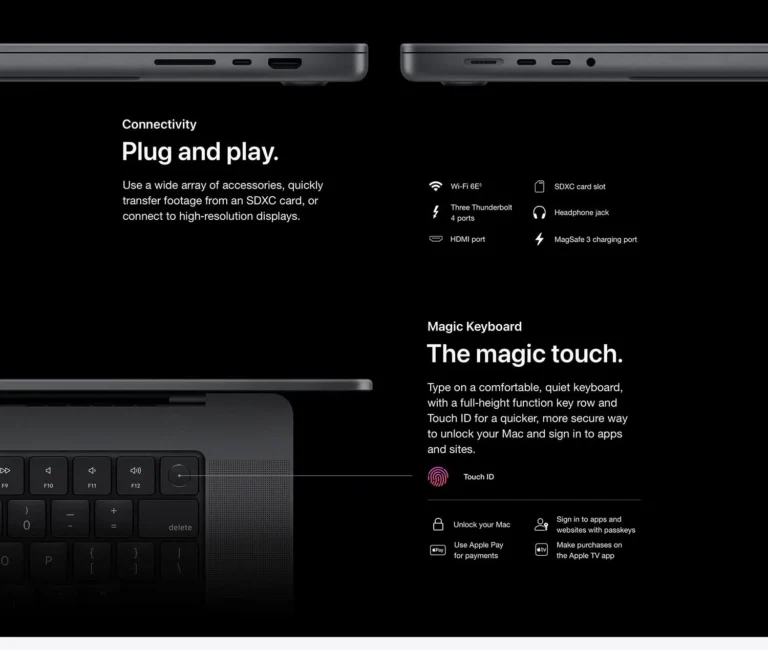
This is where the Pro starts to justify its price tag. The display gap between these two machines is not incremental — it’s generational
| Feature | MacBook Air M1 2020 | MacBook Pro 14" M1 Pro 2021 |
|---|---|---|
| Chip | M18-core CPU · 7/8-core GPU | M1 Pro Stronger8/10-core CPU · 14/16-core GPU |
| Cooling | Fanless (passive)Silent, may throttle | Active cooling (fan) BetterSustained performance |
| Display | 13.3" Liquid Retina400 nits | 14.2" Liquid Retina XDR Better1600 nits HDR |
| Refresh Rate | 60 Hz | 120 Hz ProMotion Smoother |
| Weight | 1.29 kg Lighter | 1.55 kg |
| Battery (Apple Rated) | Up to 18 hrs LongerVideo playback | Up to 17 hrsVideo playback |
| Webcam | 720p | 1080p Sharper |
| Speakers | Stereo | 6-speaker system RicherForce-cancelling woofers |
| Ports | 2× Thunderbolt/USB-C3.5mm jack | 3× Thunderbolt 4 · HDMI · SD MoreMagSafe · 3.5mm jack |
| Max RAM | 16 GB | 32 GB (M1 Pro) More64 GB with M1 Max |
| Sustained Performance | Throttles under heavy load | Maintains peak BetterUnder sustained load |
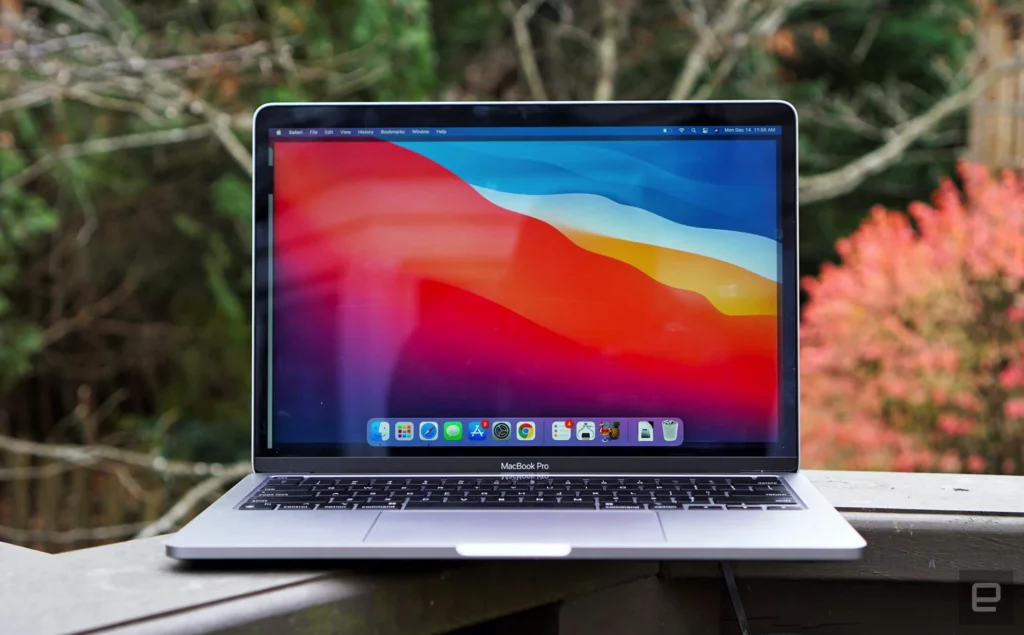
- The brightness gap is massive. The MacBook Pro outperforms Air in Display quality. The 1000 sustained nits in HDR ( High Dynamic Range) makes the videos standout. Further, 1600 nits peak enhance the experience to another level. Blacks on the mini-LED panel are genuinely black, not the dark grey that IPS displays produce. If your work involves, color critical work, XDR display MacBook is a must have.
- Promotion (120 Hz) It renders the display on the screen smoother, with animations coming to life. Once you get used to it, it is difficult going back to 60Hz.
- Resolution: The Pro’s 3024 × 1964 panel has 5.9 million pixels versus the Air’s 4.1 million. Combined with the larger 14.2” size, you get meaningfully more screen real estate for code, timelines, and design canvases without the text getting small.
The Pro's XDR display is 2.5x brighter, has mini-LED with true blacks, runs at 120 Hz, and packs 44% more pixels. It is a professional-grade screen vs the Air's very good consumer-grade panel. For colour-critical work and outdoor use, the Pro display alone may justify the price.
4. Chip Tiers — M-series Air vs Pro/Max Chips
Both machines run Apple Silicon, but the M1 and M1 Pro are fundamentally different chips designed for different workloads.
| Specification | M1 MacBook Air | M1 Pro MacBook Pro 14" |
|---|---|---|
| CPU Cores | 8 cores4 performance + 4 efficiency | 8 or 10 cores MoreUp to 8P + 2E |
| GPU Cores | 7 or 8 | 14 or 16 More |
| Memory Bandwidth | 68.25 GB/s | 200 GB/s 3× Faster |
| Max Unified Memory | 16 GB | 32 GB 2× More |
| Media Engine | Hardware decode only | Dedicated ProRes BetterEncode + Decode |
| Geekbench 6 Single-core | ~2,350 | ~2,400 Slightly Higher |
| Geekbench 6 Multi-core | ~8,400 | ~12,200 45% Faster10-core CPU |
| Transistor Count | 16 billion | 33.7 billion 2× More |
- Single-core performance is nearly identical. For everyday tasks, like using productivity tools, documents, you will not feel any difference.
- Multi-core and GPU is where the Pro pulls ahead. The 10 core M1 Pro scores 45% higher vis a vi M1. The GPU, with double the cores (16 vs 8) handles rendering, video encoding, and GPU work very smoothly. And the memory bandwidth, it tells how fast the data moves between RAM and CPU/GPU, is 3x higher in M1 Pro.
The Crucial Difference: Sustained vs Burst Performance
- As much as speed is important, what is more crucial is how long can the chip sustain its performance. The Air and Pro, may have similar benchmark in short bursts, however under sustained load they behave completely differently.
- The M1 air is a fanless design, meaning if you push the CPU too much it will throttle due to no active cooling. The machine stays safe but slows down.
- Pro has active cooling, it can maintain peak performance, for as long as required.
A 30 minute video rendering will happen on both Air and Pro in similar speed. However, for a two hour compilation, Pro will outperform the Air.
The Air throttles without a fan, the Pro maintains full speed under load indefinitely.
5. Battery Life Comparison
| Metric | Air M1 2020 | Pro 14" M1 Pro 2021 | Pro 16" M1 Pro 2021 |
|---|---|---|---|
| Battery Capacity | 49.9 Wh | 70.0 Wh | 99.6 Wh Largest |
| Apple Rated Video | Up to 18 hrs | Up to 17 hrs | Up to 21 hrs Longest |
| Real-World Mixed Use | 9–13 hrs | 9–12 hrs | 12–16 hrs Best |
| Charger Included | 30W USB-C | 67W MagSafe | 140W MagSafe Fastest |
| Fast Charge (0–50%) | No | ~30 min 67W | ~30 min 140W |
Despite having bigger batteries Pro has similar backup as Air, due to brighter display, active cooling, beefier chip.
Battery life is similar between Air and 14" Pro. The Air is actually more efficient for light tasks. The 16" Pro leads overall with its 99.6 Wh battery.
6. Ports & Connectivity
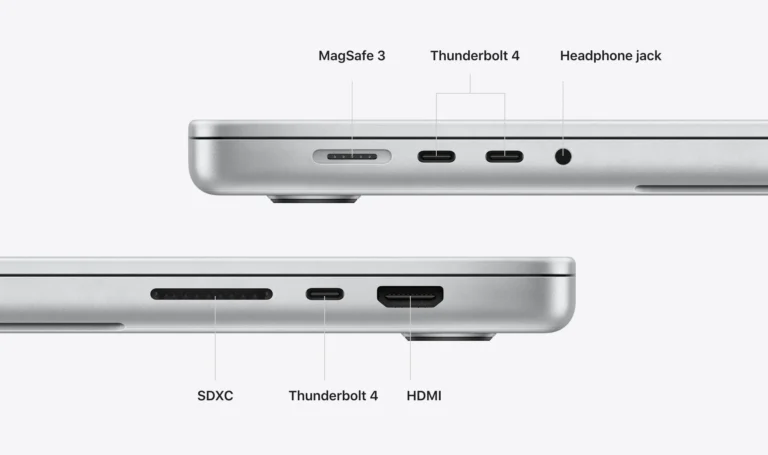
This is a bigger practical difference than most people realise before buying.
| Port / Feature | MacBook Air M1 2020 | MacBook Pro 14" M1 Pro 2021 |
|---|---|---|
| Thunderbolt / USB-C | 2 ports TB3 | 3 ports MoreTB4 |
| MagSafe | ✗Charges via USB-C | ✔ ExclusiveMagSafe 3 |
| HDMI | ✗ | ✔ ExclusiveHDMI 2.0 · 4K@60Hz |
| SD Card Slot | ✗ | ✔ ExclusiveUHS-II |
| 3.5mm Headphone Jack | ✔ | ✔ BetterHigh-impedance support |
| External Display Support | 1 display | Up to 2 displays MoreUp to 4 with M1 Max |
| Wi-Fi | Wi-Fi 6 802.11ax | Wi-Fi 6 Same802.11ax |
- Limited ports in M1 Air, is it’s biggest limitations. With only two USB-C ports, one for the charger and then only one remains for all other requirements.
- Also M1 Air, supports only 1 external display, if your work involves dual monitors then go with MacBook Pro.
7. Decision Matrix — Air If… Pro If…
Pick the MacBook Air If:
- Your heaviest task is browsing + productivity apps. Google Docs, Notion, Slack, Zoom, email, and 20 browser tabs. The Air handles all of this without engaging a fan (because there isn’t one). It’s silent, always.
- You carry your laptop everywhere. 1.24–1.29 kg, all-day battery, silent operation. The Air is designed for people whose laptop goes where they go — classrooms, co-working spaces, flights, trains.
- You code but don’t compile massive projects. VS Code, Python scripts, web development, small-to-medium Node.js or Swift projects. The Air’s M-series chips handle this beautifully. You only outgrow it if you’re compiling large codebases or running heavy local environments continuously.
- Budget is a priority. The M1 Air at ₹32–36K is the cheapest entry into the Apple ecosystem. The M2 Air at ₹48–53K is a mid-range sweet spot. Both are extraordinary value.
Pick the MacBook Pro If:
- You edit video professionally. Multi-stream 4K timelines, colour grading, long exports in Final Cut Pro or DaVinci Resolve. The Pro’s active cooling prevents throttling during renders. The XDR display shows you accurate colours. The SD card slot reads directly from your camera. This is what the Pro is built for.
- You need sustained CPU/GPU performance. Large Xcode compilations, Docker with multiple running services, Kubernetes, heavy database work, ML model training. The Air will do these things, but it’ll throttle after 15–20 minutes. The Pro won’t.
- You work with external displays regularly. Dual-monitor setups, presentations via HDMI without dongles, colour-accurate externals for design. The Pro’s native ports and multi-display support make this seamless.
- You need the display. HDR content review, photography, outdoor work. The XDR display’s 1,600-nit HDR brightness and million-to-one contrast are professional tools, not consumer luxuries.
- You work with 3D or heavy media. Blender, Cinema 4D, After Effects, Unreal Engine. The Pro’s extra GPU cores and sustained cooling translate to hours saved per week on renders.
Air: everyday computing, portability, moderate coding, budget-conscious. Pro: video editing, sustained heavy workloads, external displays, colour-critical work, 3D rendering. The question isn't which is better — it's which matches YOUR workflow.
8. Our Verdict by Use Case
Instead of a single verdict, here’s the right machine for each buyer:
| Use Case | Our Pick | Why |
|---|---|---|
| College Student | Air M1 (8/256) | Affordable, light, all-day battery |
| Writer / Blogger | Air M1 (8/256) | Silent, portable, perfect for text work |
| Web Developer | Air M2 (16/512) | Fast for code, browser, and local servers |
| Full-Stack Developer | Pro 14" M1 Pro (16/512) | Docker + DBs + IDE without throttling |
| Freelance Designer | Air M2 (16/256) | Figma, Photoshop, portability |
| Video Editor | Pro 14" M1 Pro (16/512) | Sustained renders, XDR display, SD card |
| Photographer | Pro 14" M1 Pro (16/512) | Colour-accurate display, SD slot, Lightroom |
| 3D Artist / ML Engineer | Pro 16" M2 Pro (16/512) | Max GPU, big screen, sustained perf |
| Business Professional | Air M2 (8/256) | Light, fast, great for presentations |
| Casual Home User | Air M1 (8/256) | Best value for browsing and streaming |
- Notice the pattern: the Air dominates 7 out of 10 use cases. The Pro only wins where sustained performance, professional display, or specific ports are non-negotiable. This isn’t a knock on the Pro — it’s a testament to how capable the Air has become with Apple Silicon. Most people genuinely don’t need what the Pro offers, and spending ₹37–70K extra on capabilities they’ll never use is money better spent elsewhere

FAQs:
Can the MacBook Air handle video editing at all?
Yes. The Air edits 1080p video smoothly and handles 4K for short projects. Where it struggles is sustained exports on longer timelines — it thermal-throttles and takes longer.
Is the MacBook Pro too heavy for daily commuting?
The 14-inch Pro at 1.55 kg is manageable — heavier than the Air but not unreasonably so. The 16-inch at 2.14 kg is heavy for daily carry.
I'm a software developer. Do I need the Pro?
Depends on your scale. Frontend, scripting, light backend — the Air is ideal. Full-stack with Docker Compose, large monorepos, iOS simulator + Xcode + Chrome — the Pro's sustained performance and higher memory ceiling make a daily difference. If your current machine's fan is always on during work, the Pro is probably right.
Should I buy the 13-inch MacBook Pro instead of the 14-inch?
No. The 13-inch MacBook Pro (A2338) uses the base M1/M2 chip — the same as the Air — not a Pro chip. It has the old chassis with Touch Bar and only two ports. There's no sustained performance advantage over the Air.
Does EazyPC stock both Air and Pro models?
Yes. EazyPC carries MacBook Air M1, M2, and M3, plus MacBook Pro 14" and 16" in various configurations and grades. Stock rotates based on sourcing.
Can I return a Pro and switch to an Air (or vice versa) after buying?
EazyPC offers a 7-day replacement guarantee for functional issues. If you want to switch models within the return window, contact support — we'll work with you to find the right fit, subject to stock availability and any price difference.
Find Your MacBook at EazyPC
Browse MacBook Air: eazypc.in/macbook-air – From ₹ 41,000
Browse MacBook Pro: eazypc.in/macbook-pro — from ₹64,746
M1 vs M2 Air deep dive: MacBook Air M1 vs M2 — Complete Comparison
