


Shop By Needs

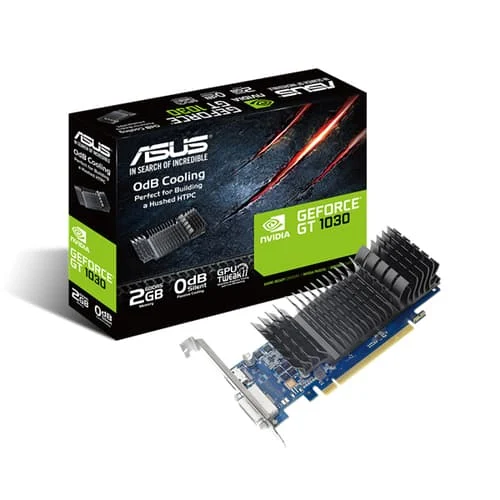
Asus GT 1030 2GB Graphics Card

Out of stock

Original price was: ₹15,190.00.Current price is: ₹9,499.00.

Asus GT 710 2GB DDR5 Graphics Card

Out of stock

Original price was: ₹3,999.00.Current price is: ₹3,400.00.

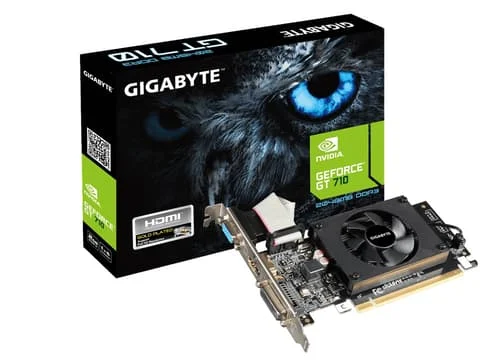
Gigabyte GT 710 2GB DDR3 Gaming Graphics Card

Out of stock

Original price was: ₹3,528.00.Current price is: ₹3,475.00.

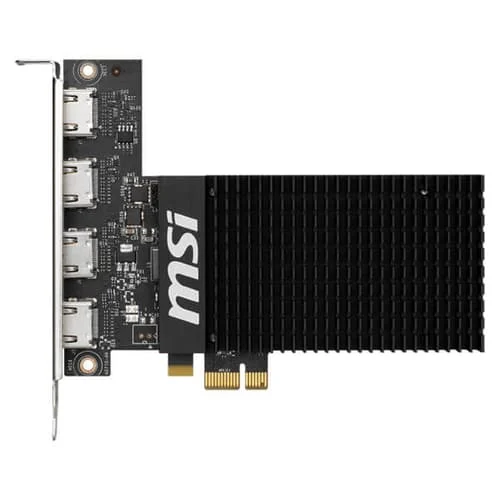
MSI Geforce GT 710 2GD3H 4HDMI Gaming Graphics Card

Out of stock

Original price was: ₹7,999.00.Current price is: ₹7,180.00.

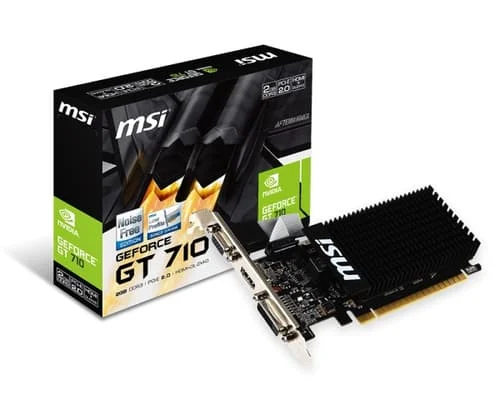
Msi GT 710 2GB

Out of stock

Original price was: ₹5,700.00.Current price is: ₹3,460.00.

MSI GT 730 4GB Graphics Card

Out of stock

Original price was: ₹10,399.00.Current price is: ₹8,490.00.

NVIDIA Quadro RTX A400 4GB GDDR6 Graphics Card

Out of stock

Original price was: ₹20,550.00.Current price is: ₹13,999.00.

Pny Quadro NVS510 2GB

Out of stock

Original price was: ₹20,550.00.Current price is: ₹13,999.00.

Zotac GT 730 4GB DDR3 Zone Edition Graphics Card

Out of stock

Original price was: ₹9,570.00.Current price is: ₹7,250.00.

Used Graphics Cards in India: The Smart Buyer's Guide for Gamers / Startups

By EazyPC | Category: GPU Guides | Reading Time: ~8 mins

Everyone who is in to gaming, wants smooth frame rates, good visuals to experience the joy of finally running a title in full mode. However, the price of brand-new RTX 4060 is out of budget for most.You do not require to spend a lot of money on a new GPU, to have a great PC gaming experience. The used GPU market in India is becoming very main stream and you can buy a graphics card which is value for money.I will guide in this technically enriching breakdown of everything that you need to understand before buying a used graphics card in India. I will explain which specs actually matter and which cards are worth your money today.

Why the Used GPU Market in India is Better Than Ever Right Now

The India GPU market is, driven by gaming, AI workloads, and content creation. More people are buying new, high-end cards and their older cards are entering the second-hand market at attractive prices.
The price of new GPU remains very high. Customers are frustrated over “ridiculous” GPU pricing these days. Today mid-range new GPU’s are quoting at prices which could have bought you a flagship spec GPU couple of years ago. For a budget gamer/student/ startup a tested, quality used GPU is simply the smarter financial decision.

What Is a "Used" Graphics Card? (And Why "Refurbished" Is Different)

It is important to have a clear distinction, so as to safeguard you from a bad purchase.
Used GPU: It is sold by the previous user, if his use ended. It could be in a good condition or worn out, you do not know without proper testing.
Refurbished GPU: It is inspected, cleaned, tested under load, and sometimes components (like thermal pads or fans) are replaced before being resold. This is the category you want to shop, and it is exactly what we offer at EazyPC, every used graphic card listed on our site goes through testing before it reaches you.
Though the difference looks small on paper, but is vast in real life. You get the warranty and assurance when buying it from EazyPC, and it is a blind purchase when buying from peer-to-peer platforms like OLX.

The Core Specs That Actually Matter (Without the Jargon)
You may have seen number of GPU listed across various product pages, but find it hard to understand which GPU is the right fit for you. I will explain below the GPU to buy for you.

VRAM (Video RAM):

This is your GPU's dedicated memory for storing game textures, render data, 3D models, or any visual workload your system is processing. More VRAM equates more compute for complex tasks. 6GB is the minimum for modern gaming at 1080p, and 8GB gives you comfortable headroom.
For professional workflows like 4K video editing or 3D rendering, 12GB or more is the starting point. Cards with only 4GB VRAM will struggle with modern AAA titles and show their limits quickly in professional software.

GPU Architecture (The Generation): GPU architecture is underlying brain design on which card is based. Newer generations are smarter, faster and consumer lesser power.  NVIDIA's

Turing architecture (GTX 16-series, RTX 20-series) and AMD's Polaris/RDNA1 (RX 500-series, RX 5000-series) are the most commonly available in the used market.
For users working on professional software, the generation also determines which features are available, like hardware ray tracing, NVIDIA's CUDA cores (essential for creative apps), and AI-accelerated Tensor cores which is critical for DLSS (Deep Learning Super Sampling) and AI workflows.

TDP (Thermal Design Power): This refers to the power consummation of the GPU at full load and how much heat it generates. A high-TDP requires better Power supply unit (PSU) and well-ventilated cabinet. In India's warm tropical climate, thermal management is very critical in comparison with countries with cooler climates.
For office or corporate deployments, a lower TDP card means lower electricity costs over time, it is a vital consideration when deploying multiple workstations.

Memory Bandwidth:
It determines speed at which data travels between the VRAM and the GPU's compute cores. It is measured in GB/s, higher bandwidth results in smoother performance while handling large textures, high-resolution timelines, or complex 3D scenes. The GTX 1660 Super uses GDDR6 memory with a 336 GB/s bandwidth, which is a significant improvement over previous generation GDDR5-based cards like the RX 580 at 256 GB/s.

CUDA Cores / Stream Processors:
NVIDIA cards use CUDA cores; AMD cards use Stream Processors. These are the actual units doing the compute. More cores translate into faster rendering and compute performance. But raw core count in itself does not tell the full story. Architecture efficiency also matters along with it. An RTX 2060 with 1920 CUDA cores on Turing will outperform an older card with twice the core count on a less efficient architecture.

PCIe Interface: Most used cards run on PCIe 3.0 x16. If your motherboard only has PCIe 2.0, performance is slightly reduced, though for 1080p gaming and office workloads, the difference is usually negligible.
For GPU compute tasks (AI, rendering), PCIe 3.0 x16 or better is the right starting point.
Display Outputs: Check that the card has the ports you need: HDMI 2.0 or DisplayPort 1.4 if you have a high-refresh-rate monitor. Most cards from the GTX 10-series era onwards handle this well.
Display Outputs: For gaming and general use, HDMI 2.0 is standard.For multi-monitor corporate setups or video production, DisplayPort 1.4 is preferred as it supports higher refresh rates and resolutions without compression. Most cards from the GTX 10-series era onwards handle dual-monitor setups well.

 NVIDIA vs AMD: Which Team Should You Join?

This is the eternal debate in the GPU world, and honestly? Both camps have strong offerings in the used market. Here's a balanced breakdown.

NVIDIA GTX/RTX Series: The Efficiency Kings

The NVIDIA's GTX 16-series GPU cards (GTX 1650, 1660, 1660 Super, 1660 Ti) are currently the gold standard for budget gaming. They were launched between 2019 and 2020 and use NVIDIA's Turing architecture, i.e. built on a 12nm process. It delivers exceptional performance-per-watt compared to older designs.

The GTX 1660 Super is the crown jewel of this tier. It carries 6GB of fast GDDR6 memory, delivers strong 1080p gaming performance across virtually all titles, and has a TDP of 125W, ensuring that it runs cool and quiet even in compact builds. It is roughly 40% faster than the AMD RX 580 in synthetic benchmarks while consuming significantly less power.
If you want something more powerful you have the RTX 2060 and RTX 3060. These add real-time ray tracing support and DLSS (Deep Learning Super Sampling), NVIDIA's AI-powered upscaling technology. It lets the GPU render at a lower internal resolution and uses AI to reconstruct the image at higher quality. This dramatically boost’s frame rates in supported titles. DLSS has broad adoption across major game titles.
A used RTX 2060 can deliver a gaming experience that outperform many new mid-range cards, especially in DLSS-supported games.

AMD RX Series — The VRAM Heroes

AMD's used market offerings are compelling for different reasons. Cards like the RX 580 8GB, RX 5500 XT, and RX 5600 XT carry more VRAM than comparable NVIDIA cards, which are an advantage in certain texture-heavy titles and for content creation workflows.
The RX 580 8GB is a workhorse. It's been around since 2017 but still handles 1080p medium-to-high settings in most games admirably. It runs hotter and draws more power than NVIDIA's GTX 16-series (around 185W TDP), but if you have a capable PSU and good airflow, it's a solid entry point into gaming at a very low price point.
AMD's newer RX 5600 XT and RX 5700 series bring the RDNA1 architecture — a significant leap in efficiency — and these cards are increasingly available in the used market as gamers upgrade to the RX 9000 series. These represent excellent value for money and support AMD's FreeSync technology, which synchronizes the monitor's refresh rate with the GPU's frame output to eliminate screen tearing — and FreeSync monitors are widely available in India at affordable prices.

The Used GPU Sweet Spot: Cards Worth Buying

I will explain below the best value for money used graphics cards for Indian budget gamers and students right now.

For the Absolute Tightest Budget:The RX 580 8GB is for you. It does the job at 1080p on medium to high settings for most titles. Also handles older AAA games with ease, and its 8GB VRAM is a genuine advantage. Just make sure your PSU is at least 500W.

The Sweet Spot: The GTX 1660 and GTX 1660 Super are brilliant for the money. 6GB GDDR6, 125W TDP, excellent 1080p performance. The GTX 1660 Super provides almost 32% better aggregate performance than the RX 580 while being noticeably more power efficient. If you are building your first real gaming PC, you should go for it.
The Performance Tier: The RTX 2060 and RX 5700 fit here. You get DLSS support with the RTX 2060, and both cards can handle 1080p gaming on Ultra settings and push into 1440p territory comfortably. These are great cards and were considered high-end just a couple of years ago.
The Serious Upgrade: This is RTX 3060 and RTX 3060 Ti territory. These cards support DLSS 3 (well, DLSS 2 natively with Frame Generation available on RTX 40-series). They have 12GB and 8GB of VRAM respectively, and handle 1440p high-refresh gaming with ease.

The Used GPU Checklist: What to Verify Before You Buy

This section could save you a lot of heartache. Whether you're buying from EazyPC or anywhere else, here's what to ensure.
Check Temperatures Under Load: A healthy GPU should stay under 85°C when stressed. Tools like GPU-Z and HWInfo64 can monitor this in real time. A card that hits 90°C+ at idle or under light load has cooling issues that will get worse over time, possibly degraded thermal paste or worn-out fans.
Look at the Fan Condition: Spin the fans manually with your finger. They should spin freely and quietly without any grinding or wobbling. A failing fan is a low cost replacement, but only if you catch it before it causes thermal damage.
Check for Mining History: Cards used in cryptocurrency mining are run at sustained, high loads 24 hours a day. This degrades thermal pads, VRAM, and in some cases, the PCB solder joints. Telltale signs include BIOS modifications, missing sticker labels, and unusually clean exteriors (miners sometimes deep-clean cards before resale). If possible, ask sellers about the card's usage history. At EazyPC, we thoroughly test every card and disclose its background, no guesswork needed.
Run a VRAM Stress Test: Use a tool like OCCT's VRAM test or MATS (Memory Addressing Test Suite for GPUs) to check for VRAM errors. Faulty VRAM will result in flickering, pixel errors during gaming.
Verify the PCIe Connector: Ensure that the PCIe power connectors on the card are undamaged. Bent or burnt pins indicate power delivery problems.
Check the Display Outputs Physically: Check HDMI, DisplayPort, DVI, and ensure that they should be clean and undamaged. Use your actual monitor to test connectivity before finalizing the purchase.

Why Buying from a Verified Seller Beats OLX Every Time

Look, the OLX/Facebook Marketplace route exists, and occasionally you'll find a genuine deal. But for every good deal, there are cards with hidden mining histories, BIOS modifications that make diagnostic tools lie to you, and sellers who simply don't allow return windows.
When you buy from a trusted source like EazyPC, you get tested and verified stock, transparent product listing, and the ability to make an informed decision without needing to be a hardware expert yourself. Our used graphic cards go through quality checks precisely so you don't have to wing it.

Browse our full collection of tested used graphics cards here: eazypc.in/product-category/used-graphic-cards/

Do Used GPUs Work with Laptops? A Common Student Question

Short answer: no, in almost all cases. Discrete graphics cards are desktop components that slot into a PCIe x16 slot on a desktop motherboard. They require significant power delivery and cooling that a laptop chassis simply doesn't have.
If you're a student on a laptop who wants better GPU performance, your options are an eGPU enclosure (very expensive and niche), a laptop with a dedicated GPU, or — honestly the most practical option — building a budget desktop where a used GPU gives you exceptional value.

Power Supply Pairing: Don't Overlook This

The most common mistakes PC builders make is pairing a capable GPU with an inadequate PSU (Power Supply Unit). Here's a simple pairing guide:
An RX 580 needs at least a 500W PSU. The GTX 1660 Super is more forgiving at 450W minimum, but 500W gives you headroom for the rest of your build. An RTX 2060 is comfortable at 500W, while an RTX 3060 Ti or RX 5700 XT ideally runs on 600W+.
Always consider your CPU, storage drives, RAM, and fans when calculating total system power draw. A quality 80+ Bronze PSU from brands like Seasonic, Corsair, or EVGA is worth the investment.

The Bottom Line: Is a Used GPU Worth It in India?

The used GPU market in India provides tangible value for budget conscious gamers / startups/ creative professionals. A used graphics card from a tested and verified source can deliver 30-40% cost savings as compared to buying new, with performance that handles modern titles at 1080p with ease.
The GPU demand is exploding and new card prices remain elevated. The supply of quality second-hand cards is better than ever. It is genuinely one of the best times to explore this space.

At EazyPC, we've done the hard work of sourcing, testing, and verifying used graphics cards so you don't have to take a leap of faith. Whether you're building your first gaming PC, upgrading a bottlenecked system, or just want to game on a student's budget — there's a card on our platform that fits your need.

Frequently Asked Questions (FAQ)

Q: Is it safe to buy a used graphics card in India? Yes, if you buy from a verified seller who tests their GPU. Graphics Cards with visible serial numbers, transparent usage history, and return policies are generally safe purchases.

Q: How long do used GPUs last? A well-maintained used GPU can last 5–7 more years of regular gaming use. GPU’s that were used for mining or 24/7 workloads have shorter remaining lifespans.

Q: Which is better for budget gaming, NVIDIA or AMD? NVIDIA GTX 16-series cards offer better power efficiency and DLSS support. AMD RX 580 and RX 5600 XT provide more VRAM at lower prices.

Q: What's the minimum VRAM I should look for? 6GB is best for modern 1080p gaming. If you can buy 8GB GPU, it is better for AAA titles or content creation.

Q: Can I use a used GPU for video editing? Yes, 8GB+ VRAM and CUDA/OpenCL work well for video editing software’s like DaVinci Resolve and Adobe Premiere. NVIDIA's NVENC encoder (available on GTX 16-series and above) also speeds up export times.

Q: Where can I buy tested used graphics cards in India? Right here at eazypc.in. We test every card before listing it.

EazyPC is India's trusted source for refurbished laptops and PC components. We believe high-performance computing should be accessible to everyone —