




Blogs
MacBook Model Number Guide: How to Identify Yours (Complete Lookup)

Identify Your MacBook Model Easily: Complete Guide to Model Numbers & Specs
Apple uses the alpha numerical nomenclature for its MacBook’s. Code like A2337 or A2681, lets you identify exact machine you are looking at, it’s Year, chip, and everything else.
Knowing it is important, as it helps you ascertain macOS compatability, resale value and many other things. This guide gives you three ways to find your model number, complete lookup tables for every MacBook Air and Pro since Apple Silicon, an explanation of Apple’s part number system, and a quick fraud-check method that takes 30 seconds
Table of Contents
- How to Find Your MacBook’s Model Number (3 Methods)
- MacBook Air Model Numbers — Complete Lookup Table
- Apple Part Numbers Explained (MGN63HN/A = India, LL/A = US)
- How to Check If a Model Number Is Genuine (Anti-Fraud)
- Know Your Model? Here’s What It’s Worth Today
- Looking to Upgrade? Find Your Next MacBook at EazyPC
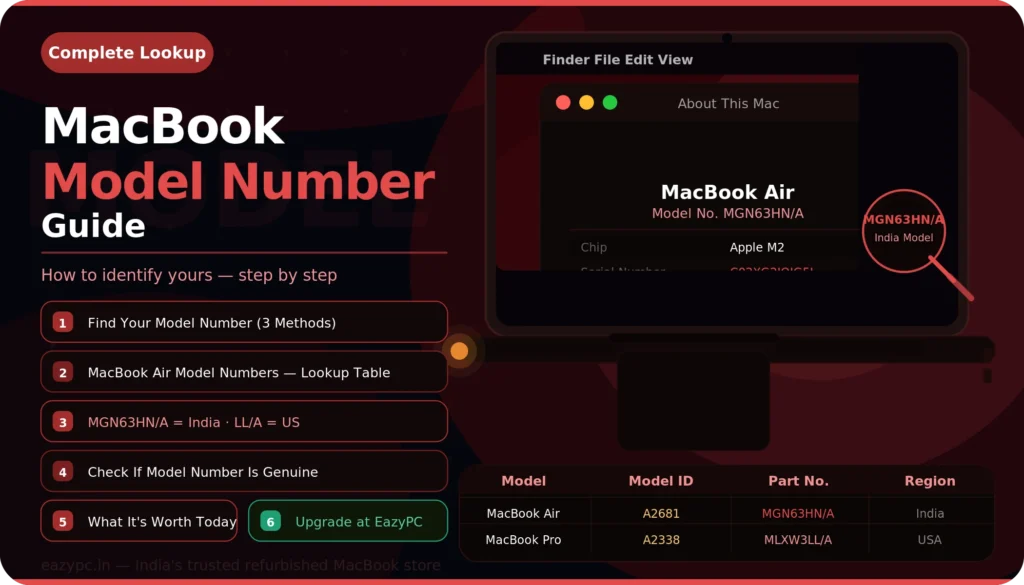
1. How to Find Your MacBook’s Model Number (3 Methods)
Method 1: About This Mac (MacBook Is On and Accessible)
- Step 1: Click the Apple menu, in the top-left corner of your screen.
- Step 2: Click “About This Mac.”
- Step 3: It shows the model name (e.g., “MacBook Air (M1, 2020)”), chip, memory, and serial number. On macOS Ventura and later, click “More Info” to see the full system report.
- Step 4: In System Information (or System Report), look under Hardware Overview. The “Model Identifier” (e.g., MacBookAir10,1) and “Model Number” (e.g., A2337) are both listed here.
Method 2: Physical Model Number (MacBook Is Off or Inaccessible)
- Flip the MacBook, on the bottom case you will find the model number mentioned. This is engraved on the aluminum panel and cannot be fudged. On latest models, after 2022+, it is printed in a very fine text, you may need good lighting or a phone camera to read it.
Method 3: Serial Number Lookup
- Step 1: Get the serial and number and go to checkcoverage.apple.com and enter it.
- Step 2: Here you will find the exact product name, warranty status, and whether AppleCare is active. This is the most authoritative way to verify what you’re buying.
2. MacBook Air Model Numbers - Complete Lookup Table
This table covers every MacBook Air from the Apple Silicon era onward — the models that are most relevant for buyers in 2026. If you’re looking at an Intel MacBook Air, those model numbers start with A1932 (2018/2019) and A2179 (2020 Intel).
| Model # | Official Name | Year | Chip | Display | RAM Options | Key Part Numbers |
|---|---|---|---|---|---|---|
| A2337 | MacBook Air (M1, 2020) | Late 2020 | M1 | 13.3" | 8 / 16 GB | MGN63HN/A MGN93HN/A MGND3HN/A MGN73HN/A |
| A2681 | MacBook Air (M2, 2022) | Mid 2022 | M2 | 13.6" | 8 / 16 / 24 GB | MLY33HN/A MLY13HN/A MLXW3HN/A MLY43HN/A |
| A3113 | MacBook Air 13" (M3, 2024) | Early 2024 | M3 | 13.6" | 8 / 16 / 24 GB | MRXN3HN/A MRXQ3HN/A MRXT3HN/A |
| A3114 | MacBook Air 15" (M3, 2024) | Early 2024 | M3 | 15.3" | 8 / 16 / 24 GB | MRXP3HN/A MRXR3HN/A MRXV3HN/A |
How to read this table: Find the model number from your MacBook’s bottom case or About This Mac. Match it to the row. Now you know the exact year, chip, and generation. The “Key Part Numbers” column lists common Indian-market part numbers (HN/A suffix) — these appear on the original box and in purchase invoices.
3. MacBook Pro Model Numbers - Complete Lookup Table
The MacBook Pro line is more complex because Apple ships multiple chip tiers (base, Pro, Max, and Ultra in some cases) under the same model number. The A-number tells you the generation; the part number tells you the specific configuration.
| Model # | Official Name | Year | Chip Options | Display | Key Part Numbers |
|---|---|---|---|---|---|
| A2338 | MacBook Pro 13" (M1, 2020) | Late 2020 | M1 | 13.3" | MYD82HN/A MYD92HN/A MYDA2HN/A |
| A2442 | MacBook Pro 14" (2021) | Late 2021 | M1 Pro M1 Max | 14.2" | MKGR3HN/A MKGP3HN/A MKGT3HN/A |
| A2485 | MacBook Pro 16" (2021) | Late 2021 | M1 Pro M1 Max | 16.2" | MK183HN/A MK193HN/A MK1A3HN/A |
| A2779 | MacBook Pro 14" (2023) | Jan 2023 | M2 Pro M2 Max | 14.2" | MPHE3HN/A MPHF3HN/A MPHG3HN/A |
| A2780 | MacBook Pro 16" (2023) | Jan 2023 | M2 Pro M2 Max | 16.2" | MNW83HN/A MNW93HN/A MNWA3HN/A |
| A2918 | MacBook Pro 14" (Late 2023) | Nov 2023 | M3 M3 Pro M3 Max | 14.2" | MTL73HN/A MTL83HN/A |
| A2991 | MacBook Pro 16" (Late 2023) | Nov 2023 | M3 Pro M3 Max | 16.2" | MRW13HN/A MRW23HN/A |
4. Apple Part Numbers Explained (MGN63HN/A = India, LL/A = US)
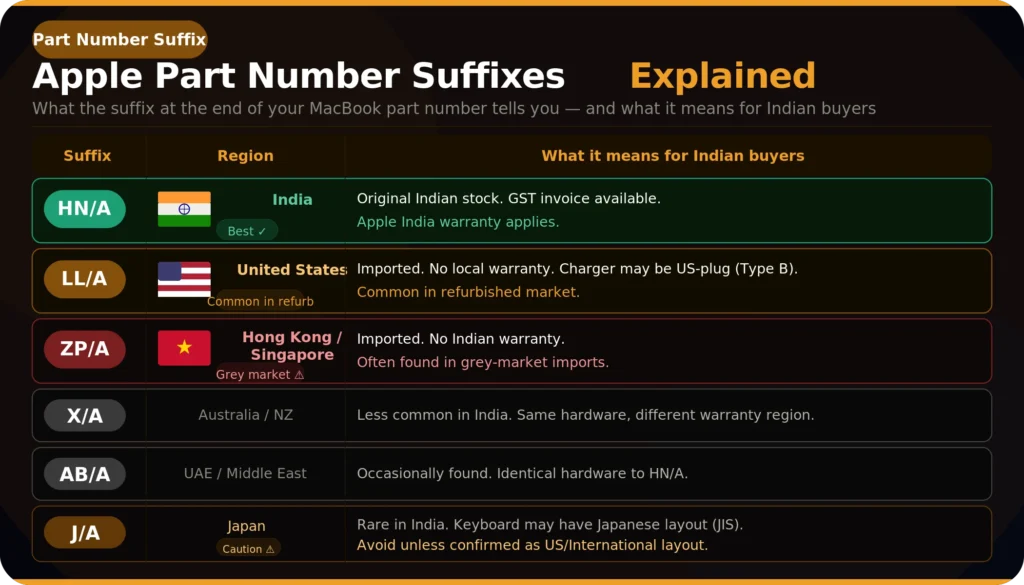
Part numbers identifies the specific configuration (colour, RAM, storage) and the region it was originally sold in. The suffix after the slash tells you the region:
| Suffix | Region | What It Means for Indian Buyers |
|---|---|---|
| HN/A | 🇮🇳 India Best | Original Indian stock. GST invoice available. Apple India warranty applies. |
| LL/A | 🇺🇸 United States Caution | Imported. No local warranty. Charger may be US-plug (Type B). Common in refurbished market. |
| ZP/A | 🇸🇬 Hong Kong / Singapore Caution | Imported. No Indian warranty. Often found in grey-market imports. |
| X/A | 🇦🇺 Australia / New Zealand Rare | Less common in India. Same hardware, different warranty region. |
| AB/A | 🇦🇪 UAE / Middle East Occasional | Occasionally found. Identical hardware. |
| J/A | 🇯🇵 Japan Avoid | Rare in India. Keyboard may have Japanese layout (JIS). Avoid unless explicitly confirmed as US / International layout. |
Does the Region Actually Matter?
For the hardware itself, no. An MGN63LL/A and an MGN63HN/A are identical internally, same M1 chip, same RAM, same storage, same display. macOS works identically regardless of region. The differences are practical:
- Warranty: Apple provides limited region specific warranty. An HN/A MacBook can be serviced at any Apple Authorized sotre in India. However for any other geo location hardware, it will refuse the warranty. For refurbished purchases from EazyPC, this doesn’t matter because you’re covered under EazyPC’s own warranty. But if you’re buying privately and want the option of Apple service, stick to HN/A units.
- Charger: US-region (LL/A) MacBooks ship with a Type B plug. You will need a plug adapter or a separate Indian charger cable. Not a dealbreaker, but worth knowing.
- Keyboard: Most regions use the same ANSI keyboard layout (US English). The exception is J/A (Japan), which uses JIS layout with different key sizes and additional keys. Avoid J/A units unless the seller explicitly confirms it’s a US/International keyboard.
How to Find the Part Number
- On the device: About This Mac → More Info → System Report → Hardware Overview.
- On the box: printed below the barcode.
- On the invoice: usually listed as the SKU or product code.
If you are buying online and the seller only provides the model number (A-series) but not the part number, ask for it. The part number is the only way to confirm the region and exact configuration.
The A-number tells you the generation. The part number (e.g., MGN63HN/A) tells you the exact config and region. HN/A = India (local warranty). LL/A = US import (no Apple India warranty). Hardware is identical across regions — the differences are warranty, plug type, and keyboard layout.
5. How to Check If a Model Number Is Genuine (Anti-Fraud)
The refurbished and second-hand market in India has its share of misrepresented listings. A seller might advertise an “M2 MacBook Air” that’s actually an older M1, or claim “16 GB RAM” on an 8 GB unit. Here’s a 30-second verification process that catches most fraud:
The 30-Second Verification
- Step 1 – Match the physical model number to the listing. Flip the MacBook. Read the A-number. Does it match what’s advertised? If the seller says “MacBook Air M2” but the bottom says A2337, it’s an M1. Reference the tables above.
- Step 2 – Cross-check with About This Mac. Boot the device. Go to About This Mac. The chip, RAM, storage, and model name should all match the physical number and the listing. If About This Mac says “8 GB” but the listing says “16 GB,” you have your answer.
- Step 3 – Verify the serial number with Apple. Go to checkcoverage.apple.com and enter the serial number. Apple will return the product name. If the serial comes back as a different product than what’s in front of you, either the serial has been swapped (a major red flag) or the device has been tampered with. Walk away.
Three-step fraud check: (1) Match the physical A-number to the advertised model — (2) verify chip/RAM/storage in About This Mac — (3) confirm the serial number on Apple's site. Any mismatch = walk away.
Full guide to selling your MacBook at the best price: How to Sell Your Old MacBook in India — Maximum Value Guide
6. Looking to Upgrade? Find Your Next MacBook at EazyPC
You now know the exact method of identifying the MacBook details. If you want to purchase a refurbished MacBook, find one on EazyPC website. Each device is verified, inspected, and warranty-backed.
- Browse all refurbished MacBooks: eazypc.in/macbooks
- Not sure which model to pick? Read our complete buying guide: Ultimate Guide to Buying a Refurbished MacBook in India (2026)

FAQs:
What's the difference between model number and part number?
The model number (A2337, A2681, etc.) tells you the hardware generation — i.e. the release year. The part number (MGN63HN/A, MLY33HN/A, etc.) tells you the exact configuration — colour, RAM, storage — and the sales region.
Can two MacBooks have the same model number but different specs?
Yes. The model number A2337 comes in both 8 GB and 16 GB variants. Similarly, A2918 covers the M3, M3 Pro, and M3 Max variants of the 14-inch MacBook Pro — same model number, very different chips and performance tiers.
Does a US-imported MacBook (LL/A) work fine in India?
Yes. Apple does not make different hardware for different geographies. The differences are warranty coverage and a US-style power plug. If you are buying refurbished from EazyPC, warranty is covered by EazyPC regardless of the original region — so the LL/A distinction becomes less relevant.
How do I check if my MacBook is stolen?
Check that the device boots without an Activation Lock screen. If Find My Mac is enabled and locked to another Apple ID, the device is completely unusable — and is very likely stolen. Always verify this before purchasing from any private seller.
Can I use the model number to check macOS compatibility?
Yes. Apple publishes a list of supported models for each macOS version. Search "macOS [version] compatible Macs" on Apple's support site for the definitive list — the model number is all you need to confirm compatibility.
