Refurbished Laptop

Dell latitude 7310 x360 – 2-in 1 laptop (i7 10th gen) review

dell latitude 7310

When Dell Latitude 7310 launched in 2020, it carried a massive enterprise price tag—often pushing near the ₹1.06 to ₹1.5 lakh mark for top-tier configurations—making it tough to justify for the average consumer at that time. Fast forward to today, and this 13.3-inch business Ultrabook has become an absolute prime target in the refurbished laptop market.

I’ve been diving deep into the hardware specifics and testing benchmarks of this i7 10th Gen model. If you are hunting for a premium, lightweight daily driver that delivers maximum value-to-performance, here is everything you need to know about the 7310.

Design, Build Quality, and The Weight Divide

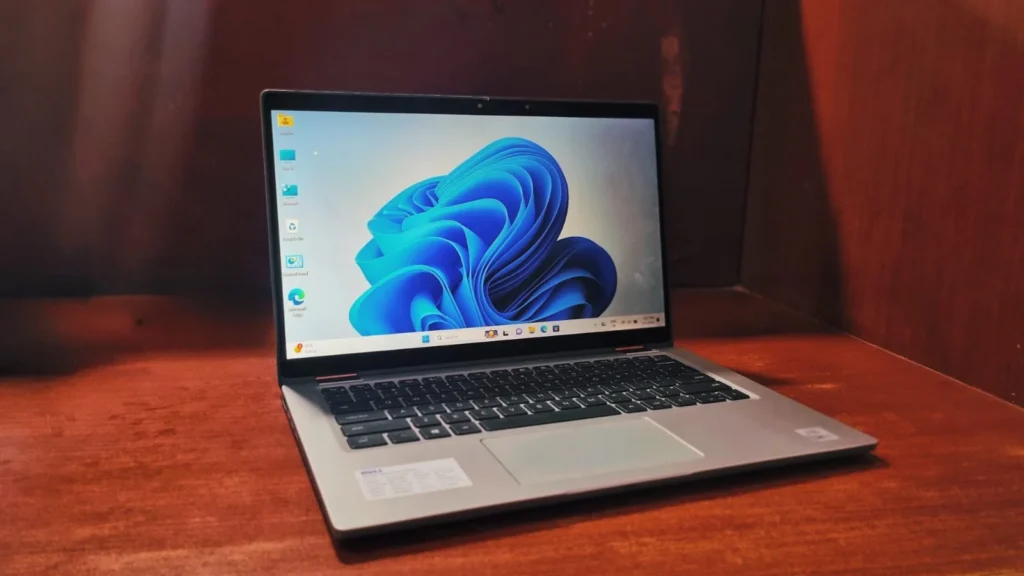
Dell Latitude 7310 gives you options to choose in-between two distinct models: a standard brushed aluminum finish one which we have and a sleeker dark carbon fiber weave.

If you can find the carbon fiber variant, grab it. It gives the laptop a soft-touch, premium texture while keeping the weight incredibly low at around 1.22 kg. The aluminum 2-in-1 convertible version which we are reviewing looks sleeker but pushes the weight closer to 1.45 kg, making it slightly heavier than competitors like the ThinkPad X1 carbon. Regardless of the material, the chassis is thoroughly tested, meaning it can survive drops, vibrations, and extreme temperatures.

The Display: A Massive Buyer Beware

This is where you need to pay close attention to the spec sheet of the refurbished unit you are buying.it might become a dealbreaker for anyone buying this laptop.

At the time it was launched with the price tag above 1 lakh, the 13.3-inch 1080p touch display on the Latitude 7310 is a massive letdown. This is mainly because it’s equipped with Dell’s “SafeScreen” privacy panel which is designed to stop onlookers from reading your screen. It absolutely tanks the viewing angles and makes the display look incredibly dim. Colors on the SafeScreen panel can also look washed out with a vignette effect around the edges pulling lower sRGB gamut than its competitors. If you plan to consume a lot of media or into photo editing, actively avoid the SafeScreen configuration. Additionally, the touchscreen enables its use as a 2-in-1 convertible, making it suitable for both home and office.

Keyboard & Touchpad

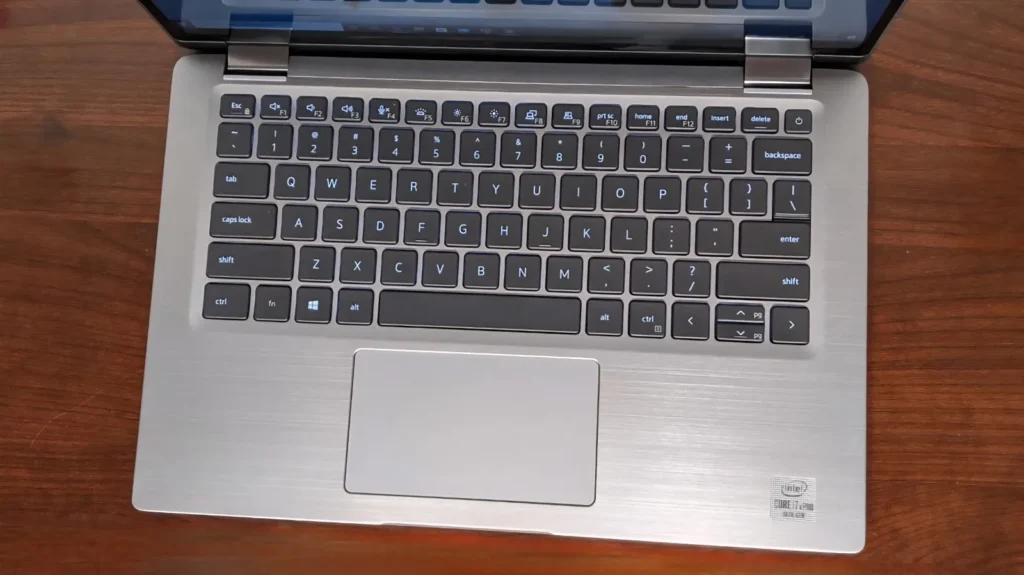
  • The Keyboard: It’s a genuinely comfortable typing experience. You get much deeper key travel than the XPS 13, making it way better for long writing sessions, even if it feels a little softer than an HP Spectre. Keys are also smaller than the other laptops featuring in the same bracket. The main keys are nice and quiet—though the Space and Enter keys have a noticeable clack—and the standard two-level backlight gets the job done.
  • The Touchpad: Honestly, this feels like a downgrade. Dell ditched the dedicated physical mouse buttons from the older models in favor of a larger, all-in-one clickpad. While the smooth glass surface gives you plenty of room to scroll, the actual clicking mechanism is not so tactile and unsatisfying. It makes precision tasks and dragging-and-dropping a real pain.
dell latitude 7310 x360

Performance & Benchmarks

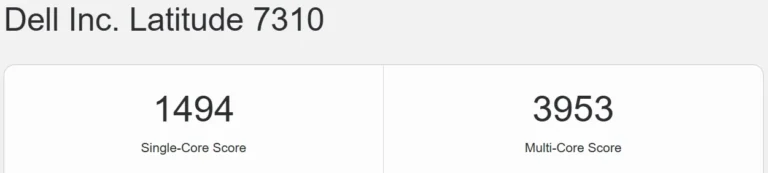
The processor i7-10610U carries a 4-core, 8-thread chip built on Intel’s 14nm process. Looking at the Geekbench results, the 7310 fetches a Single – Core score of 1494 and a Multi – Core score of 3953. That single-core performance is still remarkably snappy. For typical content writing, managing a heavy backend, or browsing a dozen Chrome tabs, you won’t feel any lag. However, the Cinebench 2024 scores show the chip’s age, coming in at a modest 37 pts (Single – Core) and 116 pts (Multi – Core). If your workflow involves heavy CPU rendering, compiling massive codebases, or intense video encoding then, this quad-core chip is not made to handle that much of workload.

dell latitude 7310 x360

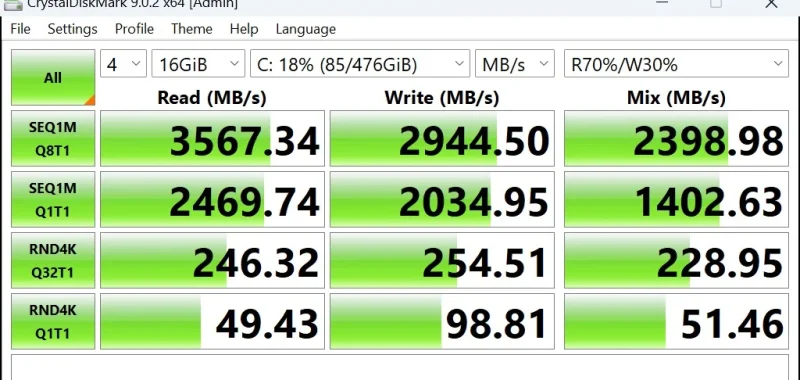
While the CPU and GPU show their age in heavy workloads, the storage speeds are what keep this laptop feeling like a premium, modern machine. In our CrystalDiskMark test, the internal NVMe SSD delivered fantastic PCIe Gen 3 speeds:

  • Sequential Read: 3,567.34 MB/s
  • Sequential Write: 2,944.50 MB/s

The Latitude’s superior speeds mean faster boot times, quicker application launches, and more responsive file transfers out of the box. While the Latitude 7310’s stock speeds are fantastic, it is worth noting that platforms like the XPS 13 9310 support newer & faster PCIe Gen 4 drives, which can push well past 6000 MB/s if upgraded aftermarket. However, for standard business and productivity uses, the Latitude’s drive punches well above its weight class.

dell latitude 7310 x360

Battery life

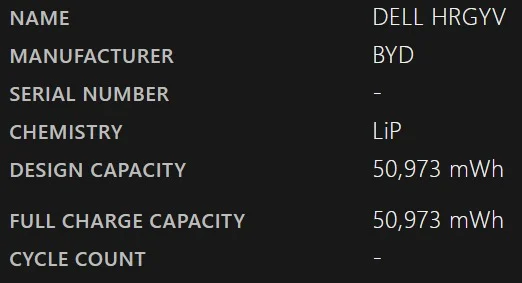
The Latitude 7310 is powered by a 51Wh 4-cell Lithium-Polymer battery. Paired with the power efficiency of the 10th Gen Intel processor. For typical workloads you can expect an average of 4-6 hours depending on high/low usage without plugging it in. It also supports type c fast charging with Dell’s proprietary “ExpressCharge” technology.

dell latitude 7310

Ports and Connectivity

Dell made a great move by ditching the old proprietary barrel charger. The I/O is thoroughly modern:

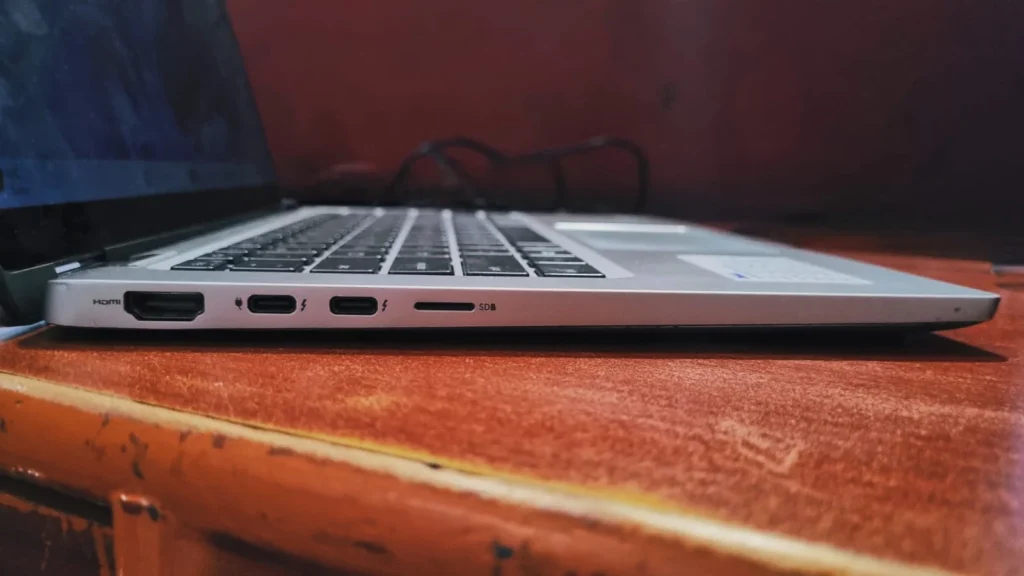
  • Left Side: 1x HDMI 2.0, 2x Thunderbolt 3 ports (both support charging and external displays), and a spring-loaded MicroSD card reader 
dell latitude 7310 x360
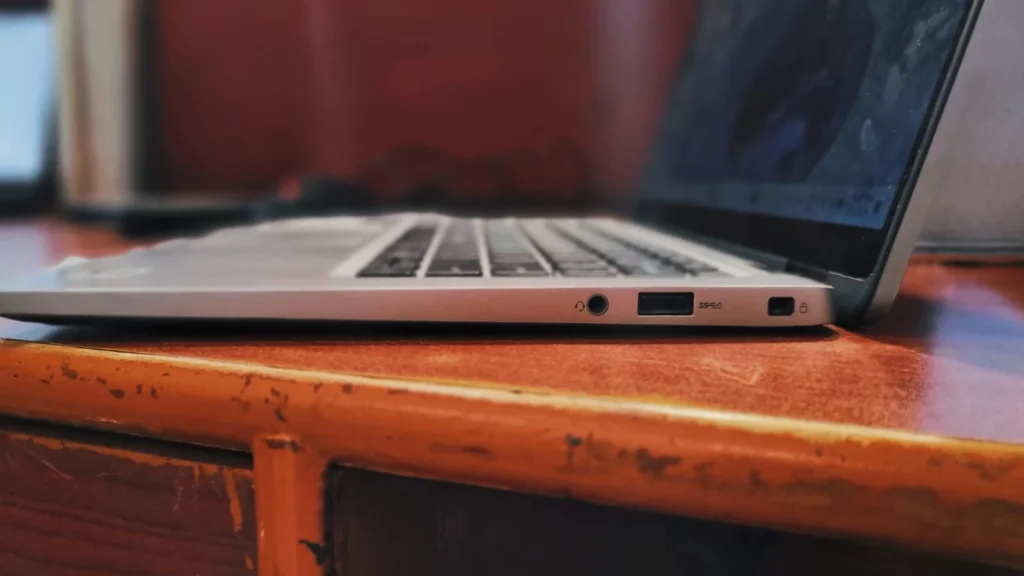
  • Right Side: Right Side: 1x USB 3.2 Gen 1 Type-A (for fast data transfer) , a 3.5mm audio jack (for seamless audio experience, and a Kensington lock slot. 
dell latitude 7310 x360

The Verdict

You can easily snag this laptop in refurbished markets at a good price for using it as a mobile workstation in your office or home, the Latitude 7310 hits the sweet spot while also maintaining the budget. The blazing-fast SSD and capable processor speeds make it a fantastic tool for productivity and general tasks. Just keep your expectations in check—this is a sleek office workhorse, not a heavy-duty workhorse.

Frequently Asked Questions

Yes, provided you secure a 16GB RAM configuration. It offers incredible build quality and battery life for the price.

Real-world web surfing and productivity tasks will easily yield 8 to 10 hours on a single charge.

No, Both the RAM and the Wi-Fi 6 card are permanently soldered to the motherboard. Only the M.2 NVMe SSD is upgradable.

No, due to Dell’s SafeScreen technology it’s far too dim and washed out for color-critical work.

Leave a Reply

Your email address will not be published. Required fields are marked *