
Blogs
Dell Latitude 3480 i7 Review (2026): Refurbished 7th Gen with 2GB AMD GPU, 8GB RAM and 256GB SSD

Quick answer: is the Dell Latitude 3480 i7 worth buying in 2026? (click to read)
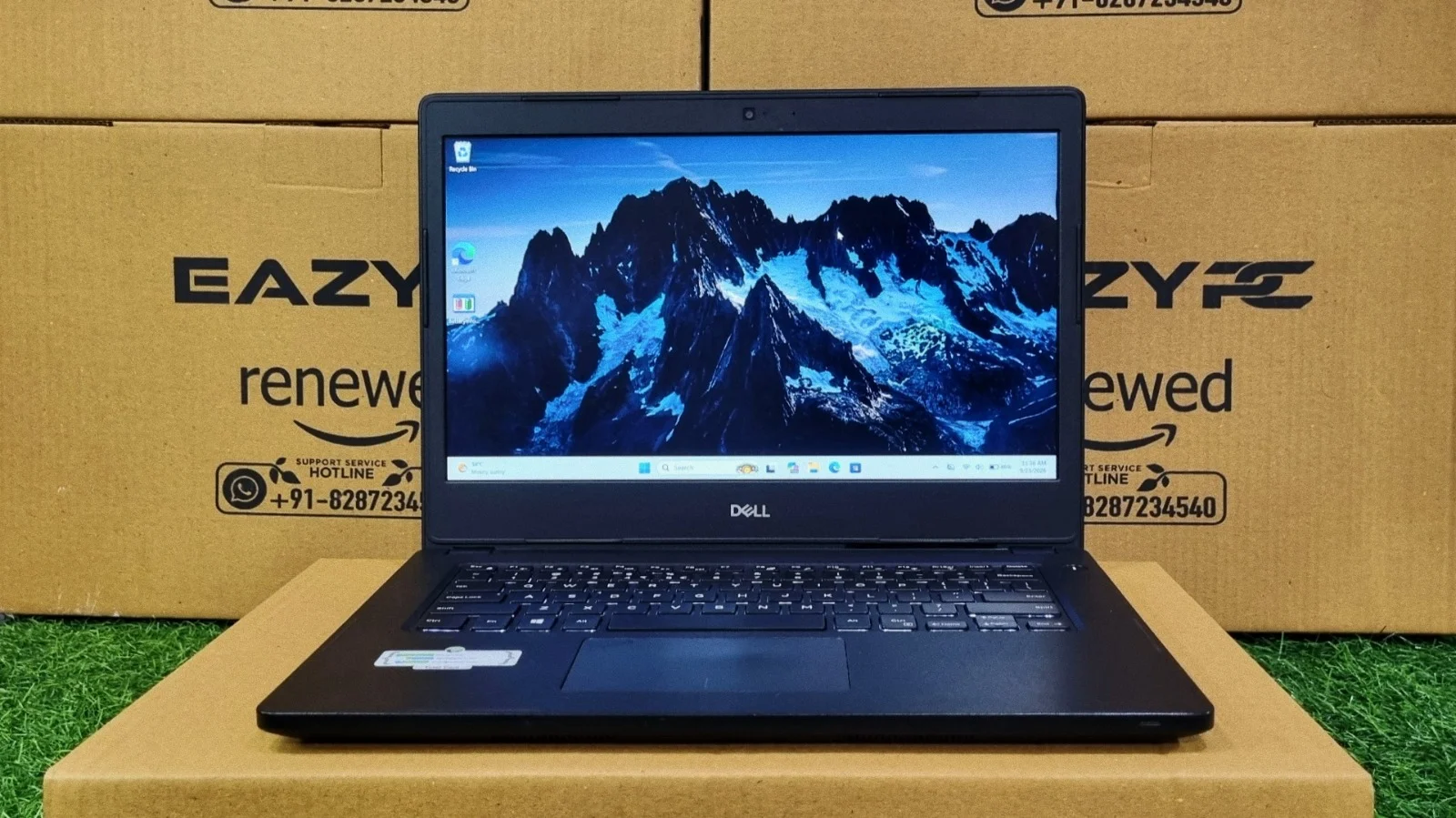
Yes, for office work, study and everyday browsing. The refurbished Dell Latitude 3480 with an Intel Core i7-7500U, 8GB RAM, 256GB SSD and a dedicated 2GB AMD Radeon R5 M330 scored 3189 in PCMark 10 and reads files at about 459 MB/s. Its 3DMark Time Spy score of 263 rules out modern gaming and video editing.
Key Takeaways
| Best for | Students, office staff, shop owners, accountants and anyone who needs a dependable everyday laptop without spending much. |
| Everyday speed | PCMark 10 Essentials (5839) and Productivity (5945) show it copes well with Office, browsing and video calls. |
| Storage | The SSD managed 458.74 MB/s sequential read and 459.67 MB/s write, a big step up from any old hard drive. |
| CPU | A dual-core, four-thread chip with Cinebench R23 scores of 757 (single) and 1449 (multi). |
| Graphics | The dedicated Radeon R5 M330 (2GB) is entry-level, with a Time Spy score of just 263. |
| Not for | Modern gaming, video editing, 3D rendering or official Windows 11 support. |
What Are the Dell Latitude 3480 Specifications?
The Dell Latitude 3480 is a 14-inch business laptop from Dell's Latitude 3000 series, introduced in 2017 with 6th and 7th generation Intel Core processors. This refurbished configuration pairs an Intel Core i7-7500U with 8GB of DDR4 RAM, a 256GB SSD and a dedicated 2GB AMD Radeon R5 M330. It is not the thinnest or the fanciest machine in the Latitude family, but it was designed to be a practical, no-drama office companion. Here is the configuration we looked at, along with the standard details of the model.
| Component | Details |
|---|---|
| Processor | Intel Core i7-7500U (7th Gen, 2 cores, 4 threads, 2.7 GHz base, up to 3.5 GHz Turbo, 15W TDP) |
| Dedicated graphics | AMD Radeon R5 M330 with 2GB memory |
| Integrated graphics | Intel HD Graphics 620 |
| Memory | 8GB DDR4 |
| Storage | 256GB SSD (about 237GiB usable) |
| Display | 14-inch HD (1366 x 768) |
| Wireless | Wi-Fi 802.11ac, Bluetooth 4.1 |
| Weight | About 1.76 kg |
| Ports | 2 x USB 3.0, 1 x USB 2.0, HDMI, VGA, Ethernet, SD card reader, headphone/mic jack |
Port layouts and extras such as the fingerprint reader and keyboard backlight can differ between configurations, so check the exact unit you are buying.
How Is the Dell Latitude 3480 Build Quality?
The plastic chassis weighs about 1.76 kg and measures roughly 337 x 244 x 23.3 mm.
The Latitude 3480 is a sturdy plastic laptop. It will not turn heads in a coffee shop, and honestly that is part of its charm. Dell built it to survive years of office desks, school bags and being opened a hundred times a day.
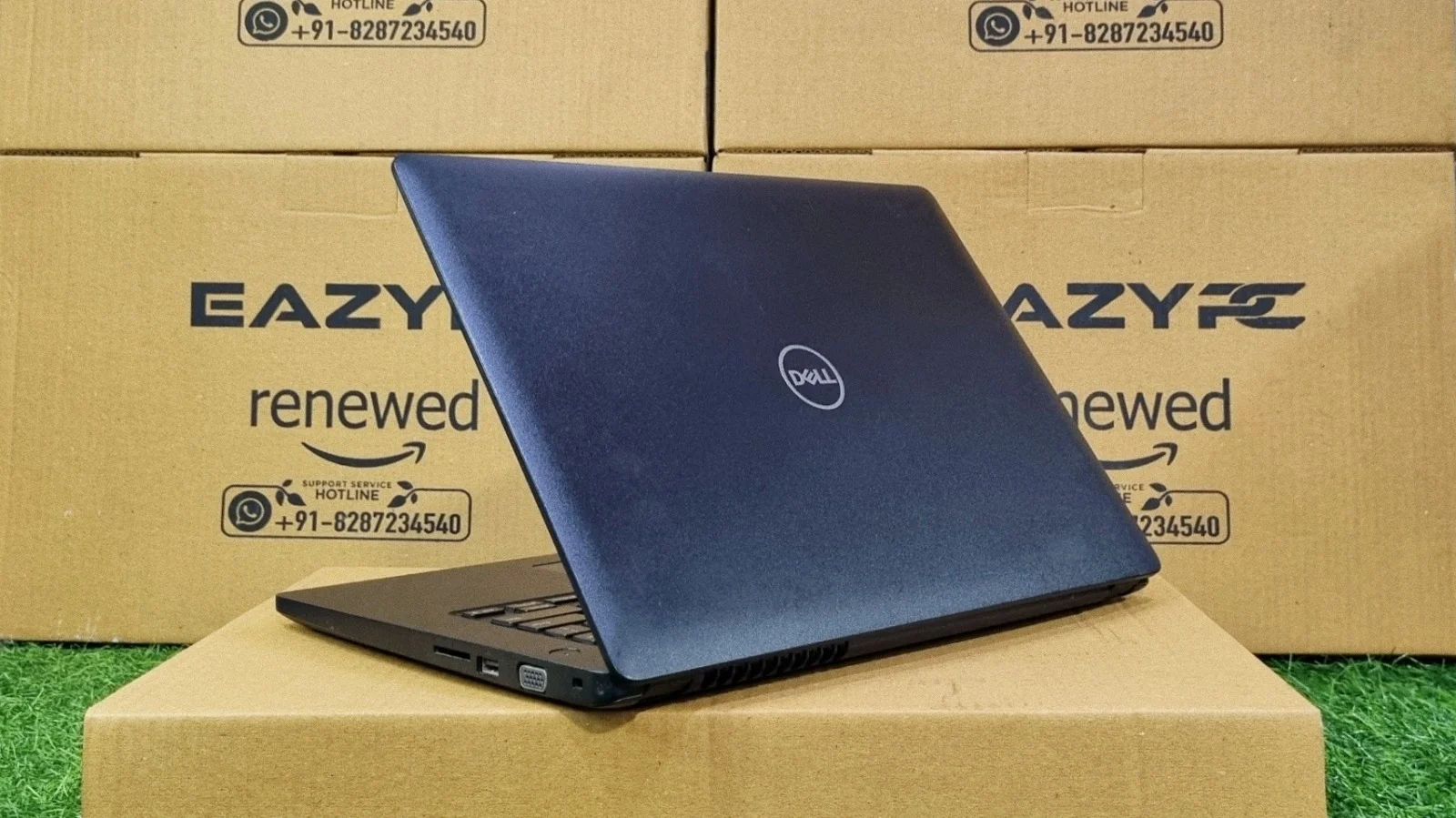
At around 1.76 kg it is a little heavier than the 12.5-inch Latitudes, but it is still easy enough to carry daily. The 14-inch body gives you a more comfortable keyboard and screen than a compact model would.
Since this is a refurbished laptop, expect a few light scuffs or wear marks. Cosmetic condition varies from unit to unit, so it is worth asking the seller for photos of the actual laptop. The underlying construction is the kind that holds up well.
Is the Dell Latitude 3480 Display Good Enough?
The standard panel is a 14-inch HD (1366 x 768) display.
It does the job for documents, spreadsheets and video calls, but it is not a screen to fall in love with. Some versions use a Full HD panel instead.
With HD resolution, text looks a bit softer and you cannot fit as many windows side by side. Viewing angles are limited too, so tilt the screen until the picture looks right. For writing reports, filling in forms and attending online classes it is perfectly usable. For editing photos or watching films in colour-rich detail, you will want an external monitor.
Is the Dell Latitude 3480 Keyboard Comfortable for Typing?
The full-size business keyboard has a firm key press that suits long typing sessions.
This is where business laptops usually beat consumer ones. The Latitude keyboard has a firm, predictable key press, and the full-size layout feels natural if you type for hours. Some units include a backlight, which is handy when you are working late or in a dim room.
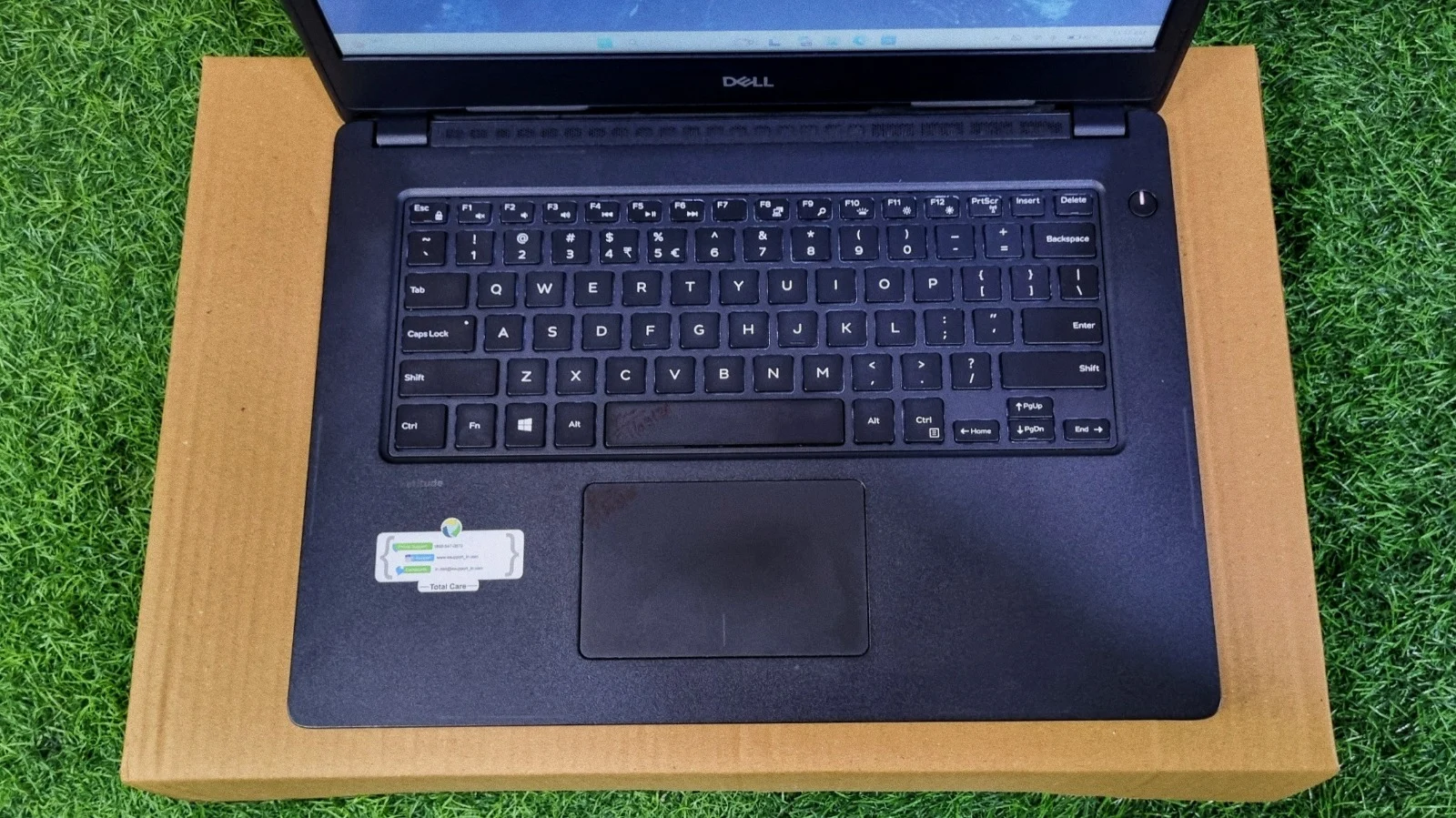
The touchpad is responsive enough for everyday use and handles standard Windows gestures. If you spend your day in Excel or Tally, an inexpensive USB mouse will make things smoother.
How Fast Is the Dell Latitude 3480? Benchmark Results
It is quick enough for office work, study and browsing, and slow for gaming and creative projects.
Here are all the scores at a glance, with the detail behind each test below.
| Benchmark | Score | What it means |
|---|---|---|
| CrystalDiskMark (sequential) | 458.74 MB/s read / 459.67 MB/s write | Typical SATA SSD; fast boot and app launches |
| Cinebench R23 | 757 single / 1449 multi | Fine for daily tasks; limited for heavy workloads |
| 3DMark Time Spy | 263 | Entry-level graphics; not made for gaming |
| PCMark 10 (overall) | 3189 | Solid for office use, weak for creative work |
How Fast Is the Dell Latitude 3480 SSD? (CrystalDiskMark)
The SSD manages about 459 MB/s for both sequential read (458.74) and write (459.67). That is typical for a SATA SSD and far faster than a hard drive.
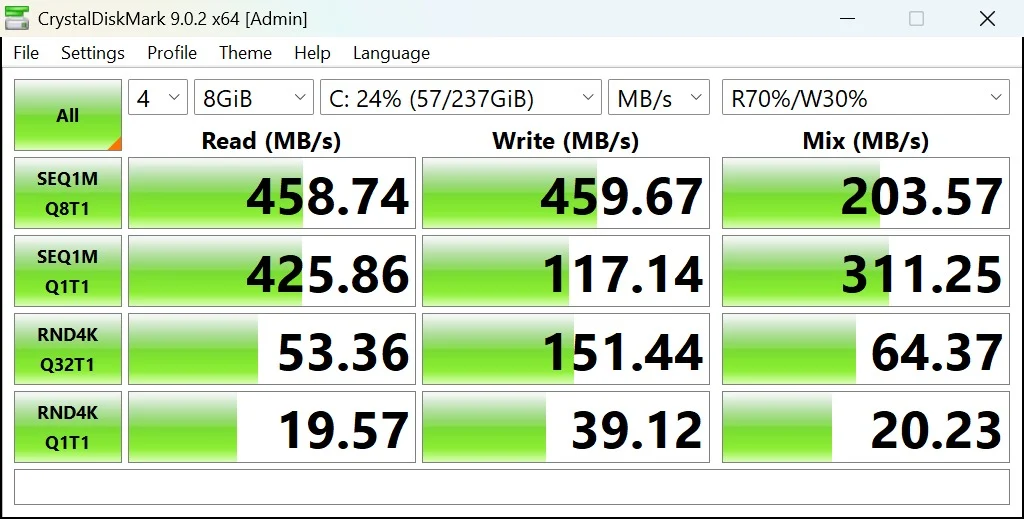
CrystalDiskMark 9.0.2 results for the Dell Latitude 3480 SSD
We tested the 256GB SSD using CrystalDiskMark 9.0.2 with an 8GiB test file and four passes. At the time of testing, the drive was about 24% full (57GiB used out of 237GiB).
- Q8T1: Read 458.74 MB/s | Write 459.67 MB/s | Mixed 203.57 MB/s
- Q1T1: Read 425.86 MB/s | Write 117.14 MB/s | Mixed 311.25 MB/s
- Q32T1: Read 53.36 MB/s | Write 151.44 MB/s | Mixed 64.37 MB/s
- Q1T1: Read 19.57 MB/s | Write 39.12 MB/s | Mixed 20.23 MB/s
These are typical SATA SSD numbers. Reading and writing at roughly 459 MB/s means Windows starts up quickly, programs open without a long pause and big files copy in a reasonable time. Compared with a traditional hard drive, the difference is night and day.
Two things are worth knowing. First, the sequential write at Q1T1 (117.14 MB/s) is noticeably lower than the other sequential results, which suggests this is an everyday budget SSD rather than a premium one. Second, the random 4K speeds are modest, which is normal for this class of drive and perfectly fine for opening apps and files. In daily use you will feel the SSD as snappiness, not as a benchmark number.
How Powerful Is the Core i7-7500U? (CPU-Z and Cinebench R23)
The i7-7500U is a dual-core, four-thread chip that scored 757 single-core and 1449 multi-core in Cinebench R23. It is good for office work and weak for heavy workloads.
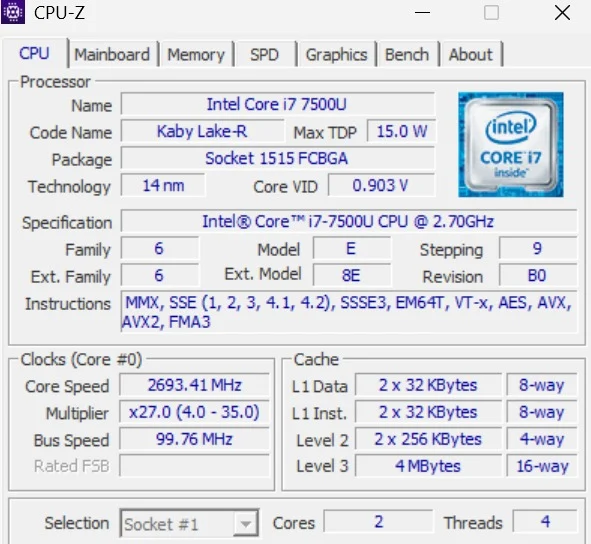
CPU-Z confirms the Intel Core i7-7500U
CPU-Z confirms the laptop uses an Intel Core i7-7500U, a 14nm Kaby Lake generation processor built for low power use (15W TDP). It has two cores and four threads, 4MB of L3 cache and a 2.70 GHz base speed. Our reading showed the core running at about 2693 MHz with a multiplier range of 4.0x to 35.0x, which points to a Turbo speed of up to 3.5 GHz. The chip also supports AVX2, FMA3, AES and VT-x virtualization.
In plain terms, it is built to sip power and deliver quick bursts of speed. That suits a business laptop where battery life and heat matter more than raw muscle.
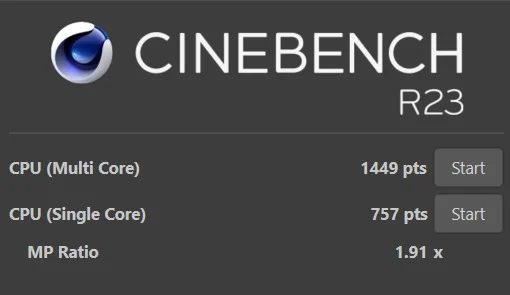
Cinebench R23 results
The single-core result of 757 is the number that reflects how the laptop feels while browsing, typing and switching between apps. It is modest by modern standards, but fine for everyday work. The multi-core score of 1449 and a 1.91x ratio show that the two cores and four threads work together well, almost doubling the single-core result. That is a healthy scaling figure for a dual-core chip. It will handle antivirus scans, cloud sync and some background apps. It will struggle with rendering, compiling code or anything that needs sustained heavy CPU power.
How Good Is the AMD Radeon R5 M330 2GB Graphics Card? (3DMark Time Spy)
The Radeon R5 M330 (2GB) is an entry-level GPU that scored 263 in 3DMark Time Spy, enough for video playback and light graphics but not for modern games.
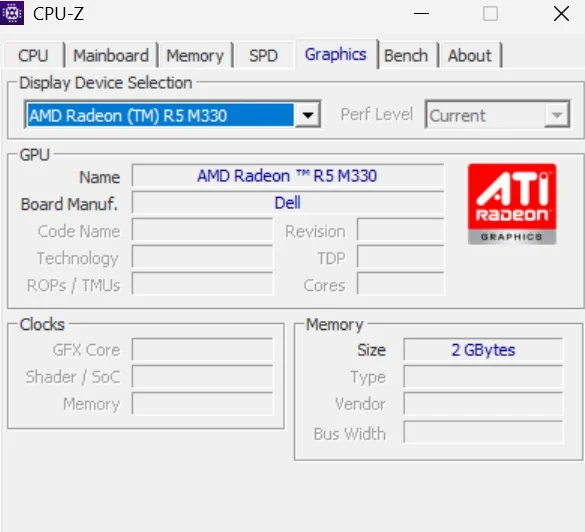
CPU-Z Graphics tab: AMD Radeon R5 M330, 2GB
This is the feature that makes this listing different from the usual Latitude 3480. CPU-Z shows a dedicated AMD Radeon R5 M330 with 2GB of memory, working alongside Intel HD Graphics 620.
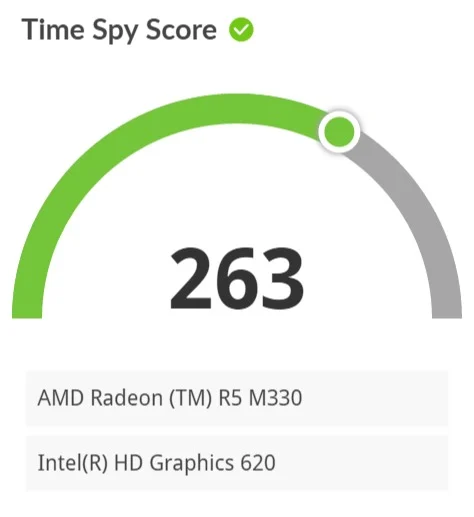
3DMark Time Spy result
3DMark lists AMD Radeon R5 M330 and Intel HD Graphics 620 for this machine. A score of 263 is low, which tells you the R5 M330 is an entry-level GPU, not a gaming card. It can help with smoother video playback, light photo editing, driving an external monitor and older or casual 2D games. It will not give you a comfortable experience in modern 3D titles.
If you want to get the most from the dedicated GPU, you can set specific apps to use it in Windows graphics settings or in the AMD control panel. Just keep expectations reasonable, because the 2GB card is an extra, not a transformation.
How Does the Dell Latitude 3480 Handle Everyday Work? (PCMark 10)
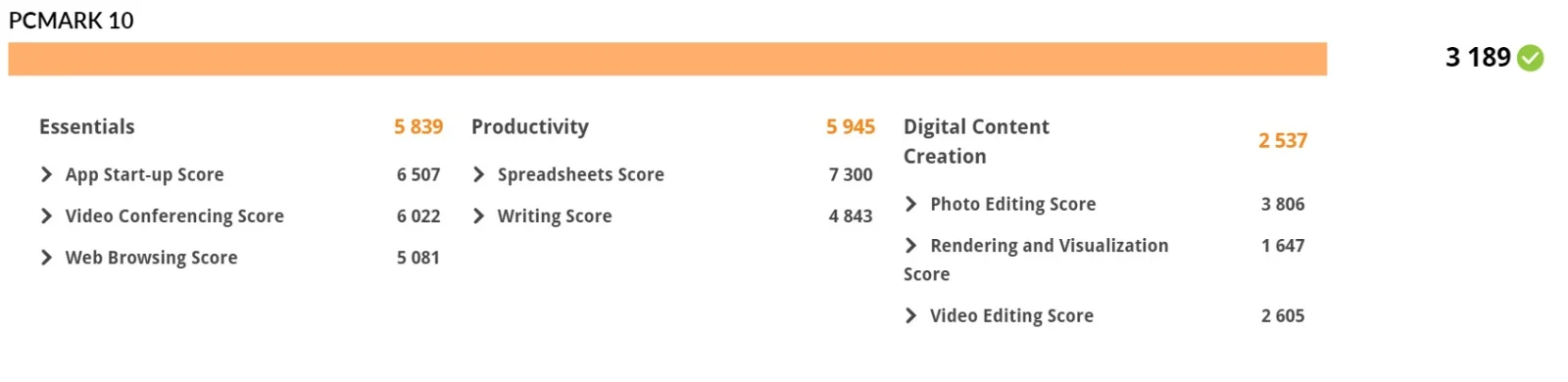
The laptop scored 3189 overall in PCMark 10, carried by Essentials (5839) and Productivity (5945), while Digital Content Creation lags at 2537.
PCMark 10 score breakdown
App Start-up 6507, Video Conferencing 6022, Web Browsing 5081
Spreadsheets 7300, Writing 4843
Photo Editing 3806, Rendering and Visualization 1647, Video Editing 2605
The overall score of 3189 may look low, but it is pulled down by the creative tests. The more useful numbers are the groups most people actually care about. Essentials at 5839 and Productivity at 5945 are solid, and they cover launching apps, browsing the web, video calls, spreadsheets and writing.
Spreadsheets start at 7300, which is good news if you live in Excel or accounting software. App start-up (6507) and video conferencing (6022) are also healthy, so Zoom or Google Meet calls should run without much fuss. Web browsing (5081) and writing (4843) are the lower scores in their groups, which fits what we see in real life: a handful of tabs is comfortable, but dozens of heavy tabs will slow it down.
Digital Content Creation, at 2537, is the weak spot. Rendering (1647) is the lowest score of the lot. Put simply, this is a capable office laptop and a poor creative one.
Everyday app checks:
- Microsoft Office: Word, Excel and PowerPoint open and respond quickly, helped by the excellent spreadsheet score and the SSD.
- Google Chrome: Comfortable with a few tabs. Open many heavy tabs while on a video call and the dual-core processor will start to feel stretched, even with 8GB of RAM.
- Accounting and billing software: Programs like Tally are light on resources and run without trouble.
- Online classes: Video conferencing at 6022 shows it handles live lessons well.
Is 8GB RAM and a 256GB SSD Enough? Upgrade Options
For office use, 8GB of DDR4 RAM and a 256GB SSD (about 237GiB usable) cover Windows, Office and everyday multitasking.
The 8GB of DDR4 RAM is the right amount for this laptop in 2026. It gives Windows and your apps enough room to breathe, and it is the main reason office work feels smooth. The 256GB SSD offers about 237GiB of usable space, and with a typical Windows setup you will still have plenty of room for documents, photos and software.
The Latitude 3480 uses standard laptop memory and storage that can usually be reached by removing the bottom panel. Before you buy an upgrade, confirm the maximum RAM supported on your exact configuration and the type of SSD installed.
How Long Does the Dell Latitude 3480 Battery Last?
Expect roughly 3 to 5 hours of mixed use on a typical refurbished unit. Battery health is the biggest unknown.
The Latitude 3480 was offered with 42Wh and 56Wh batteries, and the low-power i7-7500U helps it stretch a charge. A refurbished laptop, however, may carry a battery that has already seen years of use. We did not run a battery test for this article, so treat the range above as a rough guide. Ask the seller about battery health or warranty before you buy. If it needs replacing, it is usually a simple and affordable swap.
What Ports Does the Dell Latitude 3480 Have?
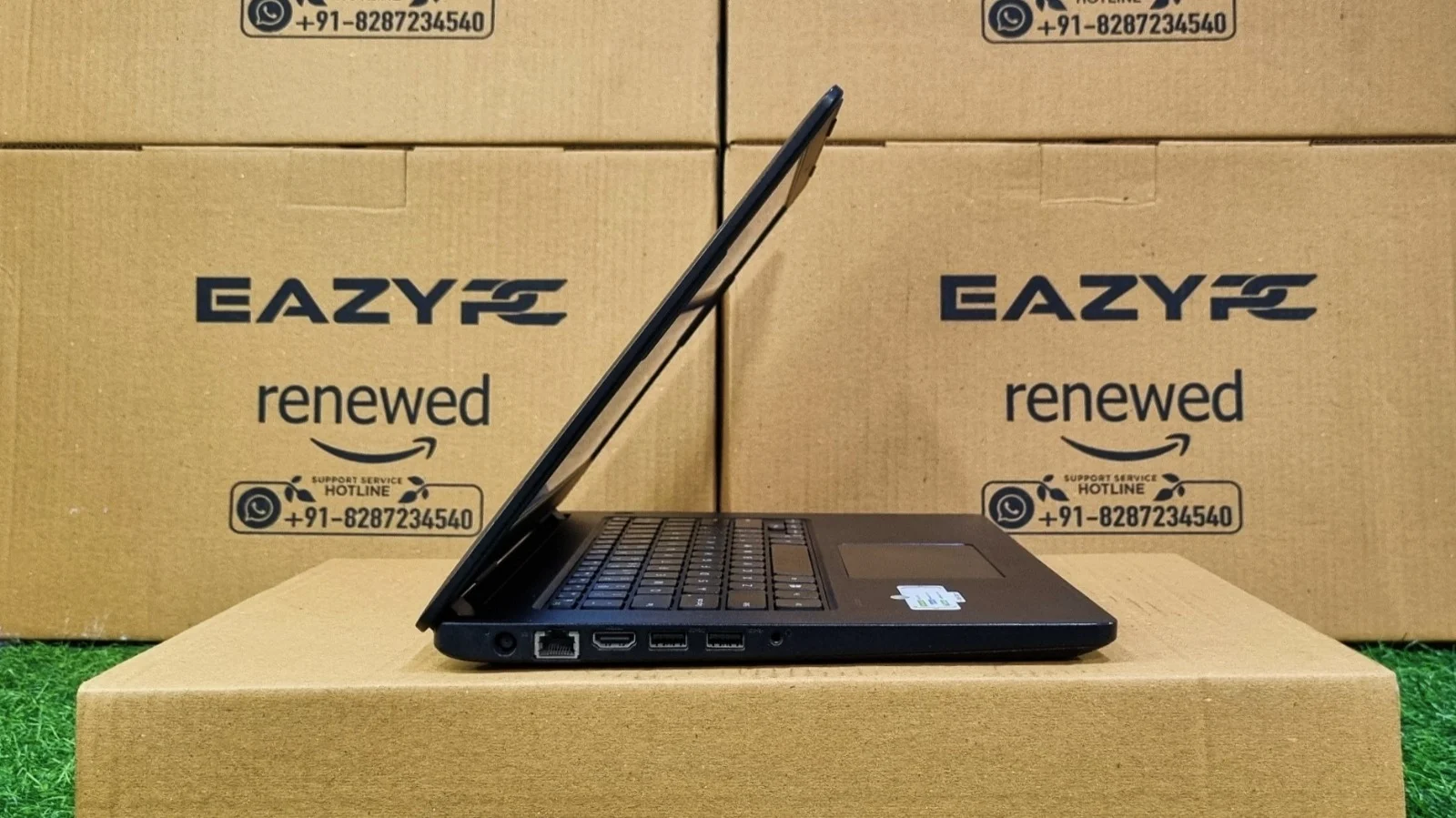
Power connector, Ethernet (RJ45) port, HDMI, two USB 3.0 ports (one with Power Share for charging devices) and a headphone/microphone jack.
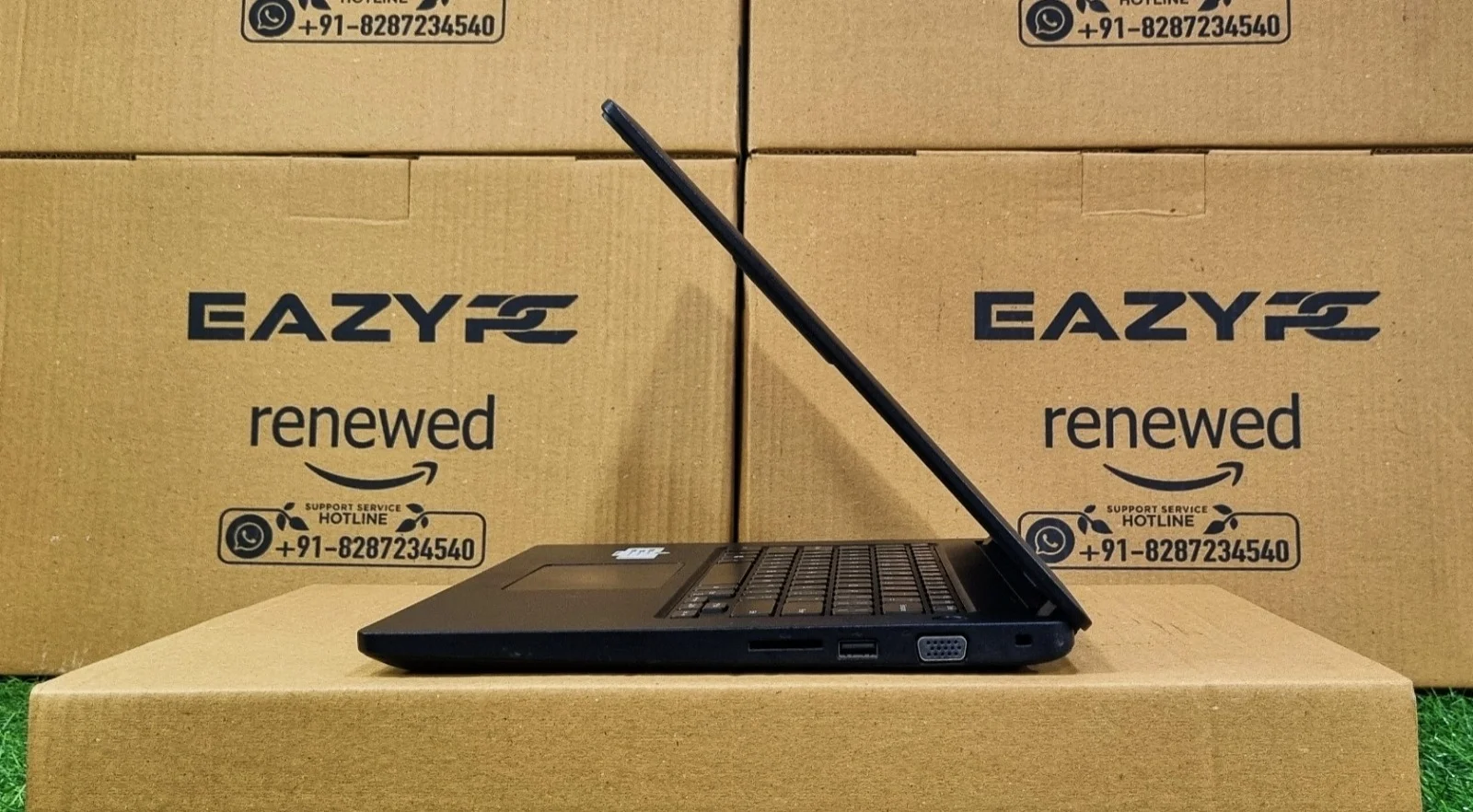
SD card reader, one USB 2.0 port, VGA (handy for older projectors and monitors) and a security lock slot.
Wi-Fi 802.11ac and Bluetooth 4.1.
There is no USB Type-C on this model, so if you rely on USB-C accessories you may need an adapter.
What Should You Check Before Buying a Refurbished Dell Latitude 3480?
Confirm the graphics card, battery health and SSD speed before you pay, because refurbished units vary a lot.
- Graphics: open CPU-Z or Device Manager and confirm the AMD Radeon R5 M330 with 2GB is listed. Some Latitude 3480 configurations only have Intel HD Graphics 620.
- Battery: request a battery report or a real runtime. The model shipped with 42Wh and 56Wh batteries, and an old pack can cut runtime sharply.
- SSD speed: run CrystalDiskMark. A healthy SATA SSD should land near the 459 MB/s sequential figures we measured.
- Screen and keyboard: look for dead pixels, loose hinges and worn or missing keys.
- Ports and charger: test every USB port, HDMI, VGA and Ethernet, and make sure the original Dell charger is included.
- Warranty and returns: get the seller's warranty and return window in writing.
Should You Buy the Dell Latitude 3480 i7 with 2GB AMD GPU?
| Buy it if you... | Skip it if you... |
|---|---|
| Work in Microsoft Office, Excel, Tally or browse the web | Play modern 3D games |
| Want an SSD-fast laptop on a tight budget | Edit videos or render 3D projects |
| Prefer a roomy 14-inch screen and a proper keyboard | Run many demanding apps at the same time |
| Need HDMI, VGA and Ethernet built in | Need USB-C or official Windows 11 support |
The Dell Latitude 3480 with Core i7-7500U, 8GB RAM and a 256GB SSD is a classic example of an older laptop that still earns its place on a desk. The benchmarks tell a clear story: strong in everyday work, average in photo tasks, and limited in rendering, video editing and gaming. The dedicated 2GB AMD Radeon R5 M330 is a welcome bonus for video playback and light graphics, but it should not be the main reason you buy it.
Accept the trade-offs up front. The dual-core processor limits heavy multitasking, the HD display is basic, and battery life depends on the individual unit. If you are a student, an office worker or a small business owner looking for a dependable machine without a big price tag, the refurbished Latitude 3480 is still a reasonable choice in 2026.
Frequently Asked Questions (FAQs)
(Hover over a question to see the answer)
Is the Dell Latitude 3480 i7 worth buying in 2026?
Yes, for office work, study and everyday browsing. Our unit scored 3189 in PCMark 10, with strong spreadsheet (7300) and app start-up (6507) results. It is not a good fit for gaming, video editing or heavy multitasking.
What are the Dell Latitude 3480 i7 specifications?
This unit has an Intel Core i7-7500U, 8GB DDR4 RAM, a 256GB SSD, a dedicated 2GB AMD Radeon R5 M330 and a 14-inch HD (1366 x 768) display. It weighs about 1.76 kg and includes HDMI, VGA, Ethernet, two USB 3.0 ports and one USB 2.0 port.
What processor does the Dell Latitude 3480 have?
This unit has an Intel Core i7-7500U, a 7th generation dual-core, four-thread processor. It runs at a 2.70 GHz base speed with Turbo up to 3.5 GHz, and has 4MB of L3 cache and a 15W TDP.
Does the Dell Latitude 3480 have a dedicated graphics card?
This configuration does. It has an AMD Radeon R5 M330 with 2GB memory alongside Intel HD Graphics 620. Many other Latitude 3480 units have only integrated Intel graphics, so confirm the card before you buy.
Can the Dell Latitude 3480 play games?
Not modern ones. The Radeon R5 M330 scored 263 in 3DMark Time Spy. It handles older, light and casual games plus video playback, but demanding 3D titles will not run well.
How fast is the SSD in the Dell Latitude 3480?
In CrystalDiskMark it reached 458.74 MB/s sequential read and 459.67 MB/s sequential write. Random 4K read and write at Q1T1 were 19.57 and 39.12 MB/s. These are typical SATA SSD figures that give quick boot times and fast app launches.
How does the Dell Latitude 3480 score Cinebench R23?
It scored 757 single-core and 1449 multi-core, with a 1.91x MP ratio. That is fine for everyday tasks and background apps, but limited for rendering or other heavy CPU work.
Is 8GB RAM enough for Dell Latitude 3480?
Yes, for Windows, Microsoft Office, web browsing and video calls. It will feel tight with dozens of browser tabs or heavy creative software.
Is the Dell Latitude 3480 good for students?
Yes. It handles Office, web browsing and online classes well, with PCMark 10 Essentials of 5839 and Video Conferencing of 6022. The 14-inch screen and comfortable keyboard help. Avoid it for design, video or heavy programming projects.
Is the Dell Latitude 3480 good for programming?
It suits light programming such as scripting, web development and learning to code. It is a poor fit for large IDEs, virtual machines or Android emulators because of the dual-core processor.
Is the Dell Latitude 3480 good for video editing?
No. Its PCMark 10 Video Editing score was 2605 and Rendering and Visualization was 1647, so editing and exporting video will be slow.
How long does the battery last on a refurbished Dell Latitude 3480?
Roughly 3 to 5 hours of mixed use is a reasonable expectation, depending on battery health and screen brightness. We did not run a battery test, so ask the seller about the battery condition before buying. A worn battery is usually a simple replacement.
How much does the Dell Latitude 3480 weigh and what size is the screen?
It weighs about 1.76 kg and has a 14-inch screen. Standard display resolution is HD (1366 x 768).
Does the Dell Latitude 3480 have HDMI and USB-C?
It has HDMI and VGA video outputs, two USB 3.0 ports, one USB 2.0 port and Ethernet. It does not have a USB Type-C port.
Can I upgrade the RAM and SSD on the Dell Latitude 3480?
In most cases, yes. The laptop uses standard memory and storage that can usually be reached by removing the bottom panel. Check the maximum supported RAM and the SSD type for your exact configuration first.
Can the Dell Latitude 3480 run Windows 11?
Not officially. The 7th generation Core i7-7500U is not on Microsoft's official Windows 11 processor list, although Windows 11 can be installed without official support. Microsoft ended regular Windows 10 support in October 2025, so ask the seller about update options.