Refurbished Laptop

Dell Latitude 5430 (i7 12th Gen) Review

dell latitude 5430 i7 12th gen

Specifications

  • The Processor: Intel Core i7-1255U (12th Gen Alder Lake) vPro Essentials
  • Graphic Capabilities: Integrated Intel Iris Xe Graphics architecture
  • Memory Configuration: 32 GB (Dual-channel 2 x 16GB) DDR4 at 3200 MHz; expandable to 64 GB
  • Storage Drive: 512GB NVMe SSD
  • The Display: 14-inch FHD (1920×1080) Anti-Glare panel with 16:9 aspect ratio
  • Connectivity: WiFi 6E and Bluetooth 5.2 support
  • Chassis Weight: 1.525kg

When it comes to business laptops, aesthetics often take a backseat while practicality, connectivity, and performance take the lead. The Dell Latitude 5430 demonstrates exactly that. With a refreshed 12th-generation Intel processor inside, it becomes the ultimate power lifter. The Latitude 5430 is designed for professionals who need a reliable, highly connected, and easily upgradable machine. It can now be found easily in refurbished markets without its premium price tag.

Design and Build Quality

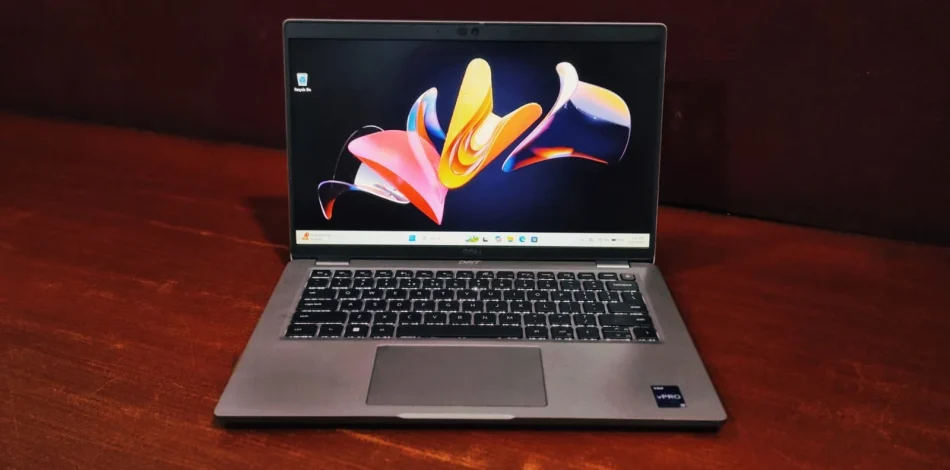
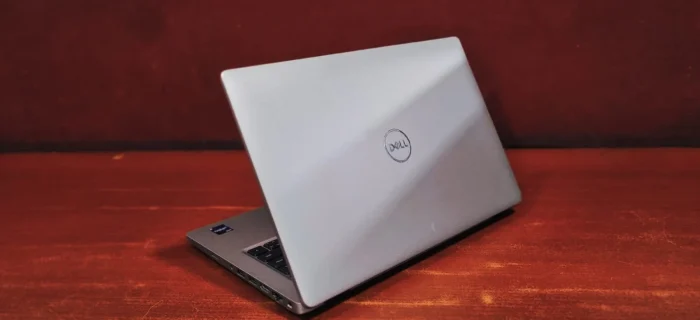
While the Dell Latitude 5430 eschews the trend of ultra-slim bezels, Dell prioritizes a functional and time-tested chassis design over modern aesthetics. This practical approach yields a travel-friendly machine that remains impressively portable. With a starting weight of a reasonable 1.525 kg, the device is sufficiently light for daily commutes while maintaining the durability required to withstand the demanding conditions of professional travel.

dell latitude 5430 i7 12th gen

Dell latitude 5430 Display

The Dell Latitude 5430 features a 14” FHD (1920×1080) anti-glare panel, reaching 250 nits according to Dell. This screen utilizes a traditional 16:9 aspect ratio rather than the newer 16:10 standard seen on some premium laptops. This configuration provides solid text clarity for standard productivity software but lacks the dynamic color depth required for creative work.

Keyboard & Touchpad

This is where the Dell latitude 5430 truly shines as a productivity machine.

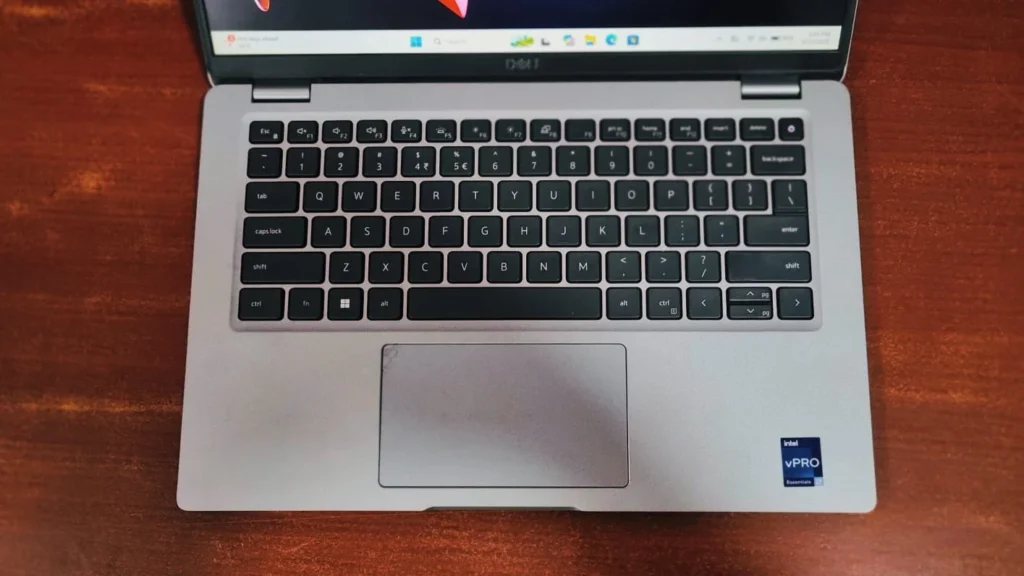
The Keyboard: Dell’s typing layout remains consistent across the 5000 series. The chiclet-style keys provide deep travel and clean tactile feedback. The keys feature a stable, satisfyingly springy feel that keep fingers comfortable during long document editing or writing codes. Choosing the backlit option is highly recommended for working in low-light areas.

The Touchpad: The touchpad has a smooth surface texture that supports Windows Precision gestures without stuttering. However, the touchpad has a plastic feel that some users might dislike and also lacks a tactile click when pressed near its top corners. While it performs reliably for everyday use, it does not achieve the standard of refined glide typical of glass touchpads.

dell latitude 5430 i7 12th gen

Performance & Benchmarks

To give you a clear picture of how the Dell Latitude 5430 performs in the real world, we ran a few popular benchmark tests: CrystalDiskMark, Geekbench, and PCMark 10.

Storage Speed (CrystalDiskMark)

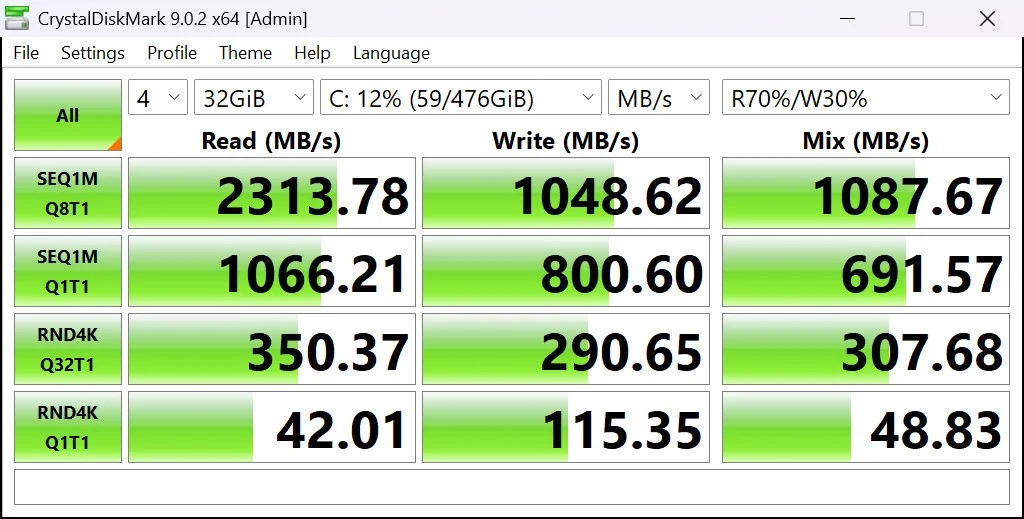
The internal NVMe SSD delivers respectable, standard speed that will keep boot times short and file transfers brisk. 

  • Sequential Read : 2313.78 MB/s
  • Sequential write : 1048.62 MB/s

While these are Gen 3 NVMe speeds, they are more than sufficient for loading large PDFs, corporate databases, and standard office applications without any noticeable bottlenecks.

dell latitude 5430 i7 12th gen

CPU Performance (Geekbench & Cinebench 2024)

The I7-1255U utilizes Intel’s hybrid architecture (performance and efficient cores), prioritizing fast responsiveness for short bursts of activity

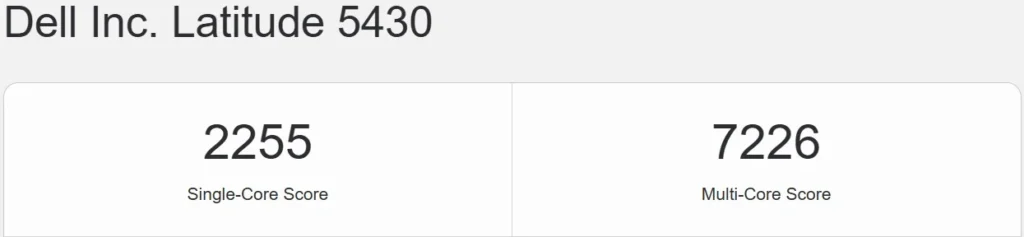
  • Geekbench: The system achieves a single-core score of 2255 and a multi-core score of 7226. The high single-core score indicates that everyday applications will feel fast and responsive.
dell latitude 5430 i7 12th gen

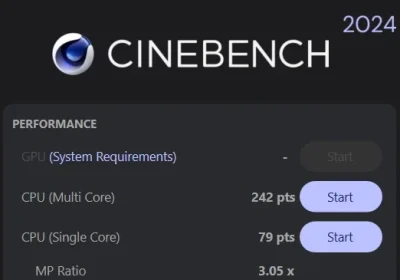
Cinebench 2024: This benchmark evaluates graphical and processing capability by rendering high-quality imagery to determine GPU and CPU performance. For the Dell Latitude 5430, the results were:

  • Single Core: 79 pts
  • Multi Core: 242 pts

These scores suggest that while the system manages multi-threaded operations, its performance during prolonged, intensive rendering is restricted by power and thermal management.

dell latitude 5430 i7 12th gen

General Productivity (PCMark 10)

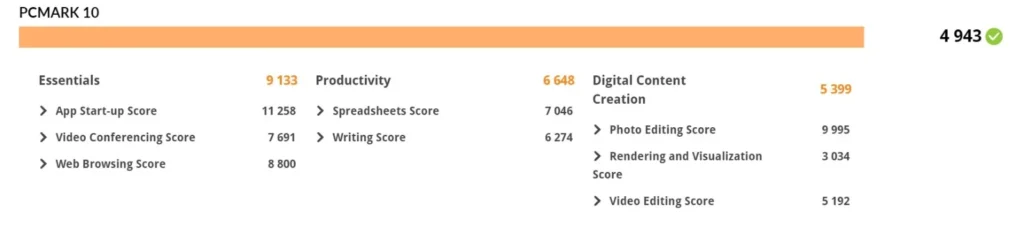
PCMark 10 simulates real-world daily workflows, and the latitude scored a solid 4943 overall.

  • Essentials (9133): the laptop flies through tasks like app start-ups, video conferencing , and web browsing with a dozen tabs open.
  • Productivity (6648): it easily handles excel or spreadsheets and word processing.
  • Digital Content Creation (5399): While editing can be done for basic photo and video editing, it is not a dedicated creator laptop.
dell latitude 5430 i7 12th gen

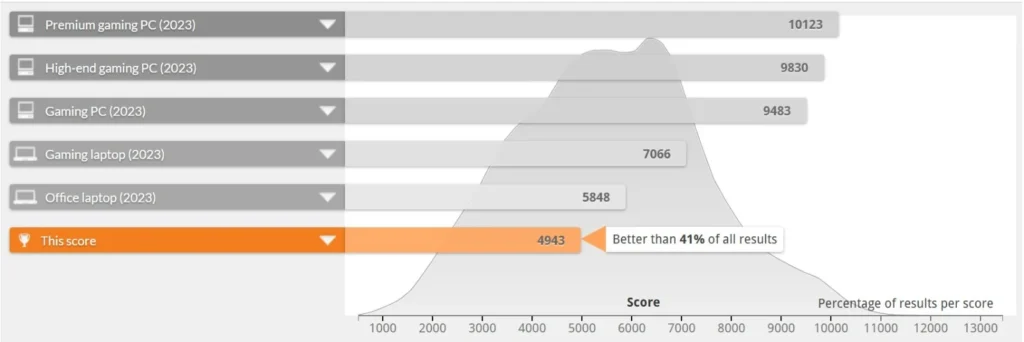
This overall score places it better than 41% of all results in the PCMark database, trailing slightly behind the 2023 “Office Laptop” (5848), which is expected since it is a 2022 laptop with a 12th-gen chip inside.

dell latitude 5430 i7 12th gen

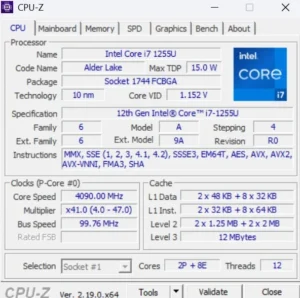
 The Dell latitude 5430 is equipped with the 12th gen Intel core I7-1255U (code named Alder Lake) processor built on a 10 nm technology. It is a highly efficient 15W TDP Chip featuring Intel’s hybrid architecture with 10 total cores (2 performance and 8 efficient ) with 12 threads. Accompanied by a 12 MB L3 cache, with the clock speed of 1.70 GHz (performance) and 1.20 GHz (efficient) with intel Turbo Boost technology , it can dynamically ramp up clock speeds up to 4.70 GHz for handling heavy and demanding workloads.

dell latitude 5430 i7 12th gen

Battery life

The battery health of a refurbished unit represents its existing ability to retain energy relative to its initial design capacity. While this specific model generally offers between 3 and 4 hours of power, real-world performance depends on how the device was handled by the previous owner. Factors such as the accumulation of charge cycles, historical charging patterns, and prolonged heat exposure all contribute to the natural degradation of the battery over time.

Ports and Connectivity

Enterprise users hate carrying dongles, and the Dell Latitude 5430 ensures you rarely have to. The port selection is outstanding, featuring:

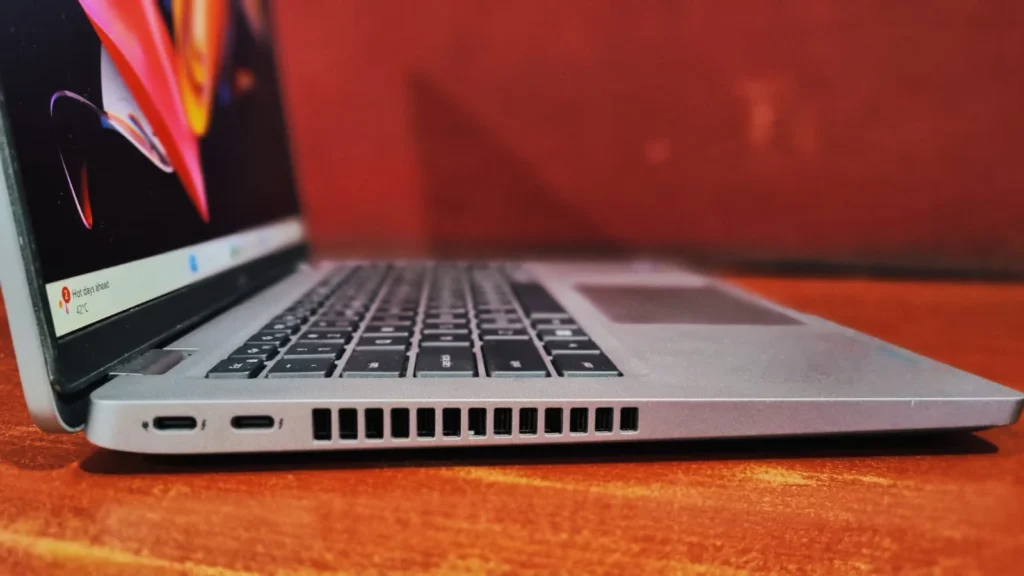
On the left side,  2x Thunderbolt gen 4 (which can also be used as USB 3.1 ports) connectors with cooling vents

dell latitude 5430 i7 12th gen
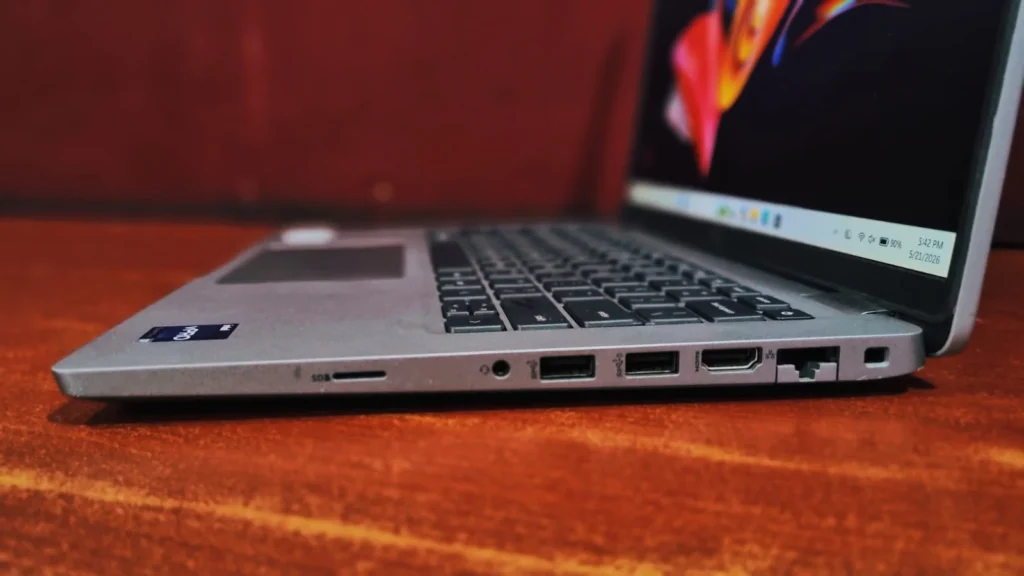
  • On the right side,  LAN port, HDMI 2.0 , 2x USB Type-A 3.2 , an audio jack, MicroSD slot and Kensington slot.
dell latitude 5430 i7 12th gen

Final Verdict

The Dell Latitude 5430 I7 12th Gen is a reliable business machine built for long-term endurance. Though this refurbished unit which I tested, comes has 32GB of RAM. However, if you are in search of a refurbished unit, try to find models with atleast 1080p IPS display and 16GB of RAM installed in dual-channel mode. If these parameters are lined up, then it serves as a robust and  highly capable productivity tool that will last for years to come.

Frequently Asked Questions (FAQs)

Sure, the chassis contains two user-accessible slots, supporting dual-channel DDR4 3200 MHz memory with a maximum capacity of 64 GB. The internal M.2 NVMe SSD can be swapped swiftly, ensuring your storage remains snappy according to your workload.

No, the Dell Latitude is built for business and productivity. With integrated graphics, it can handle some light gaming but will not run heavy titles like PUBG or GTA V.

Yes, the laptop is equipped with two Thunderbolt 4 ports to provide high-speed connectivity. It can support up to two external 4K displays with full compatibility with Dell’s docking stations, allowing you to connect all your peripherals with a single cable.

Leave a Reply

Your email address will not be published. Required fields are marked *