




Blogs
Best Laptop for Interior Design Students in 2026: New and Refurbished Picks for India

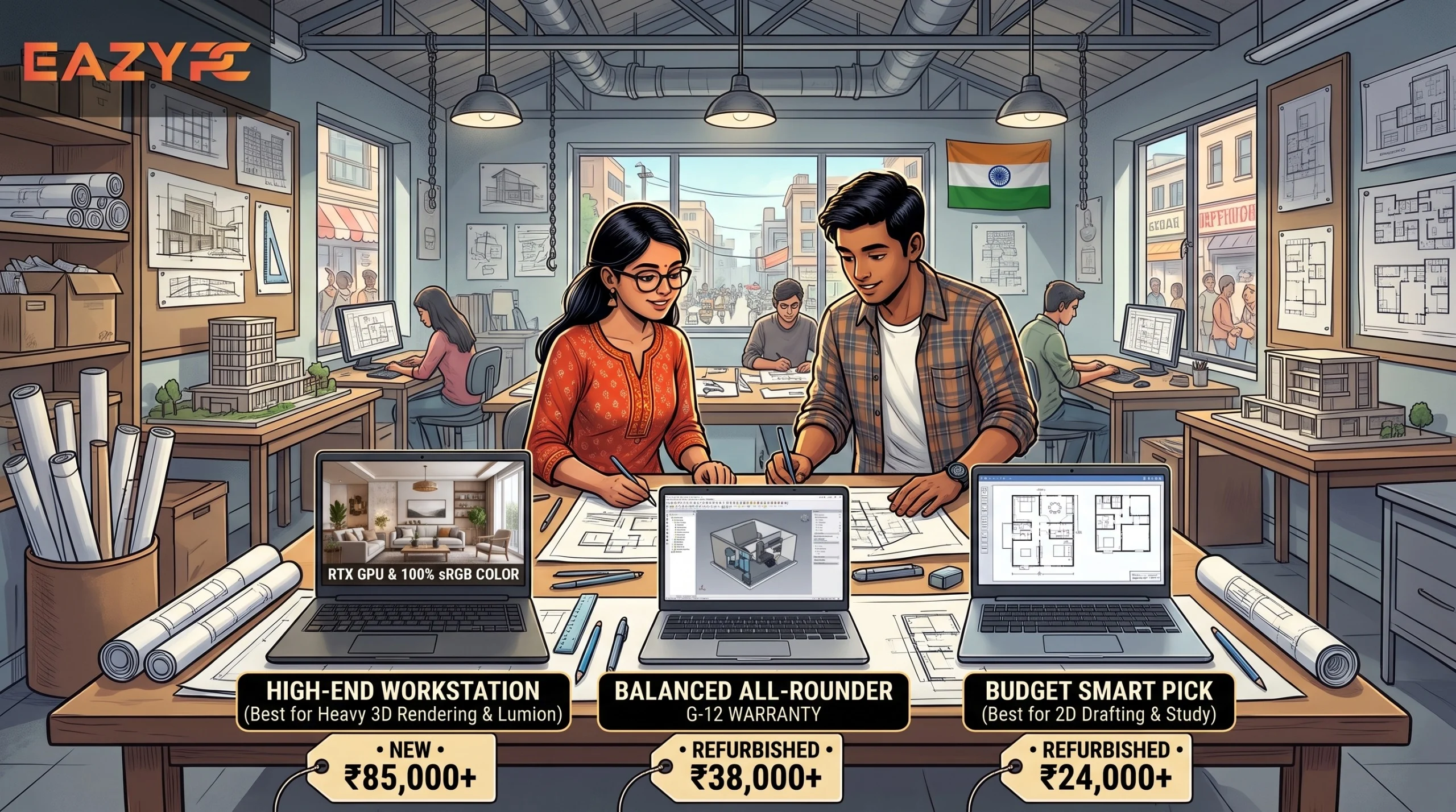
The best laptop for interior design students in 2026 has at least 16GB RAM, a 512GB SSD, a recent Core i5/Ryzen 5 or Apple M-series chip, and a Full HD display with 100% sRGB. Add a dedicated GPU (RTX 4050 to 5060 class) if you render in Lumion, Enscape or V-Ray. On a tight budget, a certified refurbished 16GB ThinkPad or Latitude handles AutoCAD and SketchUp well.
Which laptop should you choose? (At a glance)
| If you... | Choose | Approx. budget (India) |
|---|---|---|
| Need Revit, Lumion or Enscape | Windows laptop with RTX 5060-class GPU, 16GB+ RAM | ₹1.1 lakh and up |
| Want lightness and battery life, and your course supports macOS | MacBook Air M5 | Around ₹1.0 to 1.2 lakh (check live price) |
| Want a Mac for heavy work | MacBook Pro 14 (M5) | From about ₹1.9 lakh |
| Mostly do 2D drafting, SketchUp and Adobe work | Refurbished ThinkPad T480 / Latitude 7410 (16GB) | ₹25,000 to ₹38,000 |
| Sketch by hand a lot | 2-in-1 with pen support | Varies |
What software does interior design students use?
Interior design students typically use AutoCAD for floor plans, SketchUp for 3D modeling, Revit for BIM, Lumion, Enscape, V-Ray or D5 Render for rendering, and Adobe Photoshop, Illustrator and InDesign for presentations.
AutoCAD and SketchUp work fine on mid-range hardware. Rendering tools need a strong graphics card. Revit, Lumion and Enscape are Windows-first, so confirm your college’s software and OS requirements before choosing a Mac.
How much RAM does an interior design student need?
16GB is the practical minimum. 8GB can handle light 2D drafting, but SketchUp, Photoshop and a browser running together will slow it down. Choose 32GB only if you work with very large Revit models or heavy scenes. Check whether the RAM is upgradable. Many ThinkPads allow it, while most MacBooks and thin laptops don’t.
Do interior design students need a dedicated graphics card?
Yes, if you render or do real-time walkthroughs. A dedicated GPU (NVIDIA RTX 4050 to 5060 class) speeds up Lumion, Enscape and V-Ray significantly. For mostly 2D drafting, SketchUp and Adobe apps, integrated graphics are enough. Apple’s M-series chips are a special case because their integrated GPUs are strong for the price.
What display is best for interior design work?
A Full HD (1920×1080) IPS panel with 100% sRGB is the minimum. DCI-P3 coverage is better for accurate colors in textures, finishes and client presentations. A dull or inaccurate screen makes materials look different on other devices.
How much storage do you need?
512GB SSD is the comfortable minimum. Project files, textures and renders grow quickly. Pair your laptop with an external SSD or cloud backup.
Best new laptops for interior design students in India (2026)
Is a refurbished laptop good for interior design students?
Yes, if it’s certified, tested and has a warranty. Refurbished business-class laptops are durable and upgradable, and they cost a fraction of new machines. They use integrated graphics, so they suit AutoCAD, SketchUp and Photoshop, but not heavy real-time rendering.
| Laptop | Processor | RAM / Storage | Best for | Approx. price |
|---|---|---|---|---|
| Lenovo ThinkPad T480 | Core i5 8th Gen | 8GB (upgradable) / 256GB | CAD, SketchUp, Adobe | ₹24,499 to ₹26,499 |
| Lenovo ThinkPad T14 Gen 1 | Core i5 10th Gen | 16GB / 256GB or 512GB | SketchUp and Adobe multitasking | ₹31,000 to ₹33,000 |
| Lenovo ThinkPad L13 Gen 1 | Core i5 10th Gen | 16GB / 512GB | Compact, lowest-cost 16GB | ₹23,999 to ₹26,999 |
| HP EliteBook 840 G5 | Core i5 8th Gen | 8GB or 16GB / 256GB or 512GB | Light and portable | ₹29,000 to ₹34,000 |
| Dell Latitude 7410 | Core i7 10th Gen | 16GB / 256GB or 512GB | Heavier multitasking | ₹36,000 to ₹38,000 |
Should interior design students buy a Mac or a Windows laptop?
Choose Windows if your course uses Revit, Lumion or Enscape. Choose a Mac if your tools (SketchUp, AutoCAD for Mac, Adobe) run on macOS and you value battery life and portability. When unsure, ask your college which software and OS they use.
7 tips before you buy
- Ask your college about software and OS requirements.
- Use student licenses. Autodesk offers free educational access to eligible students.
- Prioritize RAM and GPU over a flashy CPU name.
- Check weight. A 2.3kg laptop gets tiring when carried daily.
- Add an external monitor for comfortable drafting.
- Back up to the cloud and an external drive.
- Check warranty and return policy, especially for refurbished buys.
Key takeaways
RAM and storage
16GB RAM and SSD are basic.
Graphics
A dedicated GPU matters only if you render heavily.
Software
Revit, Lumion and Enscape favor Windows.
Budget route
Refurbished 16GB business laptops are the best budget route.
Prices
Prices are volatile in 2026, so verify before buying.
FAQs
A laptop with 16GB RAM, a 512GB SSD, and a dedicated RTX GPU for Windows users (or a MacBook Air/Pro M5 for macOS-friendly courses) is the best choice in 2026.
Yes. Gaming laptops have strong GPUs and cooling, which suits rendering. Choose one with a good display (100% sRGB or better) and reasonable weight.
It works for light 2D drafting, but 16GB is recommended for smooth multitasking with Adobe apps and 3D models.
A certified refurbished ThinkPad T480 or Dell Latitude 7410 with 16GB RAM, priced roughly ₹25,000 to ₹38,000.
Croma, Reliance Digital, Apple authorized resellers and brand showrooms offer hands-on testing. Amazon and EazyPC often have better prices and student offers.
Yes, for SketchUp, Adobe and AutoCAD for Mac. No for Revit, Lumion and Enscape, which are Windows-first.

About Aryamann Saini
Avid tech enthusiast with a focus on strategic problem-solving. Always looking to tackle the next big challenge or learning milestone. Outside of work and studies, I enjoy traveling to historical sites and exploring the open road.
View all posts by Aryamann Saini
