Refurbished Laptop

Lenovo ThinkPad P15 mobile workstation Review

lenovo thinkpad p15

Specifications –

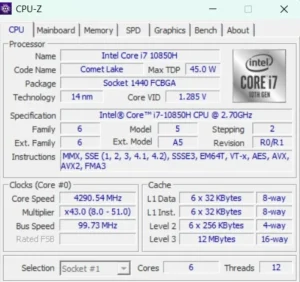
  • Processor: Intel Core i7-10750H 
  • Graphics: NVIDIA® Quadro T2000 (4 GB GDDR6)
  • Memory: 16GB 2400MHz (expandable up to 128GB)
  • Storage: Up to 4TB M.2 NVMe PCIe SSD
  • Display: 15.6” FHD (1920 x 1080) IPS, 300nit 
  • Wireless: Intel® Wi-Fi 6 AX201 (Gig+), Bluetooth® with vPro
  • Weight: 2.2kg

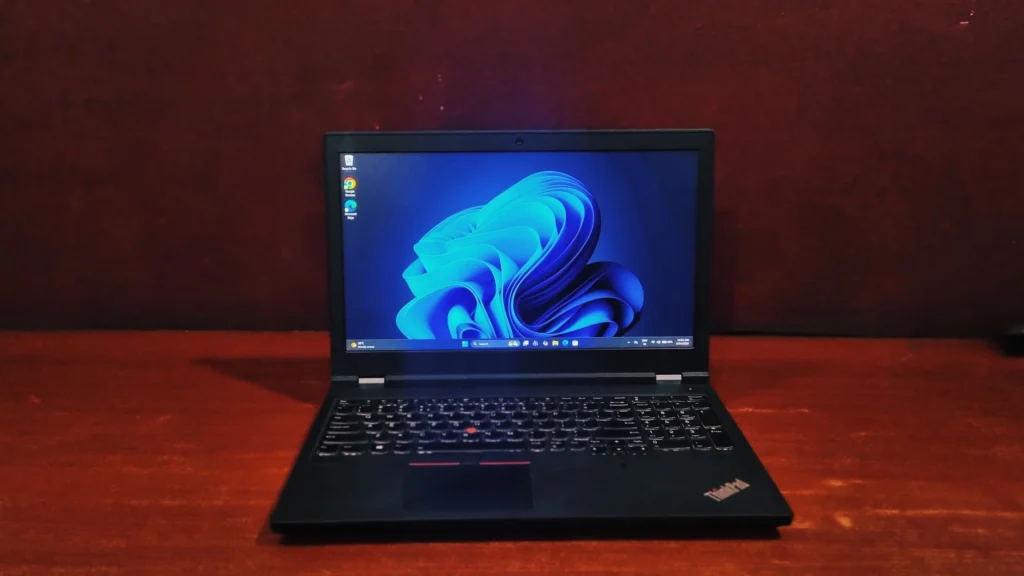
If you’re hunting for a reliable, workhorse laptop, the Lenovo ThinkPad P15 might have already crossed your radar. It’s a mobile workstation that firmly prioritizes functionality over aesthetics.

Here is the breakdown of the Lenovo ThinkPad P15.

Design And Build Quality

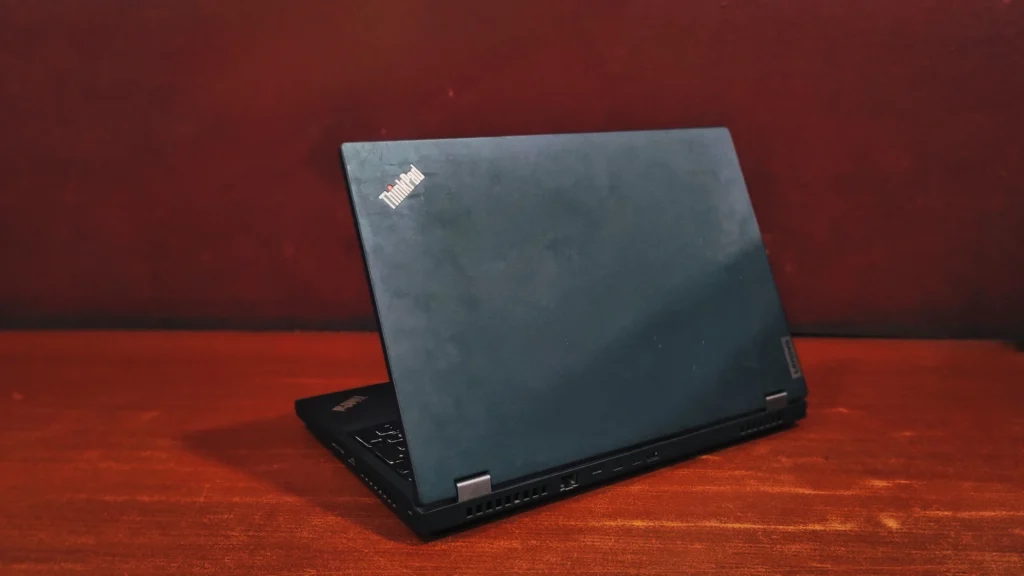
First of all, this is not the laptop you buy for working at a trendy cafe. Weighing in at a ponderous 2.2 kg’s it’s undeniably bulky. Lenovo strayed from their usual magnesium alloy here, opting for a glass-fiber-reinforced plastic shell instead. But don’t let the word “plastic” fool you; this machine is built like a tank. It has passed MIL-STD 810G military-grade torture tests for extreme temperatures, drops, and vibrations. If you press down on the keyboard deck or grab the screen by the corners, there is virtually zero flex. It sports that classic, utilitarian matte-black ThinkPad aesthetic that means strictly business.

lenovo thinkpad p15

The Display

Opening the heavy lid reveals a 15.6-inch Full HD (1920 x 1080) IPS panel. While it isn’t the battery-draining 4K OLED screen found on the highest-tier models, this 1080p display is a practical choice for most people.

At 300 nits of brightness, it is comfortable to look at in standard office lighting. The anti-glare coating is a lifesaver, ensuring you aren’t staring at your own reflection while trying to work. It’s perfectly suited for long hours of writing code, drafting documents, or managing heavy spreadsheets without causing the eye strain that overly glossy screens often induce.

Keyboard & Touchpad

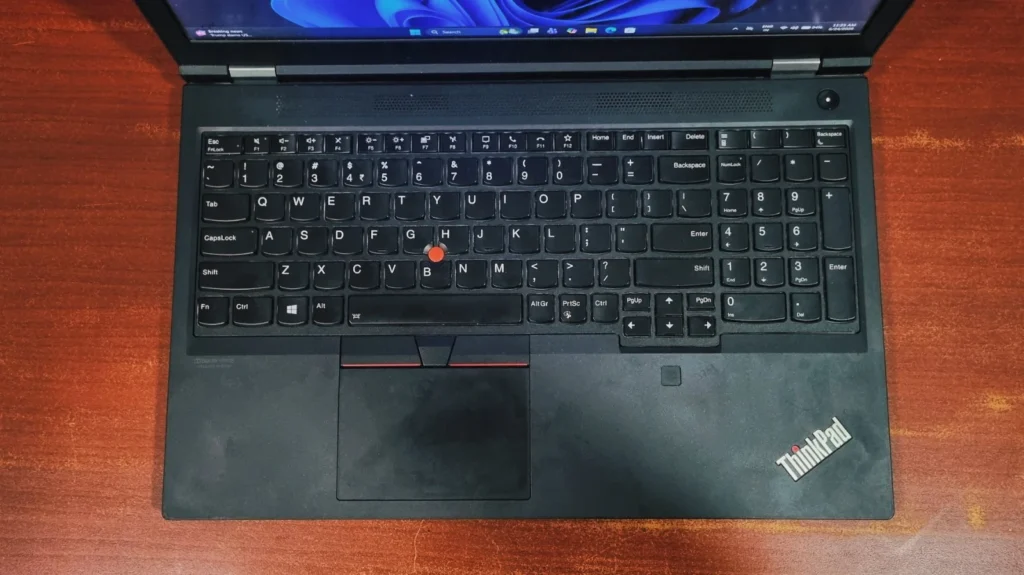
Lenovo’s keyboards are legendary in the laptop world, and the P15 delivers a masterclass in typing comfort. The keys have a deep, satisfying travel distance (around 1.8mm) that makes long typing sessions a breeze.

Because of the laptop’s wide footprint, Lenovo managed to squeeze in a full numeric keypad a massive bonus for anyone working in finance, data entry, or engineering. Right in the middle of the keyboard, you’ll find the iconic red TrackPoint nub, a staple for old-school navigation. Below that is a smooth, highly responsive touchpad complete with dedicated physical click buttons, which are incredibly useful for professional 3D and CAD software.

lenovo thinkpad p15

Performance & Benchmarks

To give you a clear picture of how Lenovo ThinkPad P15 performs in the real world, we ran it through a few popular benchmark tests:

Storage Speed (CrystalDiskMark)

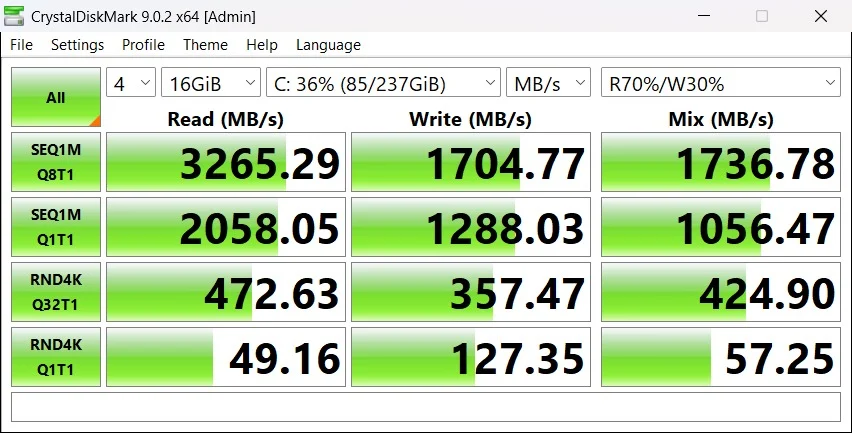
The laptop’s M.2 NVMe PCIe SSD delivers high speed, desktop-grade storage performance typical of a premium PCIe Gen 3 drive. It handles massive files and heavy multitasking with ease, ensuring zero lags during data-intensive tasks.

Here is a breakdown of what these benchmark scores mean for your daily performance:

  • Sequential Reads (3,247 MB/s): The high sequential read speed means booting up the operating system, launching massive engineering or CAD programs, and loading huge data files or project assets will happen almost instantly.
  • Sequential Writes (3,112 MB/s): This exceptionally high write speed ensures that saving large projects, exporting 4K video files, or transferring massive data to the internal drive takes only seconds without thermal throttling.
  • Random 4K Performance: The random read and write scores reveal excellent responsiveness for everyday computing. This represents how fast the drive handles thousands of tiny, scattered files, making the entire user interface, software switching, and code compilation feel incredibly snappy.
lenovo thinkpad p15

Cinebench R23

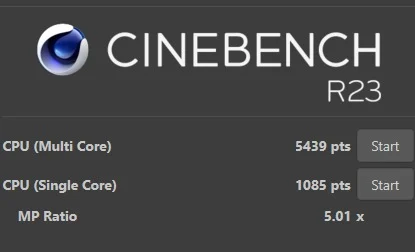
The Cinebench R23 results assess the processor’s capability to handle rigorous, sustained workloads by rendering complex 3D scenes.

  • Multi-Core Performance (6,754 pts): This score explains the multi-threaded processing power across the CPU’s 6 cores and 12 threads. It indicates that the system is well-equipped for various processing tasks, such as video rendering, compiling large codebases, and operating virtual machines.
  • Single-Core Performance (1,148 pts): The single-core result highlights performance and efficiency. High single-threaded speed is essential for the responsiveness of standard applications, active CAD viewport navigation, and tasks that cannot be distributed across multiple cores.
lenovo thinkpad p15

Geekbench (CPU & GPU Performance)

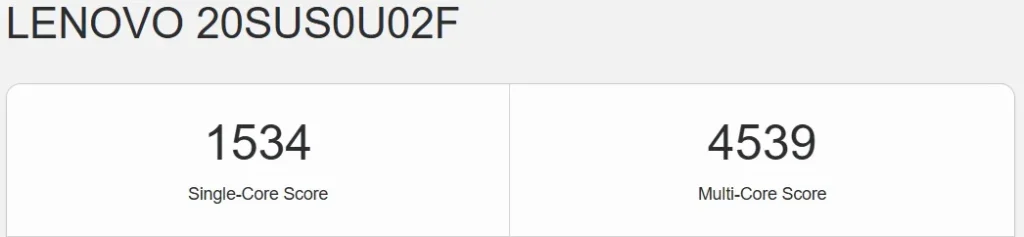
The Geekbench metrics provide insight into both standard computational tasks and graphics-accelerated processing capabilities.

  • Processor Performance: The CPU gets a Single-Core Score of 1,534 and a Multi-Core Score of 4,539, strengthening its capability to seamlessly execute multi-layered calculations and resource-heavy software.
lenovo thinkpad p15
  • OpenCL Compute Score (48,087): Scoring 48,087 points on the OpenCL framework indicates that the dedicated graphics architecture is highly capable of handling image processing, rendering/scaling, and computation-heavy professional software suites.
lenovo thinkpad p15

PCMark 10

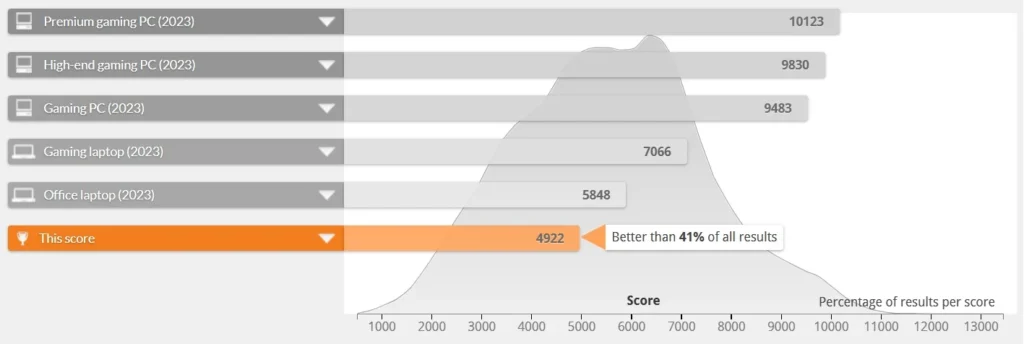
The PCMark 10 suite assesses the real-world performance of the computer across an array of common workplace activities.

  • Overall Productivity Score: This workstation earns an overall score of 4,922, placing its real-world performance ahead of 41% of all logged benchmark results on the platform.
lenovo thinkpad p15
  • Essentials (8,240): Backed by an App Start-up Score of 10,651, Video Conferencing Score of 7,015, and a Web Browsing Score of 7,490, the system handles standard corporate operations with ease.
  • Productivity (6,928): A Spreadsheets Score of 7,956 and a Writing Score of 6,034 validate the workstation’s efficiency at executing heavy data sorting, document drafting, and office multitasking.
  • Digital Content Creation (5,671): The laptop remains competitive for creators, turning in a Photo Editing Score of 7,325, a Rendering and Visualization Score of 6,615, and a Video Editing Score of 3,764.
lenovo thinkpad p15

Whether you are rendering complex 3D blueprints in CAD or compiling 4k videos in premiere pro. Its workstation-grade processor and dedicated graphics ensure you can seamlessly jump between heavy design work and daily accounting tasks without feeling any lags.

Here are the detailed specifications for the laptop’s graphics and processing hardware:

The Processor

It runs on a 10th Generation Intel Core i7 processor. It has 6 cores that allow it to handle multiple heavy tasks at once without slowing down. It uses 45 watts of power (TDP), which is higher than a typical thin laptop. This means it is built for heavy lifting and requires the larger cooling fans found inside workstations.

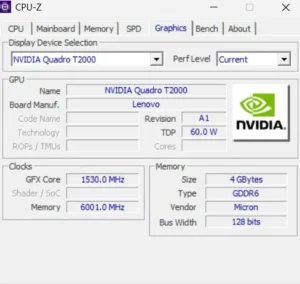
The Graphics Card

It uses an NVIDIA Quadro T2000 graphics card It has 4GB of fast, dedicated video memory, which gives it plenty of room to smoothly load and display complex 3D models or large video files. Unlike gaming graphics cards that focus on delivering the highest frame rates, this Quadro card is specifically tuned for stability. It is designed to run professional design and engineering software (like AutoCAD or SolidWorks) reliably, without crashing or glitching.

lenovo thinkpad p15
lenovo thinkpad p15

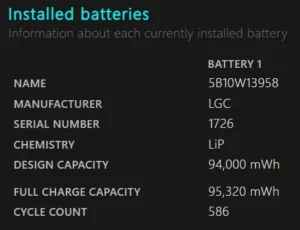
Battery life

A refurbished laptop’s battery health is essentially its current capacity to hold a charge compared to its original factory design. This laptop can get you somewhere around 2-3 hrs. of backup but the actual battery runtime will depend heavily on the laptop’s previous usage. A battery naturally degrades based on its history of charge cycles, exposure to heat, and the charging habits of its user.


lenovo thinkpad p15

Ports and Connectivity

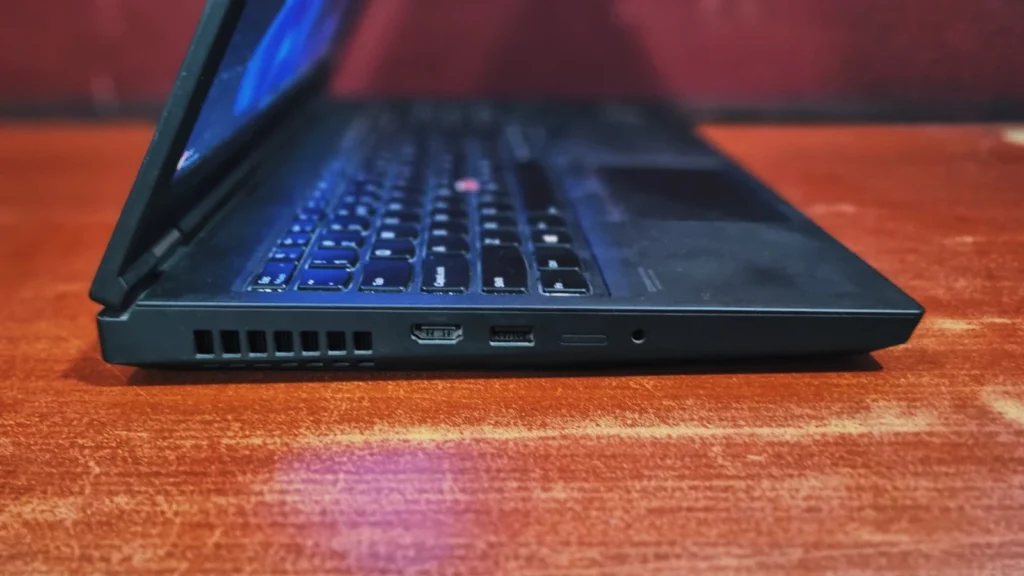
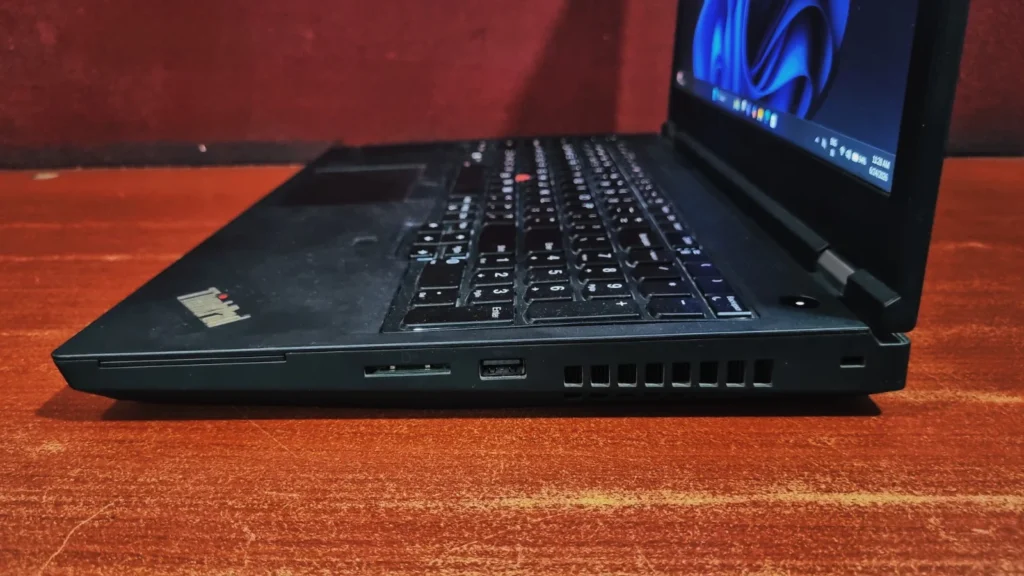
Lenovo has made a great move by ditching the old proprietary barrel charger. The I/O is thoroughly modern:

  • Left Side: HDMI, USB-A 3.0, 3.5-mm audi
lenovo thinkpad p15
  • Right Side, SD card, USB-A 3.0, Kensington Lock
lenovo thinkpad p15
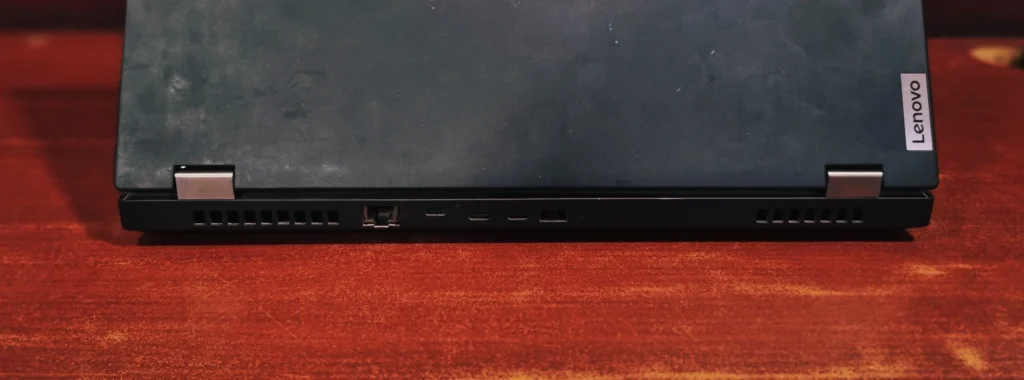
  • Back Side, RJ45-Ethernet, USB-C 3.1 Gen 1, 2x Thunderbolt 3, slim tip charger
lenovo thinkpad p15

Final Verdict

Ultimately, the Lenovo ThinkPad P15 stands as highly capable mobile workstation that prioritizes functionality and rugged durability over sleek aesthetics with MIL-STD tested chassis, it equips professionals with anti-glare FHD display, an industry-leading keyboard featuring a full numeric pad, and variety of ports. As seen by its strong benchmark performance, the integration of an intel core I7 processor, Nvidia Quadro T2000 graphics, and rapid NVMe storage delivers desktop-caliber stability for demanding workloads, ranging from complex data computation to 3D rendering. This machine’s vast upgradability and uncompromising processing power make it an outstanding investment for engineers, coders, and creators seeking a reliable cornerstone for their daily professional workflows.

Frequently Asked Questions (FAQs)

Yes, it is a portable workstation, but keep in mind that it weighs around 2.2kg (without charger), so it will add a bit of heft to your bag during transit.

This Laptop is built for engineers and business professionals. Thanks to its Intel Core i7 processor and NVIDIA Quadro graphics, it easily handles heavy multitasking, basic CAD applications, and 3D rendering.

  •  Yes, it is highly upgradeable. Just remove the bottom panel to easily swap out or expand your DDR4 RAM and SSD storage. 


  • Yes, while it is designed for professional work, the NVIDIA Quadro graphics and Intel Core i7 processor have plenty of muscle to run most popular games (GTA V, God of war etc.) smoothly at 1080p. Just keep in mind it’s a workstation, not a dedicated high-refresh-rate gaming rig.


Leave a Reply

Your email address will not be published. Required fields are marked *