Blogs
ThinkPad X1 Carbon (7th gen) Review
Specifications
- Intel Core i7-8650U Processor (8M Cache, 1.8GHz, Turbo Boost up to 4.0GHz)
- 14.0″ FHD (1920×1080), anti-glare, IPS Panel
- 16GB LPDDR3 2133MHz (non-upgradable)
- 720p HD Camera
- Backlit Keyboard (Spill-resistant)
- TrackPoint pointing device and multi-touch touchpad
- Integrated Match-on-Chip Fingerprint Reader
- 512GB SSD (SATA) (expandable)
- 65W AC Adapter – Type-C
- Intel Dual Band Wireless-AC 8265, 2×2, Wi-Fi with Bluetooth 4.1
- Weight – 1.116 kg
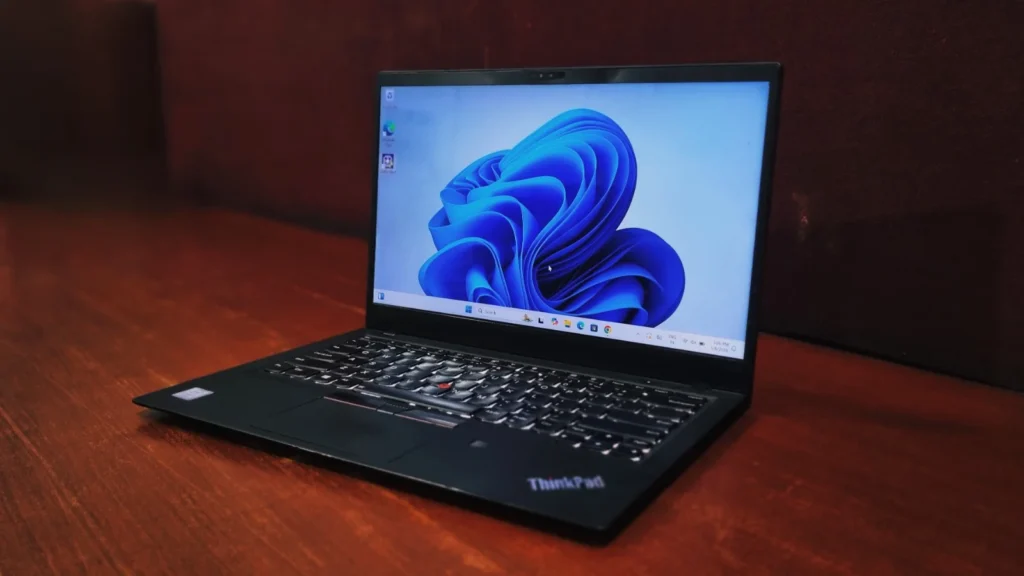
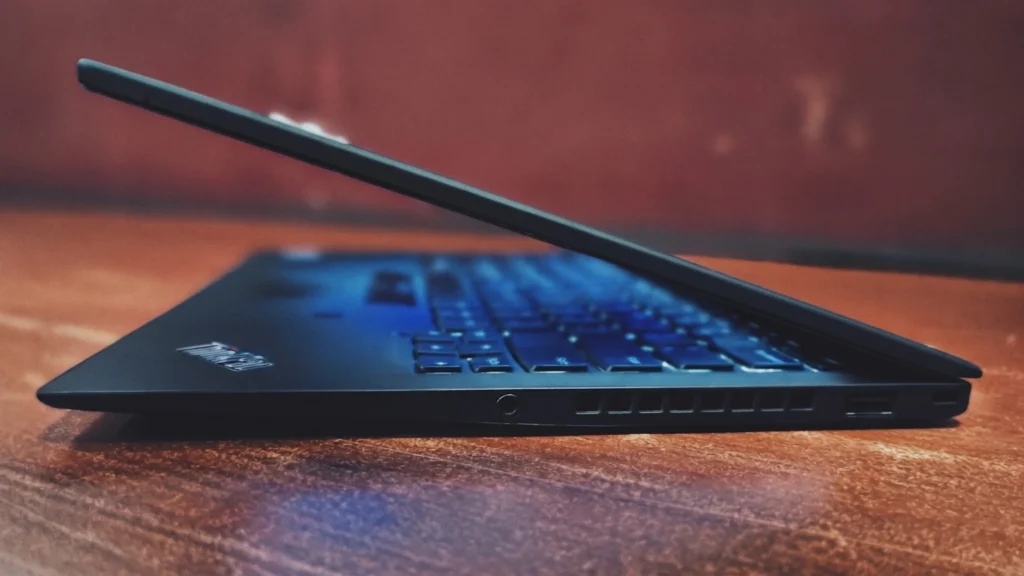
The 2018 Lenovo ThinkPad X1 Carbon (7th Gen) offers arguably the best blend of productivity, portability, and performance available in a business laptop. While this laptop used to be quite expensive, you can now grab it on the refurbished market for a genuinely unbeatable price. This 14-inch notebook is exceptionally compact and light weight. Best of all, it features Lenovo’s iconic carbon-fiber strengthened case, providing you with a device that is as durable as it is lightweight.
Design And Build Quality
- Unlike those bulky, budget-tier laptops, this machine shows the ultra – thin aesthetics and specs of a laptop. It’s crafted using the premium carbon-fiber weave, combined with a magnesium alloy Chassis which feels incredibly light in your backpack, but it’s still rugged enough to survive some drops and Harsh environment.
- This is the most preferred laptop by top level executives, as it provides exceptional compute power in ultrathin form, weighing just 1.1KG. It is also categorized as one of the lightest laptops in the world. Â Â Â Â Â Â
Lenovo ThinkPad X1 Carbon (7th gen) review: Display
The display feels nice and vibrant, with all fit neatly into a 14-inch Non-touch Panel with slim bezels. If you want maximum battery life for those long travel days, the standard 1080p anti-glare screen is your best bet.
Performance & System Benchmark
To give you a real-world idea of what this laptop can handle, we put it through a few popular benchmark tests. Powered by the Intel Core i7-8650U processor and Intel UHD Graphics 620.
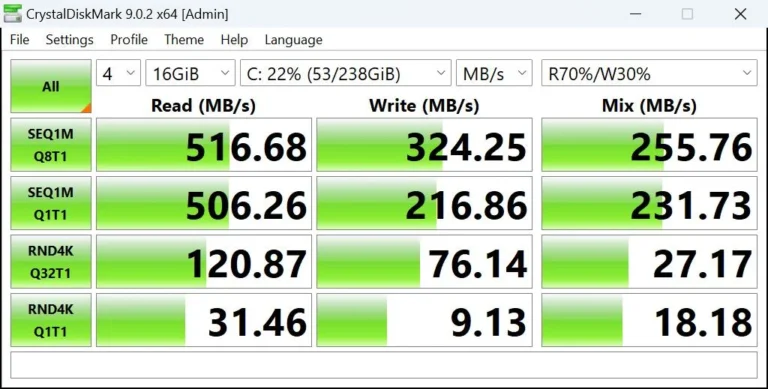
Storage Speed: (CrystalDiskMark)
The clocked sequential read speeds at around 516 MB/s and write speeds at 324 MB/s. This is still a Solid-State Drive meaning it’s much faster and more reliable than an old-school spinning hard drive. Your laptop will still boot up quickly and open apps fast, but moving massive files or folders will take some patience.
Everyday Processing (Geekbench)
The laptop scored 1153 on the single-core test and 3193 on the multi-core test. In simple terms, it has plenty of power for your daily grind. It will easily open 30 plus Chrome tabs, run heavy Excel spreadsheets smoothly, and handle your video calls without freezing. It only really starts to show its age if you try to do too many intense tasks at the exact same time.
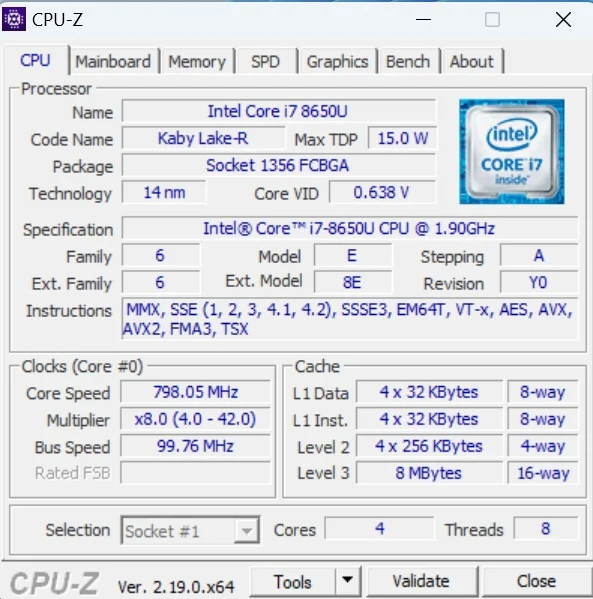
(CPU Details) – powered by Intel Core i7-8650U (from the “Kaby Lake-R” generation). It’s built on a 14 nm infrastructure with 4 Cores and 8 Threads, which gives it solid multitasking capabilities for business and everyday use. It has a Max TDP (Thermal Design Power) of 15 W. This low wattage means it is specifically designed for thin, lightweight laptops to save battery life.Â
Battery life
Since my review unit is refurbished, I’m getting around 2 to 3 hours of battery life. This is to be expected with older, refurbished batteries. If you plan to work remotely at coffee shops for long stretches, you may want to keep the lightweight Type-C charger handy or consider replacing the battery.
Connectivity and Security
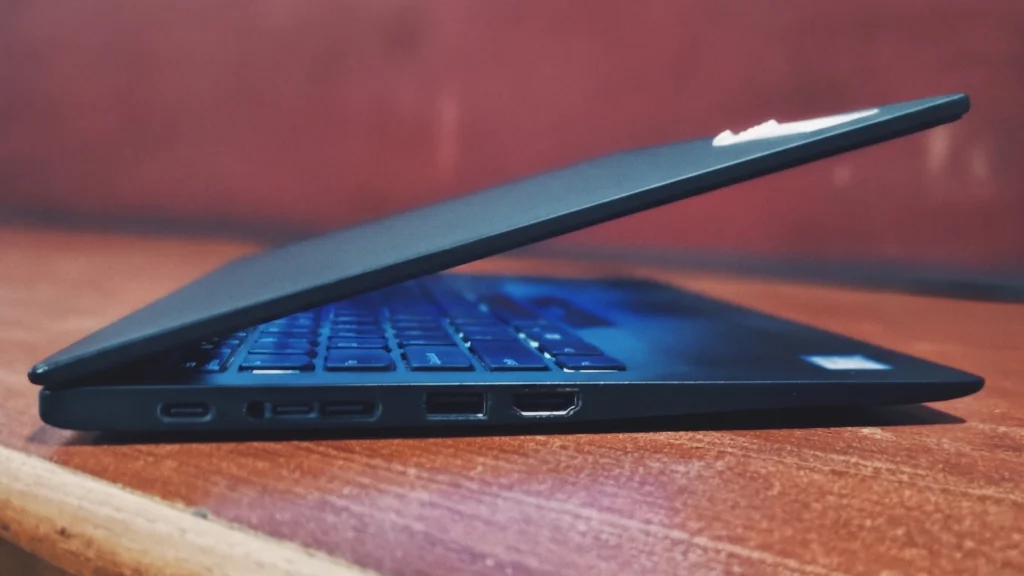
Lenovo has worked pretty well to give decent port connectivity for their ultra-thin series:Â
On the left side, two lightning-fast Thunderbolt 3 (USB-C) ports (with Lenovo’s Dock support) and a classic USB 3.0 port, HDMI port
On the right side, there’s another USB 3.0 port, a headphone jack, and a Kensington lock slot.
Lenovo ThinkPad X1 (7th gen) Carbon review: Keyboard and touchpad
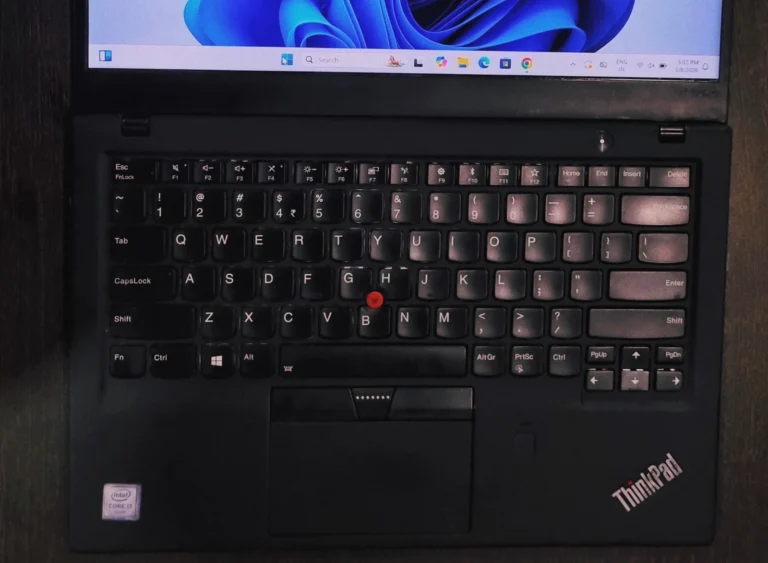
If you’ve ever typed on a ThinkPad, you know they are in the top tier for typing, and the X1 Carbon is no exception. The keys have the perfect amount of bounce, travel, and tactility, making long typing sessions surprisingly comfortable. The glass touchpad is smooth and tracks your fingers perfectly. And yes, the iconic little red TrackPoint nub is sitting right there in the middle of the keyboard for the fast fingers.
Bottom Line
The Lenovo ThinkPad X1 Carbon (7th gen) is an absolute bang for your buck if you are a professional, digital nomad, or anyone who hates bringing around a heavy bag. Also try to secure a 16GB model! Since the RAM is soldered directly to the motherboard and can’t be upgraded later, grabbing 16GB will make sure your laptop stays fast, capable, and future-proof for years to come. Keep in mind While hunting for one in used or refurbished markets.
Click the link below to get the best deal on a refurbished Lenovo ThinkPad X1 Carbon (7th gen)
Visit – Lenovo ThinkPad X1 Carbon Gen 7 – i7 8th Gen Refurbished Laptop 16GB RAM 256GB SSDÂ
Frequently Asked Questions (FAQs)
Q: Is it still worth buying the Thinkpad X1 Carbon (7th gen) in today's times?
A: Only if you find an incredible deal on a refurbished one! While it still boasts a gorgeous lightweight design, a world-class keyboard, and handles basic office work perfectly, its older processor will definitely struggle with heavy modern software.
Q: Can I upgrade Thinkpad X1 Carbon (7th gen) RAM later?
A: Unfortunately, no. The RAM is soldered right to the motherboard. If you’re buying one, try to find a model that already has 16GB of RAM so it stays fast for years. You can, however, easily upgrade the SSD if you need more storage space later on!
Q: Does it support Windows 11?
 A: Yes, it is fully ready for Windows 11. Thanks to its 8th-generation processor and built-in security chip, it runs the newer operating system without a hitch.