Best Refurbished Laptops for Students Under ₹25,000 in 2026
New laptops keep getting more expensive, and it's not your imagination. Here's why refurbished has stopped being a "compromise" and started being the smart move.
📋 Summary
If you're a student shopping for a laptop right now, you've probably noticed something annoying: new laptops just keep getting more expensive. It's not your imagination. A global RAM shortage has pushed memory prices up by anywhere from 60% to well over 100% since late 2025, and manufacturers are quietly passing that cost straight to you. Even a basic 32GB DDR5 kit that cost around $100 in September 2025 was going for $400+ by August 2026. That price pressure trickles down into every new laptop on the shelf, which is exactly why refurbished has stopped being a "compromise" and started being a smart move.
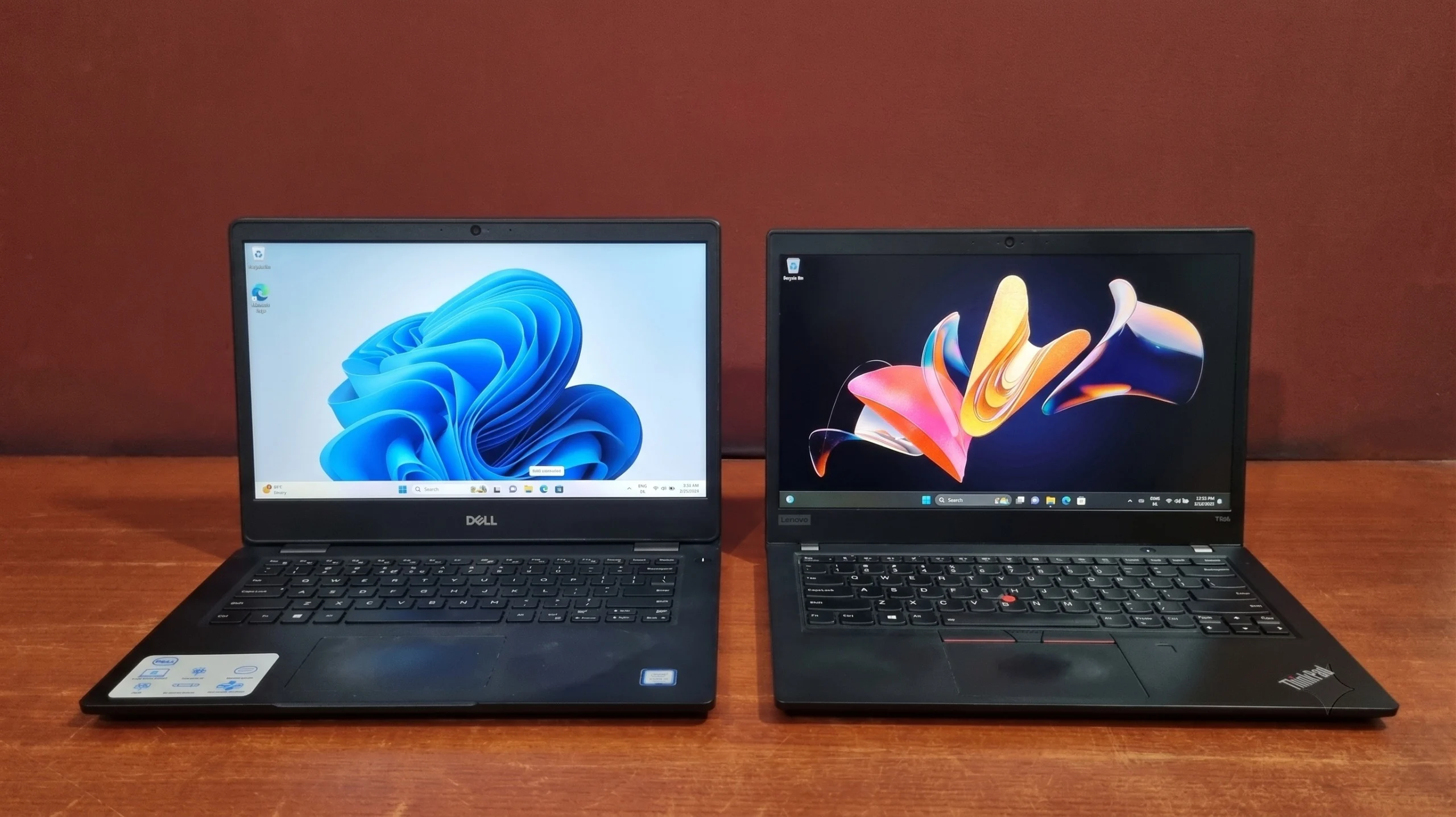
At EazyPC, we deal almost entirely in business and enterprise-grade laptops (Dell Latitude, Lenovo ThinkPad, and HP EliteBook/ProBook), the kind of machines that were originally built for corporate fleets, tested to MIL-SPEC standards, and priced well above what any student would normally pay. Once these machines finish their corporate lease cycle, they come to us, get through a proper quality check, and go out the door at a fraction of their original price.
A quick honest note before we start: ₹20,000–₹25,000 is the range where the under-₹20K bracket runs out of steam. RAM pricing has pushed several older favorites (like the HP EliteBook 840 G5) up out of the sub-₹20K category entirely, and this is where they've landed instead. Everything below is confirmed in stock and listed in the under-₹25K category as of writing, at its base 8GB RAM / 256GB SSD configuration. Higher RAM/SSD variants of the same laptop can push past ₹25,000, and stock moves quickly, so double-check both configuration and current availability before you check out.
Why ₹20,000–₹25,000 Is the Real Student Sweet Spot in 2026
1
You cross into a genuine 8th Gen quad-core floor. Below ₹20,000, you're often choosing between 6th and 7th Gen chips just to hit the price. In this band, 8th Gen quad-core is the reliable floor across Dell, Lenovo, and HP, a real step up in everyday responsiveness over the sub-₹20K bracket.
2
These machines were built to survive worse than a hostel room. Business laptops like the ThinkPad T/L-series, Dell Latitude line, and HP EliteBook series go through military-grade durability testing: drop tests, dust, temperature extremes, the works. A consumer laptop sold at this price point has none of that.
3
Every unit is checked, and you're covered if something's wrong. Every laptop we sell goes through a 30-point quality check before it ships, and comes with 6 months of warranty, with no fine print and no "warranty voids if you breathe on it" clauses.
4
Windows 11 compatibility stops being a question mark. Microsoft officially ended standard Windows 10 support on October 14, 2025. Free Extended Security Updates for home users run out on October 13, 2026, and even that's a temporary bridge, not a long-term plan. Every laptop on this list runs on 8th Gen or newer Intel silicon, so Windows 11 compatibility is a given, not a maybe.
What to Actually Look for Between ₹20,000 and ₹25,000 in 2026
Here's the benchmark I'd tell a friend to aim for before opening any product page:
| Component |
Minimum Target |
Why It Matters |
| Processor |
Intel Core i5, 8th Gen or higher |
Handles multitasking, coding IDEs, and video calls without choking |
| RAM |
8GB DDR4 (16GB where possible) |
Comfortable headroom for Chrome + MS Office + a video call running together |
| Storage |
256GB SSD |
Boot in seconds, not minutes, and non-negotiable in 2026 |
| Screen |
12.5″–15.6″ |
Small enough for a backpack, big enough for a 3-hour study session |
| Brand/Series |
Dell Latitude, Lenovo ThinkPad, HP EliteBook |
Better build quality, longer driver support, easier to repair |
A quick note on generations: in this bracket you're realistically choosing between 8th Gen Intel i5 machines, mostly with 8GB RAM and a 256GB SSD, with some options nudging toward 16GB. Don't feel pressured to chase a newer generation number outside this bracket. RAM and SSD still matter more day-to-day than the generation label alone, and every pick below is a genuine quad-core 8th Gen chip.
The 5 Laptops Actually in Stock Between ₹20,000–₹25,000: EazyPC's 2026 Picks
1. Lenovo ThinkPad X280
The Ultraportable Pick
| Processor | Intel Core i5-8250U, 8th Gen |
| RAM | 8GB/16GB DDR4 (soldered, not upgradeable) |
| Storage | 256GB/512GB SSD |
| Display | 13-inch |
| Weight | 1.18 kg |
| Price | ₹20,000 – ₹25,000 (base config sits at the entry point of this bracket) |
India's lightest business ThinkPad, and the cheapest laptop on this list. The X280 was originally sold above ₹90,000 to corporates who needed something that survives a flight bag every week. It's built from magnesium and carbon fiber, weighs barely more than a hardcover book, and still packs a quad-core 8th Gen chip and Thunderbolt 3. The trade-off is soldered RAM, so buy the configuration you'll actually need.
Best for: Students who travel or commute constantly and want the lightest laptop on this list without giving up business-grade build quality.
See the Lenovo ThinkPad X280 →
2. Dell Latitude 7490
The Premium All-Rounder
| Processor | Intel Core i5-8350U, 8th Gen |
| RAM | 8GB/16GB DDR4 (expandable to 32GB) |
| Storage | 256GB/512GB SSD |
| Display | 14-inch FHD |
| Price | ₹24,000–₹29,000 (base config is under ₹25K) |
The 7490 sits a tier above the 5000-series Latitudes: a business-premium chassis with the same MIL-SPEC-tested durability, a sharper FHD panel, and Dell's spill-resistant keyboard. It's the most "premium-feeling" pick on this list without crossing into the ₹25K+ EliteBook territory.
Best for: Students who want the nicest build quality in this bracket and don't mind paying toward the top of the ₹20K–₹25K range for it.
See the Dell Latitude 7490 →
3. HP EliteBook 830 G6
The Compact Choice
| Processor | Intel Core i5-8265U, 8th Gen |
| RAM | 8GB/16GB DDR4 |
| Storage | 256GB/512GB SSD |
| Display | 13-inch, anti-glare IPS |
| Price | ₹24,000–₹29,000 (base config is under ₹25K) |
HP's EliteBook line trades at a premium over ProBook's for a reason: aluminum chassis, backlit keyboard, and a fingerprint reader as standard. The 830 G6 is the 13-inch variant, noticeably lighter than the 14-inch options on this list, which matters if you're commuting with it daily.
Best for: Students who prioritize portability and a premium look over screen real estate.
See the HP EliteBook 830 G6 →
4. HP EliteBook 830 G5
The Budget EliteBook
| Processor | Intel Core i5-8250U, 8th Gen |
| RAM | 8GB/16GB DDR4 (expandable to 32GB) |
| Storage | 256GB/512GB SSD |
| Display | 13-inch, anti-glare IPS |
| Price | ₹25,000–₹30,000 (base 8GB/256GB config sits right at the ₹25K line) |
One generation behind the 830 G6 above, and the entry point into HP's EliteBook line at this budget. Same aluminum chassis, backlit keyboard, and compact 13-inch footprint, just on the earlier Kaby Lake Refresh platform. Worth flagging: its base configuration sits right at the ₹25,000 mark, so it's the tightest fit on this list. Confirm current pricing before you commit if you're working to a strict budget.
Best for: Students who want the EliteBook build and portability but are comfortable with one generation older silicon to keep the price down.
See the HP EliteBook 830 G5 →
5. HP EliteBook 840 G5
The Display Upgrade
| Processor | Intel Core i5-8250U, 8th Gen |
| RAM | 8GB/16GB DDR4 |
| Storage | 256GB/512GB SSD |
| Display | 14-inch FHD IPS |
| Price | ₹25,000–₹30,000 (base 8GB/256GB config sits right at the ₹25K line) |
The 840 G5 is the 14-inch sibling to the 830 G5 above, with the same aluminum build, backlit keyboard, and fingerprint reader, but with a bigger IPS panel that's genuinely nicer for long reading and writing sessions. Like the 830 G5, its base configuration sits right at the ₹25,000 mark, so double-check current pricing before you commit if you're working to a strict budget.
Best for: Students who want the best screen on this list and are comfortable pushing right up to the top of the budget for it.
See the HP EliteBook 840 G5 →
What's Actually Changed Since Last Year
- The sub-₹20K bracket has gotten thinner, pushing good laptops up into this range. Models that used to comfortably sit under ₹20,000, like the HP EliteBook 830 G5 and 840 G5, have moved into the ₹20K–₹25K bracket as the RAM shortage pushes refurbished pricing up across the board.
- Stock at this specific price band turns over fast. Several 10th Gen options that used to sit in this bracket have sold out or moved up in price; the 8th Gen picks on this list remain the most reliably available right now.
- Windows 10 is really coming out. Support ended in October 2025, and free security updates dried up in October 2026. Every laptop on this list ships on or is upgraded to Windows 11, so you're not stuck worrying about a dead-end OS a year from now.
- Configuration matters more than ever. Several laptops on this list are sold at a price range across 8GB/16GB RAM and 256GB/512GB SSD variants, and only the base config reliably stays under ₹25,000, so double-check what you're adding to cart.
A Few Honest Buying Tips
- Don't chase the highest generation number blindly. A well-specced 8th Gen i5 with 8GB RAM and an SSD will feel just as fast as a 10th Gen model in day-to-day student use. RAM and storage type matter more than the processor generation alone.
- When a listing shows a price range, add the specific config to your cart before assuming you're under budget. The base 8GB/256GB variant is usually the one that fits this bracket; jumping to 16GB RAM or a 512GB SSD can push the same laptop ₹3,000–5,000 higher, sometimes past ₹25,000.
- Battery health matters more than battery specs. Ask about the battery condition on any refurbished unit. Most units in this bracket are tested to deliver a minimum of 2 hours of real-world backup, which is worth knowing going in.
- Verify warranty terms in writing, not just verbally. Ours is 6 months with no hidden conditions, but that's not the industry standard everywhere, so check before you buy from anyone.
- If you're choosing between screen size and portability, think about where you'll actually use it. A 14-inch screen is comfortable at a desk; a 13.3-inch one (like the EliteBook 830 G6) disappears into a bag much more easily.
The EazyPC Advantage
Buying from EazyPC isn't just about the laptop, it comes with a bit of peace of mind too:
✅ 30-point quality check
🛡️ 6-month warranty, no hidden terms
💵 Cash on Delivery pan-India (₹500 prepayment)
💳 EMI via Bajaj Finance
Stock at this price point turns over quickly, so the safest way to shop is to check current availability and pricing directly on the EazyPC under-₹25K page before you decide. If you're stuck between two options, give us a call, we're happy to help you figure out which one actually fits your workload.
Call +91 8700870919 →
Your coursework deserves a machine that keeps up with you. You don't need to spend a fortune to get one.
Frequently Asked Questions
Which refurbished laptop is best for students under ₹25,000 in 2026?
The Lenovo ThinkPad X280 is the best overall choice under ₹25,000 for most students in 2026. It combines an 8th Gen Intel Core i5-8250U, 8GB DDR4 RAM, a 256GB SSD, and a 1.18 kg magnesium and carbon fiber body. Students wanting a larger screen should choose the Dell Latitude 7490 with its 14-inch FHD display.
Are refurbished laptops good for students?
Yes. Refurbished business laptops are one of the best options for students in 2026 because ₹20,000 to ₹25,000 buys an 8th Gen Intel Core i5 machine that originally sold for ₹70,000 or more. Models like the Dell Latitude, Lenovo ThinkPad, and HP EliteBook were built for corporate use and tested to MIL-SPEC durability standards.
Is it safe to buy a refurbished laptop in India?
Yes, provided the seller tests each unit and offers a written warranty. At EazyPC, every laptop passes a 30-point quality check before dispatch and ships with a 6-month warranty with no hidden conditions. Cash on Delivery is available pan-India on a ₹500 prepayment, so you can verify the machine on arrival.
How much RAM and storage does a student laptop need in 2026?
A student laptop in 2026 needs at least 8GB of DDR4 RAM and a 256GB SSD. That configuration comfortably runs Chrome, Microsoft Office, and a video call at the same time. Upgrade to 16GB RAM only if you edit video or run virtual machines, since the RAM shortage adds ₹3,000 to ₹5,000 to that jump.
Can I get 16GB RAM and a 512GB SSD under ₹25,000?
Rarely. Every price in this guide is for the base 8GB RAM and 256GB SSD configuration. Because of the global RAM shortage that began in late 2025, upgrading to 16GB RAM or a 512GB SSD typically adds ₹3,000 to ₹5,000 and pushes most of these models past ₹25,000. Add the exact configuration to your cart before you assume it fits.
Will a refurbished laptop under ₹25,000 run Windows 11?
Yes. Every laptop in this guide uses an 8th Gen or newer Intel processor, which meets Microsoft's Windows 11 CPU requirement. Each unit ships with Windows 11 installed or upgraded before dispatch. This matters because Windows 10 support ended on October 14, 2025, and free Extended Security Updates ended on October 13, 2026.
Which laptop is best for programming and coding under ₹25,000?
The Dell Latitude 7490 and the HP EliteBook 840 G5 are the best choices for programming under ₹25,000. Both have a 14-inch FHD screen, which makes running an IDE, a browser, and documentation side by side far easier. The Latitude 7490 also expands to 32GB RAM for larger projects later.
How long does a refurbished business laptop last?
A refurbished business laptop typically lasts three to five more years of student use. Machines like the ThinkPad, Latitude, and EliteBook were engineered for daily corporate use over long service lives, and their parts, batteries, chargers, and SSDs are widely available and inexpensive in India.
What battery life should I expect from a refurbished laptop?
Expect roughly 2 to 4 hours of real-world battery life. Batteries are consumables, so every unit at EazyPC is tested to deliver a minimum of 2 hours of backup. If you need all-day runtime, budget separately for a replacement battery, which is inexpensive on these business models.
What warranty comes with a refurbished laptop from EazyPC?
Every EazyPC laptop comes with a 6-month warranty covering hardware faults, with no hidden conditions. Batteries and cosmetic wear are treated as consumables, which is standard across the refurbished market. Always ask any seller to confirm warranty terms in writing before you pay.
Can I upgrade the RAM or SSD on these laptops later?
Yes, most of them. The Dell Latitude 7490 and HP EliteBook 830 G5 support up to 32GB RAM, and all five models accept a larger SSD. The exception is the Lenovo ThinkPad X280, whose RAM is soldered to the board, so choose that configuration carefully at the time of purchase.
How do I pay, and does EazyPC deliver across India?
EazyPC ships pan-India with tracking. Cash on Delivery is available on a ₹500 prepayment. EMI is available through Bajaj Finance. If you are unsure which model suits your coursework, call +91 8700870919 before you order and we will help you choose the right configuration.