




Blogs
Best Refurbished Gaming Laptops in India (2026): Top Picks Under Every Budget

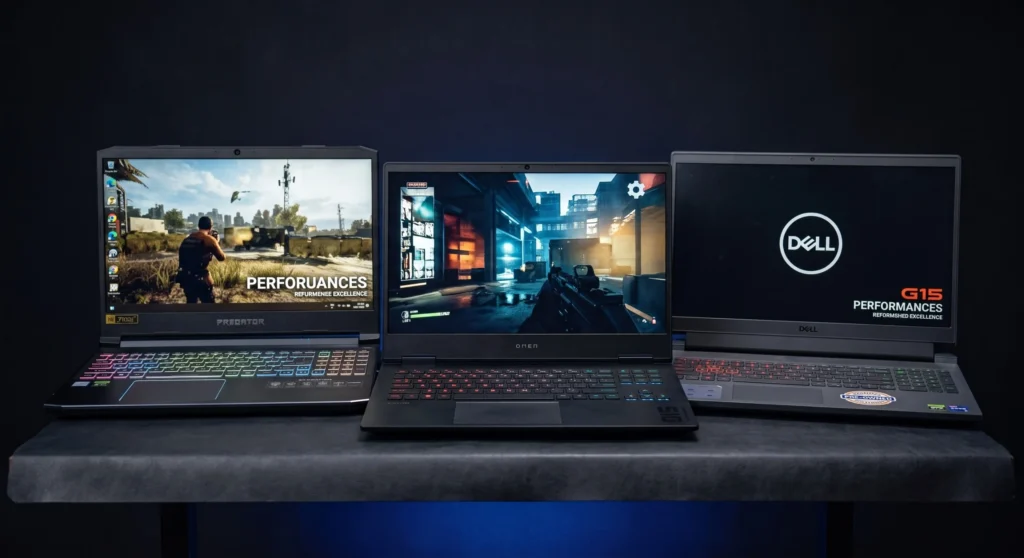
A brand-new RTX-powered machine can easily run past ₹90,000. The refurbished market has quietly gotten a lot better, and it's worth another look.
If you've been putting off buying a gaming laptop because the "new" price tags feel unfair, you're not alone. A brand-new RTX-powered machine can easily run past ₹90,000, and honestly, half of that markup is just for the "unopened box" smell. The refurbished market has quietly gotten a lot better over the last year, and it's worth another look, especially now that early RTX 40-series machines are finally trickling into the used and refurb pipeline at prices that don't feel insane.
For most buyers in India, the best refurbished gaming laptop in 2026 is a 10th/11th Gen H-series machine with a GTX 1650 or RTX 3050, 16GB RAM and a 120Hz+ screen, which typically falls in the under-₹45,000 bracket. A refurbished gaming laptop is a pre-owned machine that has been professionally cleaned, tested and resold with a warranty, unlike a used laptop, which is sold as-is.
Refurbished is now the sensible default for gaming laptops in India: the same money buys a generation or two more GPU than a new machine at the same price, and 2023-era RTX 40-series units have finally entered the resale channel. Here is the short version of what to buy at each budget and what to check before you pay.
- Under ₹30,000: workstation-class machines with Quadro or GTX 1050 graphics. Esports titles and older AAA on low settings.
- Under ₹45,000: the sweet spot for most buyers. 10th/11th Gen H-series with a GTX 1650, RTX 3050 or Quadro T1000, ideally 16GB RAM and a 120Hz or 144Hz panel.
- Under ₹65,000: RTX 3060 units are now firmly refurbing territory, and early RTX 4050 laptops beat them on efficiency and ray tracing if you can find one.
- ₹85,000 to ₹1,00,000: the new tier. First-generation RTX 4060/4070 machines from 2023 deliver current-gen performance at 1080p high or 1440p.
- Non-negotiables: a dedicated GPU, H-series CPU, 16GB RAM, an NVMe SSD, a 135W+ charger, and at least a 90-day warranty (six months is the benchmark).
- Where to buy: EazyPC for certified stock with a 6-month warranty, Cashify for price, local dealers only if you can test the unit yourself.
What Makes a Laptop "Gaming-Ready"?
RGB keyboards and a cool logo don't count. A laptop earns the "gaming" label only when it checks three boxes:
A Dedicated GPU
Intel UHD, Iris Xe, or basic integrated AMD graphics are fine for spreadsheets, not for anything with textures and shadows. You need a proper NVIDIA GTX/RTX card or an AMD Radeon mobile GPU sitting alongside the CPU.
Real Cooling
Games push a laptop far harder than everyday use ever will. Dual fans, copper heat pipes, and decent airflow aren't nice-to-haves; without them, you get thermal throttling, where the chip deliberately slows itself down to avoid cooking.
A Power Supply That Can Feed the GPU
A regular Ultrabook charger tops out around 45–65W. Gaming laptops need 135W to 230W+ chargers, because a GPU under load is genuinely power-hungry. If the charger looks small, be suspicious.
What Hardware Do Different Types of Games Need?
| Game Type | Examples | What It Needs Most | Component That Matters |
|---|---|---|---|
| Esports / competitive shooters | Valorant, CS2 | Quick frame delivery, high FPS | CPU clock speed |
| Open-world / AAA | Cyberpunk 2077, RDR2, GTA V | Heavy rendering | GPU + VRAM |
| Battle royale | PUBG, Warzone, Fortnite | Fast map/texture loading | 16GB+ RAM + NVMe SSD |
Quadro vs. GeForce: Can a Workstation Laptop Run Games?
Quadro / RTX A-series ("corporate" cards)
These live in business machines like the ThinkPad P-series and Dell Precision line. Same underlying NVIDIA silicon as the consumer cards, but the drivers are certified and tuned for CAD, 3D modelling, rendering and simulation software such as AutoCAD, SolidWorks, Revit and Maya. They're optimized for accuracy and stability over long render jobs, not for pushing frames. They also tend to sit in chassis built for all-day reliability: better keyboards, more ports, tougher hinges, ECC memory options on the higher models.
GeForce GTX / RTX ("gaming" cards)
These sit in Nitro, Legion, TUF, Omen and Victus machines. Game-ready drivers, higher clock speeds, and features aimed squarely at frame rate: DLSS, Reflex, and on RTX cards, hardware ray tracing. Paired with aggressive cooling and high-refresh panels because that's what games need.
What this means in practice: A Quadro T1000 and a GTX 1650 are close cousins in raw power, but the GTX will usually give you smoother frames in a game, while the Quadro will be steadier in a viewport. Neither is "better"; they're tuned for different work. A Quadro machine will still run most games perfectly well; you just won't get the driver-level game optimizations, and older Quadro cards (M1000, M2000, P1000) skip ray tracing entirely. Conversely, a gaming laptop will handle CAD fine for student-level work, but may not be certified for professional software licenses.
Worth noting: prices on refurbished hardware move around constantly depending on stock drops and season, so treat the numbers below as a target spec range rather than an exact price you'll see on every listing.
Best Refurbished Gaming Laptops Under ₹30,000: The Realistic Entry Point
Let's be upfront: a dedicated GPU at this price is still the exception, not the rule. What you're really shopping for here is a workstation-class laptop with just enough graphics muscle to handle esports titles and older AAA games at low settings: think Valorant, CS2, GTA V on low, or Dota 2 comfortably.
What to look for:
- CPU: Intel i5 (8th/9th Gen) or i7 (6th Gen), or Ryzen 5 3000-series
- GPU: GTX 1050 (4GB) or a Quadro-class card like the M1000/M2000; a GTX 1650 here is a genuine win if you find one
- RAM: 8GB stock, but budget separately for a 16GB upgrade; it makes a bigger difference than people expect
Models worth hunting for:
The Dell Latitude 3480 (i7 7th Gen, 2GB AMD Radeon) is in stock at EazyPC for around ₹22,000, a budget pick for lighter esports titles. Browsing by processor helps narrow things down fast too; EazyPC's i5 and i7 category pages let you filter workstation-class options like these directly.
Best Refurbished Gaming Laptops Under ₹45,000: Where Gaming Actually Starts Feeling Good
This is the tier we'd point most casual-to-mid gamers toward. 1080p, low-to-medium settings, and a genuinely playable experience across most modern titles. This bracket has gotten noticeably stronger over the past year as 10th and early 11th-gen H-series machines have entered the refurb cycle in bigger numbers.
What to look for:
- CPU: Intel i5/i7 10th or 11th Gen H-series, or Ryzen 5 4600H/5600H
- GPU: GTX 1650, RTX 3050, or a Quadro T1000
- Display: 120Hz or 144Hz if you can get it; competitive shooters feel dramatically better even at the same resolution
- RAM: push for 16GB if the seller offers it; 8GB will bottleneck you in newer titles
Models worth hunting for:
If you'd rather browse by brand than hunt for a specific model, EazyPC's Dell Refurbished Laptops and Lenovo Refurbished Laptops category pages are a good place to start, and their Refurbished Laptops Under 35K listing lines up closely with this tier.
Best Refurbished Gaming Laptops Under ₹65,000: Ray Tracing Enters the Picture
This bracket has changed the most since we last wrote about it. RTX 3060 units that were premium a couple of years ago are now firmly refurb territory, and (this is the bigger update) early RTX 4050 laptops (2022-2023 models like the Acer Nitro 5, HP Victus, and Lenovo LOQ) have started showing up refurbished as their first owner's upgrade. If you can stretch to find one, an RTX 4050 unit generally beats an older RTX 3060 on efficiency and ray-tracing performance even with similar VRAM.
What to look for:
- CPU: Intel i7 11th/12th Gen H-series, or Ryzen 7 5800H/6800H
- GPU: RTX 3060 (6GB) or RTX 4050/4060 (6GB) if available
- RAM: 16GB DDR4/DDR5 minimum; don't settle for less at this budget
- Storage: NVMe SSD, ideally 512GB+
Models worth hunting for:
EazyPC's Video Editing Laptops category: if you want workstation graphics without hunting through gaming-brand listings, this is where Quadro workstation machines show up, making it a reliable alternate route.
Best Refurbished Gaming Laptops from ₹85,000 to ₹1,00,000: The New Tier Worth Adding
We didn't cover this bracket before, but it's become relevant enough to include now that first-generation RTX 4060/4070 laptops from 2023 are starting to appear in the refurbished channel. If your budget can stretch here, you're looking at genuinely current-gen performance: 1080p high or even 1440p on many titles, and much better frame-rate stability for the next few years of releases.
What to look for:
- CPU: Intel i7/i9 13th Gen H-series, or Ryzen 7 7840HS/7940HS
- GPU: RTX 4060 (8GB) or RTX 4070 (8GB); check the actual wattage variant, since laptop RTX cards vary a lot in power draw between models
- RAM: 16GB DDR5, with room to expand to 32GB
- Display: QHD 165Hz or better if you want it to feel like a genuine upgrade over the ₹65K tier
Models worth hunting for:
Where to Buy a Refurbished Gaming Laptop in India Without Getting Burnt
EazyPC
Every unit goes through certification and testing before listing, and comes with a standard 6-month warranty plus WhatsApp/call support if something goes wrong. Their Gaming Laptops category is worth bookmarking and checking back on, since refurb stock turns over fairly often. The trade-off: laptops graded "Superb" may carry very minor cosmetic marks, which is normal for refurbished stock at this grading level.
Cashify
Competitive pricing and a 6-month warranty, but keep an eye on user reviews around post-sale support before committing.
Local Dealers (Nehru Place, Lamington Road, SP Road)
The advantage is you can physically stress-test the machine before paying. The downside is your warranty is only as good as the shop's reputation, so ask around first.
What to Check Before Buying a Refurbished Gaming Laptop
- CPU + GPU combo: Favor H-series processors paired with a real GTX/RTX GPU; U-series chips paired with a GPU are usually underpowered for gaming.
- RAM + storage: 16GB RAM and an NVMe SSD should be your baseline, not a bonus.
- Warranty: Don't settle for anything under 90 days. Six months is the sweet spot for refurbished gaming hardware.
- Physical check: Test the display for dead pixels, run the keyboard and all ports, check battery health, and if possible, run a quick stress test to see how the fans and temps behave under load.
- Battery expectations: Gaming laptops were never built for long battery life, and that hasn't changed. Expect 2-4 hours away from the charger, and treat "plugged in" as the default gaming setup.
Is a Refurbished Gaming Laptop Worth It in 2026?
- You get meaningfully better specs for the same money compared to buying new
- It's a smart entry point for students and early-career professionals who need performance now, not eventually
- Less electronic waste, which is a genuinely nice side effect rather than the main reason to buy
- The gap between "refurbished" and "new" performance has narrowed as more recent-generation machines enter the resale cycle
Related Reads
New vs. Second Hand: Which Laptop Should You Actually Buy?
A broader look at the trade-offs if you're still on the fence about refurbished in general
Best Laptop for Engineering Students, Under Every Budget
Useful if gaming is only half the requirement and you also need something for CAD or simulation work
FAQs
A refurbished laptop has been professionally cleaned, tested, and optimized, and comes backed by a warranty. A "used" laptop is sold as-is, with no guarantee it'll still be working next month.
Not really; silicon doesn't degrade in a way that affects speed. What does happen is dust buildup and dried-out thermal paste, which cause overheating rather than a drop in raw power. Reputable refurbishers replace the thermal paste as part of the process, which is worth confirming before you buy.
Refurbished units typically retain 70-80% of original battery health, and gaming laptops in general only manage 2-4 hours away from the wall even when new. Plan to game plugged in.
Six months is ideal, 90 days is acceptable, and anything under 30 days (or no warranty at all) is a red flag worth walking away from.
Yes, as long as the seller certifies and tests each unit, offers at least a 90-day warranty (six months is better), and provides post-sale support. EazyPC and Cashify both offer 6-month warranties; with local dealers, stress-test the machine in person before paying.
Yes. A Quadro T1000 performs close to a GTX 1650, so most games run comfortably at 1080p medium settings. You miss out on game-ready driver optimizations, and older Quadro cards (M1000, M2000, P1000) don't support ray tracing.
Yes, for 1080p gaming at low-to-medium settings. Paired with a 10th/11th Gen H-series CPU and 16GB RAM, they handle esports titles easily and most modern games at playable frame rates. For ray tracing, step up to an RTX 3060 or RTX 4050.
A dedicated NVIDIA GTX/RTX or AMD Radeon GPU, an H-series CPU, 16GB RAM, an NVMe SSD, a 135W or higher charger, and at least a 90-day warranty.

About Aryamann Saini
Avid tech enthusiast with a focus on strategic problem-solving. Always looking to tackle the next big challenge or learning milestone. Outside of work and studies, I enjoy traveling to historical sites and exploring the open road.
View all posts by Aryamann Saini
