Blogs
Lenovo ThinkPad T14 (Gen 2) Review
Table of Contents
Specifications –
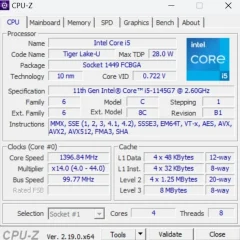
- Intel 11th Gen i5-1145G7 (2.6 GHz – 4.40 GHz)
- 14.0” FHD (1920×1080) touch panel
- Intel Iris Xe Graphics
- RAM expandable up to 40 GB (8 GB soldered + 32GB SO-Dimm) DDR4 – 3200 MHz
- 720p HD Camera with Privacy Shutter
- Backlit keyboard (spill-resistant)
- Integrated Match-on-chip Fingerprint Reader
- 512GB PCIe NVMe (expandable)
- 65W AC Adapter – Type C
- Intel Wi-Fi 6E AX210 + Bluetooth 5.2
- Weight – 1.560 kg
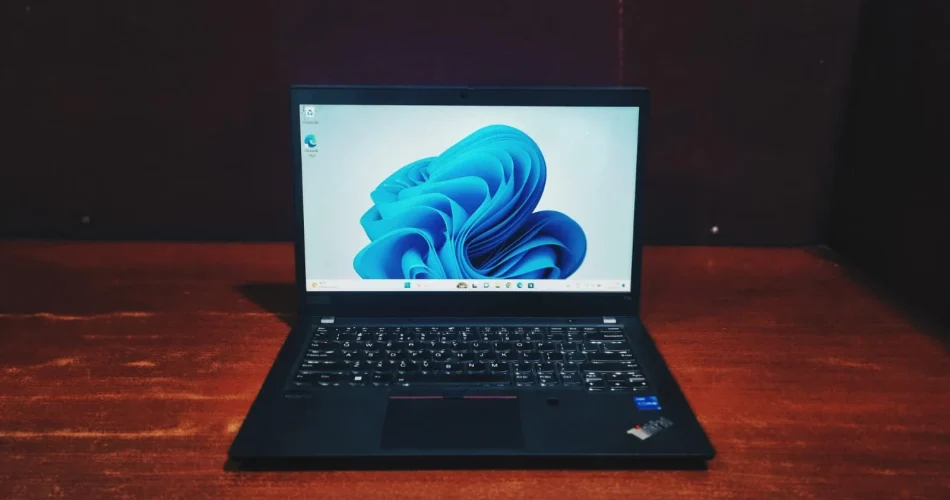
For years, the Lenovo ThinkPad T-series has remained the Standard Benchmark for working professionals, and the second-generation model definitely keeps that streak alive. It doesn’t try to reinvent the design, instead, it stuffs powerful internal refreshes into that iconic, military-grade chassis we’ve all come to trust. If you are searching for a dependable business powerhouse that delivers consistent performance without any drama, lenovo thinkpad t14 gen 2 is the ultimate choice.
Design & Build Quality
If you’ve ever used a thinkpad, you know exactly what to expect. It’s got that classic no-nonsense look made of magnesium alloy and polycarbonate with MIL-STD 810G certification to give that robust feel for carrying on the go. At about 1.5Kg, maneuver around,though it’s not the thinnest laptop in its league. One thing to note is the bezels around the screen are a bit chunky compared to the super-slim displays you see on newer rivals like the Dell Latitude series.
Lenovo ThinkPad T14 (Gen 2) review: Display
The screen is a 14.0″ FHD (1920×1080) touch panel, which is the perfect spot for most users. It has great viewing angles and an anti-glare finish on the panel that’s a lifesaver under bright lights. On the flip side, the 720p webcam is just okay and gets the job done for Zoom calls, but the video can look a bit washed out. It also has a privacy shutter slider to close the webcam physically. The speakers are decent for meetings though you won’t be hosting any parties with them.
Performance & Benchmarking
Our unit runs on an 11th Gen Intel Core i5 with Iris Xe graphics. It’s fast and responsive for everyday office use, but let’s look at how it actually handles workloads during the test.
Here is the breakdown of what these numbers mean for your day-to-day use:
CPU Performance
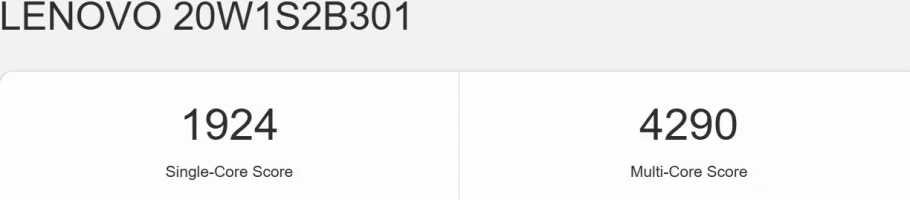
- Geekbench 6 (single-core:1924 and Multi-core:4290): The single-core score of 1924 is a strong score which means the laptop will feel exceptionally responsive during everyday tasks like opening applications, navigating the web, and editing documents. The multi-core score of 4290 reflects the limitations of an older 4-core or 10 core processor. Modern CPUs with 8 to 14 cores will score high here. It is perfectly fine for light to moderate tasks but it is not designed for heavy tasks like 3D modeling or exporting long heavy resolution video.
General System & Office Productivity
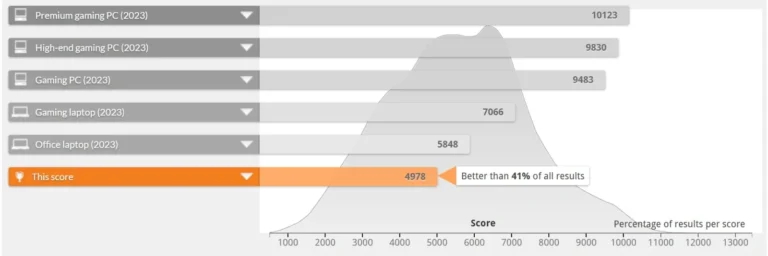
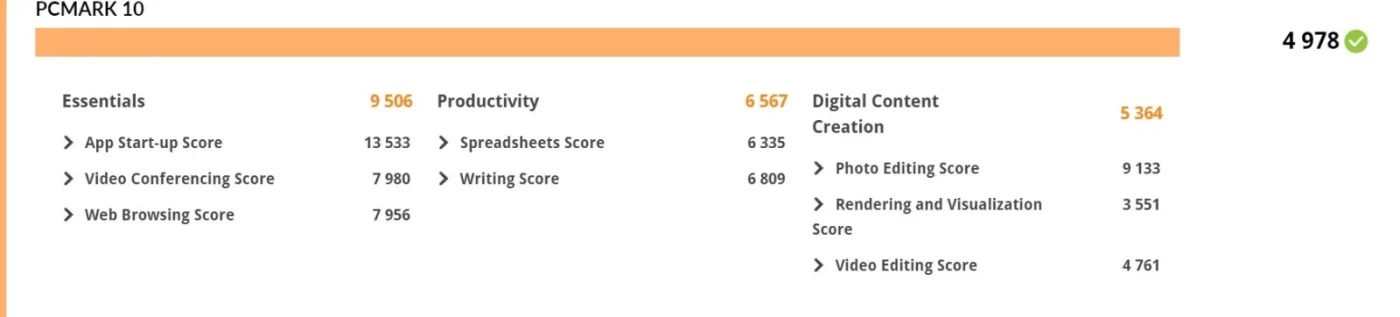
PCMark 10 (Overall: 4978): PCMark simulates real-world usage. A score of nearly 5,000 is highly respectable for a business machine, even if it falls slightly behind a benchmarked “2023 Office Laptop”(5848)
- The Breakdown:
- The Daily Grind (9,506): It easily breezes through web browsing and video calls without breaking a sweat
- Heavy Lifting (6,567): Huge spreadsheets and long documents. No problem here
Creativity (5,364): You can edit photos just fine, but don’t expect it to handle 3D rendering or complex exports smoothly
Storage Speed
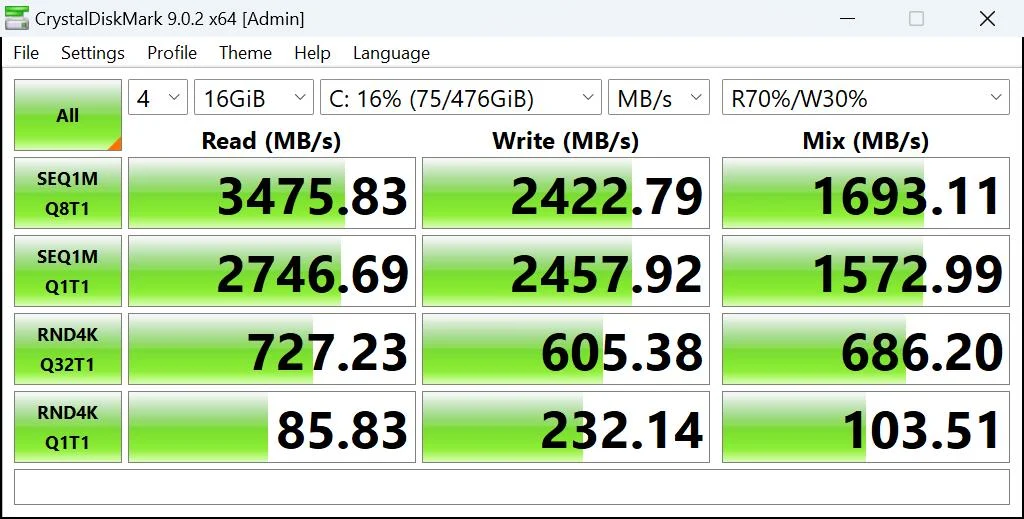
CrystalDiskMark (Read: 3475 MB/s and Write: 2422 MB/s): These are typical speeds for a PCIe Gen 3.0 x4 NVMe SSD. Sequential reads mean the system will boot up in seconds, and moving large files around the drive will feel very fast. The Random 4K Speeds (Read: 85.83 MB/s) are also very healthy. This specific metric is crucial for how snappy an OS feels when loading small background files, and this SSD performs perfectly here.
Powering this laptop is the Intel Core i5-1145G7, a 4-core, 8-thread processor that serves as a reliable multitasking engine. It is specifically engineered to maintain an optimal Balance between thermal efficiency and performance, ensuring the system remains cool and responsive even as you navigate through a demanding daily workload.
Battery Life
The actual runtime you’ll get depends heavily on the machine’s condition. However, since many users are willing to buy refurbished units, you can expect the battery performance to be slightly lower, generally providing around 2 to 3 hours of battery backup. You might need to keep your charger handy,but with the integrated Rapid Charge technology you don’t have to worry much as it can restore up to 80% of your power in only an hour.
Connectivity and Security
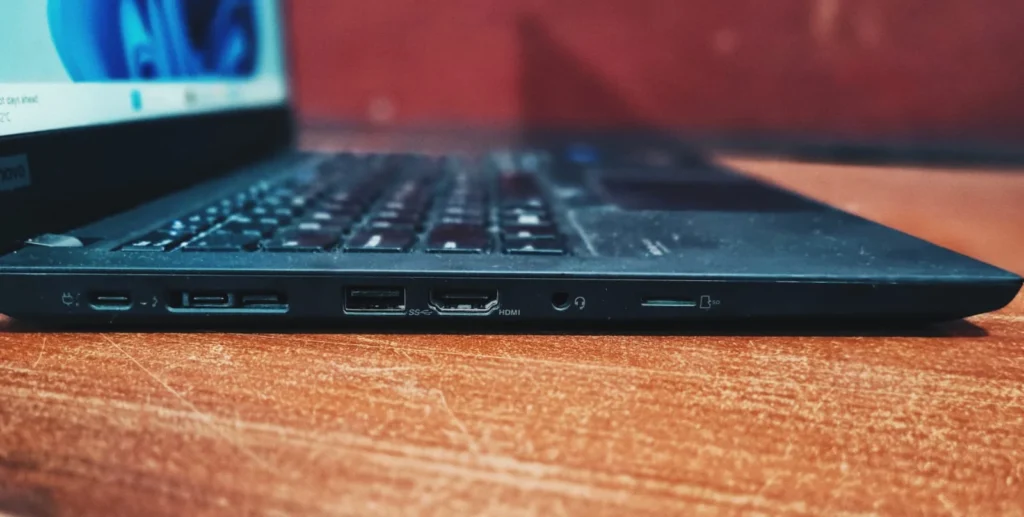
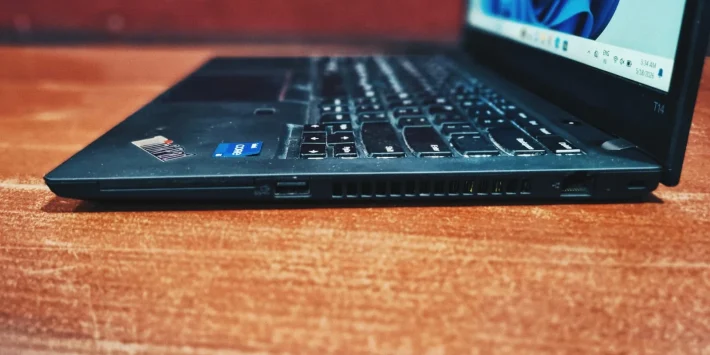
Connectivity is where this laptop truly wins. It’s got a port for everything:
On the left side, 2x Thunderbolt 4, Mini Ethernet, USB A 3.1 Gen 1, HDMI 2.0, 3.5mm Audio jack, microSD
On the right side, a smartcard reader, USB – A 3.2 Gen 1, RJ45 Ethernet , and a Kensington Lock
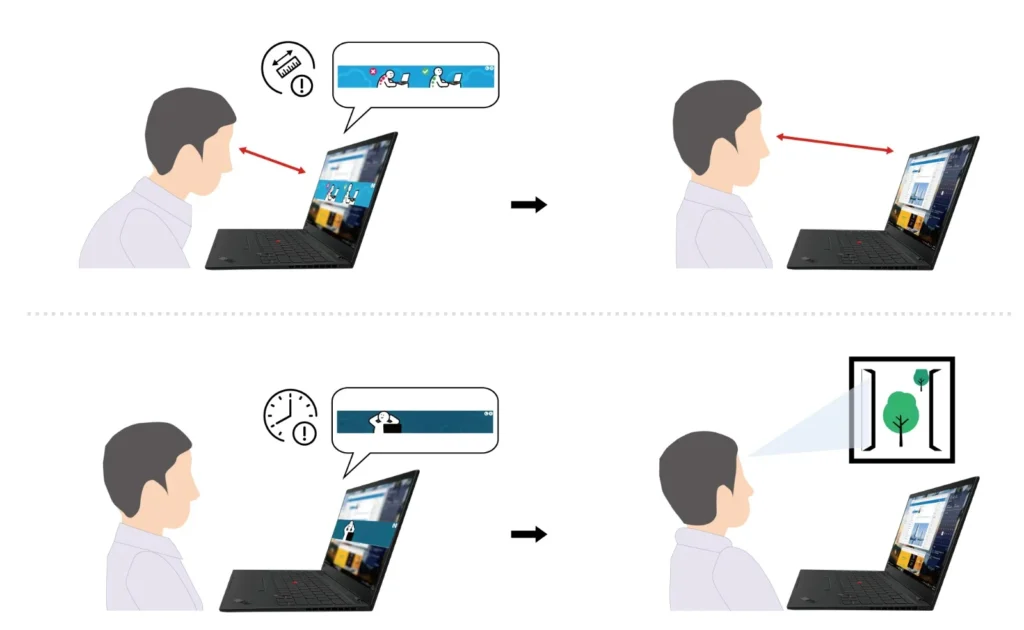
On the security front, some models are equipped with an IR (infrared) Sensor alongside Lenovo’s advanced Presence detection. With the help of Glance by Miranmetrix software, This sensor detects the person sitting in front of the laptop. It enables privacy features like automatically blurring the screen when you look away or warning you if someone is snooping over your shoulder.
Keyboard and Touchpad
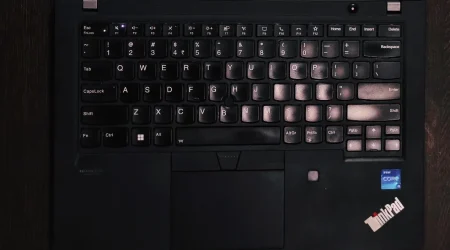
The keyboard is the best part. While other laptops are getting thinner and flatter,the T14 keeps that deep, comfortable key travel we love. Plus , you still get the classic red “Trackpoint nub” and physical mouse buttons for that authentic Thinkpad experience.
Bottom Line
Opting for the Lenovo ThinkPad T14 Gen 2 is a safe choice for any professional. Rather than being flashy or ultra-slim , it focuses on that iconic, no-nonsense build quality for which Thinkpad series is known for – rugged, military-grade machine that simply refuses to fail. This laptop excels by prioritizing extensive connectivity options, its iconic keyboard , and consistent, robust performance. While the battery endurance and 720p webcam are its few compromises, it remains the ultimate powerhouse for those who need to deliver results without any drama.
Frequently Asked Questions (FAQs)
Q: Can the Lenovo ThinkPad T14 Gen 2 handle gaming?
ThinkPad T14 Gen 2 is a purpose built corporate use machine. Its single job description is to let users work fast and smoothly. You might be able to play some old titles however not those requiring a dedicated GPU.
Q. Is it possible to upgrade the SSD and RAM on a Lenovo ThinkPad T14 Gen 2?
T14 comes with one solder and one SODIMM RAM slot. The single SODIMM slot lets you install up to 32GB of single DDR 4 RAM stick. Also you can replace the SSD with a higher storage unit.
Q. What is the expected battery life for the ThinkPad T14 Gen 2?
In a refurbished unit battery backup depends on each individual unit, rather than a standardised measure. However, with EazyPC refurbished laptops you can expect a minimum 2 -3 hours of battery backup.
Q. Is an IR sensor or facial recognition available on the ThinkPad T14 Gen 2?
Yes , Some units are equipped with IR (infrared) Sensors. Also it comes with Lenovo’s advanced Presence detection, this sensor detects the person sitting in front of the laptop with the help of Glance by Mirametrix software. It enables privacy features like automatically blurring the screen when you look away or warns you when someone is snooping over your shoulder.