




Blogs
How to Check a Refurbished Laptop’s Battery Health Before Buying


A laptop can look flawless and still have a battery that holds half its original capacity. Unlike screen scratches or keyboard wear, battery degradation isn't visible, which is exactly why it matters to check, or to buy from a seller who checks it for you.
What "Battery Health" Actually Measures
Battery health refers to a battery's current maximum capacity compared to its original factory capacity, usually shown as a percentage, alongside its charge-cycle count, how many full charge-discharge cycles it has been through. Both numbers matter more than the laptop's age in years.
How to Check Battery Health Yourself
* On Windows
- Open Command Prompt and run:
powercfg /batteryreport - Locate the report file "battery_report.html" in any of the following locations:
C:\Users\<user_name>C:\Windows\System32
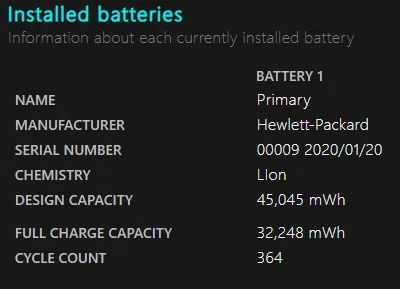
- Open the generated HTML report and compare "Design Capacity" to "Full Charge Capacity"
- Anything above 80% of original design capacity is generally considered healthy
* On macOS
- Go to Apple menu → About This Mac → System Report → Power
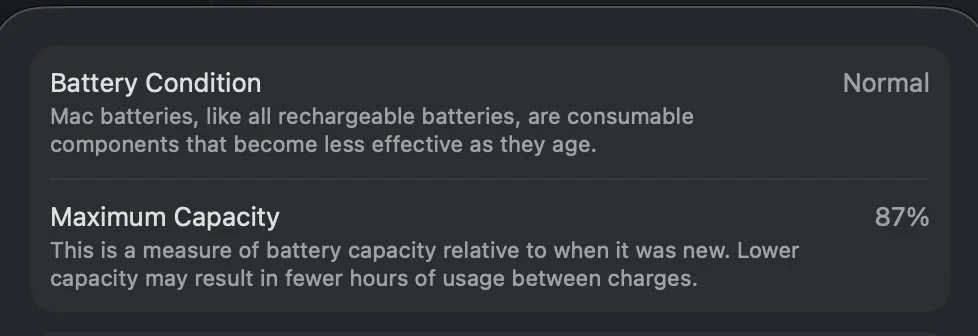
- Check "Cycle Count" and "Condition", "Normal" is the healthy indicator
💡 Rule of thumb: Under 300 charge cycles with 80%+ capacity is a strong result for a refurbished unit. Above 800–1000 cycles, expect noticeably reduced runtime, even if the battery still "works."
The Truth About "Refurbished" Batteries
Testing and Keeping
Verify the original battery still holds an acceptable charge (usually 80% or higher) and leave it in the machine.
OEM Replacement
Swap the degraded battery with a brand-new, original manufacturer part.
Third-Party Replacement
Swap the battery with a new, compatible aftermarket brand.
What a Trustworthy Seller Should Tell You Upfront
- Battery health percentage or cycle count at time of listing
- Whether the battery was replaced during refurbishment
- Whether battery condition is covered under warranty
Read what our warranty covers on battery issues.
Every EazyPC Laptop Is Battery-Tested
Battery health is verified as part of our standard quality check before any laptop is listed.
Shop Tested Refurbished Laptops →Frequently Asked Questions
Is a replaced battery as good as the original?
A quality replacement battery from a reputable refurbisher typically restores near-original capacity and is often a positive sign rather than a concern.
What battery health is unacceptable for a purchase?
Below 70–75% capacity, or a cycle count above 1000, typically signals noticeably reduced runtime and is worth asking about before buying.
Does battery health affect resale value?
Yes, a documented healthy battery is one of the strongest trust signals in a used-laptop resale listing.
