




Blogs
HP EliteBook 830 G8 Review: Benchmarks, Battery Life & Verdict

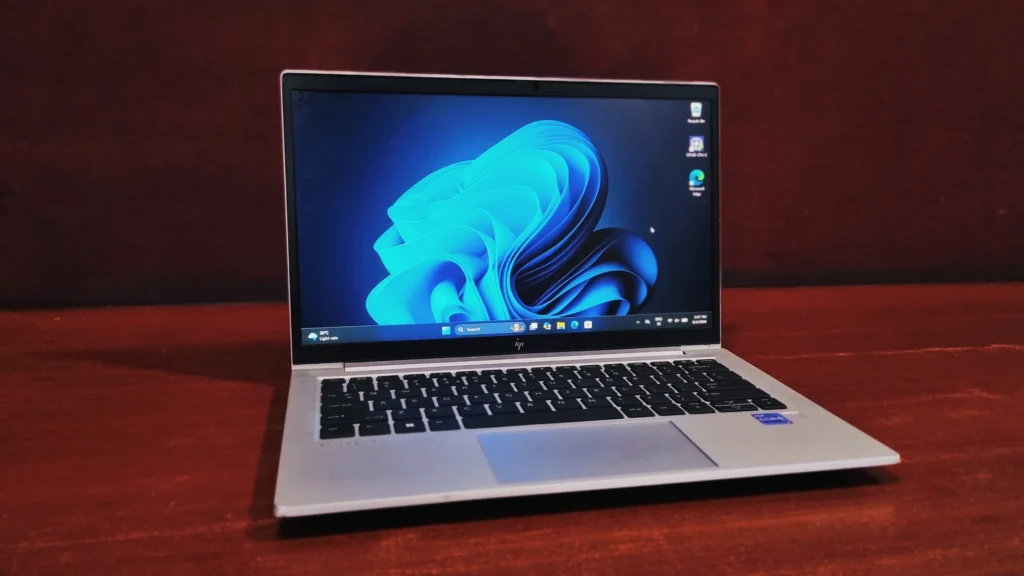
It doesn't try to be flashy, it tries to disappear into your workday, and for the most part, it succeeds.
There's a certain type of laptop that shows up in every consultant's bag, every IT fleet order, and every "what should I buy for work" thread online. The HP EliteBook 830 G8 is that laptop. It doesn't try to be flashy, it tries to disappear into your workday, and for the most part, it succeeds.
HP built the EliteBook 830 G8 around Intel's 11th Gen Tiger Lake platform, which was a genuine leap over the previous generation, faster cores, a proper integrated GPU in Iris Xe, and enough efficiency to keep the fans quiet. Pick one up refurbished, and you're getting enterprise-grade hardware, security, and battery life without paying anywhere near the original price tag.
Yes. The HP EliteBook 830 G8 is a 13.3-inch business laptop that HP launched in late 2020 with Intel 11th Gen Tiger Lake processors, and it is still one of the best refurbished laptops for office work, video calls and frequent travel. In our testing, the Core i7-1185G7 configuration scored 3,802 points in Cinebench R23 multi-core, 4,965 in PCMark 10, and read data at up to 3,544 MB/s. It weighs 1.26 kg, has passed MIL-STD-810H durability testing, and HP rates it at over 14 hours of battery life.
✅ Pros
Durable aluminum chassis; strong 11th Gen performance; RAM upgradeable to 64GB; two Thunderbolt 4 ports; enterprise-grade security (HP Sure Start, TPM 2.0, Intel vPro).
⚠️ Cons
Integrated Iris Xe graphics aren't built for gaming or heavy video editing; the 16:9 display feels shorter than newer 16:10 laptops; battery health varies on refurbished units.
Specifications
Processor
11th Generation Intel® Core™ i7-1185G7
Graphics
Intel Iris® Xe Graphics
Memory
16GB DDR4-3200 (dual-channel, 2× SO-DIMM, upgradeable to 64GB)
Storage
512GB NVMe PCIe SSD
Display
13.3" FHD IPS anti-glare
Keyboard
Spill-resistant backlit keyboard with fingerprint reader
Weight
Starting at 1.26 kg
Connectivity
Wi-Fi 6 (802.11ax), Bluetooth® 5.0, optional 4G/5G WWAN
Design & Build Quality: How Durable Is the HP EliteBook 830 G8?
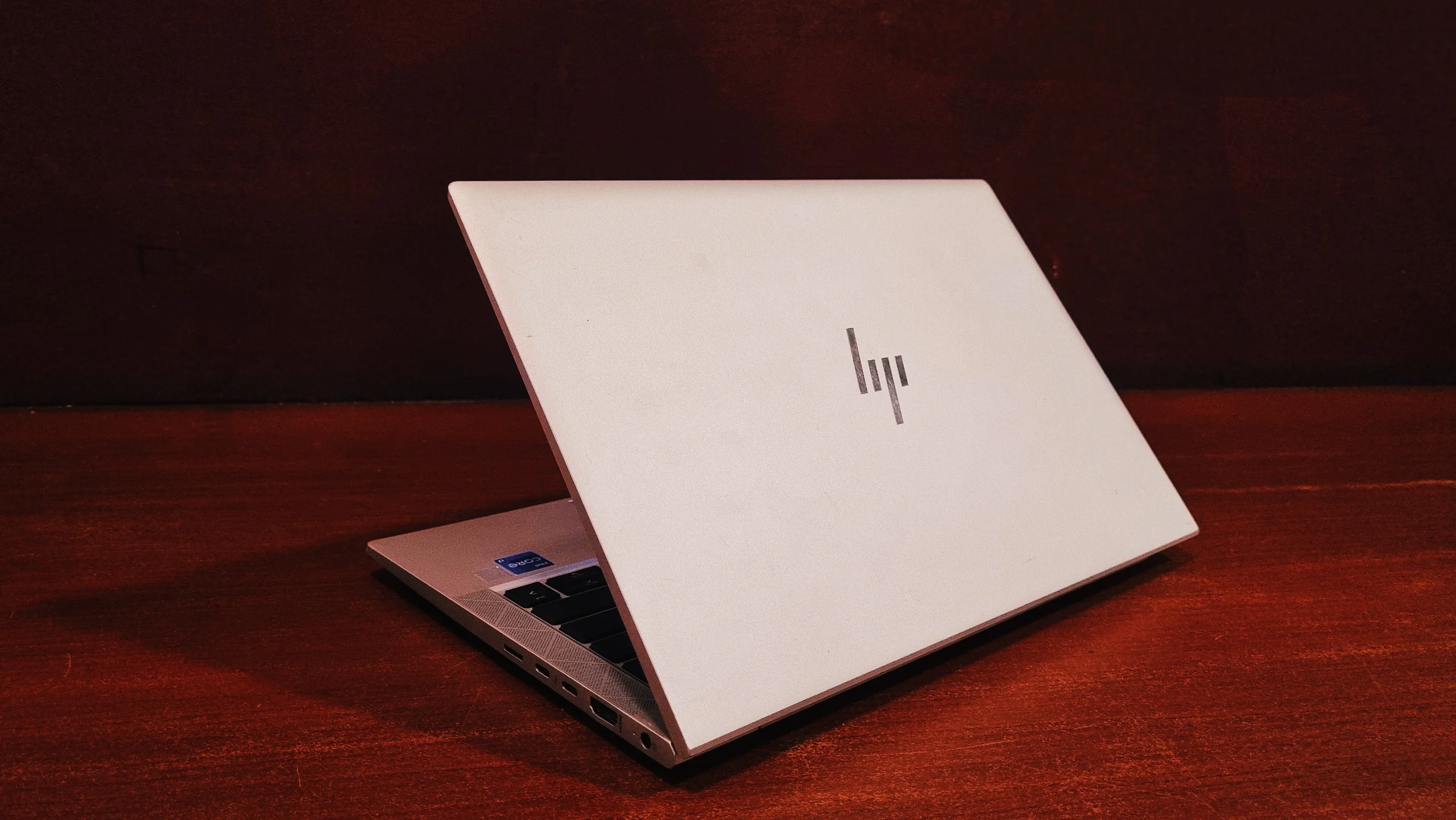
This is where the EliteBook name earns its keep. The chassis is CNC-machined aluminum, and it shows the moment you pick it up, there's no flex in the lid, no creak in the keyboard deck, and the whole thing feels like it was built to survive a decade of commuting. At 1.26 kg and just under 18mm thick, it's genuinely one of the more portable 13-inch business laptops out there.
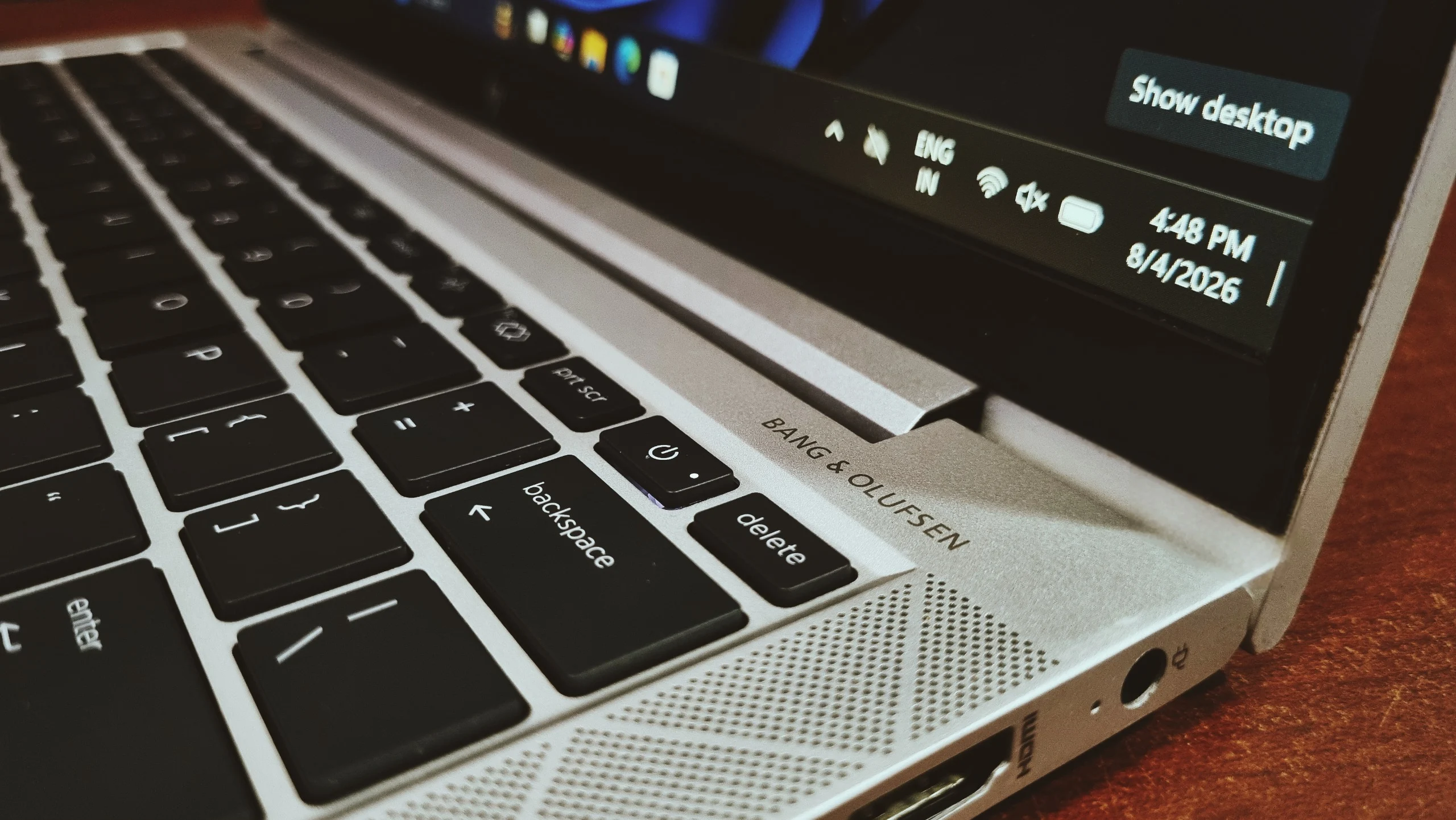
It passed MIL-STD-810H testing, which means HP put it through drops, vibration, dust and temperature extremes before it ever reached a desk. The soft-touch finish resists fingerprints better than most metal laptops, and the hinge has just the right amount of resistance, stiff enough to hold the screen steady yet loose enough to open one-handed.
HP EliteBook 830 G8 Display: How Good Is the Screen?
The HP EliteBook 830 G8 has a 13.3-inch Full HD (1920 × 1080) IPS anti-glare display, with optional panels rated up to 1000 nits. The 13.3-inch FHD IPS panel is compact, sharp, and easy on the eyes over long sessions. Text renders cleanly at this resolution and pixel density, and the IPS panel means you can angle the screen for someone across the desk without the colors washing out.
Depending on configuration, you can get panels rated up to 1000 nits, which is genuinely bright for a business laptop and makes a real difference working near windows or outdoors. Even the standard panels handle typical office lighting comfortably, and the anti-glare coating keeps reflections from becoming a distraction during video calls.
Performance
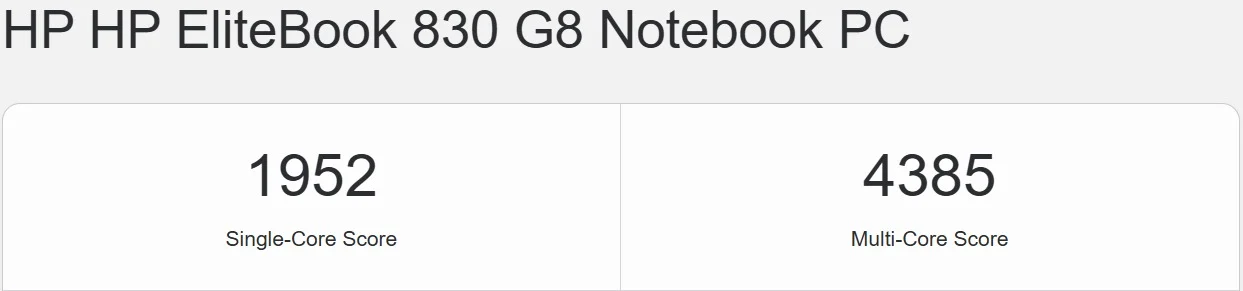
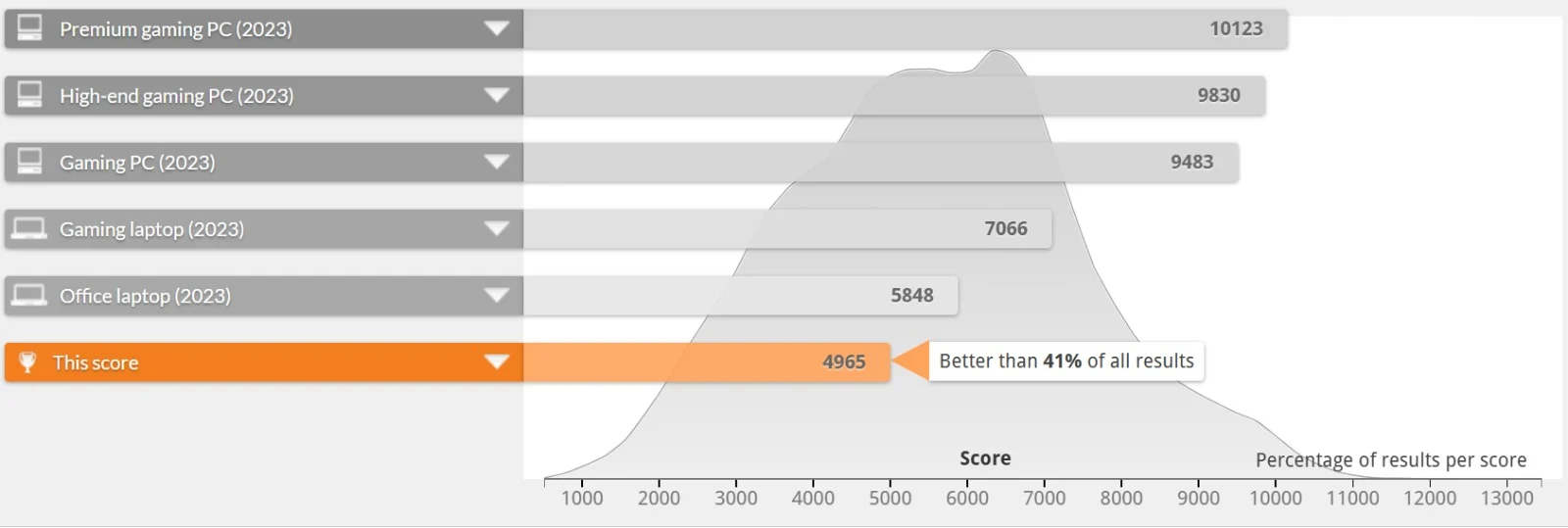
The HP EliteBook 830 G8 with a Core i7-1185G7 is fast enough for heavy office multitasking and light creative work: it scored 3,802 in Cinebench R23 multi-core, 1,952/4,385 in Geekbench 5 single/multi-core, and 4,965 in PCMark 10. This is where the jump to 11th Gen shows up most. The EliteBook 830 G8 handles heavier multitasking, more demanding browser tabs, and quick creative work without the strain you'd feel on an older-generation Ultrabook. We put our test unit, configured with the Core i7-1185G7, through a full benchmark suite to see exactly what it's capable of.
CrystalDiskMark (Storage Speed)
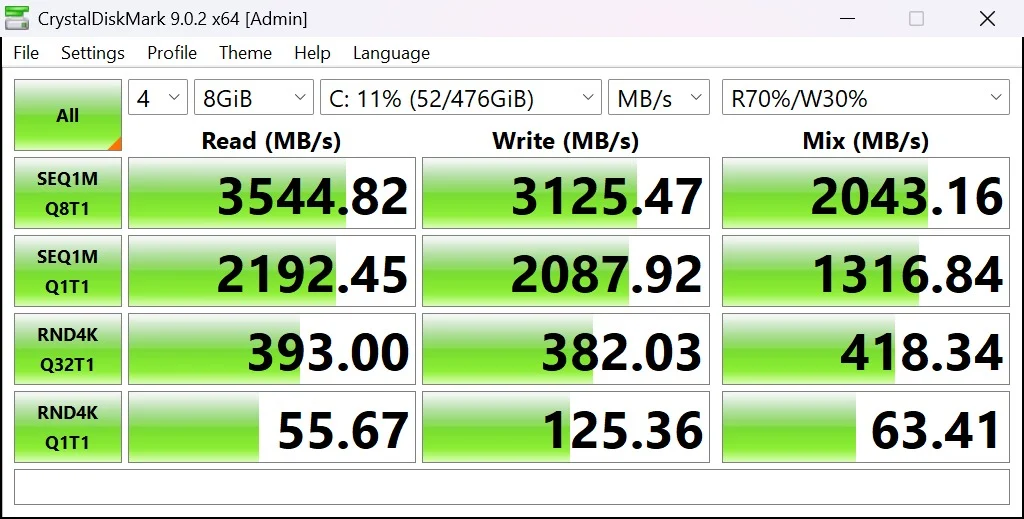
The NVMe SSD in our unit is fast, sequential reads hit 3,544.82 MB/s and writes reach 3,125.47 MB/s at higher queue depth, which is well into the range of a modern high-performance drive. Single-queue sequential speeds still landed at 2,192.45 MB/s read and 2,087.92 MB/s write. Random 4K performance, the number that governs everyday snappiness, came in at 393.00 MB/s read and 382.03 MB/s write under load. In real terms: this drive is not a bottleneck at all, Windows boots in seconds and large files move without any waiting around.
Cinebench R23 (Rendering Performance)
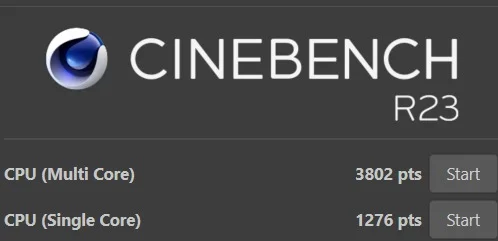
Cinebench R23 hammers every core simultaneously, which makes it a good proxy for sustained, CPU-heavy work. The i7-1185G7 scored 3,802 points multi-core and 1,276 points single-core, both are strong numbers for a 28W mobile chip, and the single-core score in particular is genuinely close to what you'd get from a desktop processor a few years older. This is a laptop that will comfortably handle spreadsheet macros, compiling small projects, and even the occasional export job without breaking a sweat.
Geekbench 5 (CPU & Compute)
Geekbench's cross-platform CPU test gave the EliteBook 830 G8 a single-core score of 1,952 and a multi-core score of 4,385. Both numbers are a clear step up from the previous ProBook/EliteBook generations we've tested, and they translate directly into a system that feels immediately responsive, quick app launches, fast window switching, and no lag when several things are running at once.
On the OpenCL side, which measures compute performance on the integrated GPU, the system posted a score of 10,998. That's a big jump over the previous-generation UHD graphics and reflects how much more capable Iris Xe is, smoother 4K video playback, faster photo editing filters, and noticeably better performance in GPU-accelerated apps, though this still isn't a laptop built for gaming.

PCMark 10 (Overall System Productivity)
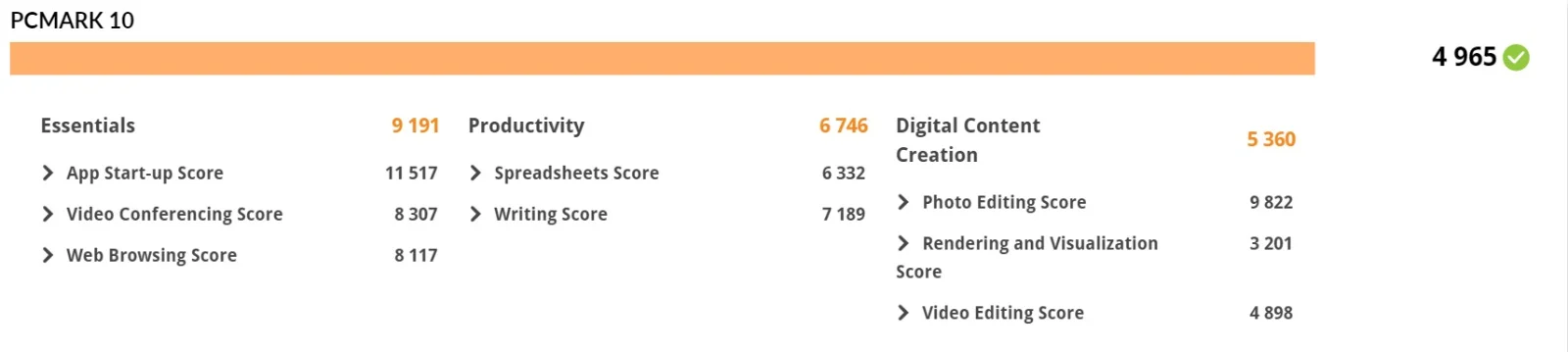
The Essentials score of 9,191 shows just how quick this machine feels for basic daily tasks. The Productivity score of 6,746 (spreadsheets 6,332, writing 7,189) confirms it handles Office workloads without hesitation. Even Digital Content Creation came in at a respectable 5,360, with photo editing hitting 9,822, well ahead of what you'd expect from integrated graphics.
CPU Details: Which Processor Does the HP EliteBook 830 G8 Use?
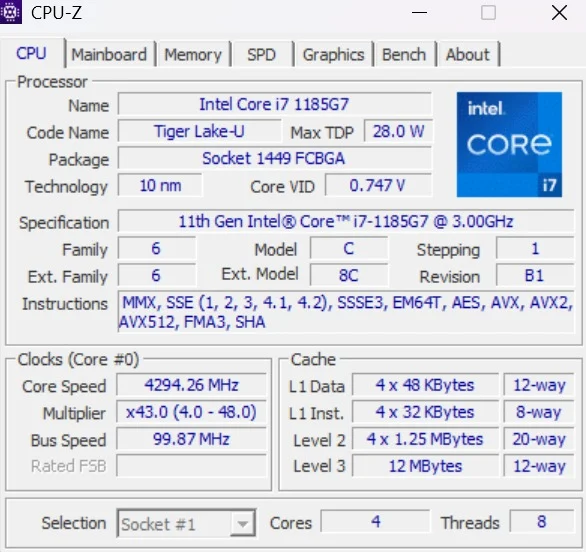
Powering our test unit is an 11th Gen Intel Core i7-1185G7, a Tiger Lake-U chip built on Intel's 10nm SuperFin process. It's a quad-core, eight-thread processor with a generous 12MB L3 cache and a maximum TDP of 28W, noticeably higher than the 15W chips found in entry-level business laptops, which explains the performance jump. Base clock sits at 3.00 GHz, and Turbo Boost pushes individual cores up to 4.8 GHz under load. This is also a vPro-certified chip, which matters if your IT team relies on remote management and hardware-level security features.
Battery Life
The HP EliteBook 830 G8 lasts a full workday in mixed use (about 8 to 10 hours), and HP rates it at over 14 hours under light workloads. The EliteBook 830 G8 ships with a 53Wh battery, and HP rates it for over 14 hours of use under light workloads. Realistically, especially on a refurbished unit, expect somewhere between a full workday and that ceiling depending on brightness, background apps, and the battery's overall health. HP's fast-charge tech gets you to roughly 50% in about 30 minutes, which is genuinely useful when you're rushing between meetings.
Connectivity and Security: HP EliteBook 830 G8 Ports and Features
Security is arguably where the EliteBook line pulls furthest ahead of HP's more budget-focused ranges. Our unit came with a fingerprint reader built into the keyboard deck, an IR camera for Windows Hello facial login, and a physical webcam privacy shutter. Some configurations also offer HP Sure View Reflect, a built-in privacy screen that blacks out the display from side angles at the press of a button, genuinely useful if you work in open offices or on flights.
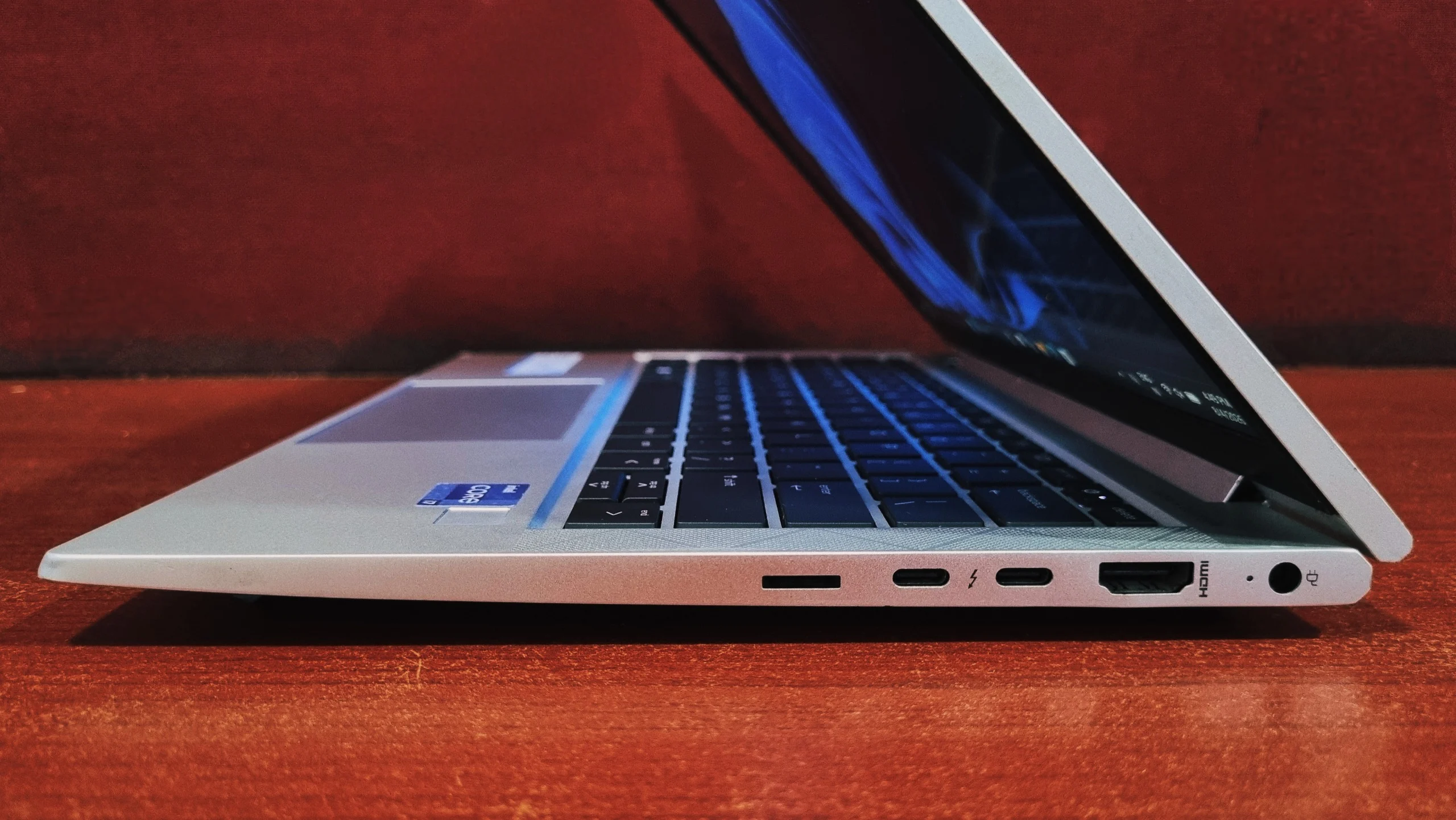
HP splits the port layout across both sides of the chassis, so you're never reaching too far for the connection you need.
Right Side
Right side: HP charging point, two Thunderbolt 4 / USB4 Type-C ports (with DisplayPort and USB Power Delivery support), an HDMI port for a quick wired display connection, and a nano-SIM slot on configurations with optional 4G/5G WWAN.
Left Side
Left side: a security lock slot, two USB-A 3.2 ports (one supports charging), a headphone/microphone combo jack, and an optional smart card reader on select configurations.
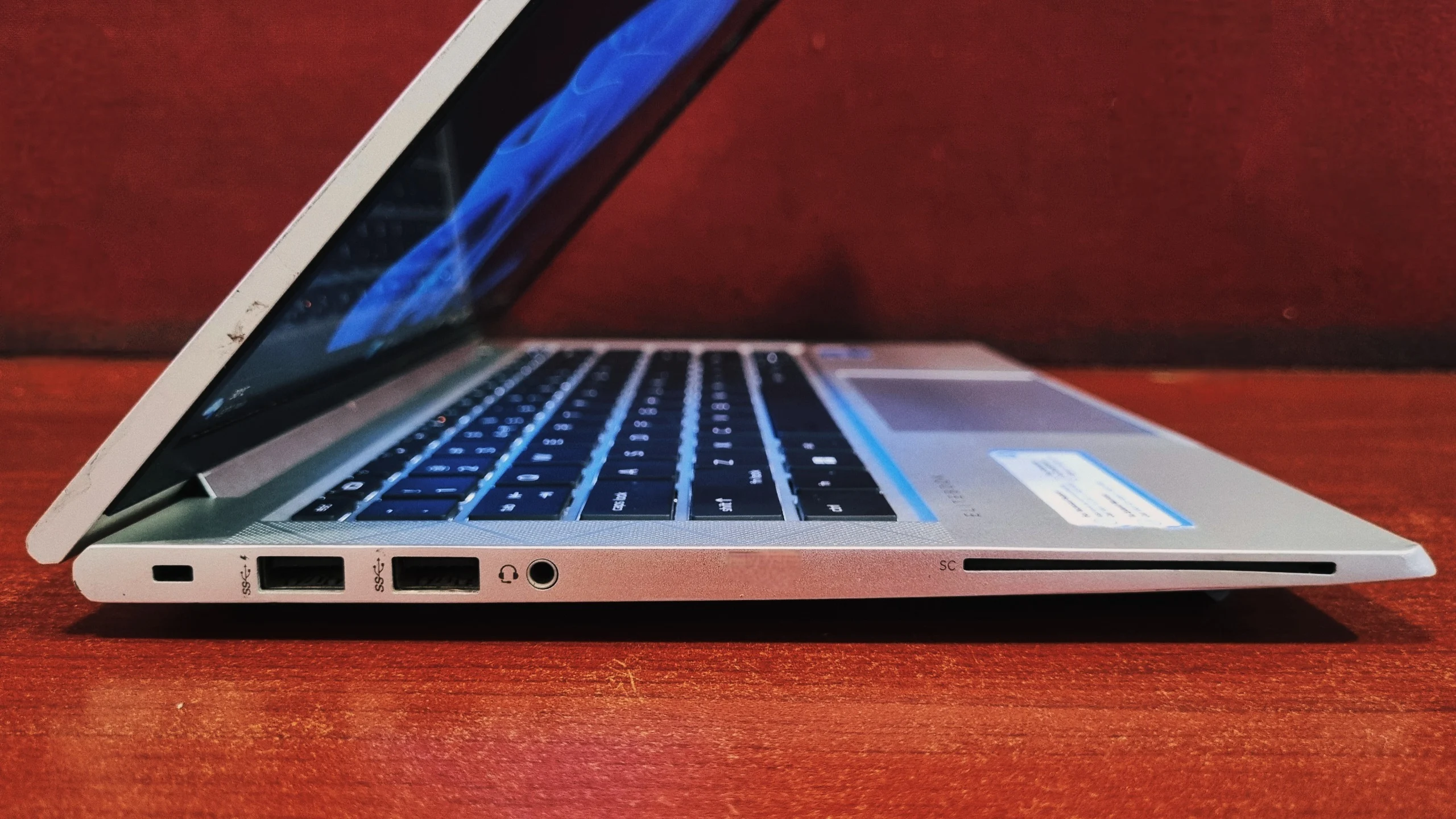
Between the HDMI port and the pair of Thunderbolt 4 connectors, you can run a dual-monitor setup without needing a dock. Frequent travelers who want to charge and drive an external display off a single cable will still appreciate a Thunderbolt dock for convenience.
HP EliteBook 830 G8 Keyboard and Touchpad: Are They Any Good?
The keyboard is one of the better ones we've typed on in this class. Key travel is shallow but well-damped, the backlighting is even, and the layout leaves no awkward key placement. It's quiet enough for a call, yet still gives enough feedback that touch typists won't feel like they're typing on glass.
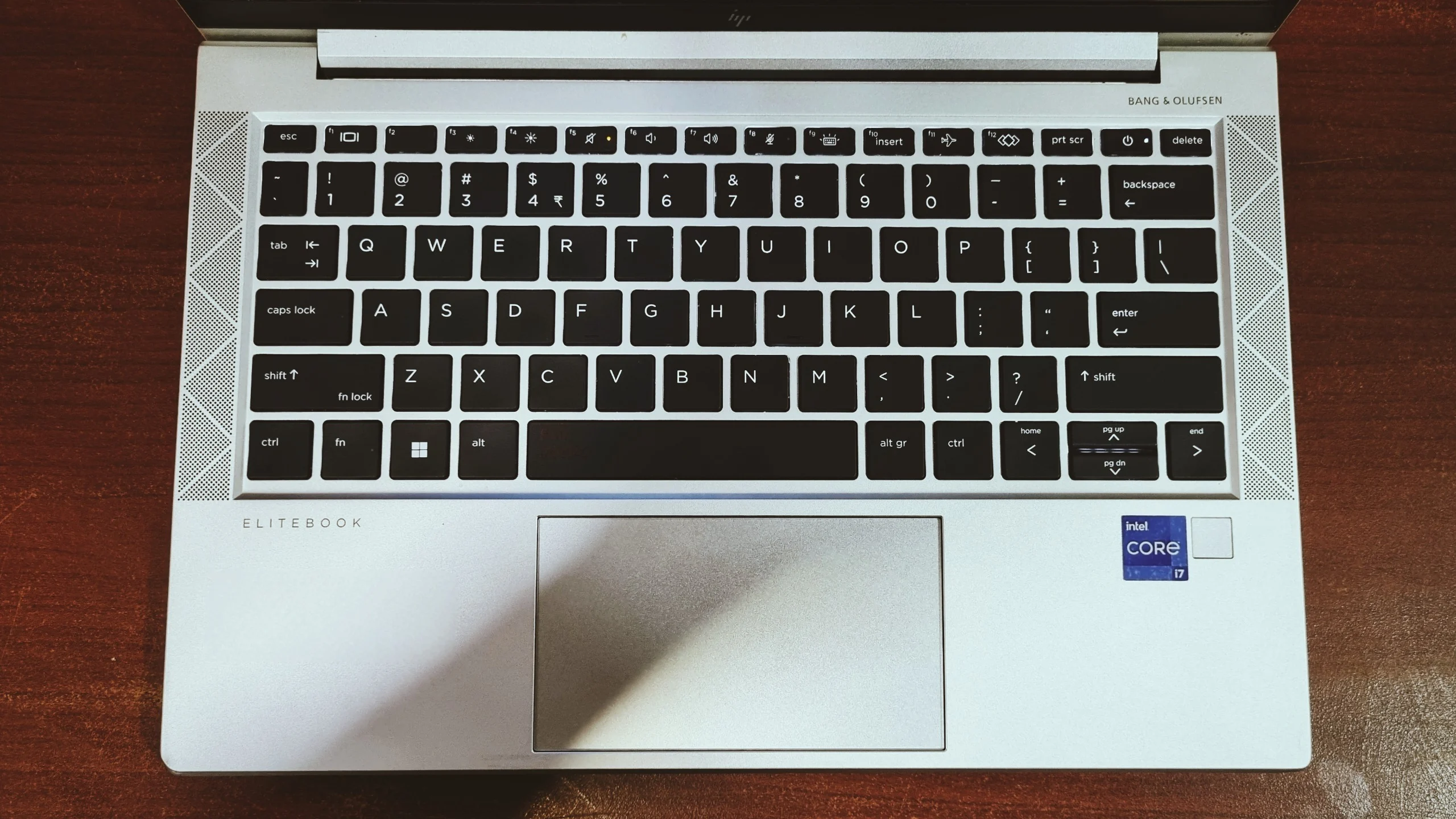
The glass-surfaced touchpad is smooth and accurate, with reliable multi-touch gesture support. It's a noticeable step up from the plastic click pads found on HP's budget lines, tracking feels precise and clicks register cleanly across the whole surface.
Bottom Line: Should You Buy the HP EliteBook 830 G8?
Bottom Line
The HP EliteBook 830 G8 is what happens when a laptop is designed around actual enterprise needs rather than spec-sheet bragging rights. It's light, it's fast enough for real multitasking, the display and keyboard are both genuinely pleasant to use daily, and the security features are a serious step up if that matters to your organization.
Buy it refurbished and you're getting Tiger Lake-era performance, aluminum build quality, and a long battery life for a fraction of what this laptop cost. For anyone who spends their day in spreadsheets, video calls, and browser tabs, this is a very easy laptop to recommend.
Frequently Asked Questions
Unlike many modern thin-and-light laptops, the standard HP EliteBook 830 G8 features two standard DDR4 SO-DIMM slots. This means you can upgrade the memory up to 64GB of DDR4-3200 RAM after purchase, giving the machine excellent longevity. The NVMe SSD can also typically be swapped for a larger drive.
Yes, it includes two Thunderbolt 4 / USB4 ports that support DisplayPort output, USB Power Delivery, and 40Gbps data transfer, enough to run an external monitor and charge the laptop through a single cable or dock.
Very good for video calls, thanks to the IR camera, noise-cancelling mics, and Bang & Olufsen-tuned speakers. For light content creation like photo editing, it holds up well too, though it's not built for heavy video editing or 3D rendering.
HP rates it at over 14 hours under light use. In everyday mixed use, expect somewhere around 8 to 10 hours, which is still a comfortable full workday, especially with HP's fast-charge support to top it up quickly between meetings.
Yes, especially refurbished. Its 11th Gen Intel processor, Thunderbolt 4 ports, upgradeable RAM and enterprise security features still cover everyday business work comfortably, and refurbished units cost a fraction of the original price.
Yes. The 11th Gen Intel Core processors and TPM 2.0 chip meet Microsoft's Windows 11 requirements, and many units shipped with Windows 11 Pro or a Windows 11 upgrade license.
Not really. The integrated Intel Iris Xe graphics can handle older or lightweight games at low settings, but this laptop is built for productivity, not modern AAA gaming.
It starts at 1.26 kg (about 2.78 lb) and is just under 18mm thick, making it one of the more portable 13-inch business laptops.
Both use the same 11th Gen Intel platform and similar features. The main difference is size: the 830 G8 has a 13.3-inch display and is lighter, while the 840 G8 has a 14-inch display and a slightly larger, heavier chassis.
Ready to Get Yours?
Certified refurbished, tested, and backed by warranty, at a fraction of the original price.
Shop Now →

