




Blogs
Lenovo ThinkPad T480s Review: Benchmarks, Battery Life, and Verdict

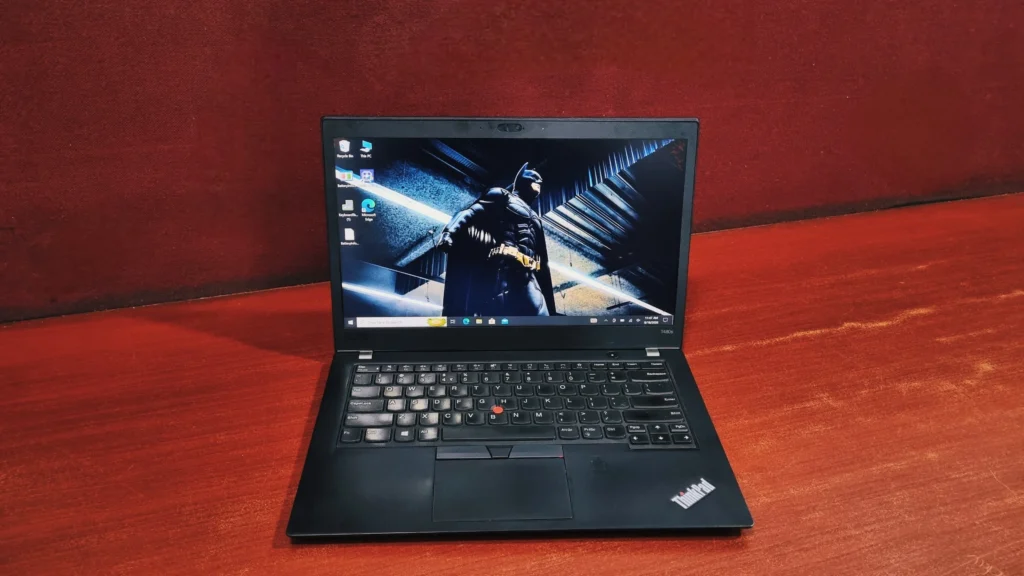
If the T480 is the workhorse, the T480s is the version you'd actually want to carry around all day.
The Lenovo ThinkPad T480s is a 14-inch business Ultrabook that weighs about 1.32 kg and pairs an 8th-generation Intel Core i7-8650U with fast NVMe storage. In our testing it delivered solid productivity performance (PCMark 10: 3,799; Cinebench R23 multi-core: 3,105) and a classic ThinkPad keyboard, but our used unit lasted only about two hours on battery. It's best for office professionals who want a light, durable laptop at refurbished prices, not for gaming or heavy video editing.
✅ Pros
Light, rigid build (about 1.32 kg); excellent keyboard and TrackPoint; very fast NVMe reads (3,236 MB/s); two Thunderbolt 3 ports; supports Windows 11.
⚠️ Cons
Short real-world battery life on our unit (about two hours); no hot-swappable battery; partially soldered RAM; weak for rendering and gaming.
Lenovo ThinkPad T480s Specifications
Processor
8th Generation Intel Core i7-8650U (4 cores, 8 threads, up to 4.2 GHz)
Graphics
Intel UHD Graphics 620
Memory
Up to 24GB DDR4-2400 (partially soldered)
Storage
M.2 NVMe SSD (up to 1TB)
Display
14.0" FHD (1920 x 1080) IPS, anti-glare
Wireless
Intel Wireless-AC with Bluetooth
Webcam
720p webcam, optional IR camera for Windows Hello
Weight
Starting around 1.32 kg
The Lenovo ThinkPad T480s sits in an interesting spot in Lenovo's lineup. It's built on the same T-series foundation as the T480, but Lenovo trimmed the chassis down, swapped in faster DDR4-2400 memory, and pushed the internals to squeeze out a genuinely lighter, slimmer machine, without giving up the durability ThinkPads are known for. If the T480 is the workhorse, the T480s is the version you'd actually want to carry around all day.
Lenovo ThinkPad T480s Design & Build Quality
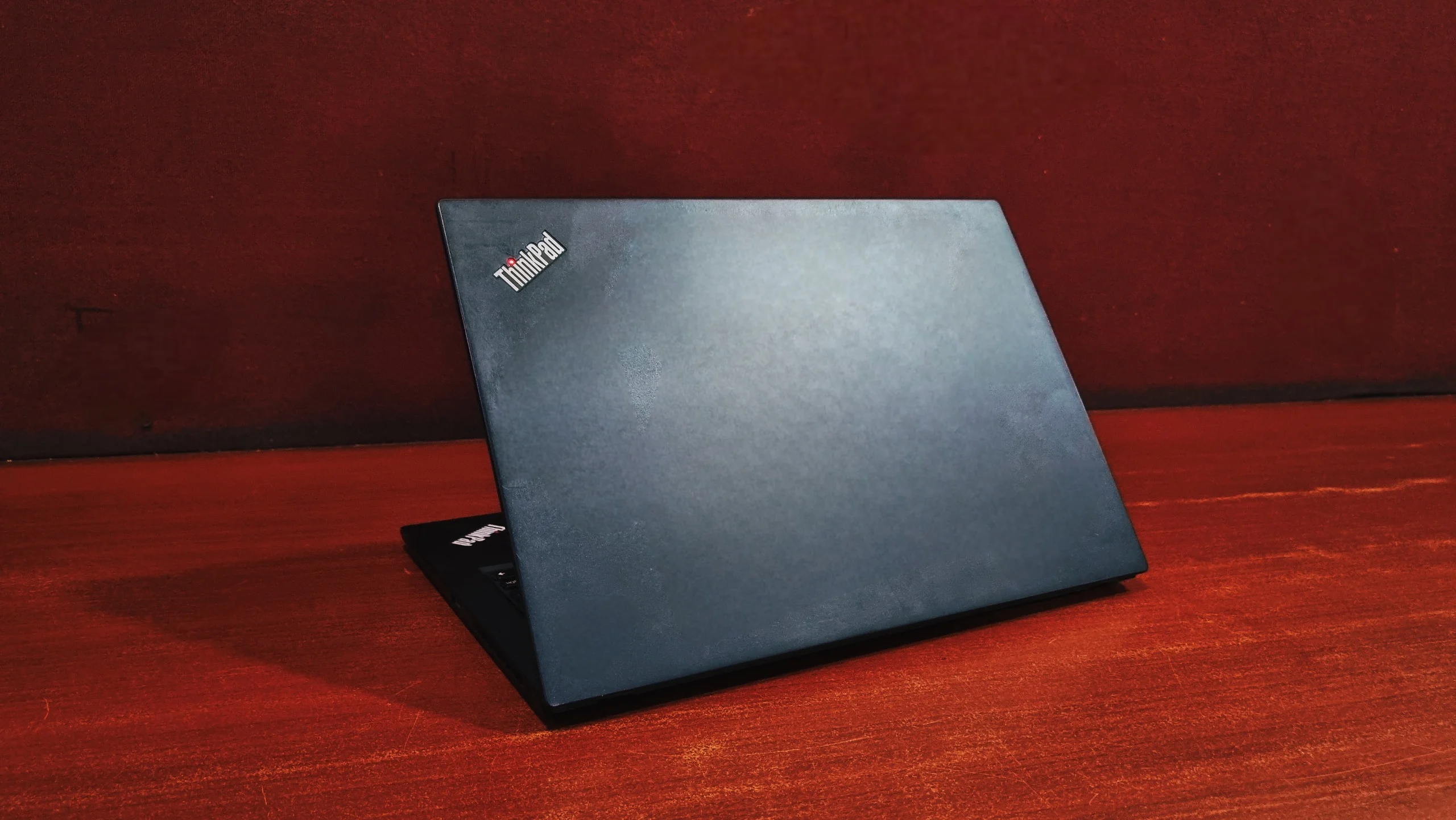
Visually, the T480s doesn't stray far from ThinkPad tradition: matte-black finish, minimal branding, and a shape that prioritizes function over flash. But pick it up and the difference from the standard T480 is obvious immediately. Lenovo shaved the thickness down noticeably, and the carbon-fiber-reinforced top cover keeps the frame rigid despite the reduced bulk. There's barely any flex when you twist the chassis, and the hinges feel tight even after repeated opening and closing. It's the kind of build that's meant to survive years in a backpack, not just look good on a desk.
How Good Is the ThinkPad T480s Display?
Our unit came with the 14-inch FHD IPS panel, and it's a solid, no-nonsense screen for office work. Colors are accurate enough for everyday tasks, brightness is sufficient for most indoor lighting, and the anti-glare coating does a good job keeping reflections under control near windows or overhead lights. Viewing angles hold up well thanks to the IPS technology, so the screen doesn't wash out even when someone's looking over your shoulder. It won't wow anyone used to a high-end OLED display, but for spreadsheets, documents, and video calls, it gets the job done without complaint. Lenovo also offers a sharper WQHD option on higher configurations, which is worth considering if you do a lot of detailed reading or light photo work.
ThinkPad T480s Performance and Benchmarks
This is where the T480s starts to pull ahead of its bigger sibling. Our review unit was configured with the Intel Core i7-8650U, a quad-core, eight-thread chip that runs noticeably hotter and faster than the i5 options. We ran it through the usual suite of benchmarks to see how it actually behaves under load, not just on paper.
Storage Speeds (CrystalDiskMark)
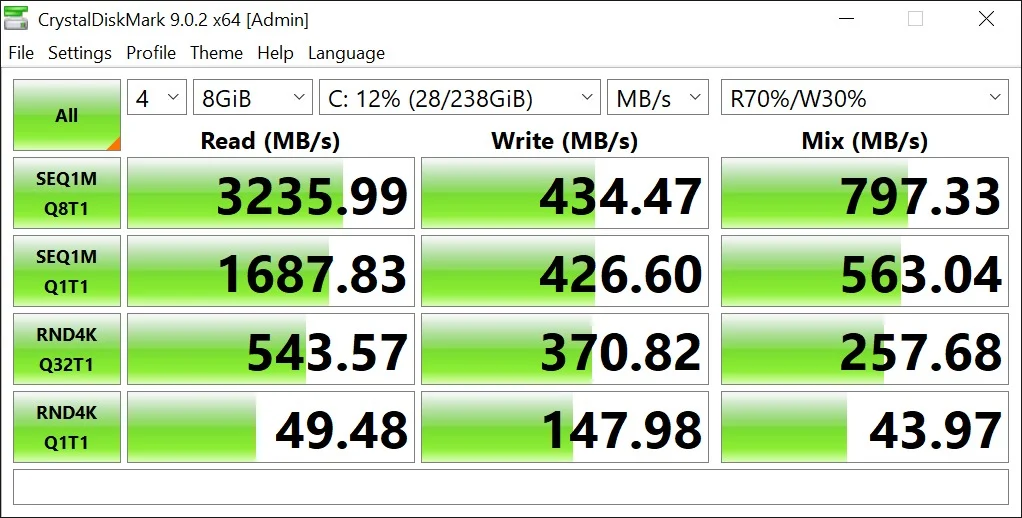
The NVMe SSD in our unit turned in some genuinely fast numbers. Sequential read speeds hit an impressive 3235.99 MB/s in the queued Q8T1 test, which is well into modern NVMe territory rather than the more modest speeds you'd expect from an older Ultrabook. Write speeds came in more conservatively at 434.47 MB/s, and the smaller queue-depth tests (SEQ1M Q1T1 at 1687.83 MB/s read / 426.60 MB/s write) still felt snappy for everyday file transfers.
Processor & Multitasking Performance
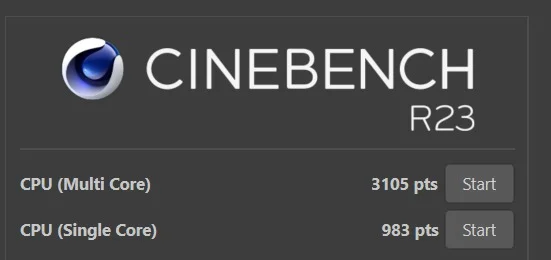
Cinebench R23: the i7-8650U posted a Single-Core score of 983 pts and a multi-core score of 3105 pts. That's a meaningful step up from the i5 variants; the extra clock headroom on the i7 clearly helps when all four cores and eight threads are working together, whether that's exporting a document batch or running a heavier multitasking session.
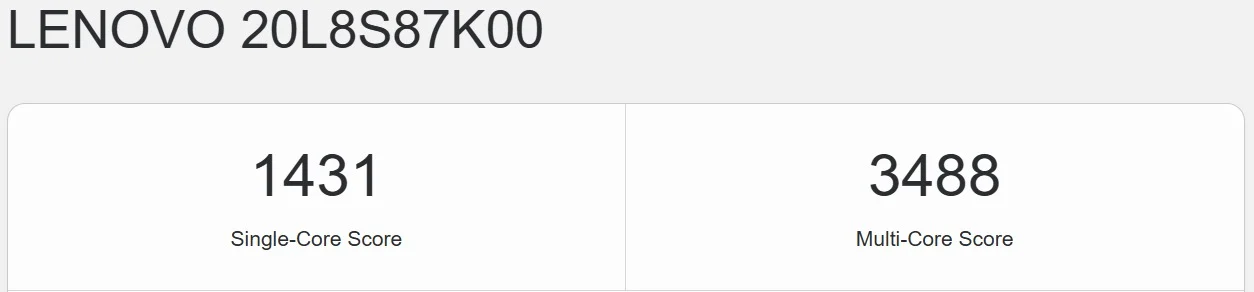
Geekbench: the system scored 1431 in Single-Core and 3488 in Multi-Core testing, again reflecting the i7's advantage in both quick, single-threaded tasks (like opening apps or navigating the OS) and sustained multi-threaded workloads.
OpenCL: the integrated UHD Graphics 620 returned a score of 5152, which is respectable for onboard graphics. It won't replace a dedicated GPU for anything demanding, but it comfortably handles GPU-accelerated tasks like video playback, light photo editing filters, and everyday display work.

PCMark 10
In real-world productivity testing, the T480s earned an overall score of 3799.
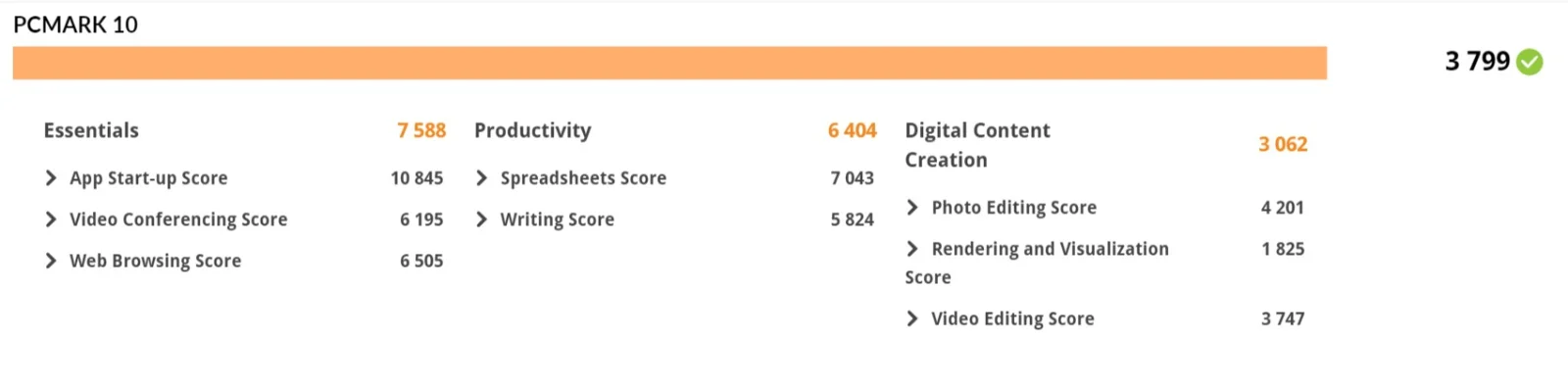
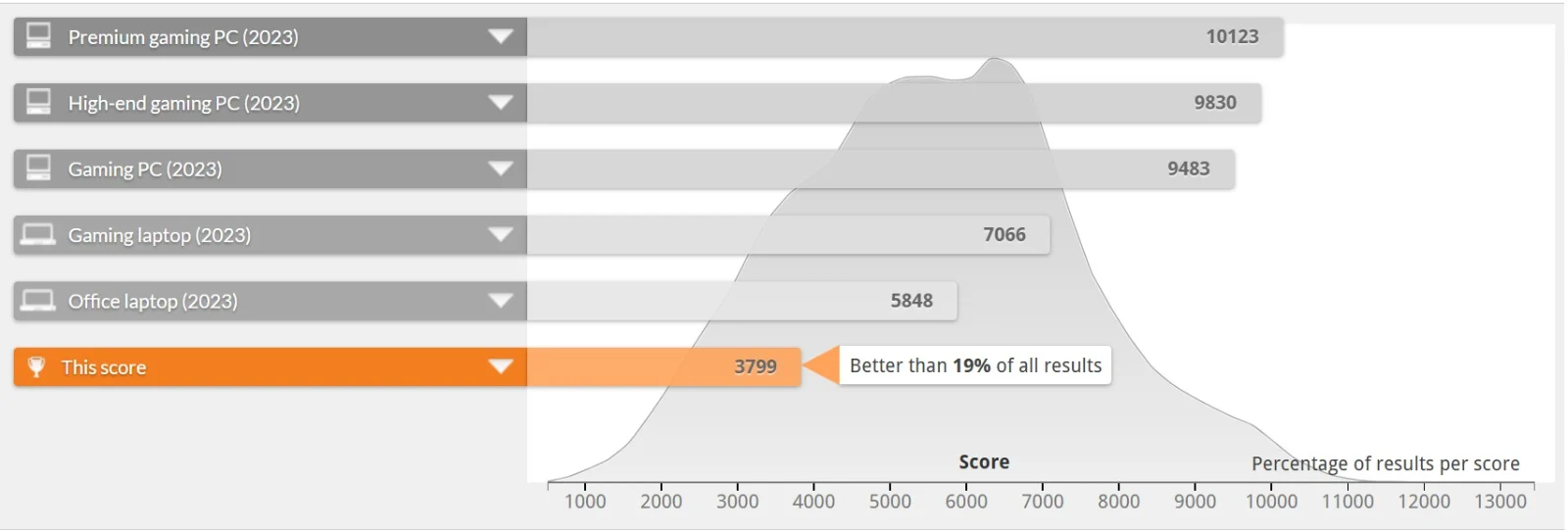
For context, the overall PCMark 10 score of 3799 places this configuration better than 19% of all tested systems, behind a typical 2023 office laptop (5848) and well behind gaming-class machines, but that's an expected trade-off for a slim business Ultrabook built around battery life and portability rather than raw horsepower.
CPU Details
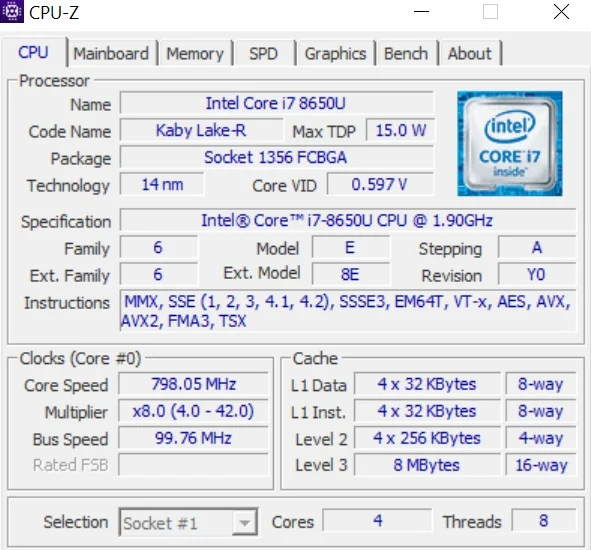
The Core i7-8650U is a 14nm "Kaby Lake-R" chip with 4 physical cores and 8 threads, running at a 1.90 GHz base clock with a Max TDP of just 15.0 W. It's designed to stay cool and efficient in a thin chassis while still turbo boosting up to roughly 4.2 GHz when the workload demands it; the CPU-Z readout during testing showed the multiplier scaling from 4.0 up to 42.0, confirming that boost behavior in practice. For a chip rated at 15 watts, the performance ceiling here is genuinely impressive.
ThinkPad T480s Battery Life
Unlike the T480's hot-swappable Power Bridge system, the T480s relies on a single internal battery that isn't meant to be swapped on the fly. It's a 57Wh integrated pack that supports Rapid Charge, reaching roughly 80% in an hour on a 65W USB-C adapter. It's a trade-off Lenovo made deliberately: losing the swap-battery convenience in exchange for the slimmer, lighter chassis. Real-world battery life, though, is where our unit disappointed: we measured only a little over two hours of mixed use per charge. Some of that is age-related capacity loss on a used machine, but it's well short of a full workday, so plan on keeping the charger nearby.
ThinkPad T480s Ports and Connectivity
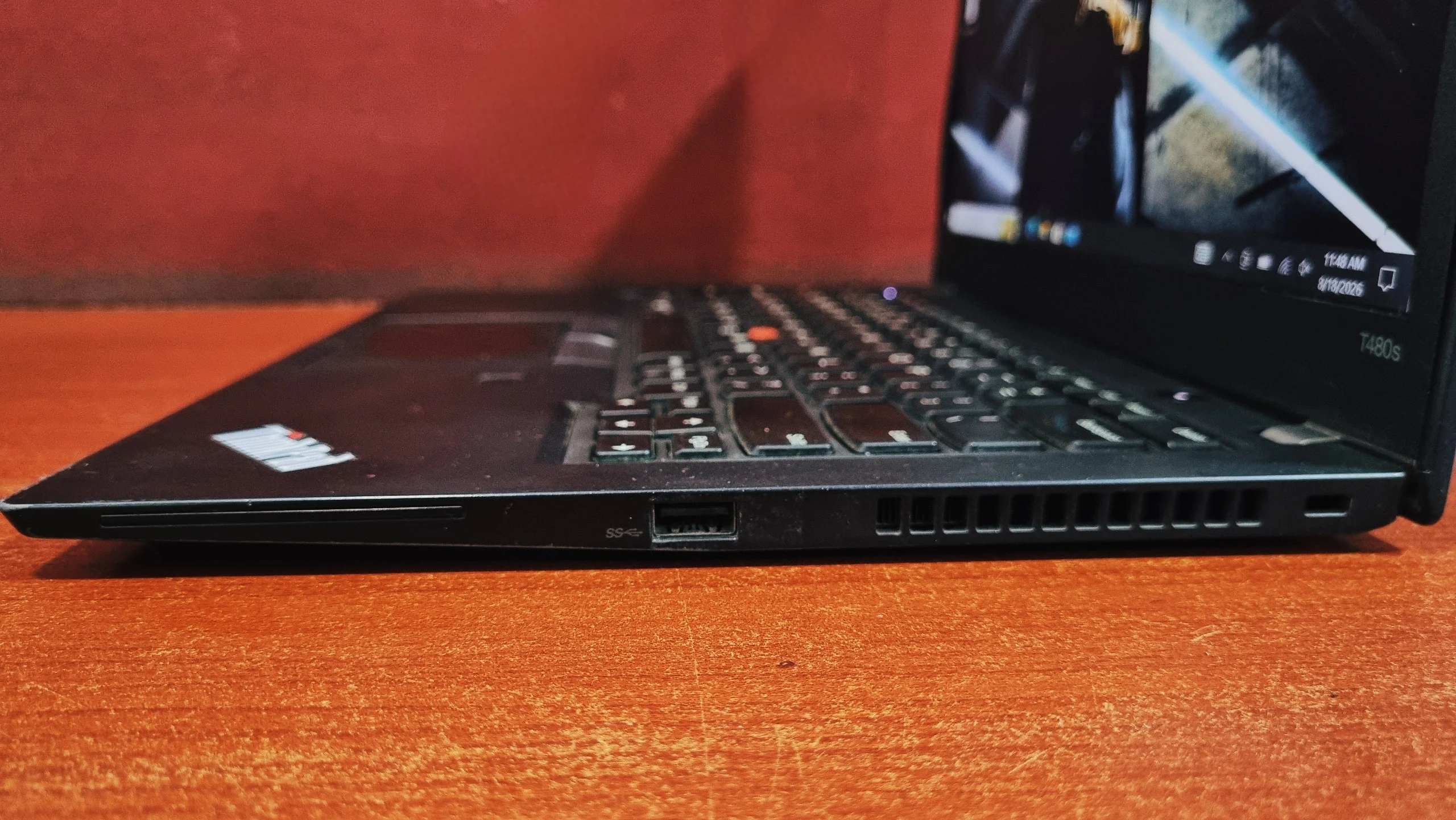
Lenovo kept the essentials while trimming a few of the bulkier ports found on the standard T480:
Right Side
Left Side
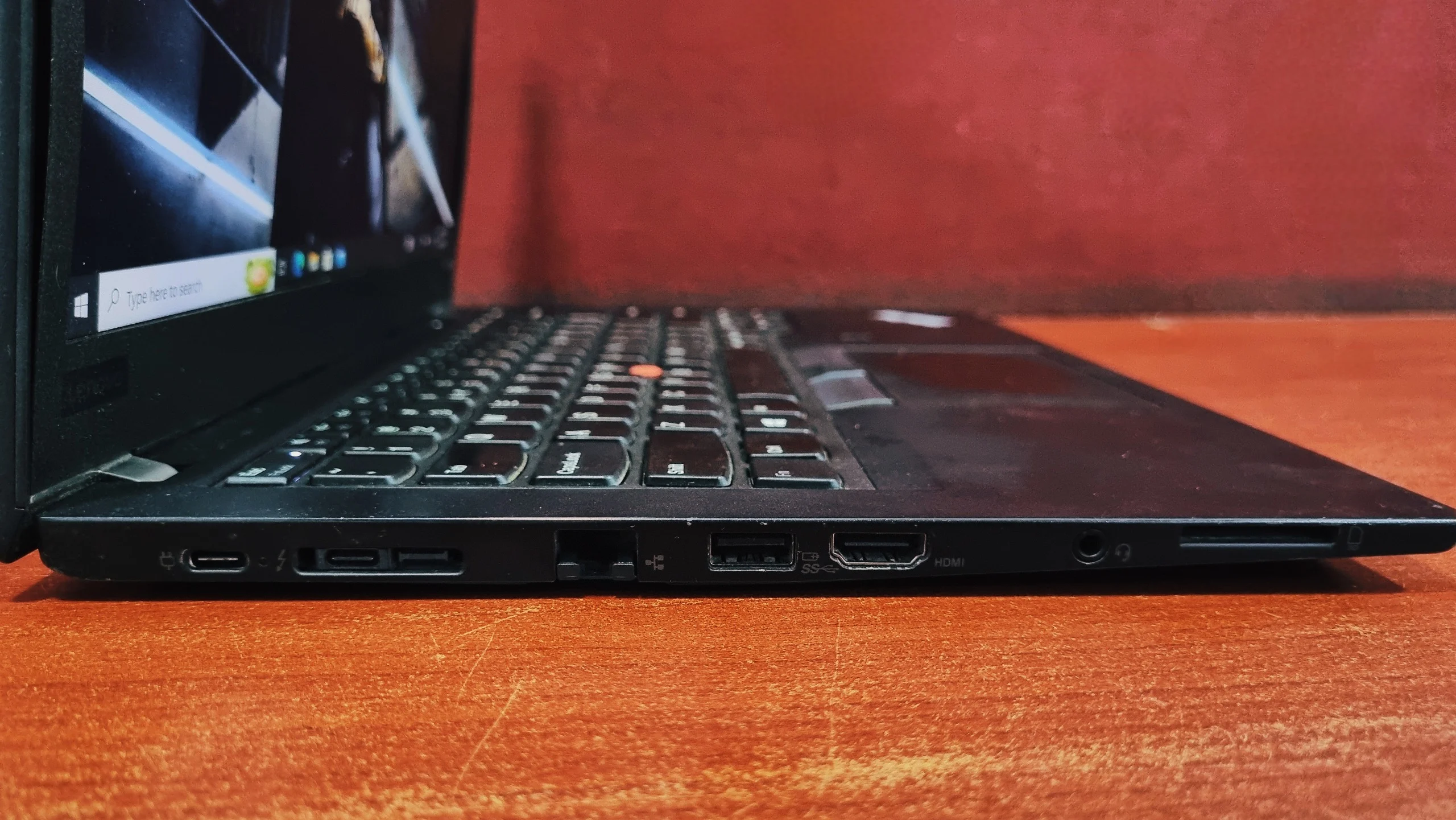
It's not quite as generous as the T480's port selection, but the trade-off makes sense given how much thinner the chassis is.
ThinkPad T480s Keyboard and Touchpad
The keyboard is where the T480s still feels unmistakably ThinkPad. Key travel is slightly shorter than on the T480 due to the thinner frame, but it's still tactile, quiet, and comfortable for long typing sessions. The backlighting is even and easy to adjust. Navigation is handled by a smooth glass touchpad along with the signature red TrackPoint nub, which loyalists will appreciate for staying put on the keyboard's home row.

Verdict: Should You Buy the ThinkPad T480s?
Verdict
The Lenovo ThinkPad T480s is the pick for anyone who wants ThinkPad reliability without carrying around ThinkPad bulk. It trades a bit of raw expandability and the T480's swappable battery convenience for a noticeably lighter, slimmer machine that still holds up to daily abuse. With the i7-8650U on board, it handles everyday productivity work with room to spare, and the benchmark numbers back that up: fast storage, strong CPU scores for a 15W chip, and more than enough headroom for spreadsheets, browsing, and video calls.
It's not a machine built for heavy rendering or gaming (for that, browse our video editing laptops), but for professionals who live in office apps and want something they can actually carry comfortably, the T480s is hard to argue with.
Frequently Asked Questions
Yes, particularly configurations with the i7-8650U and an NVMe SSD. It remains capable for office work, light coding, and everyday browsing, especially at refurbished pricing.
Yes, as long as it's configured with an 8th-generation Intel processor such as the i5-8350U or i7-8650U, which meet Microsoft's compatibility requirements.
Up to 24GB of DDR4-2400 memory, though part of that is soldered to the motherboard, so upgradeability is more limited than on the standard T480.
Not really. The integrated UHD Graphics 620 is fine for browser games or older, lightweight titles, but modern 3D games are out of reach. A few configurations shipped with an optional Nvidia GeForce MX150, which helps a little, though it's still not a gaming GPU.
The T480s is noticeably lighter and thinner, making it more comfortable for daily commuting, but it gives up the T480's hot-swappable battery system and a couple of ports in the process.
Yes. It uses a standard M.2 2280 NVMe slot, so the SSD can be swapped or upgraded, though unlike the T480, there's no second drive bay for extra storage.
Lenovo fitted the T480s with a 57Wh internal battery, but our used review unit managed only a little over two hours of mixed use. A newer or replacement battery should do better, but plan to carry the charger.
Lenovo announced the ThinkPad T480s in January 2018 as a slimmer, lighter version of the ThinkPad T480.
Yes. It has two Thunderbolt 3 (USB-C) ports on the left side, which handle charging, docking, and external displays.
Yes, for web development, scripting, and general coding. The quad-core i7-8650U and fast NVMe SSD handle IDEs and multiple browser tabs well, though large compiles and virtual machines will be slower than on newer laptops.


