




Blogs
Is the “Dell Latitude 7320” Worth It in 2026? Full Review with Benchmarks and Battery Test

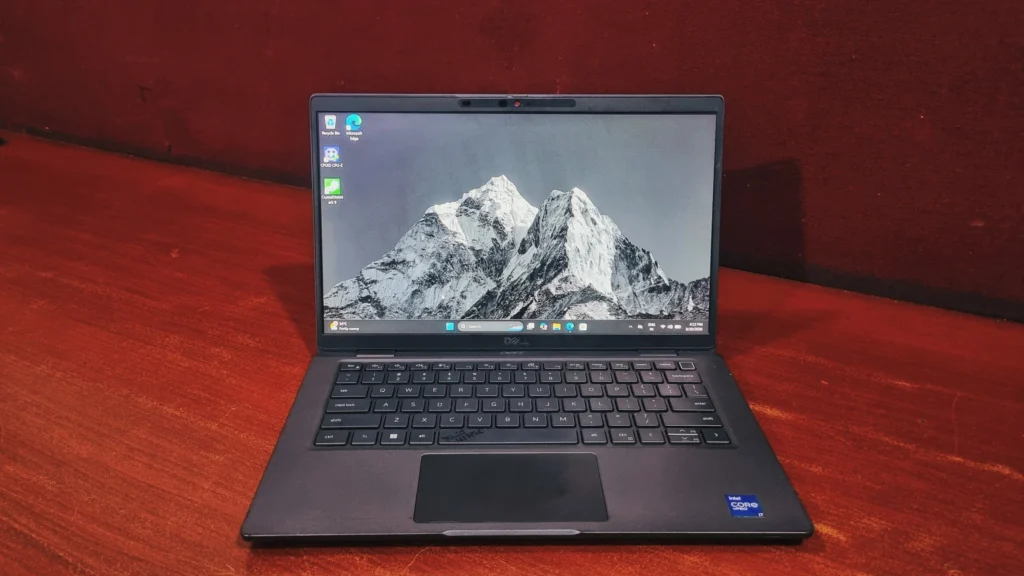
The 13-inch business Ultrabook that travelers ask for by name, light, tough, and genuinely modern.
The Dell Latitude 7320 is a 13.3" business Ultrabook with an 11th Gen Intel Core i7-1185G7, 16GB RAM, and a 512GB NVMe SSD, weighing just 1.19 kg. Built to MIL-STD 810H durability standards with an anti-glare Full HD display and 8–10-hour battery life, it's a strong refurbished pick for professionals who need a light, reliable daily driver, though RAM isn't upgradeable. Verdict: Recommended for business use, travel, and everyday productivity.
✅ Pros
Very light at about 1.19 kg; MIL-STD 810H durability; modern 11th Gen quad-core performance; fast NVMe storage (2,462 MB/s reads); Thunderbolt 4; anti-glare Full HD display; 8–10 hours of battery life on a healthy unit.
⚠️ Cons
16GB of soldered RAM with no upgrade path; fewer ports than older 14-inch Latitudes; modest write speeds; not meant for gaming or heavy rendering.
Dell Latitude 7320 Specifications
Processor
Intel Core i7-1185G7 (Quad-Core, 3.0 GHz base, up to 4.8 GHz Turbo)
Graphics
Integrated Intel Iris Xe Graphics
Memory
16GB LPDDR4x (soldered, non-upgradeable)
Storage
512GB NVMe SSD (expandable up to 2TB)
Display
13.3", Full HD (1920 x 1080), IPS, anti-glare
Wireless
Wi-Fi 6 (802.11ax), Bluetooth 5.1
Weight
Starting at 1.19 kg
There's a particular kind of laptop that business travelers ask for by name, and the Latitude 7320 is exactly that laptop. It's the 13-inch flagship of Dell's 7000 series, built for people who live out of airport lounges and need a machine that boots fast, survives a badly-packed carry-on, and still looks the part in a client meeting.
If you're shopping the refurbished market and want something genuinely modern rather than a leftover from a few generations back, the 7320 deserves a close look. Here's how it actually holds up.
Dell Latitude 7320 Design & Build Quality
Dell trimmed the 7320 down considerably compared to the 7000-series machines that came before it, and the difference is obvious the second you pick one up. The chassis mixes a magnesium-alloy frame with a carbon-fiber composite lid, so it stays rigid without piling on weight. There's almost no keyboard flex, and the hinge holds the screen exactly where you leave it rather than wobbling with every tap on the trackpad.
It's also passed the standard MIL-STD 810H battery of tests, covering drops, vibration, dust, and temperature swings, so it's built to survive the kind of daily abuse a laptop bag dishes out.
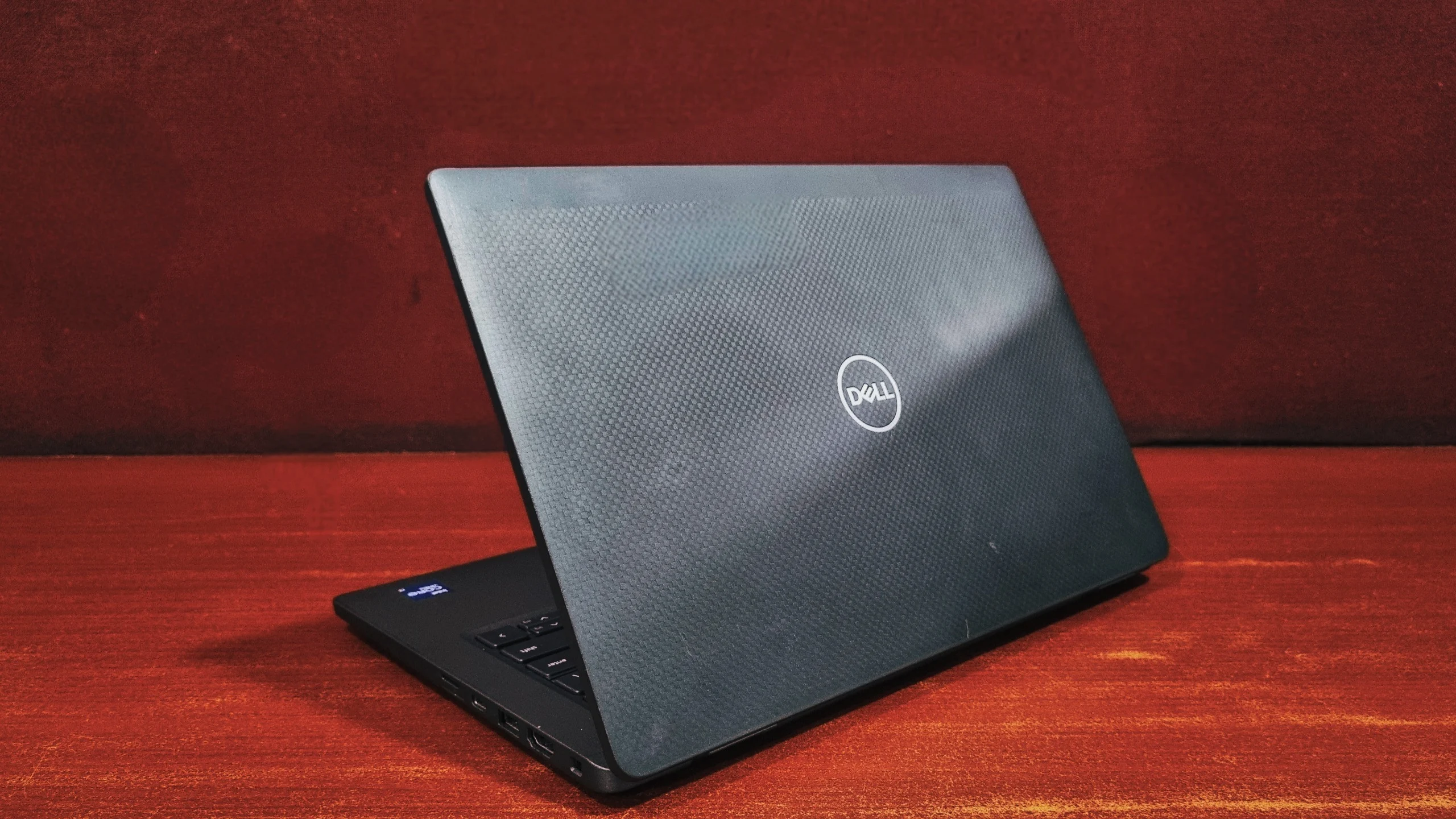
At around 1.19 kg, it's noticeably easier to live with than the older 14-inch Latitudes, and that smaller 13.3-inch footprint means it slides into bags that a 14-inch machine simply won't fit into. The hinge tension is firm enough that you can open the lid one-handed without the base lifting off the desk, which matters more than it sounds like when you're balancing a coffee in the other hand.
How Good Is the Dell Latitude 7320 Display?
The 13.3-inch Full HD IPS panel on the 7320 is sharp, evenly lit, and colour-accurate enough that you won't feel the need to second-guess how a document or photo actually looks once it leaves the screen. Being IPS, the viewing angles hold up well, so sharing the screen with a colleague across a desk doesn't wash out the image.
The anti-glare coating continues to be the standout feature here. Sit this laptop under office fluorescents or next to a window and reflections barely register, which makes a real difference if your day is mostly spreadsheets, email, and video calls. It's a screen built for long stretches of reading and typing rather than for showing off, and it does that job well.
Dell Latitude 7320 Keyboard and Touchpad
Keyboard
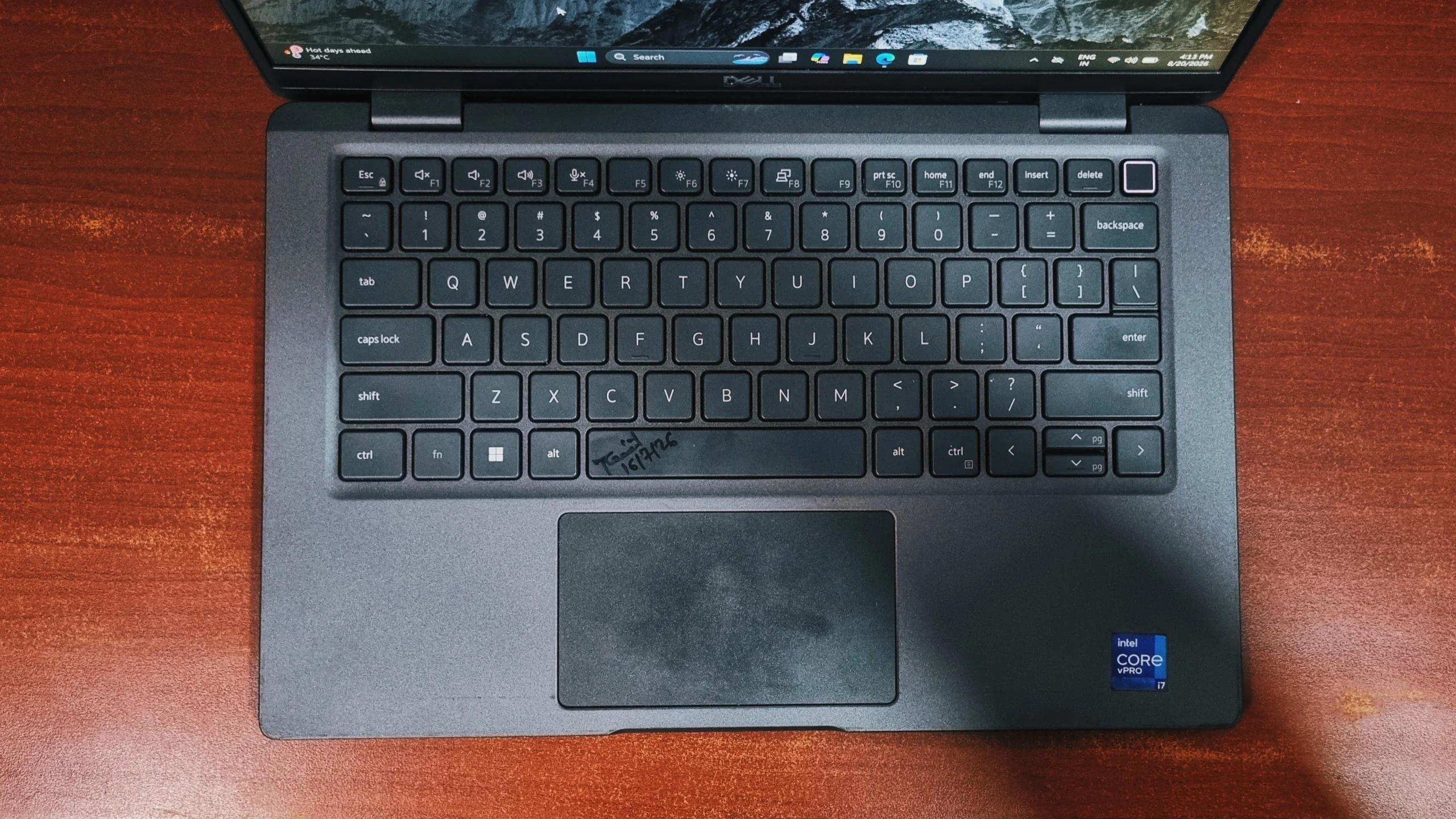
Dell hasn't diluted the keyboard experience to hit a thinner chassis. Key travel is shorter than on the older 14-inch Latitudes simply because there's less room to work with, but the switches still have a crisp, defined bottom-out, and the deck underneath barely gives even under fast typing. If you've used a ThinkPad or an older Latitude, the layout will feel immediately familiar.
Touchpad & Pointing Stick
The glass touchpad is smooth, accurate, and supports the full set of Windows Precision gestures. Dell also kept the red TrackPoint nub embedded in the keyboard, along with the row of physical click buttons above the touchpad, so anyone who prefers never lifting their hands off the home row still has that option.
Dell Latitude 7320 Performance and Benchmarks
Specs on a page only tell you so much, so we ran our test unit through the usual battery of benchmarks to see how the 7320 actually behaves under load, not just on paper.
CPU Details (CPU-Z)
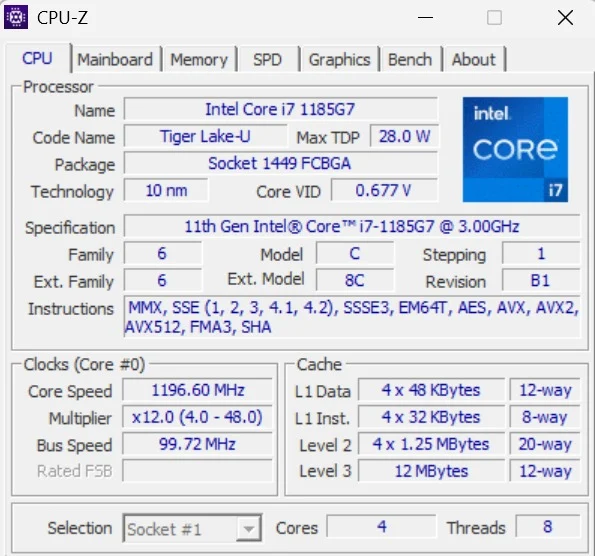
CPU-Z confirms what's under the hood: an 11th Gen Intel Core i7-1185G7, codenamed "Tiger Lake-U," built on Intel's 10nm process. It's a true quad-core, eight-thread chip with a 28W max TDP, running a 3.0 GHz base clock that Turbo Boost can push as high as 4.8 GHz on a single core. With 12MB of L3 cache backing it up, this is a considerably more modern architecture than the 8th Gen chips found in older Latitudes, and it shows in how much snappier the system feels under everyday multitasking.
CPU Performance (Cinebench R23)
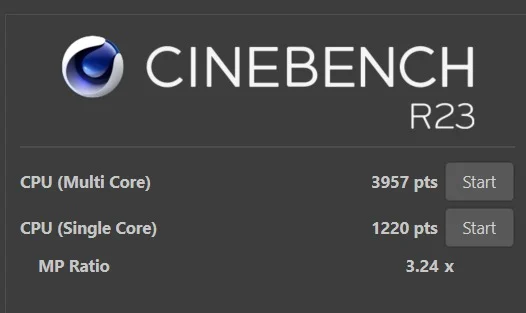
That single-core number is a solid step up from older Latitude generations, and it directly translates into a system that feels quicker to respond, whether you're switching between apps or scrolling through a long document. The multi-core score, with an MP ratio of 3.24x, shows the chip scaling reasonably well across its four cores and eight threads, enough to keep background tasks like antivirus scans or cloud syncing from getting in the way of whatever you're actively doing. It's still not a machine you'd reach for to render video, but for sustained office work it comfortably outpaces the previous generation.
CPU Benchmark (Geekbench 5)

A single-core score approaching 2000 is genuinely strong for a laptop in this class, and it's the number that matters most for the everyday feel of the machine: opening apps, switching browser tabs, and general responsiveness. The multi-core figure benefits from Tiger Lake's improved efficiency per core, comfortably ahead of the quad-core chips from just a couple of generations earlier.
Graphics Performance (Geekbench OpenCL)

An OpenCL score of 14,912 is a big jump over the older UHD 620 graphics found in previous Latitude generations, and it's one of the clearer signs of how far Intel's integrated graphics has come. Iris Xe won't run current games at any serious settings, but it comfortably handles 4K video playback, light photo and video editing, and driving an external 4K monitor without breaking a sweat.
3D & Gaming Performance (3DMark Time Spy)
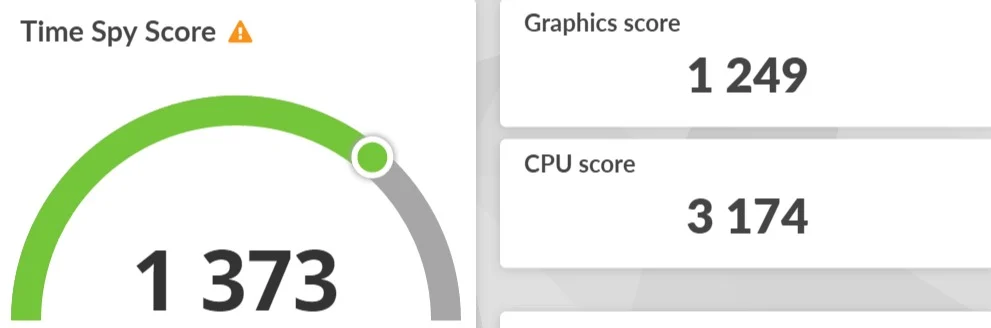
Time Spy is a DirectX 12 benchmark that leans harder on GPU muscle than most productivity tests, and the 7320's overall score of 1373 (Graphics: 1249, CPU: 3174) reflects exactly what you'd expect from integrated graphics. This isn't a gaming score, and it was never going to be. What it does confirm is that the CPU side holds up its end of the bargain, while the graphics component is there for display output and light creative work rather than anything demanding.
Storage Performance (CrystalDiskMark)
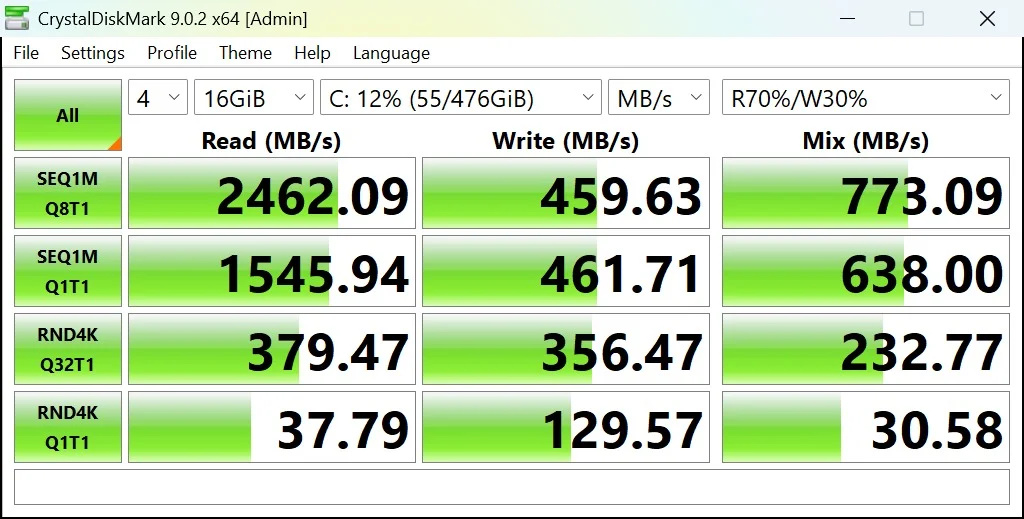
These numbers make it obvious this is a proper NVMe drive rather than the SATA SSDs found in older Latitude units. A sequential read speed north of 2400 MB/s means the system boots in seconds and large files copy almost instantly. Write speeds are more modest by comparison, which is fairly typical of this drive class, but the random 4K figures are strong enough that the machine stays responsive even when several applications are reading and writing small files in the background at once, which is really where an SSD's character shows up in daily use.
Overall System Performance (PCMark 10)
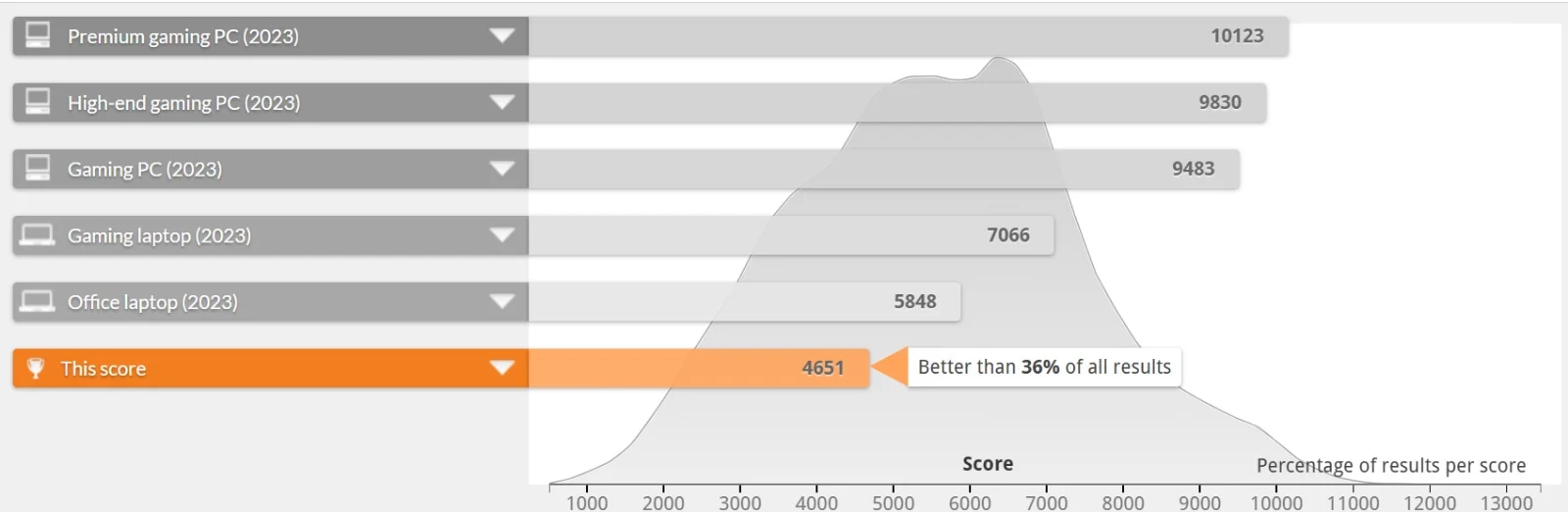
On PCMark 10's comparison chart, our unit landed a little under the average "Office laptop (2023)" benchmark of 5848, which tracks with the 7320 now being a couple of generations removed from brand-new. What matters more is where that score actually sits: comfortably clear of the territory where a laptop starts to feel sluggish, and squarely within the range needed for spreadsheets, web browsing, video calls, and everyday multitasking without friction. In practice, this is a machine that still feels current rather than one you're tolerating.
Everyday App Checks
Dell Latitude 7320 Hardware Details
The Latitude 7320 runs on an 11th Gen Intel Core i7-1185G7, part of Intel's Tiger Lake-U family and built on a 10nm process, confirmed directly from our test unit via CPU-Z. It's a genuine quad-core, eight-thread processor, a meaningful architectural jump over the 8th Gen chips still floating around in older refurbished Latitudes.
It carries a 28W max TDP, so Dell has tuned it to lean harder into performance than the ultra-low-power chips in thinner consumer laptops, without giving up the efficiency needed for all-day battery life. Base clock sits at 3.0 GHz, with Turbo Boost capable of pushing a single core up to 4.8 GHz under short bursts of demanding work. Paired with 12MB of L3 cache and Iris Xe graphics on the same die, it's a chip built for fast, fluid office computing, video conferencing, and light creative work rather than gaming or heavy rendering.
Dell Latitude 7320 Battery Life
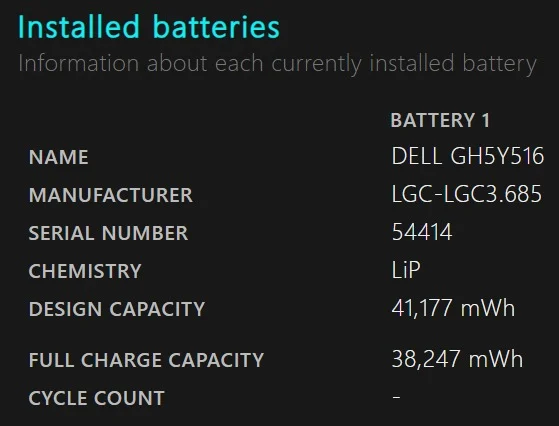
Our test unit's battery report shows a design capacity of 41,177 mAh against a full charge capacity of 38,247 mAh meaning this particular battery has retained the vast majority of its original capacity, a good sign on a refurbished machine of this age. With that kind of health remaining, realistic mixed-use lands somewhere around 8 to 10 hours, easily enough to get through a full working day without needing to plug in.
As with the rest of the Latitude line, Dell hasn't made the battery a pain to service. The base panel lifts off with a standard set of screws, so if capacity does eventually drop off, swapping in a replacement is a job you can do yourself rather than something that needs a repair shop visit.
Dell Latitude 7320 Ports and Connectivity
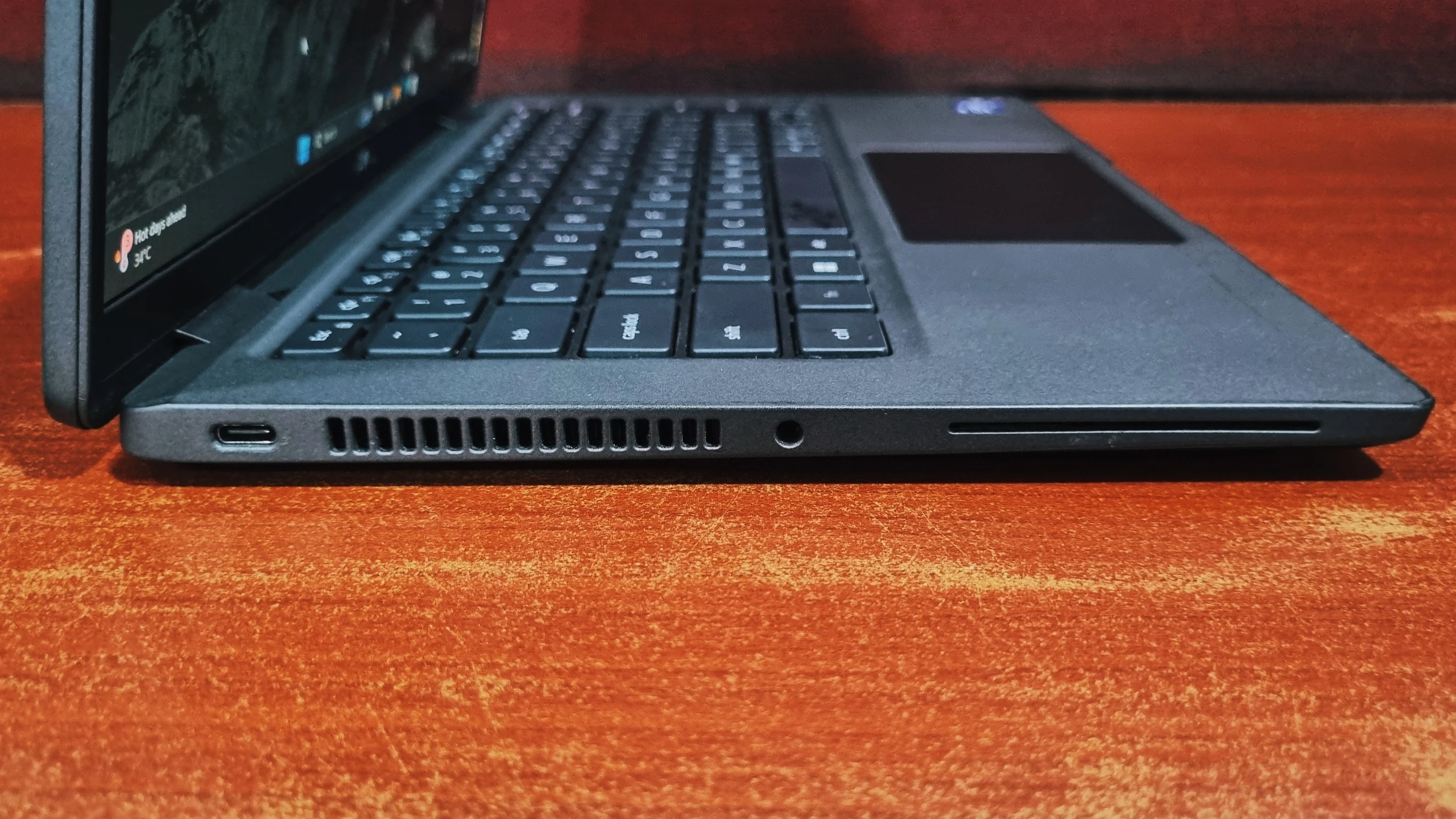
Dell spaced the ports out across both sides of the chassis, which keeps cables from bunching up on one side no matter which hand you favor.
Left Side
Right Side
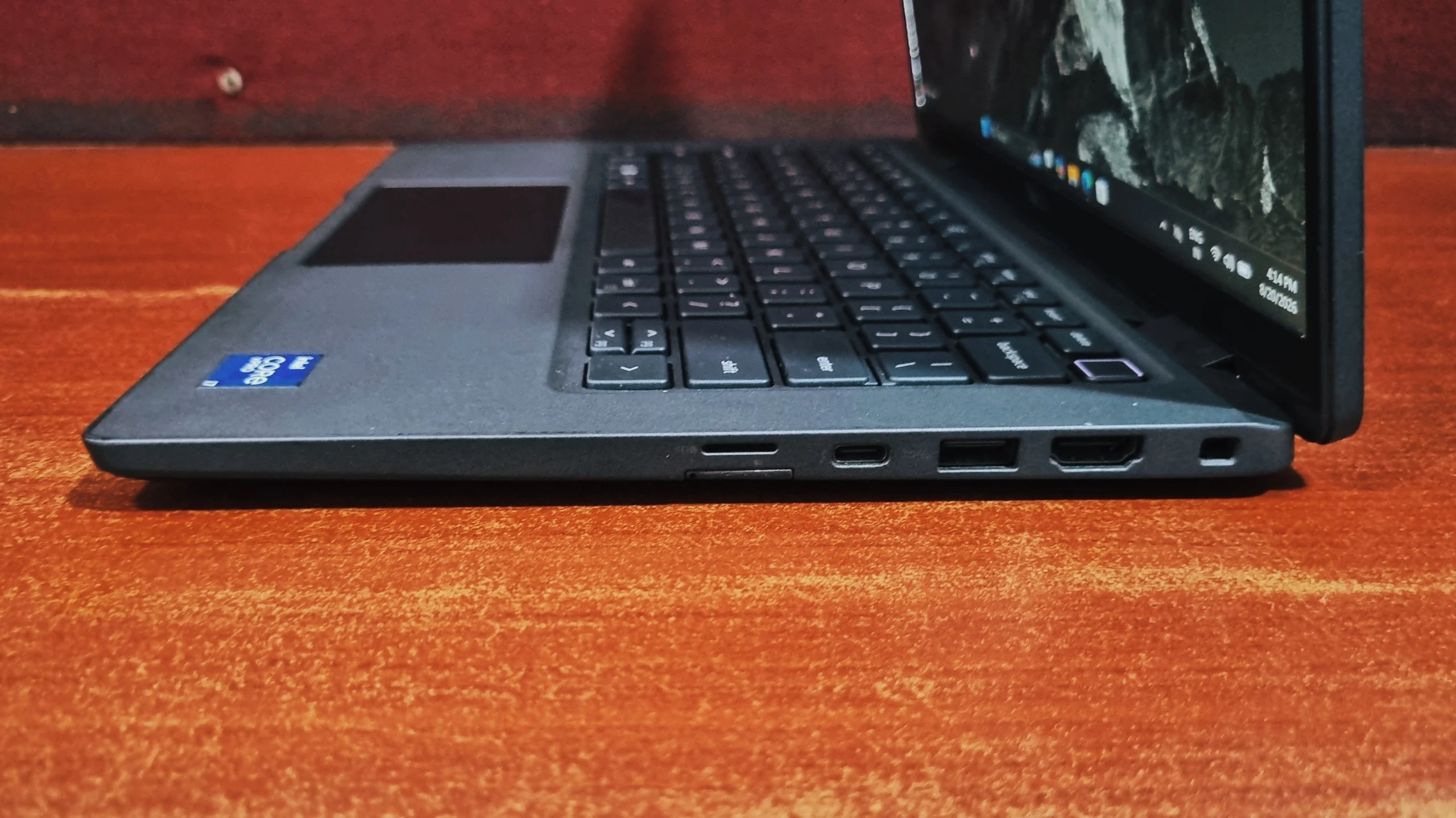
It's a leaner port selection than the older 14-inch Latitudes, reflecting the thinner chassis, but the inclusion of Thunderbolt 4 means you can drive an external display, charge, and transfer data through a single cable if your dock supports it.
Verdict: Should You Buy the Dell Latitude 7320?
Final Verdict
The Dell Latitude 7320 makes a strong case for itself as a refurbished buy that doesn't feel like a compromise. At roughly 1.19 kg, with an 11th Gen quad-core chip that has real headroom for multitasking, an NVMe drive that boots and loads in a hurry, and a chassis built to MIL-STD 810H standards, it holds up well against machines that cost considerably more when new.
The anti-glare Full HD display is comfortable for long work sessions, the keyboard keeps Dell's reputation for business-laptop typing intact, and Thunderbolt 4 covers most modern docking and display needs. The trade-offs are real: 16GB of soldered RAM is the ceiling with no upgrade path, and the smaller chassis means fewer ports than older 14-inch models. But for professionals who travel often and want a light, dependable daily driver with genuinely modern internals, the 7320 is a smart pick.
Frequently Asked Questions
Yes. Its 11th Gen quad-core processor, NVMe storage, and durable chassis make it a strong option for business use, remote work, and everyday productivity.
No. The RAM is soldered to the motherboard, so it's fixed at whatever configuration the unit shipped with. The M.2 SSD, however, can be swapped for a larger drive.
It depends on the battery's remaining health, but a unit in good condition typically delivers 8 to 10 hours of mixed real-world use.
Yes. It includes a Thunderbolt 4 / USB-C port, which covers charging, external displays, and high-speed data transfer through a single cable.


