Blogs
Dell Latitude 7420 (i7 11th gen) touch screen laptop review
The Latitude 7420 is an excellent workhorse featuring Intel’s 11th Gen processors, incredible battery life, and high-end security features. While it carried a premium price tag when it was launched in 2021, it is a superior option for professionals seeking mobility without sacrificing power. If you’re looking for a premium 14-inch convertible that can handle heavy web workflows without the fear of buckling, the. Here is everything you need to know before you buy.
Pros & Cons
Pros:
- Available in premium carbon fiber or aluminum build materials.
- Battery life that easily covers a full workday.
- Top-tier security features including a human proximity sensor and IR face recognition.
- Two Thunderbolt 4 ports.
Cons:
- Premium price tag, especially for higher configurations.
- Memory is soldered to the motherboard, limiting future upgrades.
- Webcam quality leaves some room for improvement regarding focus and exposure.
- Only One USB A port.
Design, Build Quality, and The Weight Divide
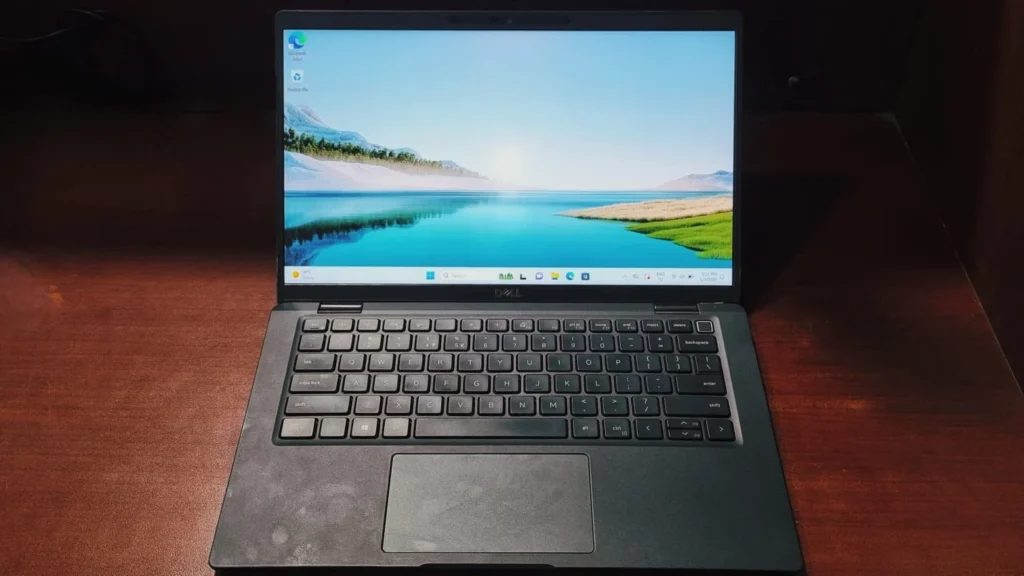
When it comes to business laptops, durability and portability are paramount. Dell Latitude 7420 comes in two material variants: a standard silver aluminum finish and a sleek black carbon fiber weave which we have for today’s review. The carbon fiber model we are focusing on brings the starting weight down to an impressive 1.37 kg. It is incredibly lightweight and easy to carry. Despite the light footprint, the chassis is remarkably sturdy, although it does exhibit a very slight flex in the base and lid under heavy pressure. The hinges are firm,and do not feel flimsy.
The Display & security
The 14-inch Full HD (1920 x 1080) IPS display maintains the traditional 16:9 aspect ratio. While the bezels aren’t the absolute thinnest on the market, the panel delivers excellent viewing angles and solid contrast even in heavily lit conditions. Tests show it covers around 90% of the sRGB color gamut, making it quite accurate for content creation and standard office tasks.
Where the Latitude 7420 truly shines is the top bezel. Dell has packed this space with an array of sensors. Alongside the HD webcam and a physical privacy shutter. It also has a fingerprint sensor baked right into the power button for easier access. The laptop features an IR sensor for Windows Hello face recognition and a human proximity sensor. Step away from your desk, and the screen turns off, locking the laptop; sit back down, and it instantly wakes up and unlocks (note that this requires the additional Dell Optimizer software to function). However, it can sometimes be slow to respond. When we tested this feature, it did not work consistently. Ultimately, it is a hit-or-miss feature that needs some improvement from Dell in the future.
Keyboard & Touchpad
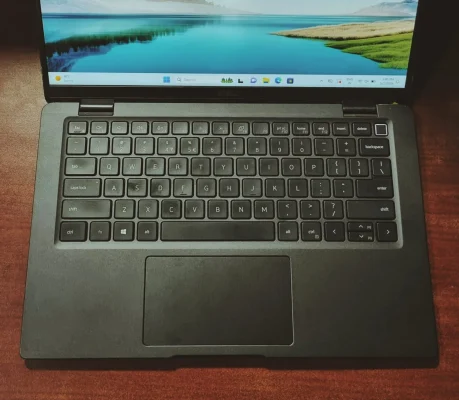
- The Keyboard: The keyboard mechanism is sturdy and provides a comfortable, moderate amount of key travel. The keys deliver a good, quiet clicky, which makes the laptop highly comfortable for long typing sessions without disturbing others. While there is some noticeable flex in the keyboard under pressure, the overall typing experience remains firmly on point.
- The Touchpad: Dell slightly enlarged the touchpad compared to the older Latitude models, now there much more room to navigate around.The surface is made of smooth glass, which provides an excellent premium feel, allowing for smooth gliding and highly accurate tracking.
Performance & Benchmarks
Under the skin, the leap to Intel’s I7 11th Gen processors represents a significant step up from the previous generation. Equipped with options like the Core i5 or the Core i7, this laptop effortlessly slices through heavy productivity workloads.
The integration of Intel Iris Xe Graphics also drastically improves the machine’s capability to handle multimedia tasks and high-resolution viewing compared to older Intel UHD graphics.
However, there is a significant catch for buyer before thinking of buying this laptop:
The RAM is soldered directly to the motherboard.
This might become a downer for some people as they want flexibility but Since you cannot upgrade it later, purchasing a 16GB or 32GB configuration from the start is absolutely essential to future-proof the machine.
CPU Performance: A Massive Generational Leap
The transition from 10th Gen to 11th Gen processors brings a boost in its raw computing power.
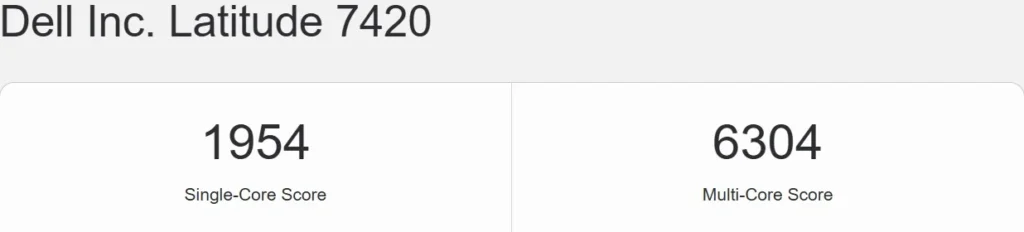
- Geekbench 6: The Latitude 7420 pulls a highly impressive Single-Core score of 1954 and a Multi-core score of 6304. To put that in perspective, this is a massive leap over the older Latitude 7310 (which scored around 1494 SC / 3953 MC).
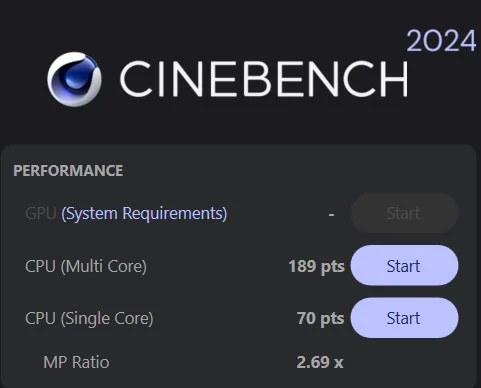
- Cinebench 2024: It scored 70 points in Single-Core and 189 points in Multi-Core. Cinebench stresses the CPU rather than the GPU to render a complex image. The result is a proprietary score indicating a PC’s suitability for processor-intensive workloads.
- The Real-World Translation: This machine is a multitasking machete. The high single-core performance means UI navigation, application launches, and heavy web browsing will feel incredibly snappy. The 6300+ multi-core score in Geekbench ensures that running heavy Excel macros while sitting on a Zoom call with a 30-40 of Chrome tabs open won’t cause the system to stutter.
Graphics: Iris Xe Changes the Game!
The biggest weakness of older business laptops was their integrated Intel UHD graphics. The Latitude 7420 fixes this by introducing newer Intel Iris Xe Graphics.
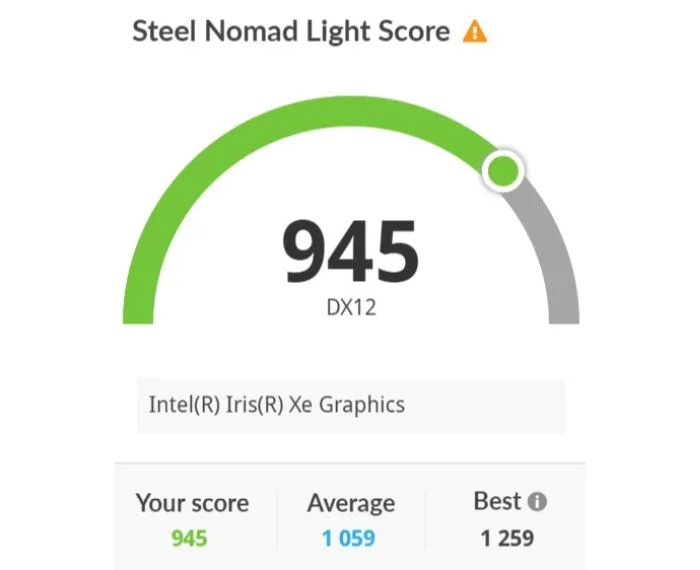
- 3DMark Steel Nomad Light: The Iris Xe GPU scored a highly respectable 945. Compared to the measly 340 scored by the previous generation’s UHD graphics, this is nearly triple the graphical horsepower.
- Geekbench OpenCL: The system posted an OpenCL score of 15003.
While it still isn’t a dedicated gaming rig, the Iris Xe graphics cross the threshold into genuine usability for creative professionals. Hardware acceleration in applications like Photoshop, Illustrator, and Canva will be noticeably smoother.
Storage Speeds
While the CPU and GPU are stellar, the storage speeds highlighted a potential weak point depending on the specific SSD installed in your unit.
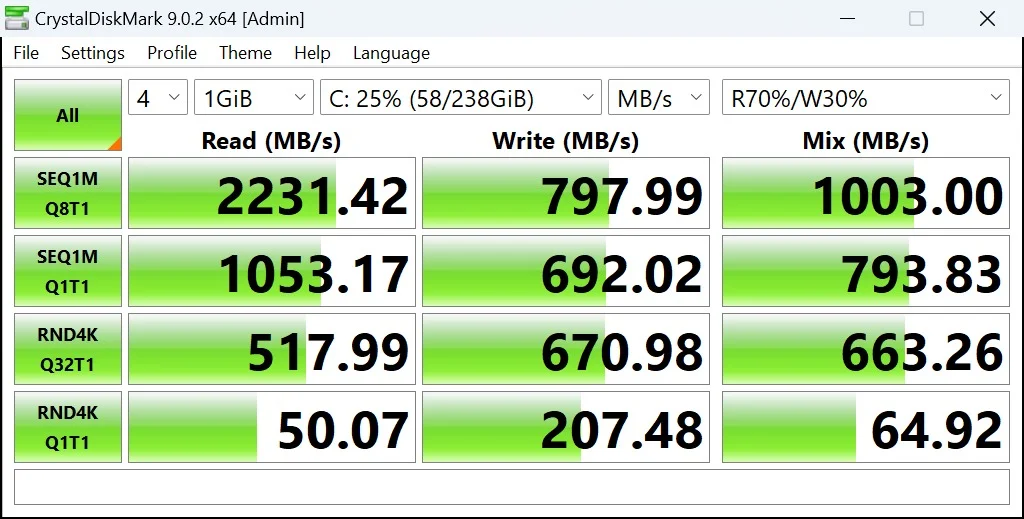
- CrystalDiskMark: The internal NVMe SSD delivered 2231.42 MB/s in Sequential Read, but a surprisingly low 797.99 MB/s in Sequential Write.
Battery life
The Latitude 7420 is powered by a 62Wh 4-cell Lithium-Polymer battery. Paired with the power efficiency of the 11th Gen Intel processor. For typical workloads you can expect an average of 6-8 hours depending on high/low usage without plugging it in. It also supports type c fast charging with Dell’s proprietary “ExpressCharge” technology.
Ports and Connectivity
Dell made a great move by ditching the old proprietary barrel charger. The I/O is thoroughly modern:
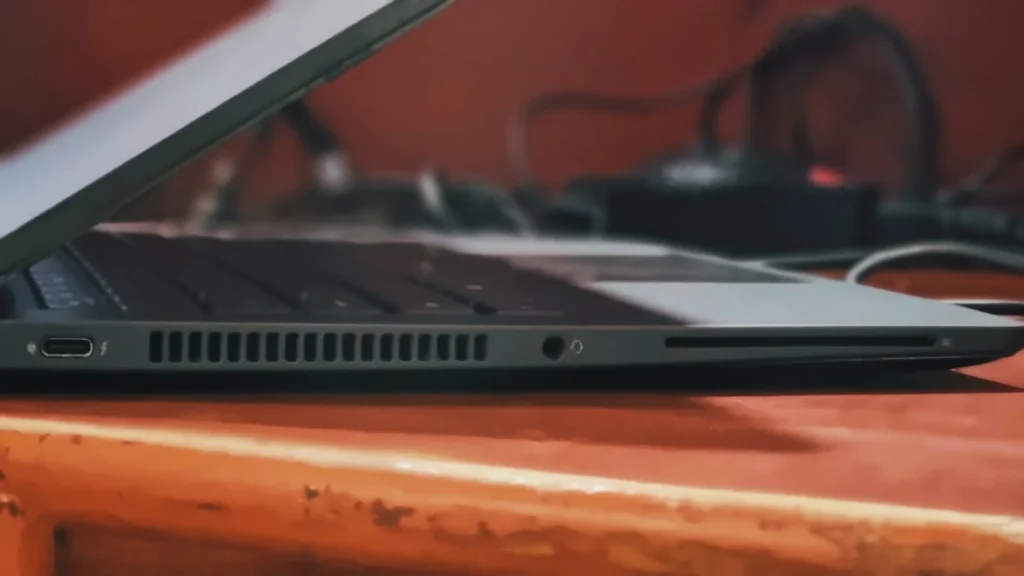
- Left Side: 1x Thunderbolt 4 port, a 3.5mm audio jack, and a Smartcard reader. (Optional)
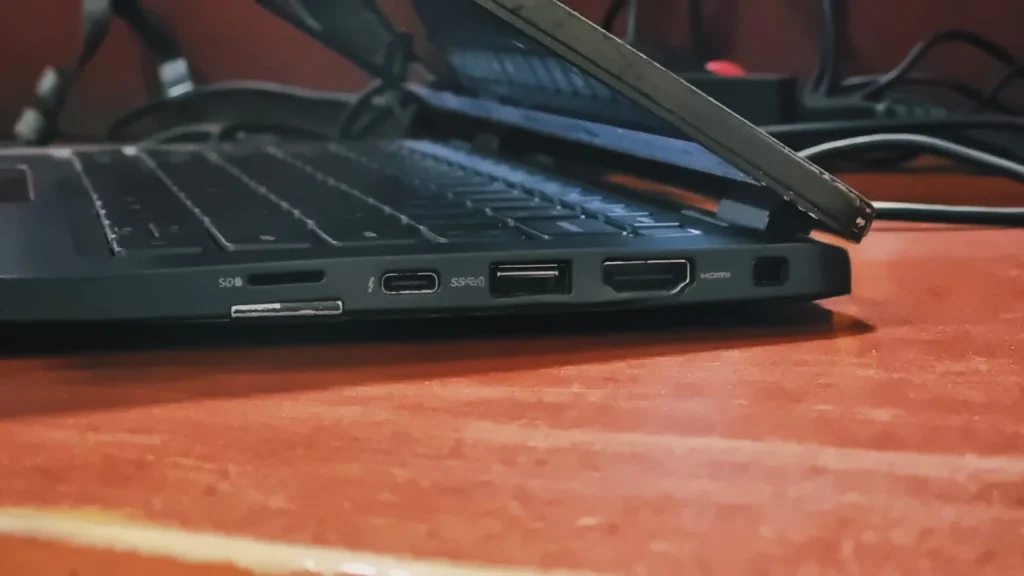
Right Side: Kensington slot, HDMI 2.0 port, USB 3.2 port, a second Thunderbolt 4 port and a MicroSD card reader
The Verdict
The Dell Latitude 7420 is a very capable corporate device that packs a ton of features aimed at privacy and stability. The combination of I7 11th Gen performance, a sleek carbon fiber chassis, incredible battery life, and top-tier security features make it one of the most reliable laptops on the market. Just ensure you buy the right amount of price and it is readily available in refurbish markets.
If you are looking for one, you can buy right from here
Frequently Asked Questions (FAQs)
Q1: Can I upgrade the RAM on the Dell Latitude 7420?
No. The RAM is permanently soldered to the motherboard and cannot be upgraded after purchase. Always ensure you buy a configuration with at least 16GB or 32GB upfront to handle future multitasking needs.
Q2: Can I upgrade the storage (SSD)?
Yes. Unlike the RAM, the internal M.2 NVMe SSD is fully upgradable. Swapping the factory drive for a faster, higher-capacity aftermarket PCIe SSD is a quick and easy way to boost the machine’s overall speed of dell latitude 7420.
Q3: How long does the battery last?
Battery life is exceptional. Models equipped with the larger 62Wh battery can easily deliver 6 to 8 hours of real-world web browsing and office productivity, comfortably getting you through a full workday without the need of a charger.
Q4: Is a refurbished Dell Latitude 7420 worth buying in 2026?
Absolutely. Thanks to its premium carbon-fiber build, capable 11th Gen Intel processors, and Iris Xe graphics, a refurbished 16GB model offers top-tier enterprise reliability.