Refurbished Laptop

Lenovo ThinkPad L13 Gen 2 (intel i5 11th gen) Review

Specifications -
  • OS: Windows 11 Pro
  • CPU: Intel 11th Generation Intel Core i5-1145G7 vPro Processor (2.60GHz, up to 4.20GHz Max Turbo, 4 Cores, 8 Threads, 8MB Cache)
  • Memory: 8GB DDR4, 3200MHz (8 or 16GB Soldered RAM)
  • Storage: 256GB PCIe SSD (up to 1TB)
  • Graphics: Integrated Intel Iris Xe Graphics
  • Screen: 13.3″ FHD (1920 x 1080) IPS, anti-reflective, anti-smudge, touchscreen
  • Connectivity: AX201 Wi-Fi 6 802.11AX (2×2), Bluetooth 5.1
  • Weight – 1.370 kg

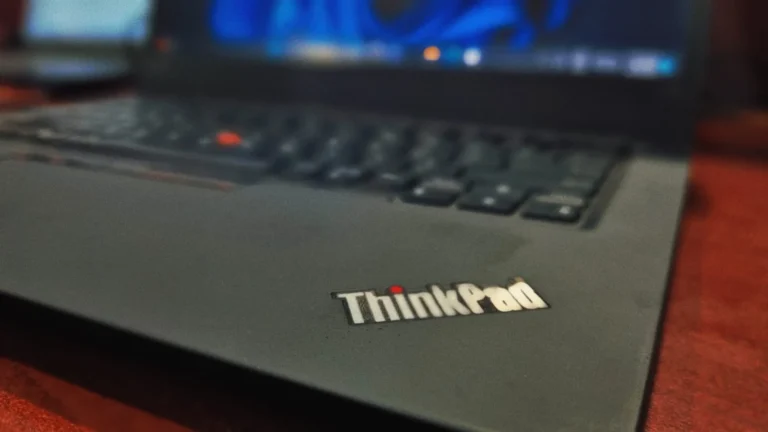
Today, we’re looking at another enterprise workhorse: the lenovo ThinkPad L13 Gen 2. At first glance, it’s exactly what you’d expect from a ThinkPad robust, industrial, and incredibly stable. While some may find it difficult to find any visual difference across the lineup and design, it also feels a bit repetitive but there’s a reason for it. Ultimately, it’s all about brand recognition and that “built-to-last” reputation that users have come to rely on.

Design & Build Quality

The Lenovo Thinkpad L13 Gen 2 embraces the “form follows function” philosophy that ThinkPads are famous for. It features a robust, industrial chassis (available in classic Black ) that feels incredibly stable. While the polycarbonate/aluminum mix doesn’t quite match the premium carbon-fiber weave of the flagship X1 series.

It is almost as light and feels as premium as X1 carbon at about half the price. 

It is MIL-STD-810G tested, this means it will survive rigorous drop, dust, and temperature testing. The hinges are durable, keeping the display firmly in place with zero wobble.

lenovo thinkpad l13 gen 2

Lenovo ThinkPad L13 Gen 2 review: Display

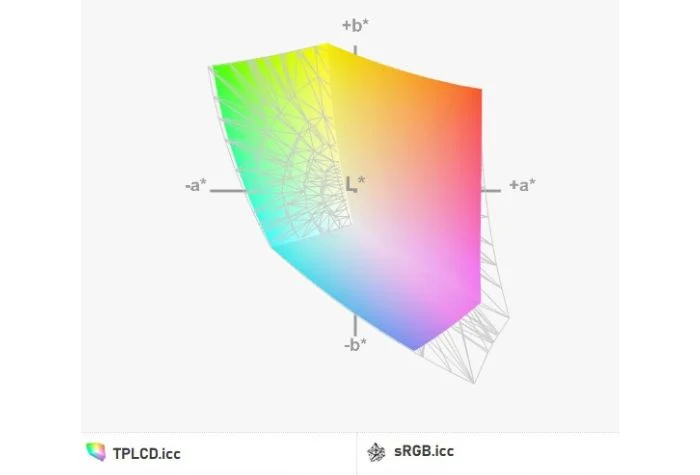
The 14-inch FHD (1920×1080) IPS display holds up quite well, especially considering the unit launched back in 2021. In fact, it has a reasonably bright screen but the display is adequate only for reading text, browsing the web, and working in Excel. Though quite good at handling standard workflows and internet usage, the panel falls short for creative professionals, due to its narrow color space found in our color gamut test. However, the viewing angles are moderately good. The anti-glare coating helps alleviate some of the brightness issues.

lenovo thinkpad l13 gen 2

Performance & System Benchmark

To provide an objective look into the capabilities of this laptop. We ran it through two popular synthetic benchmarking tools: Geekbench 6, crystaldiskinfo.

  1. Storage Performance (CrystalDiskMark)

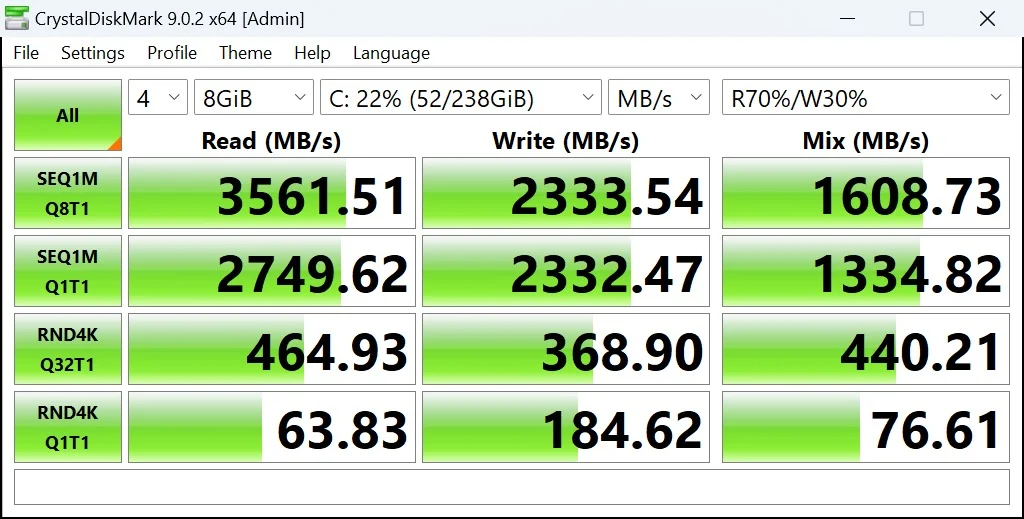
To evaluate the speed of the 256GB NVMe SSD, we ran CrystalDiskMark, which tests both raw throughput and everyday responsiveness. Here are the results from a heavy 16 GB test file:

  • Sequential Read (SEQ1M): 3561.51 MB/s
  • Sequential Write (SEQ1M): 2333.54 MB/s
  • Random 4K Read (RND4K): 464.93 MB/s
  • Random 4K Write (RND4K): 368.90 MB/s

This means Windows will boot in seconds, applications will launch instantly, and moving heavy files will be much easier to transfer.

lenovo thinkpad l13 gen2

2. Processor (CPU): A Major Bottleneck 

The single-core score is 563, and the multi-core score is 1997 in Geekbench. These numbers are low which is expected due to the age of the unit but were considered good at the time it was launched . As I am using it for a day – it can definitely run all my daily chores like opening a dozen tabs at a time or using excel to review my sheets. it works smoothly without any stuttering The Test notes that this CPU is strictly for watching media web browsing and Excel work. If you try to open a heavy software or game, this CPU will hit a hard wall, resulting in long execution time or crashing the system.

lenovo thinkpad l13 gen 2

Connectivity and Security

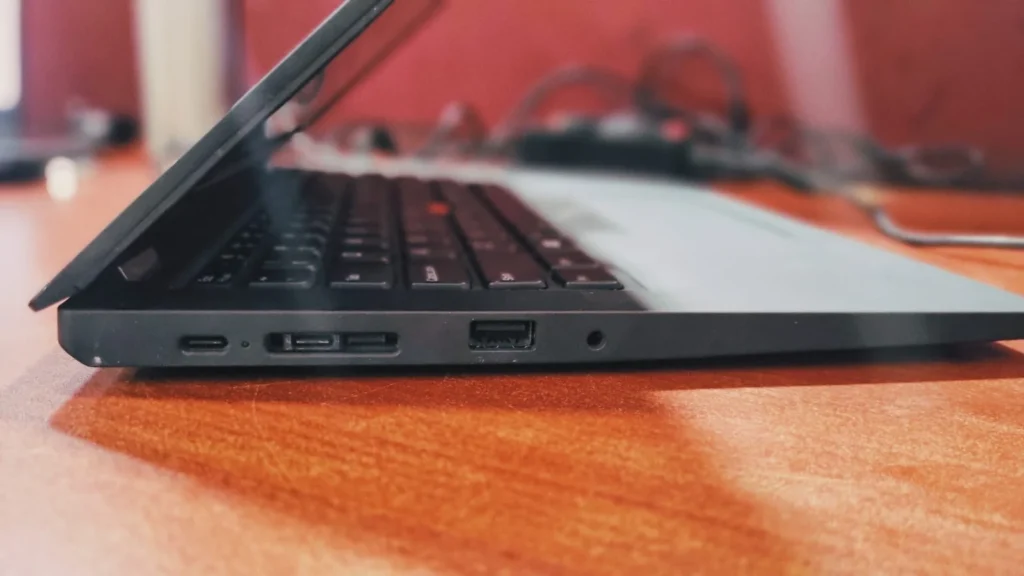
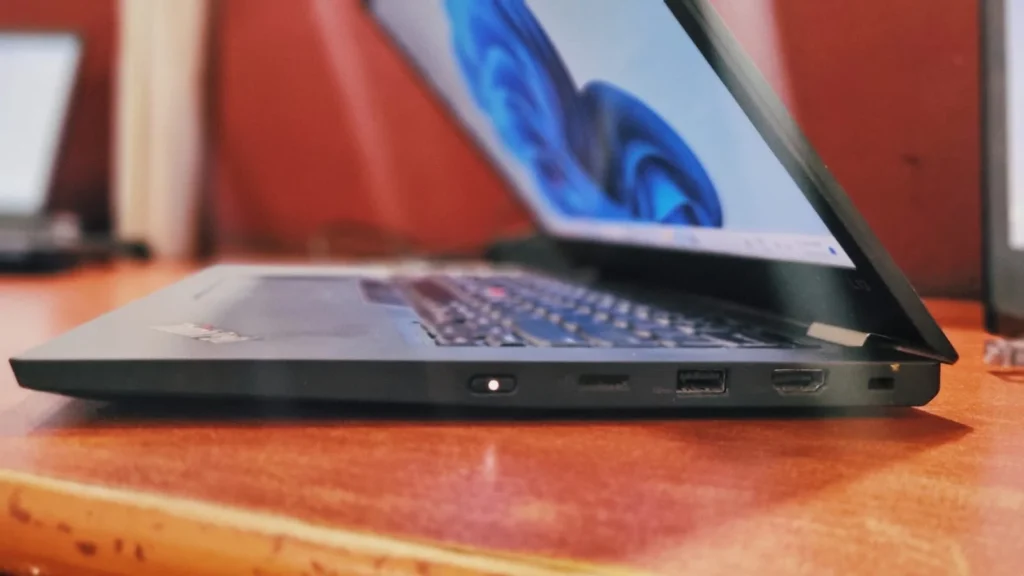
For a 13-inch chassis, the I/O is excellent –

On the left side of the notebook, there is a USB Type-C 3.2 Gen 2 port, followed by a Thunderbolt 4 connector, Ethernet connector, a USB Type-A 3.2 (Gen. 1) port and an audio jack

lenovo thinkpad l13 gen 2

On the right side you will find the Kensington security slot, an HDMI 2.0 connector, a USB Type-A 3.2 (Gen. 1) port, a MicroSD card slot, and the power button

lenovo thinkpad l13 gen 2

Lenovo ThinkPad L13 Gen 2 review: Keyboard and touchpad

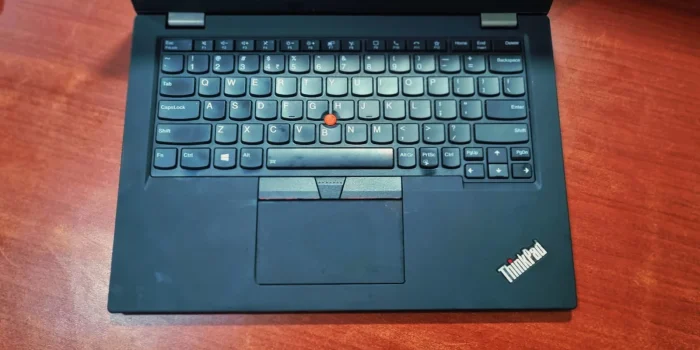
The ThinkPad range has been using what is essentially the same keyboard for most of its history However, there’s a reason the ThinkPad keyboard has remained unchanged for all that time; it’s not only comfortable to type on, but also among the sturdiest laptop keyboards around. While the key bounce and presses are a bit rougher and not quite as smooth as top-tier premium keyboards in the brand’s flagship models, it still delivers a solid, reliable typing experience.

lenovo thinkpad l13 gen 2

Bottom Line

The Lenovo ThinkPad L13 Gen 2 is a durable & reliable Machine. While it may lack some  aesthetics and specs of enterprise laptops like the flagship X1 Carbon, it makes up for it with bulletproof build quality, an industry-leading keyboard, and generous port selection. It is an incredibly practical machine for digital marketers, analysts, and corporate workforce who prioritize function and reliability over visual flair. If you are hunting for one on the used or refurbished market, check for battery health as used ones only have 2-3 hrs. of battery backup without charger also, securing a 16GB model is a must have for, future-proof machine that punches well above its weight class.

Frequently Asked Questions (FAQ)

No, the RAM on the ThinkPad L13 Gen 2 is soldered directly to the motherboard and cannot be upgraded after purchase. If you are buying this laptop, it is highly recommended to look for a configuration with 16GB of RAM to ensure smooth multitasking and future-proofing. However, the M.2 NVMe SSD storage is fully user-upgradable.

 Yes, the ThinkPad L13 Gen 2 is fully compatible with Windows 11. Because it features Intel 11th Gen vPro processors along with a built-in TPM 2.0 security chip.

Absolutely, especially if you find a good deal on the refurbish market. While it lacks the ultra-premium materials of the flagship X1 Carbon, it offers the same, spill-resistant ThinkPad keyboard, excellent port selection, and robust durability. It remains an incredibly practical choice.

Leave a Reply

Your email address will not be published. Required fields are marked *