




Blogs
ASUS TUF Gaming F15 Review

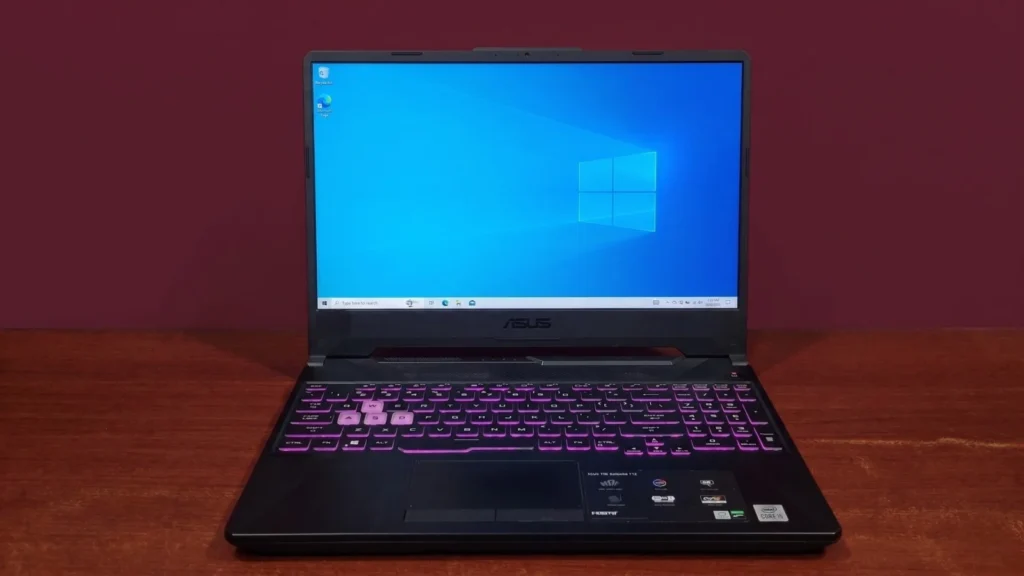
Specifications –
- Processor: Intel® Core™ i5-10300H Processor (2.5 GHz – 4.5 GHz)
- Graphics: NVIDIA® GeForce GTX™ 1650, 4GB GDDR6
- Memory: 8GB DDR4 (Dual Channel) (expandable up to 32GB)
- Storage: 512GB PCIe 3.0 NVMe M.2 SSD (expandable up to 2TB)
- Display: 15.6” FHD (1920 x 1080) Anti-glare display | 144Hz Refresh Rate
- Wireless: Wi-Fi 6, Bluetooth 5.2
- Weight: 2.1kg
When you’re building a reliable mobile gaming setup, finding the sweet spot between performance and price can be a balancing act. The ASUS TUF Gaming F15 is for those who want a machine that simply gets the job done without breaking the bank.
This specific ASUS TUF Gaming F15 model comes packing an Intel i5 10th Gen processor and an NVIDIA® GeForce GTX™ 1650. Let’s break down what this machine actually brings to the table and who it’s built for.
Design And Build Quality
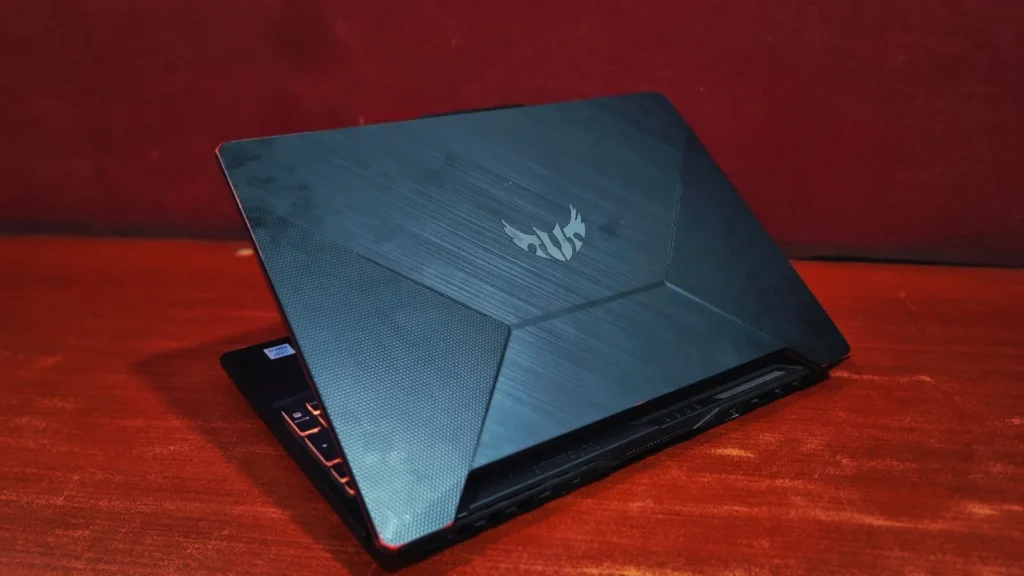
The TUF series is literally built to take a beating. ASUS designs these chassis to meet the MIL-STD-810H military standard, meaning they are tested to survive drops, vibration, and extreme temperatures that would crack flimsier laptops. It has a rugged metal-like finish and sharp, aggressive lines. Weighing in at 2.1 kg, it certainly isn’t an ultra-thin featherweight, but that weight translates to feeling incredibly solid and firmly planted on your desk during intense gaming sessions.
The Display
The ASUS TUF Gaming F15 comes with a 15.6-inch Full HD (1920 x 1080) anti-glare panel. The real highlight for gamers here is the 144Hz refresh rate paired with Adaptive-Sync, which dynamically matches your monitor’s refresh rate (Hz) to the frame rate (FPS) output by your graphics card. While the color gamut (62.5% sRGB and 45% NTSC as per ASUS) means it might not be the primary choice for professional video color graders, the snappy 144Hz IPS-level screen provides a buttery-smooth, tear-free edge in fast-paced competitive shooters where reaction timing is everything.
Keyboard & Touchpad
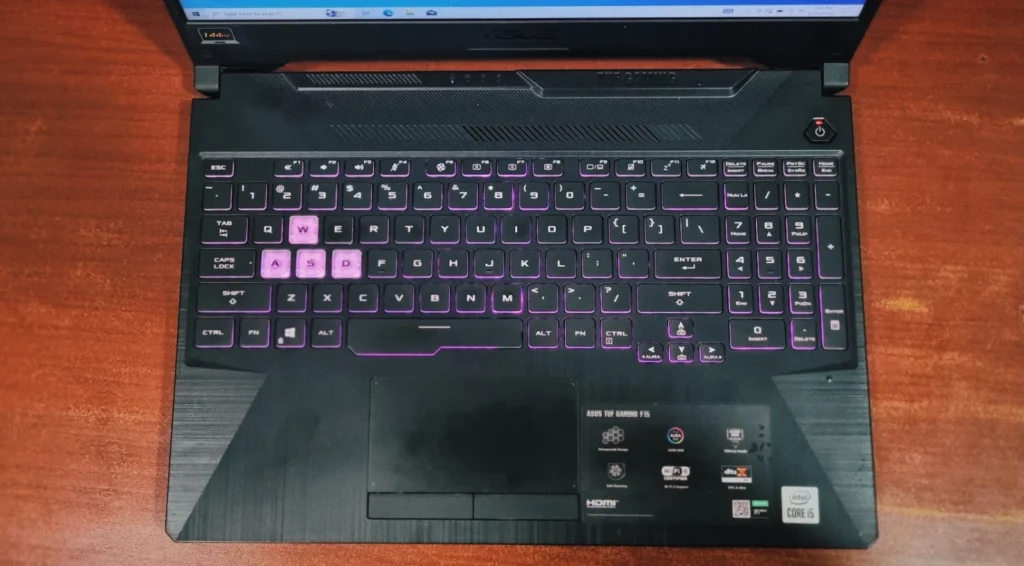
If you type heavily or game for long hours, you will appreciate this deck. It features a desktop-style backlit chiclet keyboard with 1-Zone RGB lighting, allowing you to customize the keys with ASUS’s Armoury Crate software. The WASD keys are transparently highlighted to serve as a quick visual indicator, and the keys offer a satisfying, tactile key travel. The touchpad is sufficiently sized, tracks smoothly for daily browsing, and features dedicated physical left and right click buttons—a rare but highly appreciated inclusion that prevents accidental misclicks.
Performance & Benchmarks
To give you a clear picture of how the ASUS TUF Gaming F15 performs in the real world, we ran it through a few popular benchmark tests:
Storage Analysis
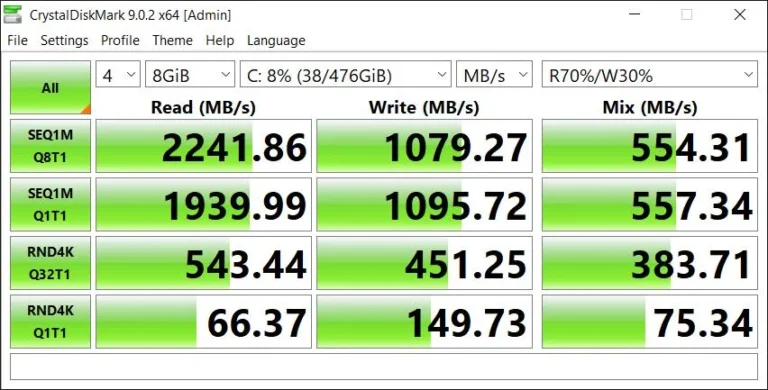
Boot times, file transfers, and game loading screens are dictated entirely by the onboard solid-state drive. Testing the 512GB NVMe M.2 drive yields very reliable PCIe 3.0 speeds:
Test Profile | Read Speed (MB/s) | Write Speed (MB/s) |
|---|---|---|
Sequential (SEQ1M Q8T1) | 2241.86 | 1079.27 |
Sequential (SEQ1M Q1T1) | 1939.99 | 1095.72 |
Random 4K (RND4K Q32T1) | 543.44 | 451.25 |
Random 4K (RND4K Q1T1) | 66.37 | 149.73 |
With a sequential read speed of over 2,241 MB/s, Windows boots in less than 10 seconds, and games like GTA V will pull you out of loading screens and put into the game incredibly fast. The write speed holds a steady 1,079 MB/s, making game updates and large file downloads painless. Furthermore, the random 4K read speeds 66.37 MB/s ensures that everyday Windows snappiness opening folders, launching discord, and multitasking feels instant.
General Productivity & Processing Power
When it comes to everyday tasks—shuffling between browser tabs, drafting documents, or keeping up with remote work—the combination of the Intel i5 CPU and fast SSD delivers a snappy, dependable experience.
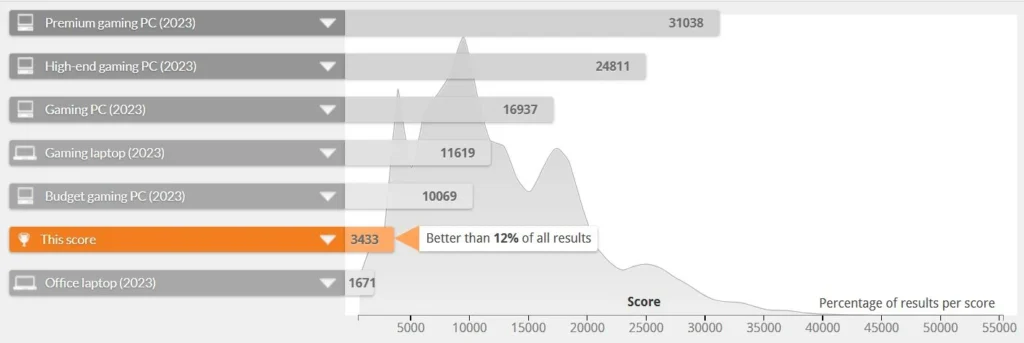
- Daily Tasks & Office Work: Looking at overall PCMark 10 score of 4,714. Its Essentials score (7,948) is anchored by an exceptional App Start-up score of 10,700 and fluid web browsing (7,167), meaning you won’t be sitting around waiting for apps to load. For office use, a Productivity score of 7,873 proves that complex spreadsheet calculations and word processing are effortless.
- Database Positioning: According to the score of 4,714, it places the laptop better than 36% of all results in the global database. While it sits just under the baseline of a standard 2023 office laptop (5,848), it remains a highly reliable station for handling multi-layered business workflows according to its age.
- Raw CPU Speed: the laptop puts up a Single-Core Score of 1,584 and a Multi-Core Score of 4,268. The strong-single-core performance ensures immediate responsiveness for single-threaded tasks, while the multi-core capability provides the necessary muscle for steady background multitasking.
Graphics, Gaming & Content Creation
Shifting over to 3D rendering and graphic capability, the NVIDIA GTX 1650 reveals its identity as an entry-level for those who want productivity.
- DirectX 12 Performance: In the 3D Mark Time Spy benchmark, the machine pulls a Time Spy Score of 3,337. When isolated against identical setups, it hovers just under the global hardware Average of 3,540, with the absolute highest-tuned systems maxing out at a best score of 3,974.
- Content Creation Capabilities: The PC Mark gives the machine a Digital Content Creation score of 4,546. It shows genuine competence in Photo Editing (6,382) and baseline Rendering and Visualization (5,124). However, with a Video Editing score of 2,873, you should expect longer export times for complex 4K timelines, making it best suited for lightweight 1080p video projects.
Gaming performance
While synthetic charts give a solid structural baseline, how it actually plays is what matters most. Looking at real-world benchmarks, the I5-10300H and GTX 1650 combo delivers exactly what you’d hope for in classic and slightly heavier modern titles:
Grand Theft Auto V
Running at 1080p with very solid (including FXAA, TXAA, and High/very High textures/shadows), The ASUS TUF Gaming F15 runs smoothly at an average of 48.8 FPS, maxing out at 74.2 FPS during lighter scenes. With frame times remaining incredibly stable, 98% of the rendered frames stay well under the 33ms threshold and the experience feels fluid, responsive, and perfectly optimized for long gaming sessions.

Assassin’s Creed Odyssey
As an incredibly heavy, CPU-bound open-world title, this game pushes the hardware a bit harder. At 1080p, you can expect an average hovering around 37 FPS. It’s not going to unlock the potential of that high 144Hz display, but it stays comfortably above a console-like 30 FPS floor. For an epic RPG of this scale, it remains totally playable, though you will want to drop to medium settings to get back a few extra frames during gameplay.

Here are the detailed specifications for the laptop’s graphics and processing hardware:
Graphics (GPU) Specifications
Processor (CPU) Details
The laptop is powered by a 10th-generation Intel processor:
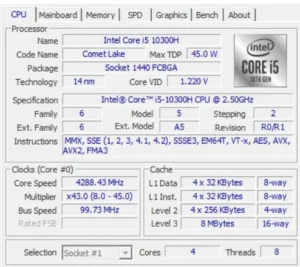
- Model: Intel® Core™ i5-10300H (Comet Lake), built on a 14nm process architecture.
- Core Configuration: It features 4 physical cores and 8 threads, allowing for efficient multitasking.
- Clock Speeds: It has a base clock speed of 2.50 GHz with an active boost up to 4.50 GHz.
- Cache: Equipped with 8 MB of Level 3 (L3) cache.
- Power (TDP): It has a maximum Thermal Design Power (TDP) of 45.0 Watts,
Graphics Card (GPU) Details
The laptop includes a dedicated graphics card manufactured by ASUS.
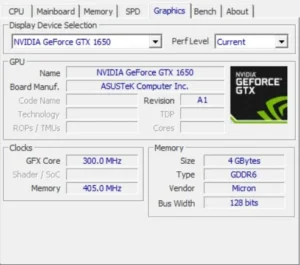
- Model: NVIDIA GeForce GTX 1650.
- Video Memory (VRAM): It has 4 GB of dedicated VRAM.
- Memory Type: Notably, it uses faster GDDR6 memory. This is an upgrade over the original laptop GTX 1650 variants, which shipped with slower GDDR5 memory.
Battery life
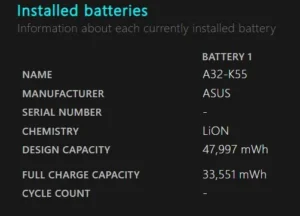
A refurbished laptop’s battery health is essentially its current capacity to hold a charge compared to its original factory design. Whether you are buying this brand new or picking it up on the refurbished market, remember that this is a gaming laptop, which means battery life is not its strong suit. This machine can provide around 2+ hours of backup, but the actual runtime will depend heavily on previous usage and current task intensity.
Ports and Connectivity
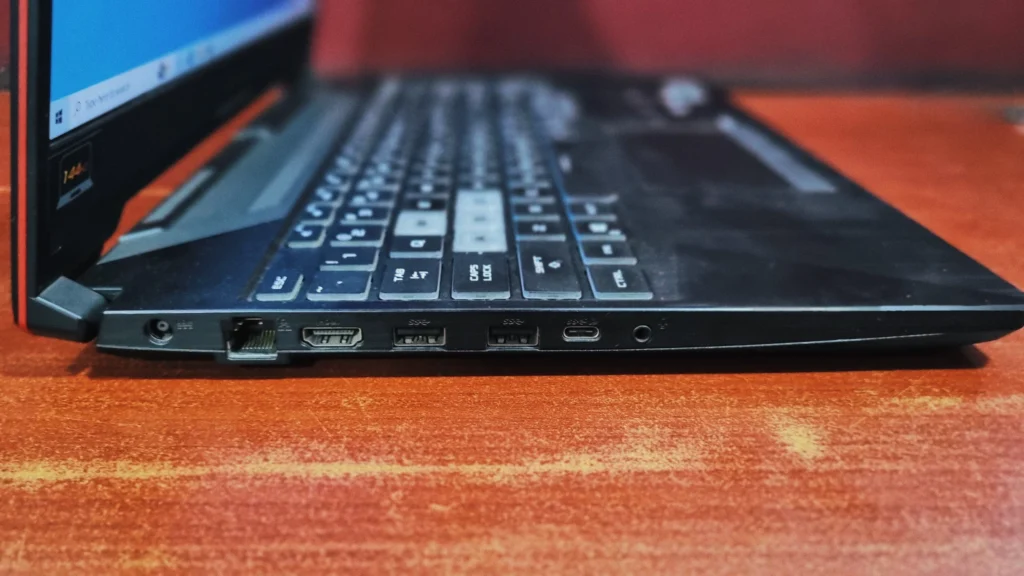
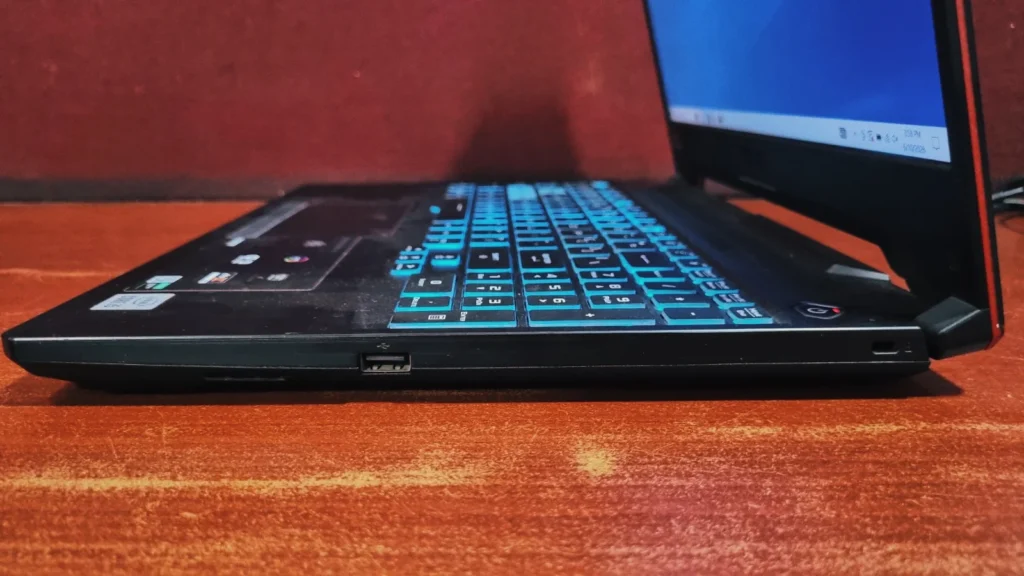
The port placement on the TUF F15 chassis is very practical, keeping most of your heavy cables strictly on the left side so your right hand (where your mouse usually sits) stays clutter-free.
Left-Side: power DC-in port, RJ45 LAN port, HDMI 2.0, USB 3.2 Type-A , Type-C, 3.5mm Combo Audio Jack.
Right-Side: 1x USB 3.2 Gen 1 Type-A (perfect for plugging in your mouse),Kensington Security Slot.
Final Verdict
The Asus TUF Gaming F15 is a highly practical machine that knows exactly what it’s built to do. It offers excellent connectivity, a sturdy build, a smooth 144Hz display, and just enough graphical horsepower to let budget-conscious gamers play their favorite modern titles without any lag.
Yes, the battery life is short and the display colors are not ideal for professional video/photo editors, but the core performance is absolutely there. Furthermore, the ability to easily upgrade both the RAM and the SSD down the line means this laptop is future-proof. If you are looking for a reliable entry point into PC gaming, this laptop is a superb choice.
Frequently Asked Questions (FAQs)
Q: Can it run games like GTA V and Valorant smoothly?
Yes, it can run titles like Valorant at well over 150 FPS. For bigger, Open-world games like GTA V (legacy), you will easily get a smooth 60 FPS on medium to high settings.
Q: Can I upgrade the RAM and storage later?
Yes, you can bump the Ram all the way up to 32GB, and features an empty, secondary M.2 NVMe PCIe slot for easy storage expansion.
Q: How is the battery life of the Asus TUF Gaming F15?
Keep your charger handy. You’ll get 2 plus hours for browsing the web or typing up notes. But if you are actually gaming, you need to keep it plugged into the wall, or the battery will drain fast and your games will lag.
Q: Does the RTX 1650 support Nvidia DLSS?
No, it does not support DLSS
Q: Is this a good pick for a student or programmer?
Yes, 100%. The i5 processor easily handles heavy coding software. Plus, with the military grade certification, it can comfortably survive the daily commute in your backpack.
Q: Does Asus TUF Gaming F15 get hot while gaming?
It definitely gets warm. It’s a gaming laptop, after all. The internal fans do a solid job keeping things safe, but do yourself a favor by playing on a hard desk (not your bed) so the vents on the bottom are not blocked and can actually breathe.

About Aryamann Saini
Avid tech enthusiast with a focus on strategic problem-solving. Always looking to tackle the next big challenge or learning milestone. Outside of work and studies, I enjoy traveling to historical sites and exploring the open road.
View all posts by Aryamann Saini
