Refurbished Laptop

ASUS TUF Gaming F17 Review
asus tuf gaming f17

Specifications –

  • Processor: Intel Core I5-11400H 
  • Graphics: 4GB GDDR6 NVIDIA GeForce RTX 2050 (55W TGP)
  • Memory: 8GB DDR4 3200MHz (Dual Channel) (expandable up to 32GB)
  • Storage:  512GB PCIe 3.0 NVMe M.2 SSD (expandable up to 2TB)
  • Display: 17.3” FHD (1920 x 1080) Anti-glare display | 144Hz Refresh Rate
  • Wireless: Wi-Fi 6, Bluetooth 5.2
  • Weight: 2.5kg

Finding a dependable entry-level gaming machine doesn’t have to mean compromising on all the fun stuff. If you’ve been hunting for an entry-level machine that can handle everyday college or work tasks while letting you dive into some serious gaming at night, the ASUS TUF Gaming F17 might just be exactly what you’re looking for.

This specific Asus TUF Gaming F17 Model Comes Packing an intel i5 11th Gen processor and an NVIDIA RTX 2050. Let’s break down what this machine actually brings to the table and who it’s built for.

Design And Build Quality

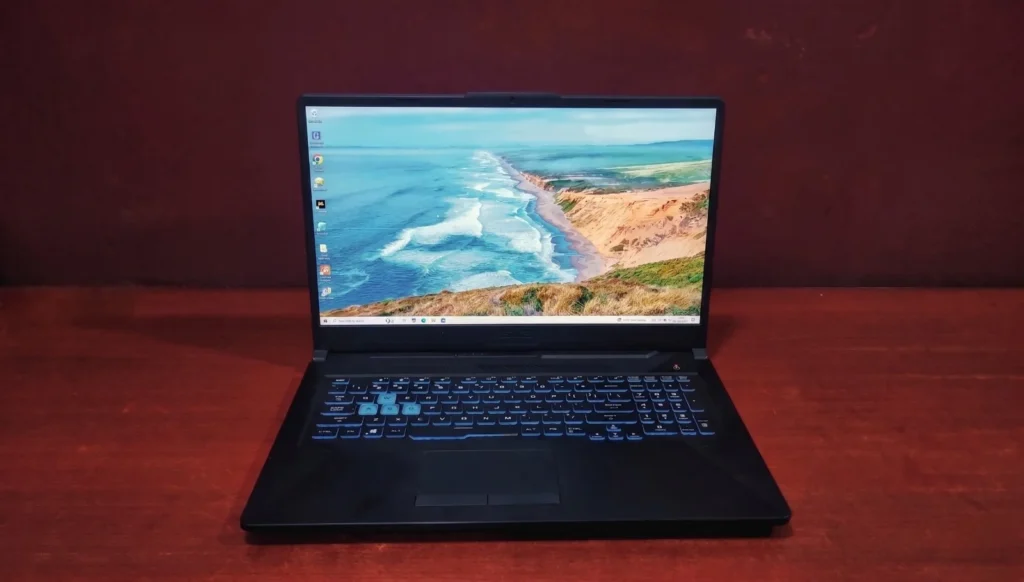
The Asus TUF Gaming series has always leaned into a rugged, industrial aesthetic, and this model rocks the “Graphite Black” finish. It’s undeniably a gaming laptop, but it isn’t so aggressive that you’d feel awkward pulling it out in a classroom or a coffee shop.

Weighing in at 2.5 Kg, It’s Got some Bulk to it, but that weight goes to make a very sturdy feel all – around the laptop.  Asus shows off its MIL-STD-810H military-grade durability for TUF lineup, Meaning the plastic and metal chassis is designed to survive minor drops, vibration, extreme temperature better that your average consumer laptop. The hinges are smooth, but can’t be opened with one hand.

asus tuf gaming f17

The Display

When you open the lid, you are greeted by a 17’’ Full HD (1920 x 1080) anti-glare panel. The absolute best feature here is the 144Hz refresh rate. Paired with adaptive-sync, it ensures that your gameplay in fast-paced shooters like Valorant or Call of Duty feel incredibly smooth and free of visual tearing.

As per the official specs, the screen pushes a peak brightness of 250 nits and covers 45% of the NTSC color gamut. Which means the colors are decent for gaming and casual media consumption, but professional photo editors might want to plug into an external monitor. The brightness is perfectly fine for a gaming laptop, though you might have to squint a bit if you’re gaming outside on a sunny afternoon.

Keyboard & Touchpad

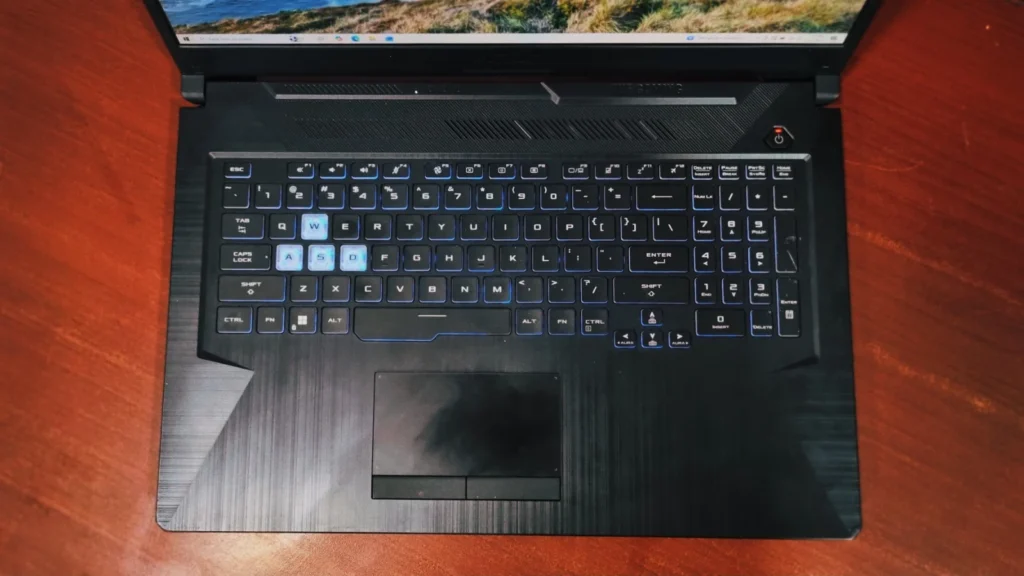
Asus knows how to make a comfortable keyboard. You get a 1-zone RGB backlit chiclet keyboard that gives off a great glow for gaming night. The keys have a nice 1.8mm travel, which feels tactile and responsive whether you’re typing up a long article or using the WASD keys to dodge enemy fire. The spacebar is slightly extended on the left side, which is a neat, gamer-friendly touch.

The touchpad is a decent size with a smooth finish. It tracks well for everyday browsing and navigating Windows, with physical left and right click buttons at the bottom. But of course, for any actual gaming, plugging in a proper gaming mouse is recommended.

asus tuf gaming f17

Performance & Benchmarks

To give you a clear picture of how the ASUS TUF Gaming F17 performs in the real world, we ran it through a few popular benchmark tests:

1. General Productivity & Daily Tasks

If you need a machine for office work, heavy multitasking, or student life, these scores show a highly reliable daily driver.

  • PC Mark 10 Real-World:  the laptop secures an overall score of 5,976. Looking closely at the breakdown, it gains an excellent 9,816 in Essentials (app startup speeds and web browsing) and an 8,676 in Productivity (spreadsheets and writing). This means it will effortlessly go through office suites
asus tuf gaming f17
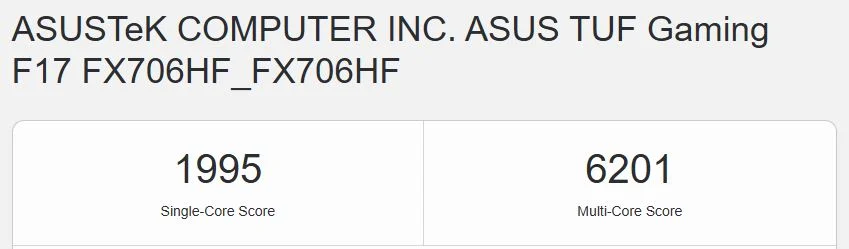
  • Processing power: The Core i5-11400H pulls a Single-Core score of 1,995 and a multi-core score of 6,201. These are solid numbers for an 11th Gen chip, ensuring that code compilation, everyday data processing and handling Background tasks feel snappy. 
asus tuf gaming f17

2. Graphics, Gaming & Rendering Performance

By today’s standards, The NVIDIA GeForce RTX 2050 isn’t a top-tier flagship card but the benchmarks reveal it to be a very capable budget performer, especially for esports and moderate content creation.

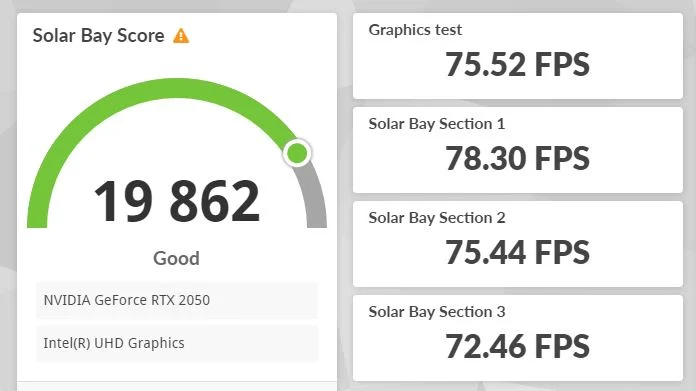
  • Ray Tracing & Vulkan Gaming: In 3D-Mark, the laptop runs the Solar Bay benchmark (which tests light ray tracing capabilities) and scores a very respectable 19,862. It manages a smooth 75.52 FPS on the graphics test, proving it can handle modern, optimized graphics engines with stable frame rates.
asus tuf gaming f17
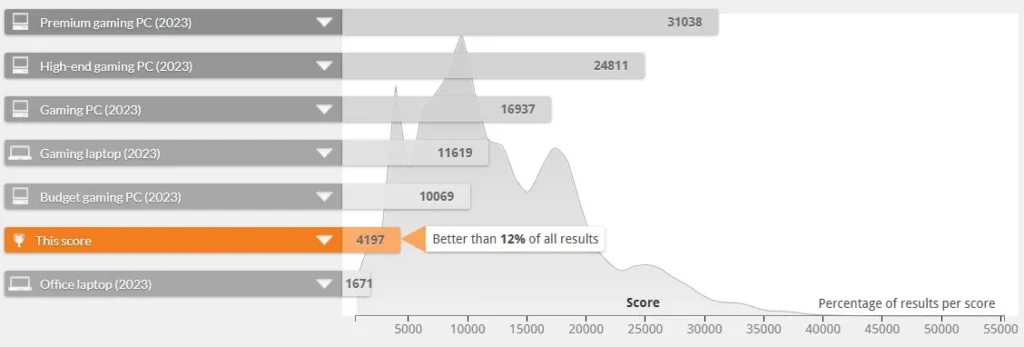
  • The Overall Gaming Landscape: Looking at graph, the overall time spy/fire strike benchmark suite gives a score of 4,197, noting it sits comfortably ahead of standard office laptops but below high-end gaming rigs. It’s a sweet spot entry-level gamer.
asus tuf gaming f17
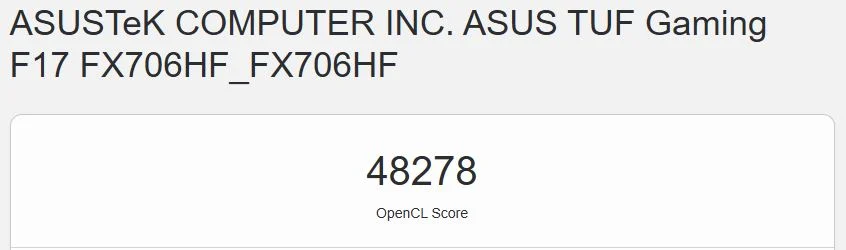
  • GPU Compute Capabilities: In Geekbench, the card clocks an OpenCL score of 48,278. For casual photo editing and video editing, this GPU provides a massive hardware-acceleration boost compared to integrated graphics.
asus tuf gaming f17

3. Storage Analysis: Quick and Responsive

A gaming laptop needs fast storage to minimize long loading screens and eliminate texture pop-ins while exploring massive maps’

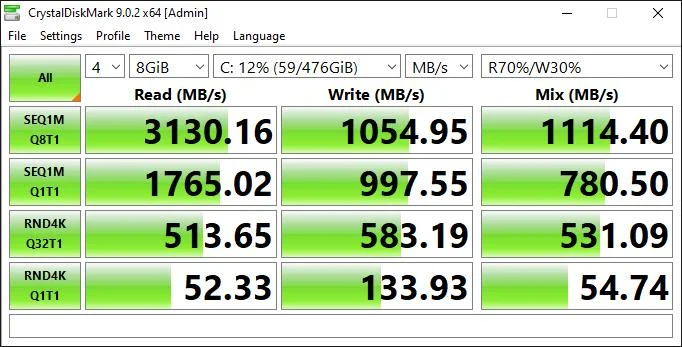
According to the drive benchmark captured in, the internal NVMe M.2 SSD performs exceptionally well:

  • Sequential Read Speed: 3,130.16 MB/s
  • Sequential Write Speed: 1,054.95 MB/s

What this actually means for you: A read speed crossing the 3,100 MB/s threshold ensures that Windows boots up almost instantly when you hit the power button. More importantly, when launching massive games like GTA 5 or Ghost of Tsushima, your loading screens pass by incredibly fast, letting you jump straight into the action without waiting around.

asus tuf gaming f17

Gaming Performance

When it comes to gaming, the combination of the Intel Core i5-11400H and the 4GB NVIDIA RTX 2050 delivers an incredibly satisfying experience for budget-conscious players. Let’s look at how it handles a massive modern AAA title and a legendary open-world classic using real, local benchmark testing data.

Ghost of Tsushima

 This game is highly demanding ; it pushes the GPU to its maximum limits. Still, it runs surprisingly well on this hardware. Pushing a highly stable 59 FPS in real-time gameplay, the laptop delivers a beautifully fluid, console-like 60 FPS experience at 1080p. What’s even more impressive is the thermal efficiency shown during the run: the GPU temperature hovers comfortably at 67°C with VRAM utilization sitting tightly at 3,318 MB, showing that the dual-fan design keeps the laptop stable without thermal throttling during intense combat sequences.

asus tuf gaming f17

GTA 5

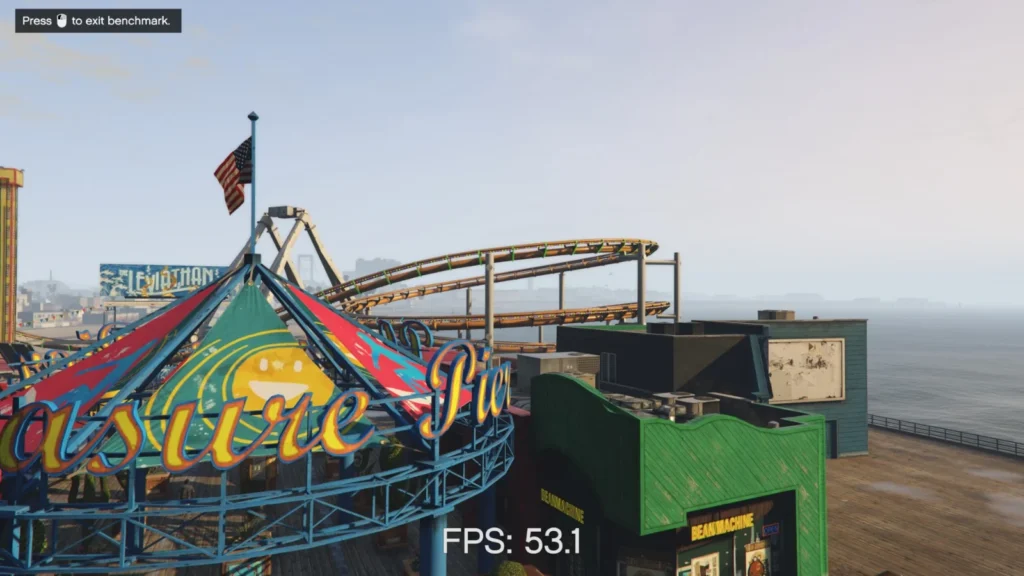
Looking closely at the official in-game benchmark log data, Grand Theft Auto V runs Perfectly on high settings at full 1080p resolution: 

 Across the five benchmark scenes, the machine maintains a rock-solid average framerate ranging from 54.7 FPS up to 67.0 FPS.  In less crowded areas, the performance jumps significantly, hitting maximum peaks between 74.0 FPS and 94.7 FPS. The real proof of stability lies in the frame rendering times. Over 99.8% of all rendered frames across every single pass stayed comfortably under 33ms. it guarantees a perfectly smooth 30+ FPS floor even during explosive, high-speed car chases down Vinewood Boulevard, keeping micro-stutters completely out of sight.

asus tuf gaming f17

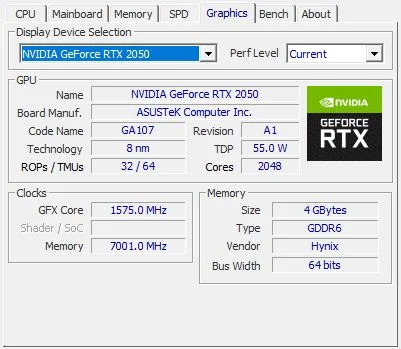
here are the detailed specifications for the laptop’s graphics and processing hardware:

Graphics (GPU) Specifications

Processor (CPU) Details

The laptop is powered by a 11th-generation Intel processor:

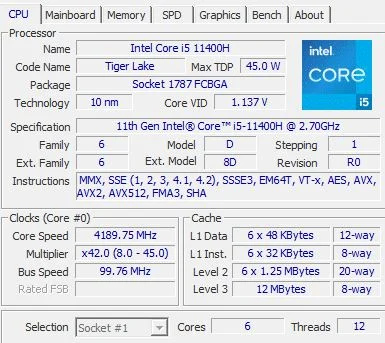
    • Model: Intel® Core™ i5-11400H (Tiger Lake), built on a 10nm process architecture.
    • Clock Speeds: It has a base clock speed of 2.70 GHz with an active boost up to 4.50 GHz.
    • Core Configuration: It features 6 physical cores and 12 threads, making it highly efficient at multitasking, everyday productivity, and modern gaming.
  • Power (TDP): It has a maximum Thermal Design Power (TDP) of 45.0 Watts, 


Graphics Card (GPU) Details

The laptop includes a dedicated graphics card manufactured by ASUS.

  • Model: NVIDIA GeForce RTX 2050 GDDR6. (Max TDP of 55.0 W) 
  • Video Memory (VRAM): It has 4 GB of dedicated VRAM.
  • Memory Type: Notably, it uses faster GDDR6 memory. This is an upgrade over the original laptop GTX 1650 variants, which shipped with slower GDDR5 memory.
asus tuf gaming f17
asus tuf gaming f17

Battery life

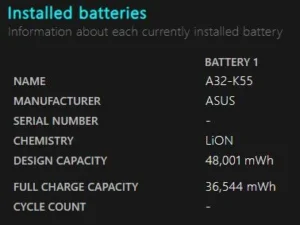
A refurbished laptop’s battery health is essentially its current capacity to hold a charge compared to its original factory design. Whether you are buying this brand new or picking it up on the refurbished market, this is a gaming laptop, which means battery life is not going to be its strong suit. This laptop can get you somewhere around 2 hours plus of backup but the actual battery runtime will depend heavily on the laptop’s previous usage.

asus tuf gaming f17

Ports and Connectivity

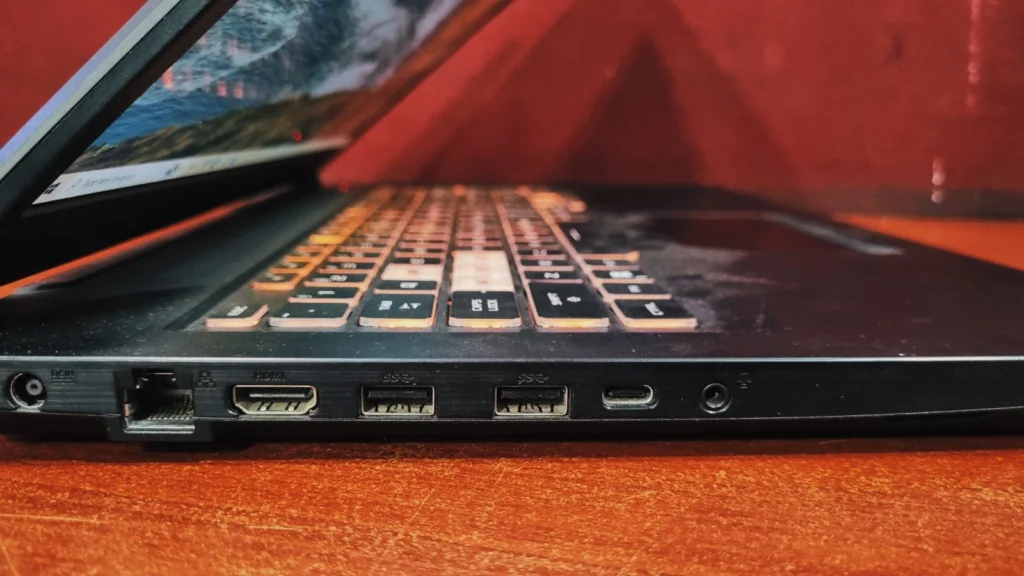
Left-Side: Power DC-in port, RJ45 LAN port,  HDMI 2.0  ,2x USB 3.2 , Type-C , 3.5mm Combo Audio Jack.

asus tuf gaming f17

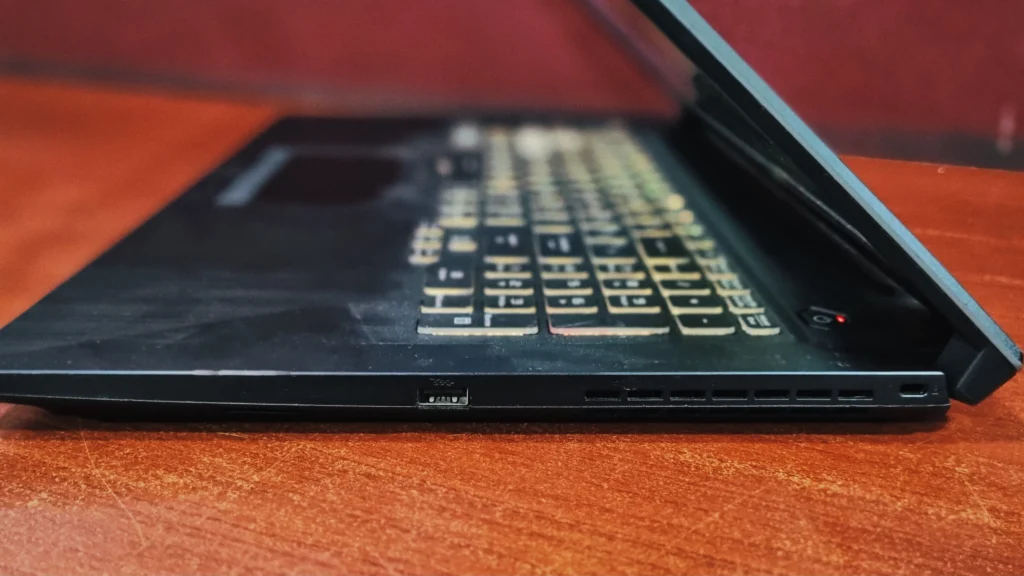
Right-Side: USB 3.2 Gen 1 Type-A, Kensington Security Slot, Fan cooling vents.

asus tuf gaming f17

Final Verdict

The Asus TUF Gaming F17 is a highly practical machine that knows exactly what it’s built to do. It offers excellent connectivity, a sturdy build, a smooth 144Hz display, and just enough graphical horsepower to let budget-conscious gamers play their favorite modern titles without any lag.

Yes, the battery life is short and the display colors are not for video/photo editors but the core performance is absolutely there. Furthermore, the ability to easily upgrade both the RAM and the SSD down the line means this laptop is futureproof. If you are looking for a reliable entry point into PC gaming, this laptop is a superb choice.

Frequently Asked Questions (FAQs)

Keep your charger handy. You’ll get 2 plus hours for browsing the web or typing up notes. But if you are actually gaming, you need to keep it plugged into the wall, or the battery will drain fast and your games will lag.

It definitely gets warm. It’s a gaming laptop, after all. The internal fans do a solid job keeping things safe, but do yourself a favor: play on a hard desk (not your bed) so the vents on the bottom are not blocked and can actually breathe.

Yes, it can run titles like Valorant at well over 150 FPS. For bigger, Open-world games like GTA V (legacy), you will easily get a smooth 60 FPS on medium to high settings.

Yes, you can bump the Ram all the way up to 32GB, and features an empty, secondary M.2 NVMe PCIe slot for easy storage expansion.

Yes, it does. This is a huge win for a budget laptop. DLSS is basically a magic button in supported games that uses AI boosted frame rates without ghosting in the graphics.

Yes, 100%. The i5 processor easily handles heavy coding software. Plus, with the military grade certification, it can comfortably survive the daily commute in your backpack.

Leave a Reply

Your email address will not be published. Required fields are marked *