




Blogs
Dell Latitude 7490 Review (2026): Is This Refurbished Business Laptop Still Worth Buying?

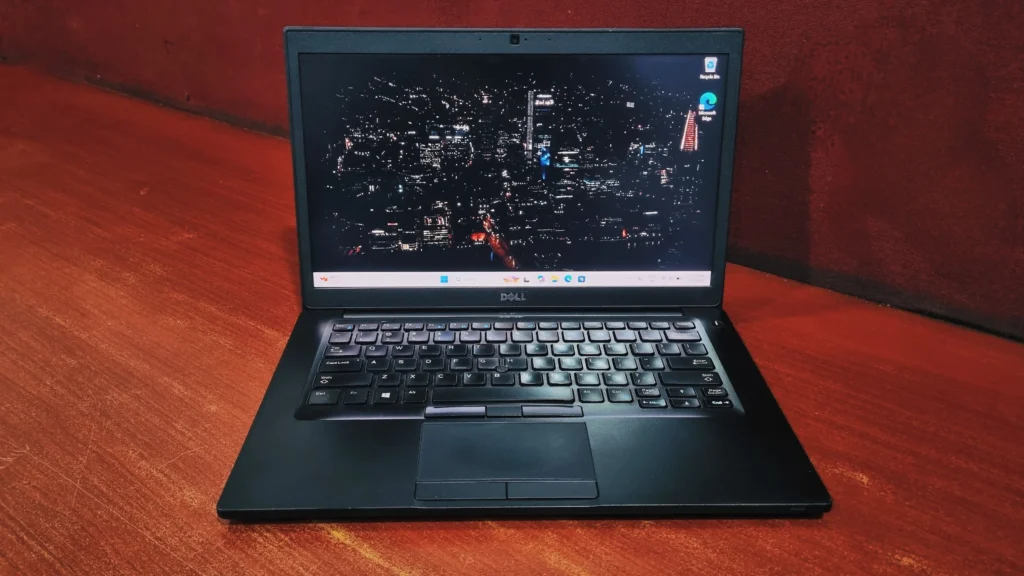
Somewhere between ultra-light consumer laptops and bulky workstations, Dell built something that just gets on with the job.
Yes, the Dell Latitude 7490 is still worth buying in 2026 as a refurbished machine. Its quad-core Intel Core i7-8650U, 16GB DDR4 RAM, 512GB SSD, and anti-glare 14" Full HD IPS display handle office work, 15 to 20 browser tabs, and video calls comfortably. Expect 4 to 6 hours of battery life and a 1.4 kg MIL-STD 810G tested chassis. It is not suitable for modern gaming or heavy video editing.
Somewhere between the ultra-light consumer laptops that snap in half if you look at them wrong and the bulky workstations nobody wants to carry, Dell decided to build something that just gets on with the job. That's the Latitude 7490 in a nutshell. It sits at the top of Dell's 7000 series business lineup, and it was built for people who open a laptop forty times a day and simply expect it to work every single time.
If you're hunting for a refurbished machine that can handle real office workloads without feeling like a hand-me-down, the Dell Latitude 7490 is worth a proper look. Here's what stood out to us.
Specifications
Dell Latitude 7490 specifications (as tested):
Processor
Intel Core i7-8650U (Quad-Core, 1.9 GHz base, up to 4.2 GHz Turbo)
Graphics
Integrated Intel UHD Graphics 620
Memory
16GB DDR4 (expandable up to 32GB)
Storage
512GB SSD (expandable up to 2TB)
Display
14.0", Full HD (1920 x 1080), IPS, anti-glare
Wireless
Wi-Fi 802.11ac, Bluetooth 4.2
Weight
1.4 kg
Design & Build Quality: How Durable Is It?
Dell carried over the same carbon-fiber-reinforced palm rest and magnesium-alloy frame from the 7480, and it shows the moment you pick this thing up. There's barely any flex in the keyboard deck, and twisting the lid takes real effort rather than the gentle give you get on cheaper business laptops. It's also been run through the usual MIL-STD 810G torture tests, so knocks, drops, dust, and the occasional coffee-adjacent scare are all things this laptop is built to shrug off.
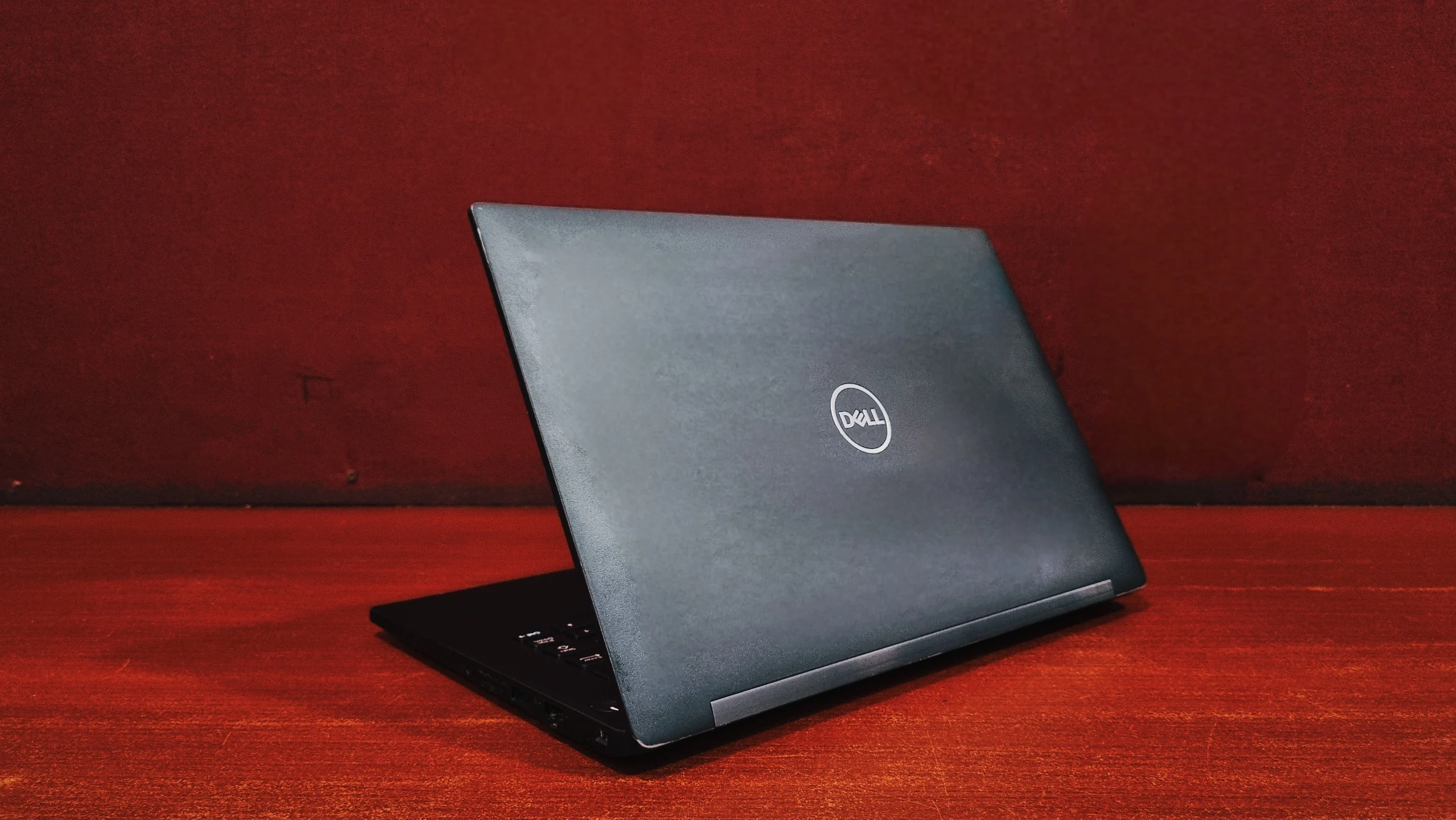
At 1.4 kg, it's noticeably lighter than the older E7470, and that difference is easy to feel the moment you sling it into a backpack. The hinges are firm and the lid opens one-handed without the base lifting off the table, which sounds small until you're the person juggling a coffee cup and a laptop bag at the same time.
The Display: Is the Screen Good Enough?
The 14-inch Full HD IPS panel is one of the better screens Dell put in a business laptop of this generation. Colours look accurate rather than washed out, and because it's an IPS panel, you can tilt the screen or glance at it from the side during a meeting without the image degrading.
The anti-glare finish is the real hero here. Under harsh fluorescent office lighting or a sunny window seat, the matte coating keeps reflections down to almost nothing, which matters a lot if you're spending hours reading spreadsheets or writing reports. This panel is built for day-to-day productivity work, it's comfortable on the eyes in a way a lot of glossy consumer laptops simply aren't.
Keyboard & Touchpad
Dell's business keyboards have a reputation for being some of the best in the industry, and the 7490 doesn't break that streak.
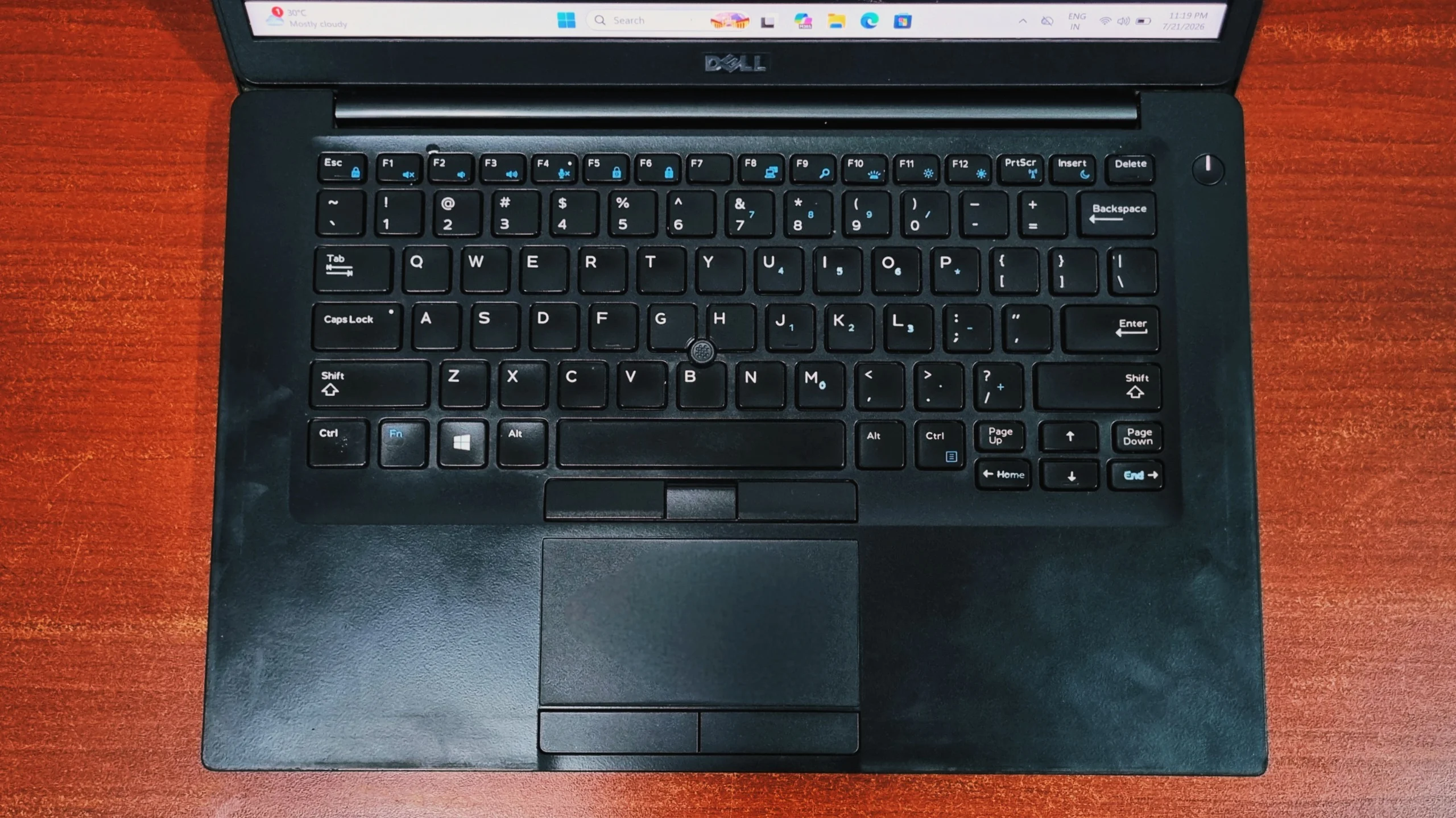
Keyboard: Key travel is good for a laptop this thin, and every keystroke has a satisfying, tactile bottom-out. The deck itself barely moves even when you're typing quickly, thanks to the rigid internal frame sitting underneath it. Anyone coming from a ThinkPad will feel instantly at home.
Touchpad & Pointing Stick: The glass touchpad tracks smoothly and supports the usual Windows Precision gestures. Just like its predecessors, the 7490 keeps the red TrackPoint nub in the middle of the keyboard, along with a dedicated row of physical click buttons above the touchpad, so you never have to lift your fingers off the home row to move the cursor.
Performance & Benchmarks: How Fast Is It?
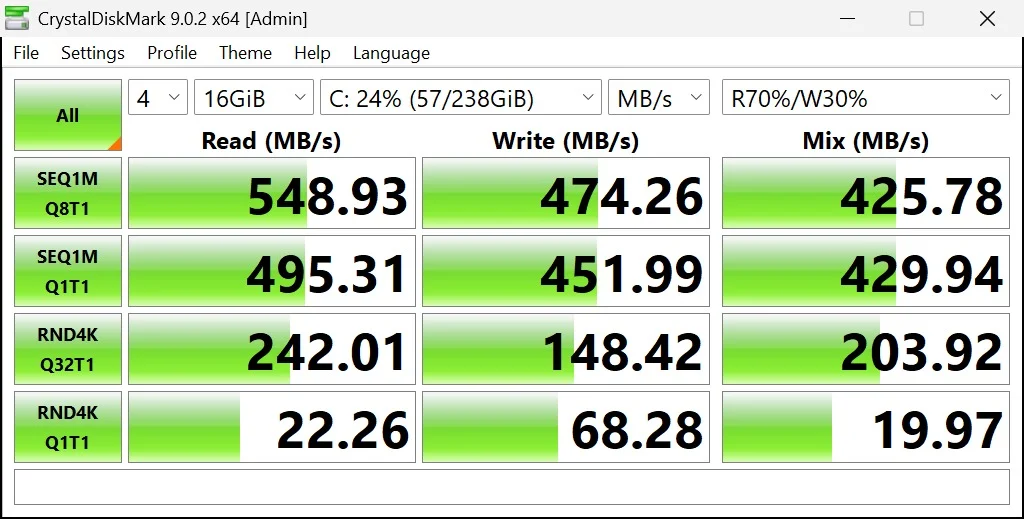
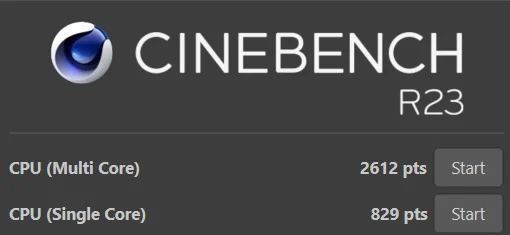
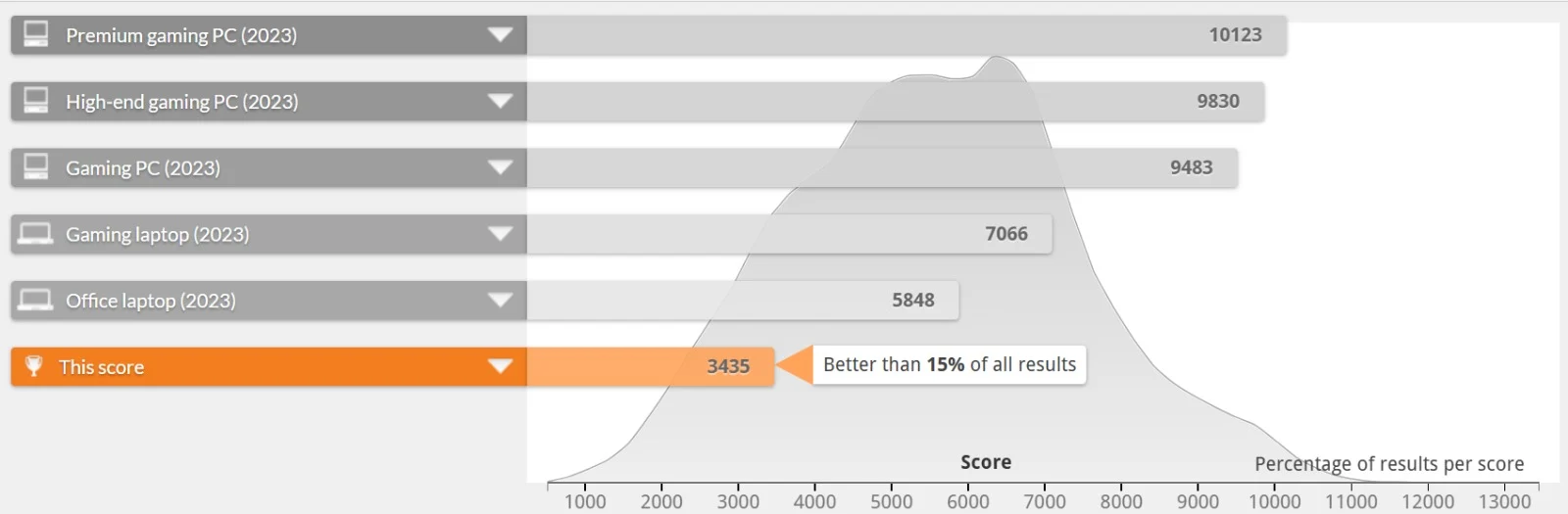
Numbers only tell half the story, but they're a useful starting point if you're wondering whether this machine can keep pace with your daily workload. We put our test unit through a full run of standard benchmarks, so here's exactly how it performed.
Storage Performance (CrystalDiskMark)
CPU Performance (Cinebench R23)
CPU Benchmark (Geekbench 5)

Graphics Performance (Geekbench 5 OpenCL)

Overall System Performance (PCMark 10)
Everyday App Checks
- Tally: Loads and saves data almost instantly, thanks to the SSD and the extra cores handling background sync without stutter.
- Microsoft Office: Excel macros, large spreadsheets, and Word documents open and save without any noticeable lag.
- Google Chrome: Comfortably manages 15 to 20 tabs at once. Push past 25 heavy tabs alongside a video call and you'll start to feel the RAM ceiling if you're on the 8GB configuration.
Hardware Details
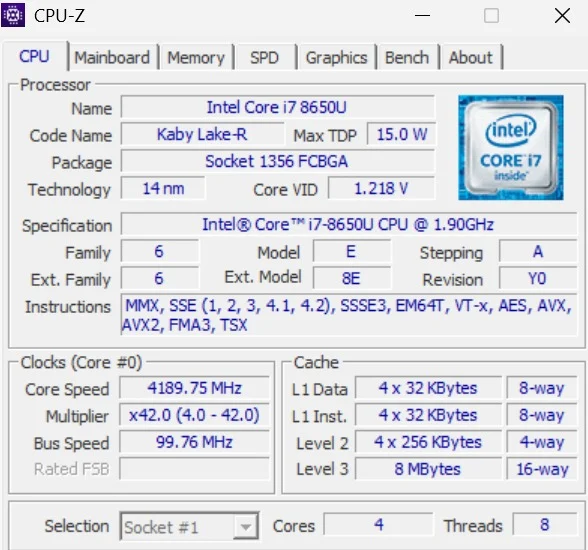
The Latitude 7490 is powered by an 8th generation Intel Core i7-8650U "Kaby Lake Refresh" processor, confirmed directly off our test unit via CPU-Z. Unlike the dual-core chips found in earlier Latitude generations, this is a true quad-core, eight-thread part, which makes a noticeable difference the moment you start juggling more than a handful of applications.
It carries a 15-watt TDP, so it's tuned for efficiency rather than raw clock speed, running at a 1.9 GHz base clock with Turbo Boost pushing individual cores as high as 4.2 GHz under light, bursty loads. Paired with 8MB of L3 cache, it's a chip built squarely for office productivity, video calls, and multitasking, not for gaming or heavy content creation.
Battery Life: How Long Does It Last?
On a healthy refurbished unit, the 60Wh battery realistically delivers somewhere between 4 to 6 hours of mixed use, depending on screen brightness and how many browser tabs are fighting for attention. That's a substantial jump over older Latitude generations, and it's genuinely enough to get through most of a working day without hunting for an outlet.
As with the rest of the Latitude range, serviceability hasn't been sacrificed for battery life. The base panel comes off with a handful of standard screws, so if the battery ever starts to wear down, swapping in a fresh one is a straightforward DIY job rather than a trip to a repair shop.
🔋 How to Check Refurbished Laptop Battery Health Before Buying
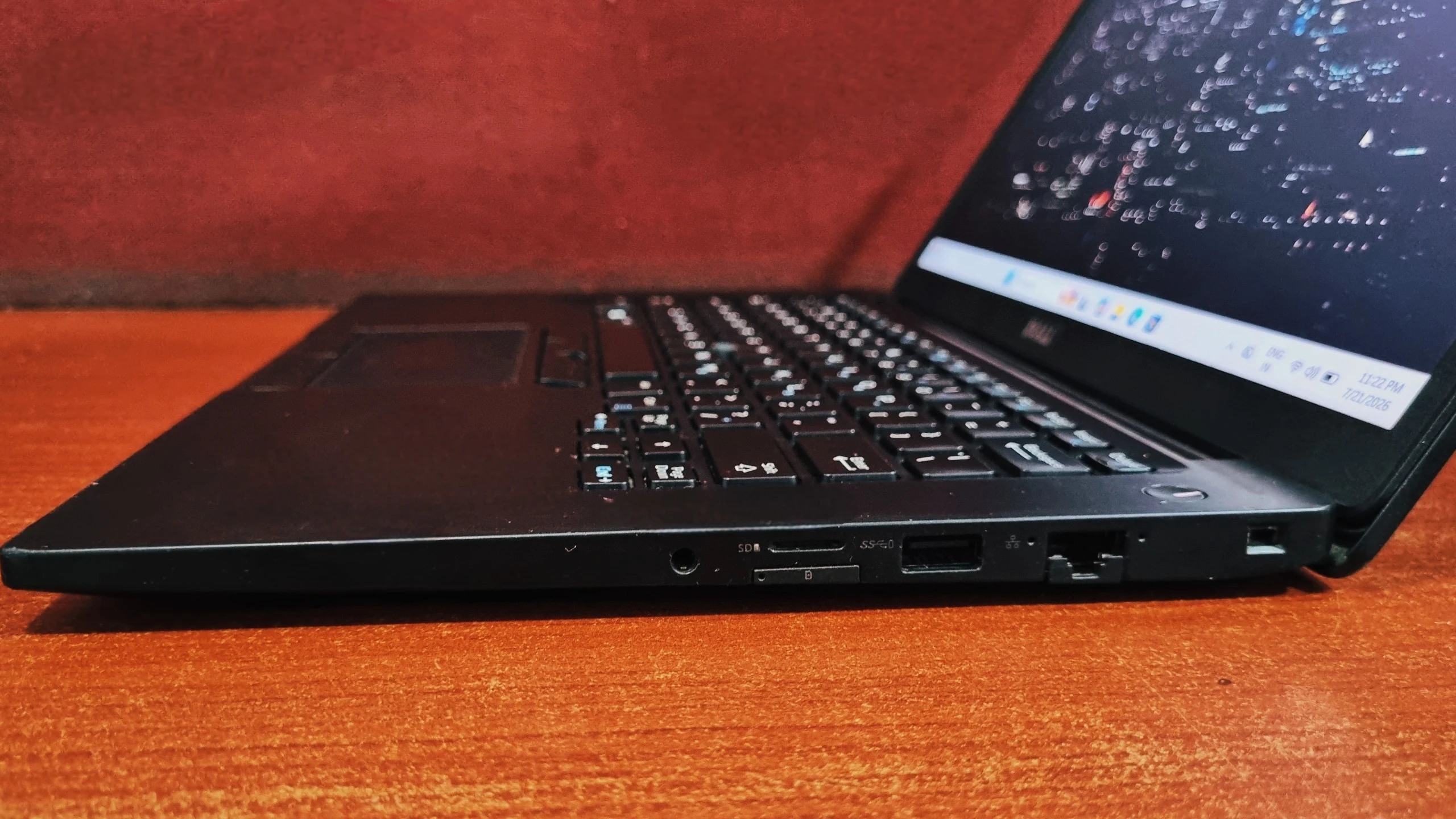
Ports and Connectivity: What Ports Does It Have?
Dell spread the ports across both sides of the chassis rather than crowding them onto one edge, which keeps cable clutter to a minimum whether you're right- or left-handed.
Left Side
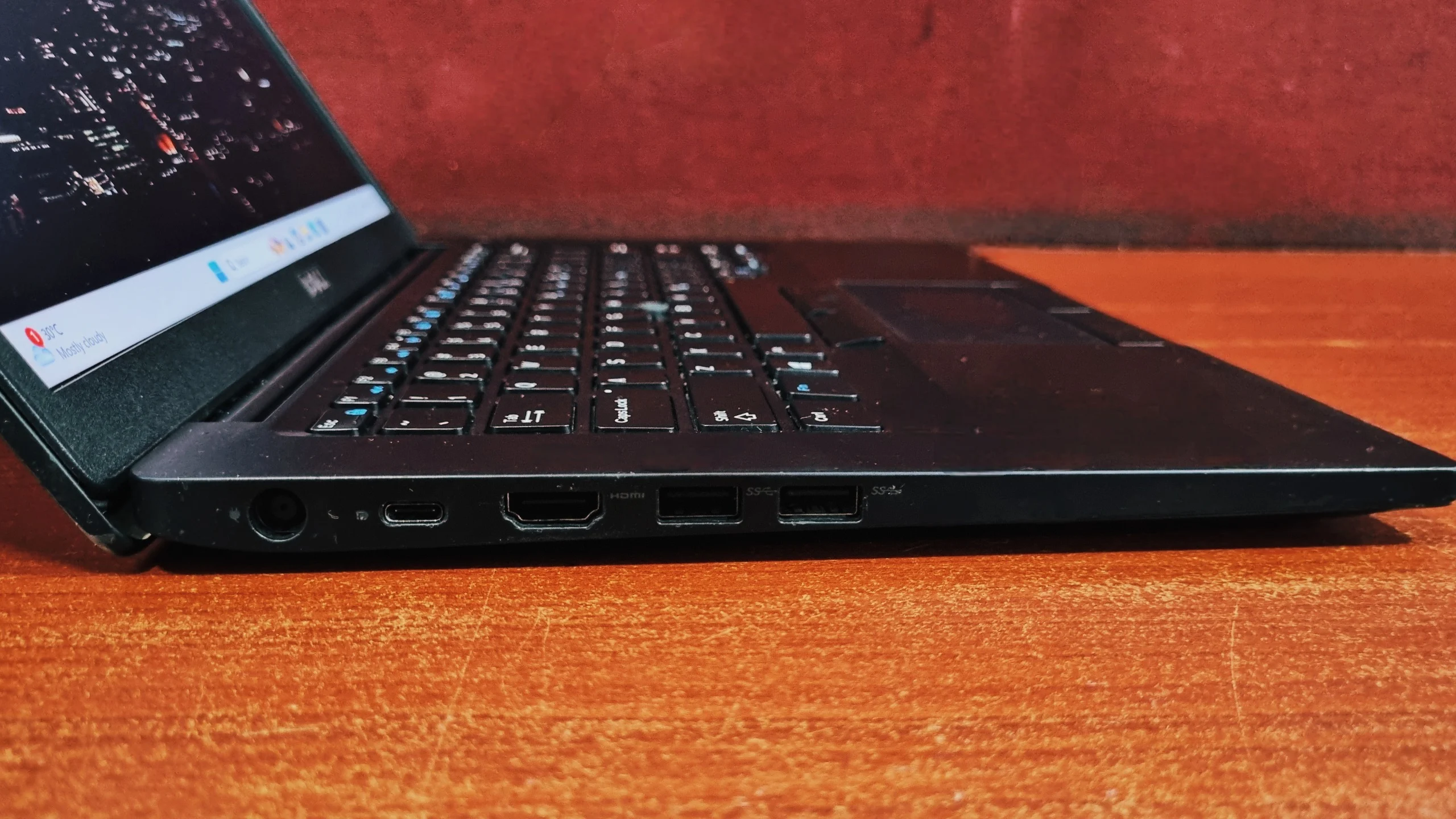
Right Side
Final Verdict: Should You Buy It?
Final Verdict
The Dell Latitude 7490 is proof that a laptop doesn't need to be brand new to still feel genuinely capable. At 1.4 kg, with a MIL-STD 810G tested chassis and a quad-core i7 that has real headroom for multitasking, it comfortably outperforms its own reputation as "just another old business laptop." The anti-glare 1080p IPS display is easy on the eyes through long work sessions, the keyboard remains one of the best in its class, and the port selection means you're rarely reaching for an adapter.
It's not going to touch modern gaming or serious creative work, and 8GB of RAM can start to feel tight if you're the type who never closes a browser tab. But for students, remote workers, and office professionals who want a dependable daily driver without paying flagship prices, the refurbished Dell Latitude 7490 remains a genuinely smart buy in 2026.
✅ Buy the Dell Latitude 7490 if:
You need a durable, portable laptop for Microsoft Office, Tally, browsing, and video calls on a tight budget, and you want a machine you can upgrade and service yourself.
⛔ Skip it if:
You play modern games, edit video, compile large codebases, or need official Windows 11 support.
Frequently Asked Questions
Yes. Its quad-core processor, durable build, and excellent keyboard make it a strong budget-friendly option for office work, studying, and everyday browsing.
Yes. The laptop supports up to 32GB of RAM and the M.2 SSD can be swapped for a drive up to 2TB, both accessible by removing the bottom panel.
Depending on the battery's health, you can expect roughly 4 to 6 hours of real-world use, and replacing the battery yourself takes only a few minutes.
Yes, select configurations include a Thunderbolt 3 port alongside standard USB-C, in addition to full-size HDMI.
Yes. It is light at 1.4 kg, runs Microsoft Office and 15 to 20 Chrome tabs without lag, and lasts 4 to 6 hours on battery, which covers a typical day of classes and assignments.
The i7-8650U is an 8th generation Intel processor, which falls outside Microsoft's official Windows 11 CPU support list. The laptop runs Windows 10 fully supported, and Windows 11 can be installed on it but without official Microsoft support.
No. It relies on integrated Intel UHD Graphics 620, which scored 5083 in Geekbench 5 OpenCL. That is enough for video playback, light photo editing, and an external monitor, but not for modern games.
It supports up to 32GB of DDR4 RAM across two SODIMM slots. Our test unit shipped with 16GB, and 8GB configurations can feel tight with heavy multitasking.


