Blogs
HP ProBook 440 G7 Review (2026): Specs and Benchmarks

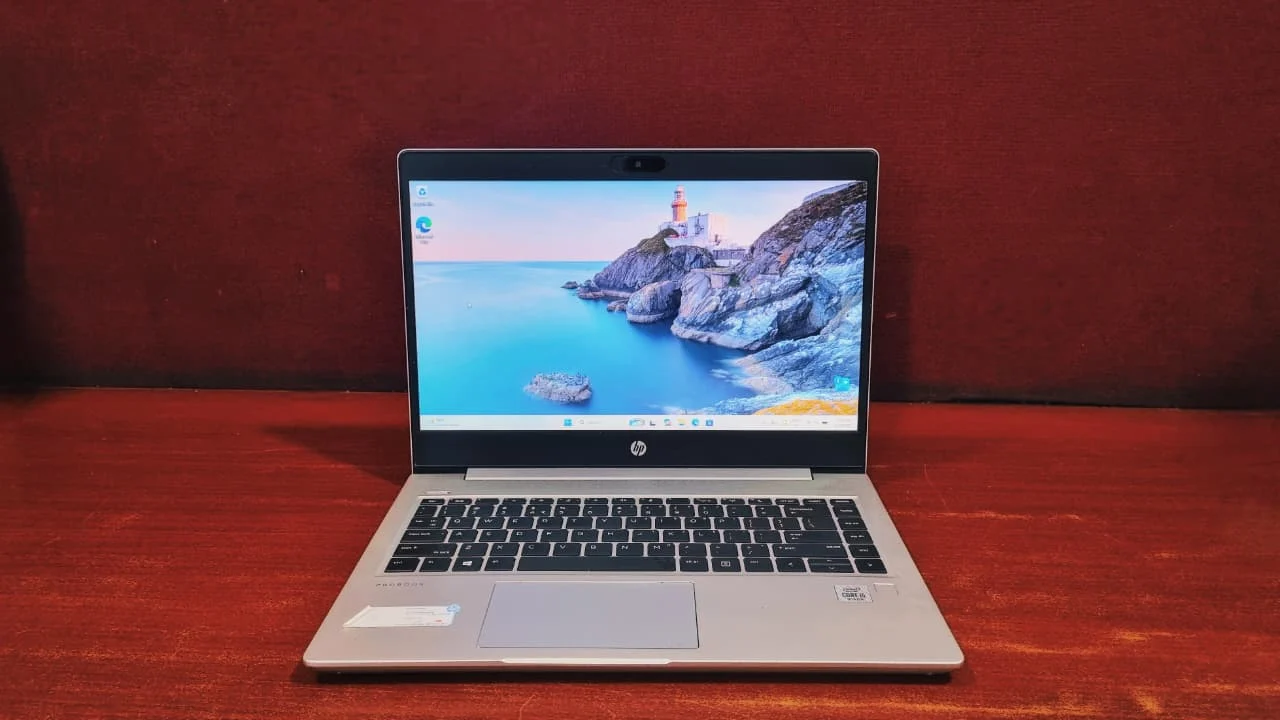
Grey, sturdy, and built to survive IT departments — the ProBook 440 G7 is more capable than its plain exterior lets on.
The HP ProBook 440 G7 is a 14-inch business laptop built for office productivity, not creative work. It runs a 10th Gen Intel Core i5-10210U with 8GB of RAM and a 256GB NVMe SSD, weighs 1.6 kg, and is rated against military-grade durability tests. It handles browsing, Office apps, and video calls comfortably, but its 15W processor and integrated Intel UHD 620 graphics make it a poor fit for 3D rendering or video editing. Bought refurbished, it is one of the better value business laptops available.
Business laptops have a bit of a reputation problem. Say the words "entry-level corporate notebook" and most people picture something grey, sluggish, and about as exciting as a stapler. So, it's fair to raise an eyebrow at the HP ProBook 440 G7 walking in with that exact label.
But spend a week actually using one, and the picture changes. HP built the ProBook 440 G7 to survive IT departments, long shifts, and the occasional desk drop, not to win design awards. And once you look past the plain exterior, there's a genuinely capable little machine underneath, especially when you pick one up refurbished at a fraction of the original price.
Specifications
HP ProBook 440 G7 specifications (as tested):
Processor
10th Generation Intel Core i5-10210U (quad-core, 8-thread)
Graphics
Intel UHD Graphics 620
Memory
8GB DDR4 2666MHz (2 slots, expandable to 32GB)
Storage
256GB NVMe PCIe SSD (expandable, plus spare 2.5" SATA bay)
Display
14-inch FHD (1920x1080) IPS anti-glare
Weight
1.6 kg
Battery
45Wh
Connectivity
Wi-Fi 6 (802.11ax), Bluetooth 5.0
Operating System
Windows 10/11 Pro
Design and Build Quality: HP ProBook 440 G7
HP kept things simple here, and that's not a complaint. The chassis is a mix of aluminum on the lid and keyboard deck with sturdy plastic elsewhere, so it doesn't feel cheap in the hand even though it's clearly built to a budget. The hinge opens flat to 180 degrees, which is genuinely useful when you're sharing a screen across a table, and it holds its position without wobbling.
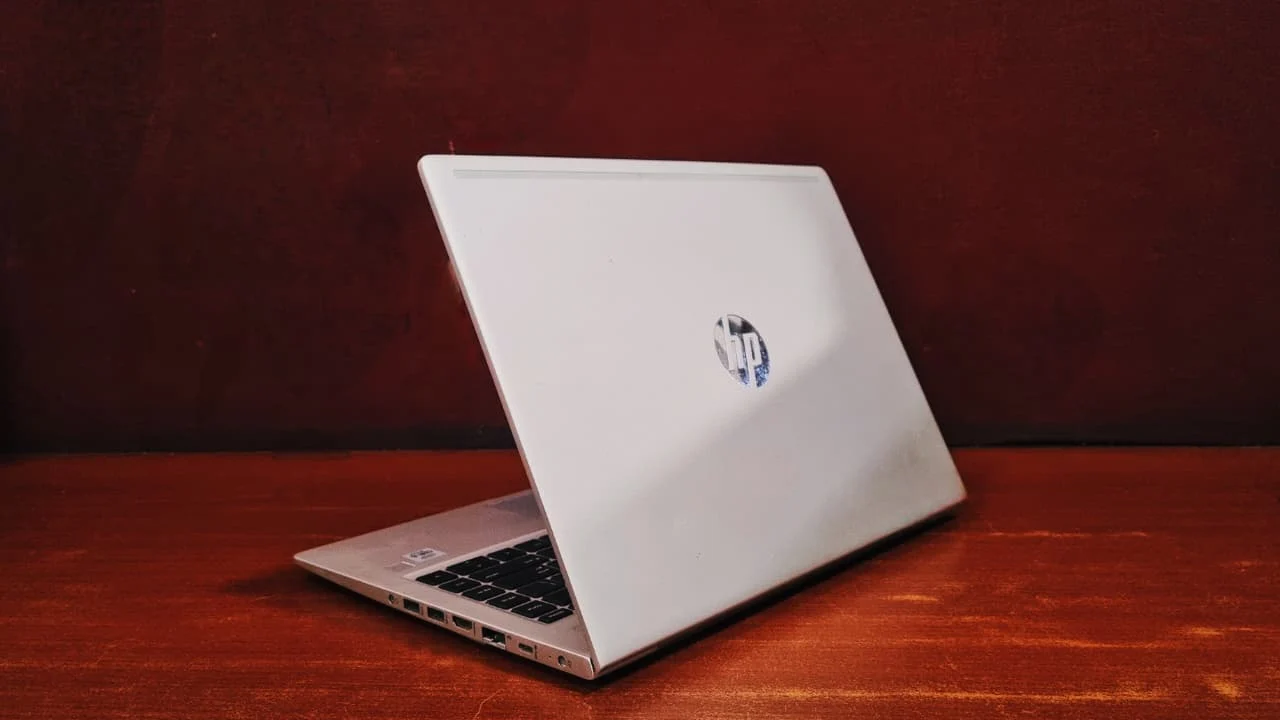
It won't turn heads the way a slim consumer Ultrabook does. The bezels around the display are noticeably thicker than what you'd find on newer laptops, and starting at roughly 1.6 kg, it has some real heft to it. What you're trading away in style, you get back in durability. The ProBook 440 G7 is tested against MIL-STD-810G military-grade stress standards, so it handles knocks, drops, and rough handling far better than most laptops in this price bracket.
HP ProBook 440 G7 Display: 14-inch FHD IPS Screen
The HP ProBook 440 G7 has a 14-inch Full HD (1920x1080) IPS anti-glare display. It is well suited to indoor office work and poorly suited to outdoor use or color-critical work like photo editing.
The panel isn't trying to impress anyone with punchy colors or eye-watering brightness. It's built to do one job well: let you work comfortably for hours. Viewing angles are wide thanks to the IPS panel, and text stays crisp whether you're reading emails or reviewing spreadsheets.
Brightness sits in a modest range that's fine for indoor office lighting but can feel a little dim near a sunny window. Colors are accurate enough for everyday documents and browsing, though this isn't the screen you'd choose for photo editing. The anti-glare coating is a nice touch; it cuts down on reflections without making the display look washed out.
Performance: How Fast Is the HP ProBook 440 G7?
Day-to-day, the ProBook 440 G7 feels quick and composed. Opening a dozen browser tabs, running Office apps side by side, or hopping between video calls and email doesn't slow it down. It's a machine built for admin work, reporting, coding in lightweight IDEs, and general multitasking rather than heavy creative rendering. We ran it through a full suite of benchmarks to see exactly where it lands, and the numbers back up that impression.
At a glance, here is how the HP ProBook 440 G7 scored across every benchmark we ran:
| Benchmark | Test | Result |
|---|---|---|
| CrystalDiskMark | Sequential read (Q8T1) | 2,410.98 MB/s |
| CrystalDiskMark | Sequential write (Q8T1) | 1,146.44 MB/s |
| CrystalDiskMark | Random 4K read | 363.59 MB/s |
| CrystalDiskMark | Random 4K write | 212.84 MB/s |
| Cinebench R23 | Multi-core | 2,364 points |
| Cinebench R23 | Single-core | 965 points |
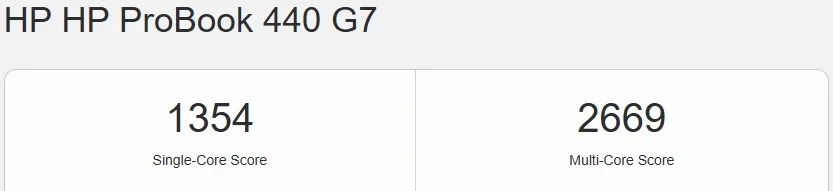
| Geekbench 5 | Single-core | 1,354 |
| Geekbench 5 | Multi-core | 2,669 |
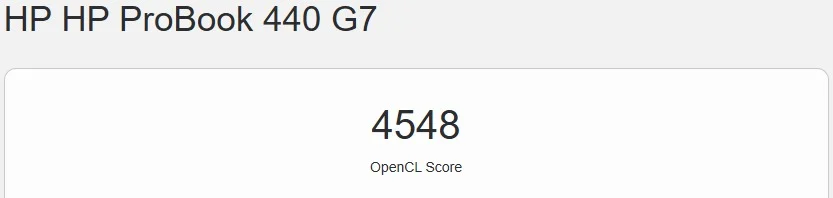
| Geekbench 5 | OpenCL (compute) | 4,548 |
| Blender Open Data | Monster scene | 17.76 samples/min |
| Blender Open Data | Junkshop scene | 13.98 samples/min |
| Blender Open Data | Classroom scene | 9.33 samples/min |
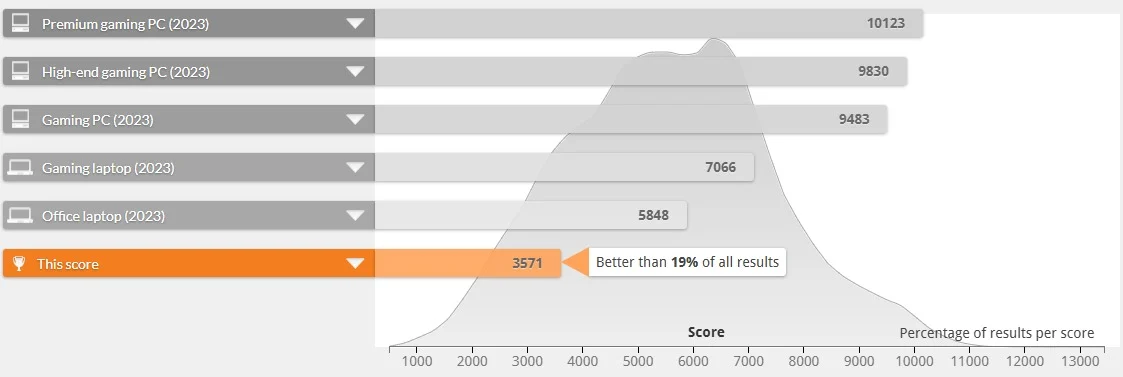
| PCMark 10 | Overall system score | 3,571 |
CrystalDiskMark (Storage Speed)
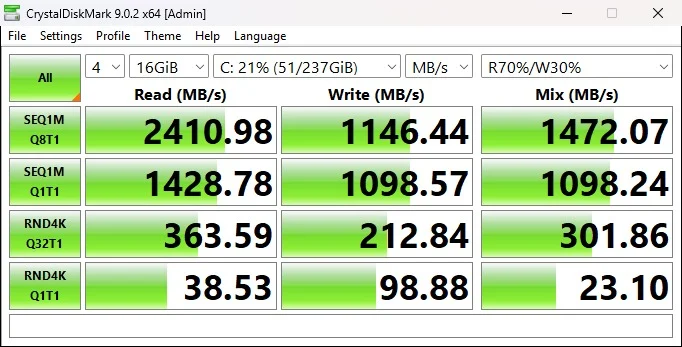
The unit we tested carries a PCIe NVMe SSD, and the numbers make it clear this isn't a laptop held back by its storage. Sequential reads hit 2,410.98 MB/s and writes reached 1,146.44 MB/s at higher queue depth, while single-queue sequential speeds still landed at a healthy 1,428.78 MB/s read and 1,098.57 MB/s write. Random 4K performance governs how snappy Windows feels day to day. It came in at 363.59 MB/s read and 212.84 MB/s write under load, with single-thread 4K reads of 38.53 MB/s and writes of 98.88 MB/s. In plain terms: boots are quick, apps open instantly, and the drive won't be the thing slowing you down.
Cinebench R23 (Rendering Performance)
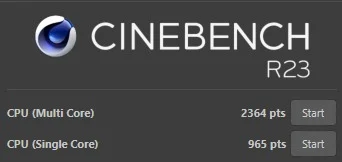
Cinebench R23 stresses every core at once, and it's a good stand-in for how the CPU handles sustained, demanding workloads like exporting a large document, compressing files, or rendering. The i5-10210U posted 2,364 points in the multi-core run and 965 points single-core. That single-core number is genuinely solid for a 15W ultra-low-power chip, and it translates to snappy, responsive everyday use. The multi-core score confirms this isn't a processor built for heavy sustained rendering. Short creative bursts are fine; all-day video exports are not what this machine is for.
Blender Open Data (Real-World Rendering)
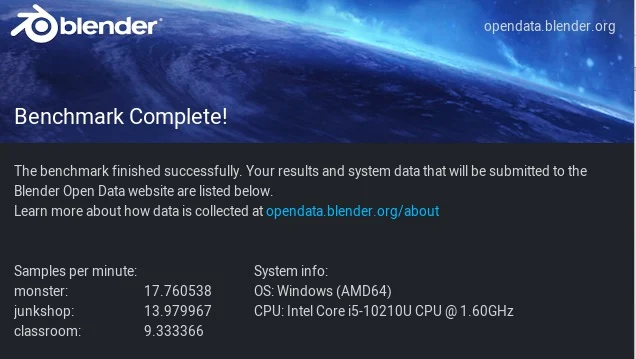
We also ran the official Blender Open Data benchmark, which renders three increasingly complex scenes and reports samples processed per minute, higher is better. The i5-10210U managed 17.76 samples/min on the lightweight "monster" scene, 13.98 on "junkshop," and 9.33 on the far more demanding "classroom" scene. These are numbers you'd expect from integrated graphics and a single-fan business laptop rather than a creator workstation. Blender and other GPU-heavy 3D work will run, but slowly. This chip and its Intel UHD 620 graphics are built for office productivity, not 3D rendering.
Geekbench 5 (CPU & Compute)
Geekbench's cross-platform CPU test gave the ProBook 440 G7 a single-core score of 1,354 and a multi-core score of 2,669. That single-core figure is what you'll actually feel in daily use, quick app launches, responsive scrolling, and snappy window switching, while the multi-core number reflects the realistic ceiling of a 4-core/8-thread ultra-low-power chip once you start layering on background tasks.
On the OpenCL side, which measures how well the integrated graphics handle compute-accelerated work like video playback, light photo editing, and hardware-accelerated browser tasks, the system posted a score of 4,548. That's respectable for Intel UHD 620 graphics and enough for smooth 1080p playback and basic GPU-assisted tasks, though it's not a number that will excite anyone hoping to game or edit video on this machine.
PCMark 10 (Overall System Productivity)
PCMark 10 is the most holistic of the bunch, it weighs web browsing, video calls, office app performance, and everyday responsiveness into a single score. The ProBook 440 G7 scored 3,571 overall, which the benchmark places better than 19% of all submitted results. For context, the 2023 average "office laptop" benchmark is 5,848. That gap isn't surprising for a 15W business chip from 2020 measured against a much newer field of test data. Taken on its own terms, the ProBook 440 G7 comfortably handles browsing, video conferencing, and office apps without stutter. It just won't set any speed records doing it.
CPU Details: Intel Core i5-10210U Specifications
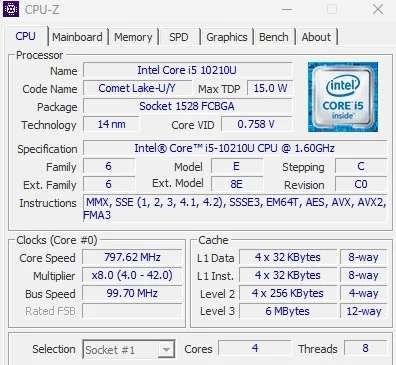
Under the hood is a 10th Gen Intel Core i5-10210U, a Comet Lake-U chip built on Intel's 14nm process. It's a genuine quad-core, eight-thread processor with a 6MB L3 cache, and it's designed first and foremost for efficiency, with a maximum TDP of just 15W. Base clock speed sits at 1.60 GHz, but Turbo Boost pushes individual cores up to roughly 4.2 GHz when the workload calls for it. That low power envelope is exactly why the fans stay quiet and the battery lasts as long as it does. This chip is tuned for long office days, not benchmark records.
Battery Life: How Long Does the HP ProBook 440 G7 Last?
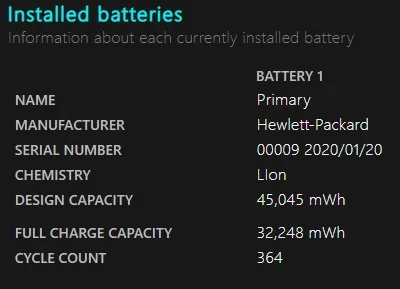
The HP ProBook 440 G7 ships with a 45Wh battery rated by HP at over 4 hours under light use, with fast charging to roughly 50% in about 30 minutes. On a refurbished unit, expect around 2 hours of minimum charge.
HP's official figures put battery life at well over 4 hours under light use. In the real world, especially on a refurbished unit, expect that number to be a bit lower depending on the age and health of the battery, but a solid full workday of use is a realistic expectation with moderate brightness and typical office tasks. HP's fast-charge tech is a nice bonus too, getting you back to roughly half a charge in about half an hour.
Connectivity, Ports, and Security Features
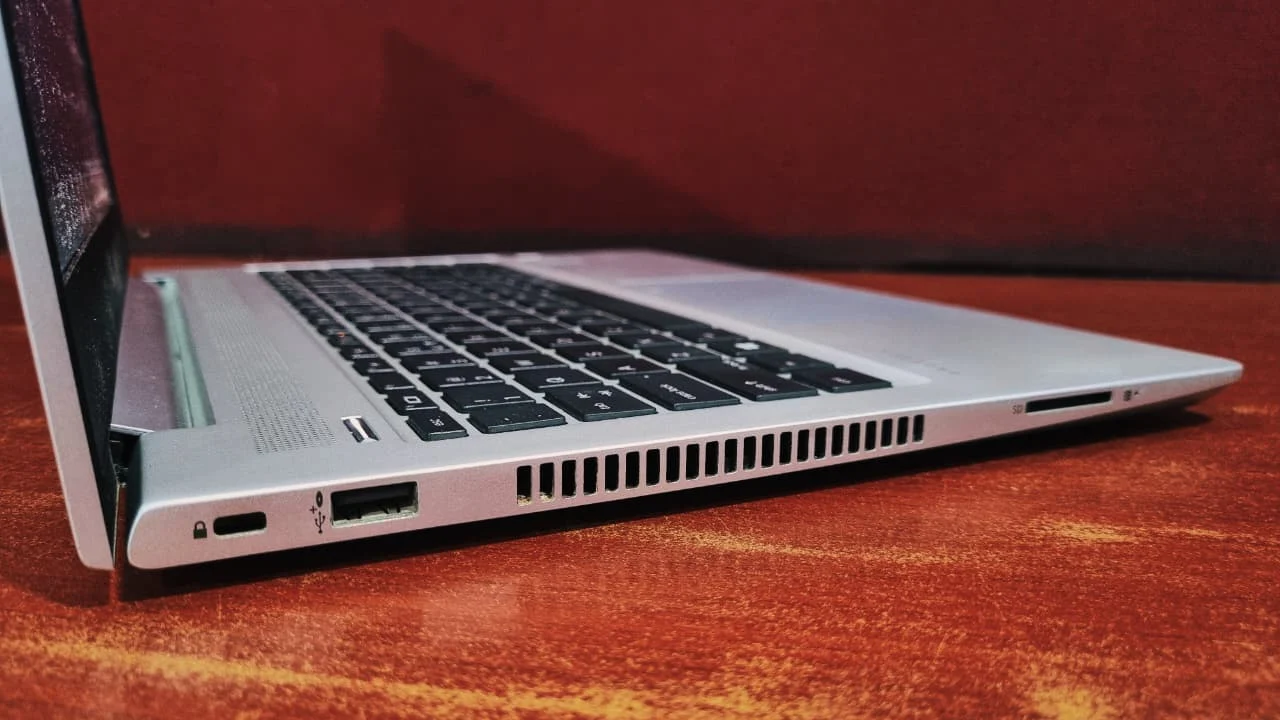
For a laptop aimed squarely at business buyers, HP didn't skimp on security. Depending on configuration, you can get a fingerprint reader, an IR camera for Windows Hello facial login, and a physical webcam privacy shutter, so there are several ways to keep the machine locked down without relying on passwords alone.
Security Features
- HP Sure Start & HP Biosphere: self-healing BIOS protection against firmware attacks.
- TPM 2.0: hardware-based encryption support for enterprise deployments.
- Optional fingerprint sensor and IR camera for Windows Hello.
Ports and Connectors
Left Side
Right Side
HP ProBook 440 G7 Keyboard and Touchpad: Typing Experience
The keyboard is one of the quieter strengths of this laptop. Key travel is comfortable, the layout feels natural, and the backlighting makes it easy to work in dim rooms or on red-eye flights. It's not quite as plush as a premium ThinkPad keyboard, but it's a clear step above what you'd find on most laptops in this price range.
The touchpad is a fairly standard click pad, precise enough for everyday navigation and gestures, though it lacks the extra tactile options some rivals offer, like a dedicated pointer stick. For general office work, it does the job without any complaints.
Bottom Line: Is the HP ProBook 440 G7 Worth Buying?
Final Verdict
The HP ProBook 440 G7 was never meant to be flashy, and it doesn't pretend to be. What it does offer is dependable performance, solid build quality, a comfortable keyboard, and enough security features to satisfy an IT department, all wrapped up in a laptop that's easy on the wallet, especially when bought refurbished. If you need a laptop for spreadsheets, emails, video calls, and everyday admin work, and you'd rather spend your money elsewhere, this is a hard machine to argue against.
✅ Buy the HP ProBook 440 G7 if:
You need a durable, secure business laptop for spreadsheets, emails, video calls, and everyday admin work, and want strong IT-friendly security features at a refurbished price.
⛔ Skip it if:
You need bright outdoor visibility, color-critical editing, 3D rendering, or gaming performance.
Frequently Asked Questions
Yes. The HP ProBook 440 G7 has two RAM slots supporting up to 32GB of DDR4 memory, and its NVMe SSD can be swapped for a larger drive. Some configurations even leave room for a secondary 2.5" SATA drive if you need extra storage.
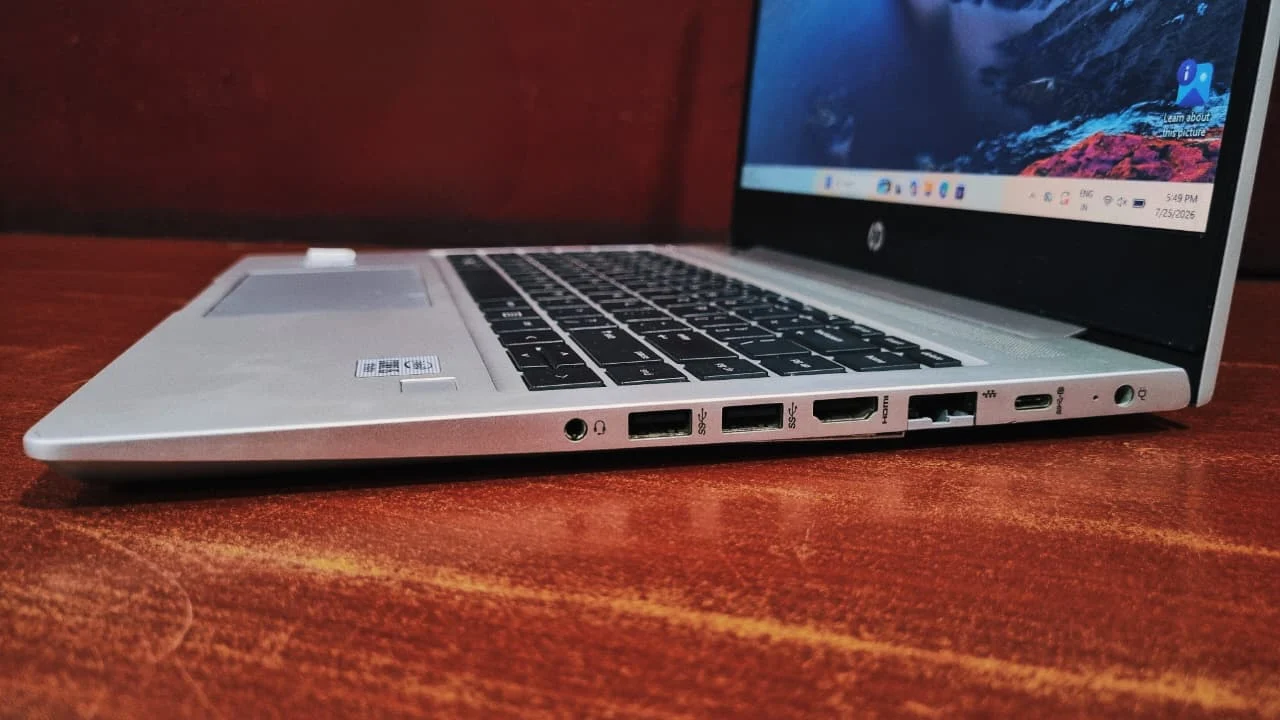
Yes. The HP ProBook 440 G7 includes a USB Type-C 3.1 Gen 1 port that supports DisplayPort output and power delivery, so you can charge the laptop or run an external monitor through it depending on the configuration.
No. The HP ProBook 440 G7 display is not bright enough for comfortable outdoor use. Its 14-inch IPS panel is tuned for indoor office lighting, and while the anti-glare coating helps cut reflections, brightness levels will feel a bit low in direct sunlight.
No. The HP ProBook 440 G7 is not a gaming laptop. It relies on integrated Intel UHD Graphics 620 with no discrete GPU, which limits it to older or heavily scaled-down titles at low settings. Its Geekbench 5 OpenCL score of 4,548 is adequate for 1080p video playback and browser acceleration, but not for modern gaming.
Yes, as a refurbished purchase for office work. The HP ProBook 440 G7 launched in 2020, so its 10th Gen processor is several generations behind current chips, and its PCMark 10 score of 3,571 trails the modern office-laptop average of 5,848. For browsing, Office apps, email, and video calls, it remains capable, and the refurbished price is where its value sits.
The HP ProBook 440 G7 weighs from 1.6 kg, making it reasonably portable and lighter than many business laptops in its class, though not quite as slim as a premium Ultrabook. The trade-off is a genuinely tough build that can handle daily commuting and rougher handling.