Blogs
Apple MacBook Pro 13-inch Review: Is the Last Intel 13-inch Pro Still Worth Buying in 2026?

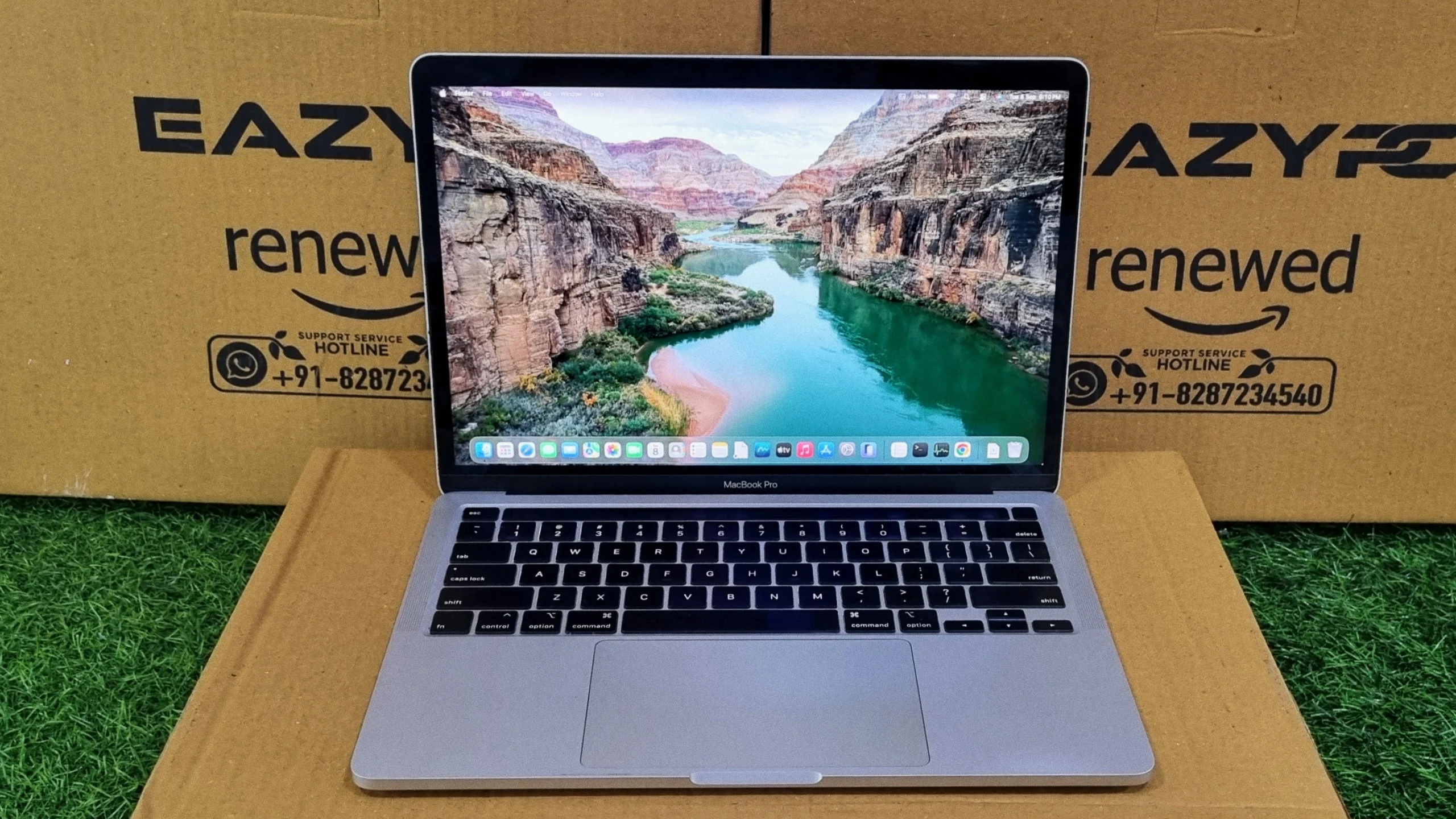
The last Intel-based 13-inch MacBook Pro, tested on a refurbished unit to see how it holds up in 2026.
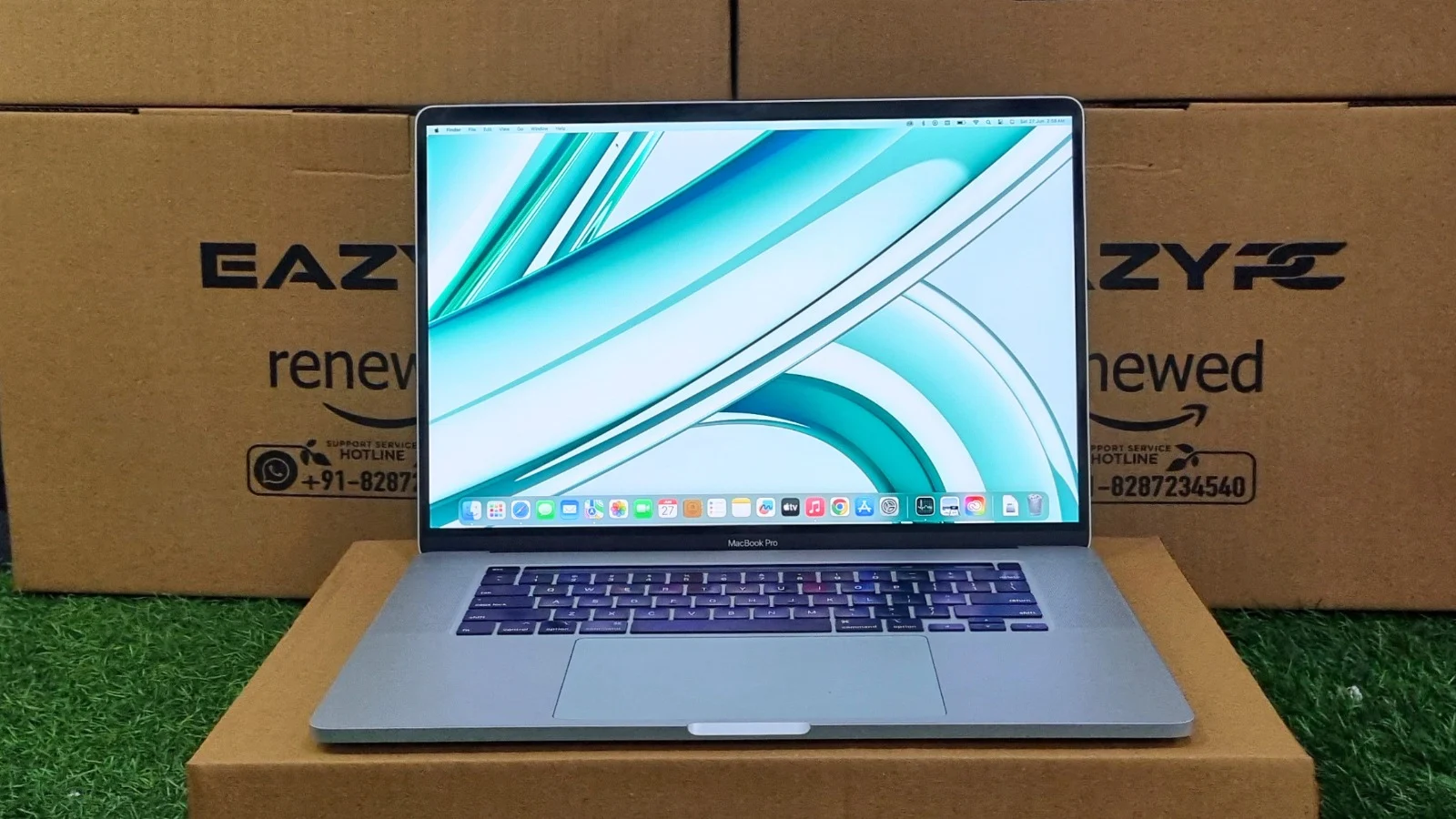
The Apple MacBook Pro 13-inch (2020) is the last Intel-based 13-inch MacBook Pro, and in 2026 it still handles everyday productivity well but not GPU-heavy work. Its 10th-gen Core i7-1068NG7 scores 1539 single-core and 4858 multi-core in Geekbench, and the trade-offs are integrated-only graphics plus soldered, non-upgradable RAM and storage.
✅ Pros
Solid unibody aluminum build; redesigned scissor-switch Magic Keyboard; sharp 2880x1800 Retina display; 32GB RAM on this configuration; four flexible Thunderbolt 3 ports; still runs the latest macOS.
⚠️ Cons
Integrated graphics only, no discrete GPU; RAM and SSD soldered and non-upgradable; no Apple Neural Engine; no USB-A, HDMI, or SD card reader.
Apple MacBook Pro 13-inch (2020) Specifications
Processor
10th Gen Intel Core i7-1068NG7 Quad-Core (2.3GHz base, up to 4.1GHz Turbo Boost)
Graphics
Integrated Intel Iris Plus Graphics (1536MB shared)
Memory
32GB 3733MHz LPDDR4X (16GB + 16GB, soldered, non-upgradable)
Storage
500GB SSD on the test unit (other trims exist), soldered and non-upgradable
Display
13-inch Retina IPS panel (2880 x 1800 resolution)
Input
Full-size backlit scissor-switch "Magic Keyboard"
Camera
Built-in 720p FaceTime HD webcam
Operating System
macOS Tahoe (26.5.2) on the test unit
The Apple MacBook Pro (13-inch, 2020) with four Thunderbolt 3 ports, identified by its model number MacBook Pro 16,14 etc, was the last 13-inch Pro built on Intel silicon before Apple's switch to Apple Silicon later that same year. It paired a 10th-generation Ice Lake quad-core chip with Apple's redesigned scissor-switch keyboard, addressing one of the most common complaints about the outgoing butterfly-switch models.
Here is a breakdown of what this 13-inch machine has to offer, based on a full round of benchmarking on a refurbished test unit.
Design & Build Quality
Like every MacBook Pro of this era, the unibody aluminum chassis is rock solid, with no perceptible flex in the lid, keyboard deck, or base. At just under 1.4 kg, it remains comfortably portable, and the footprint is unchanged from the previous 13-inch generation, so existing sleeves and cases still fit.
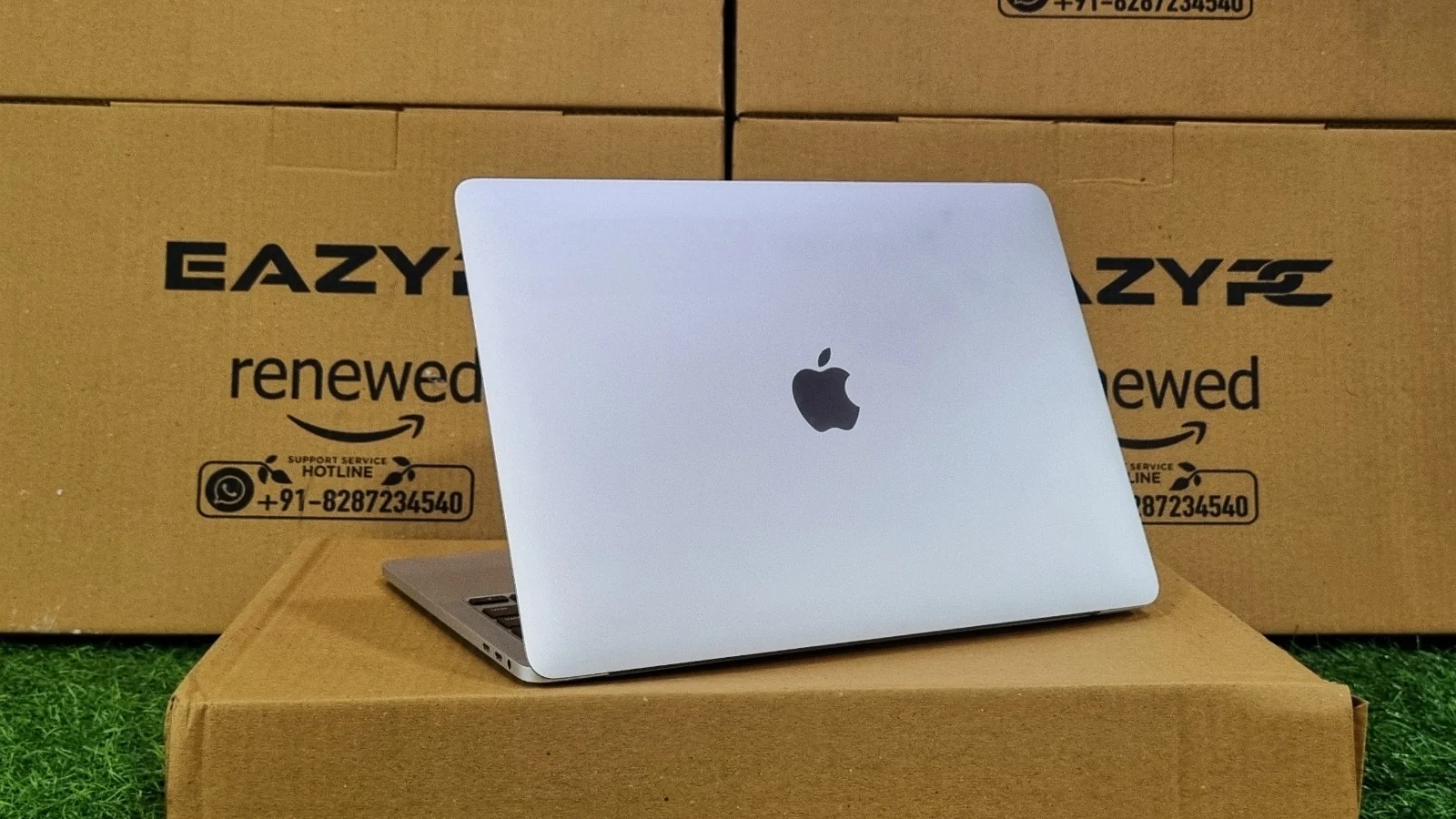
Unibody aluminum chassis — rock solid with no perceptible flex
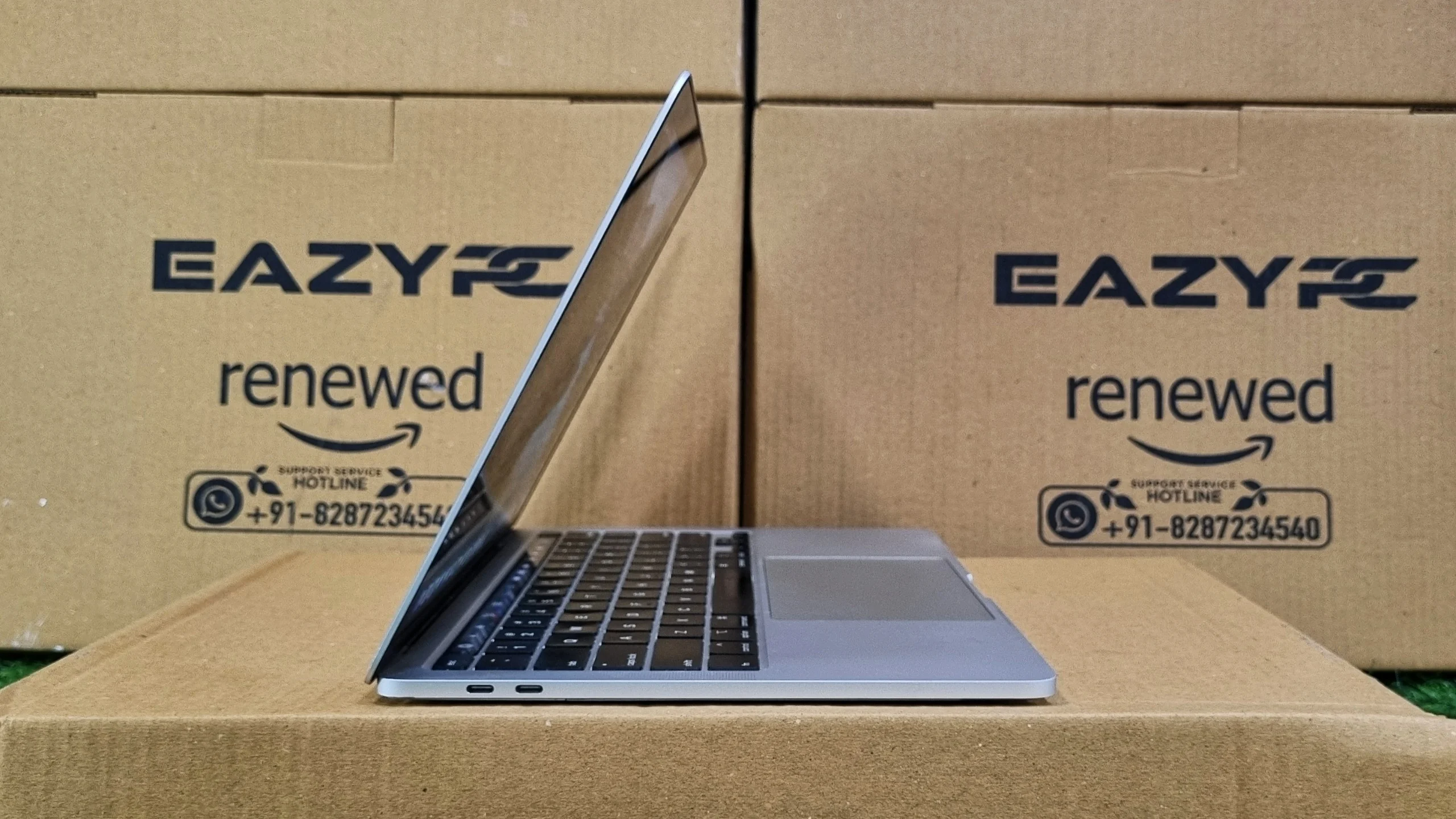
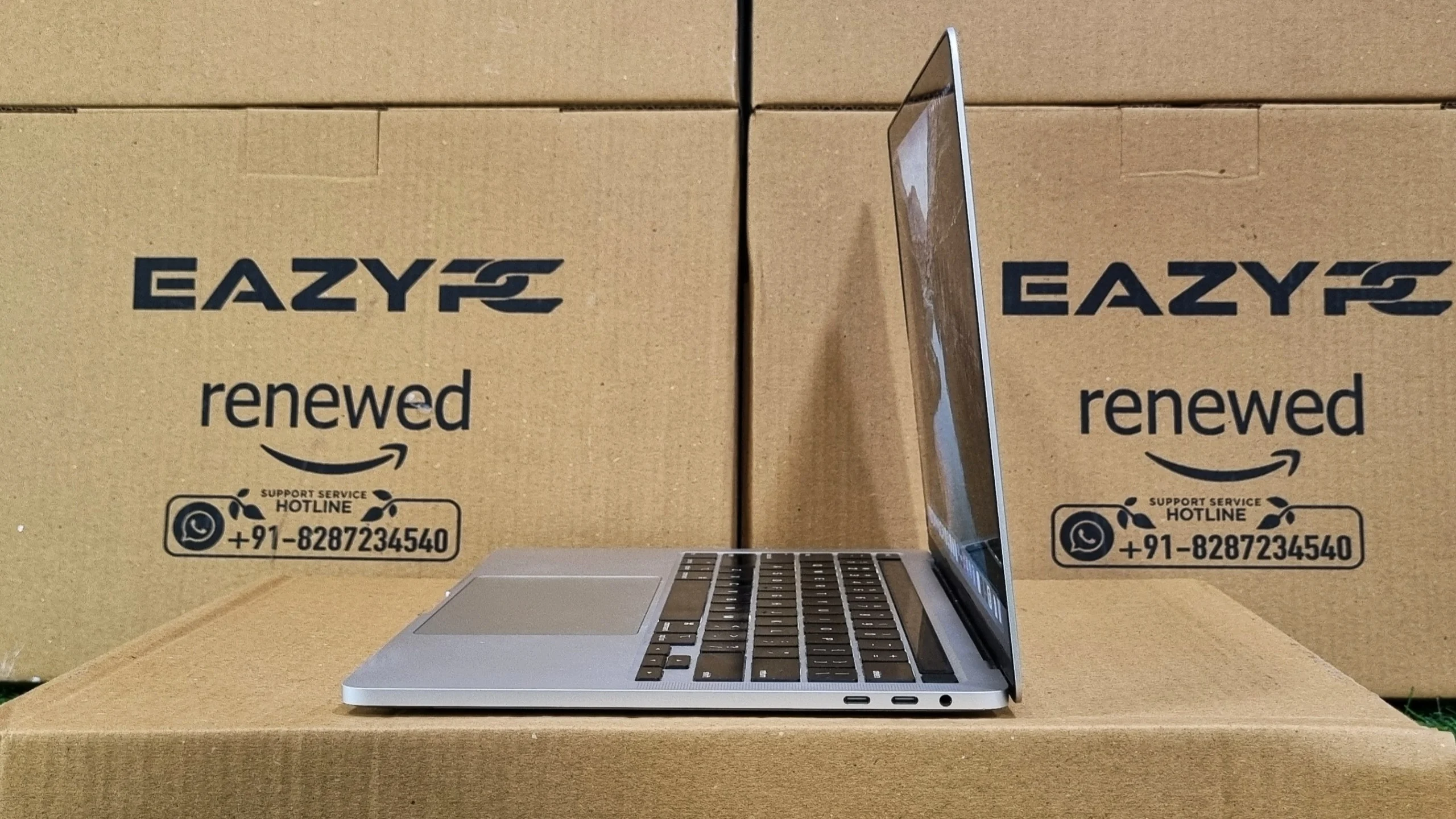
Port selection follows the pattern set by the rest of the late-2010s lineup: four USB-C/Thunderbolt 3 ports (two on each side) plus a 3.5mm headphone jack, and nothing else. There's no card reader, no USB-A, and no HDMI, so a dongle or hub is effectively mandatory for older peripherals.
Display & Audio
The 13.3-inch Retina display runs at 2880 x 1800, giving the same excellent pixel density Apple is known for. It supports the P3 wide color gamut and holds up well for photo editing, document work, and general everyday use, including in reasonably bright rooms.
Audio quality is solid for a machine this size, with a stereo speaker system that produces clear mids and highs, though bass response is understandably limited by the compact chassis compared to the larger 15/16-inch models.
Performance & System Benchmarks
The quad-core i7-1068NG7 inside this unit is a 10th-generation "Ice Lake" chip, a meaningful architectural step up from the earlier 8th-gen chips used in prior 13-inch models. The test unit was running macOS Tahoe (version 26.5.2), well beyond what this generation officially shipped with, and a useful sign of how long Intel Macs continued to receive OS support.

10th-gen Ice Lake Core i7-1068NG7 under test
Geekbench CPU Performance
The machine achieves a Single-Core Score of 1539 and a Multi-Core Score of 4858. A single-core score of 1539 is a strong result for this generation, reflecting the higher per-core IPC gains Ice Lake brought over the 8th-gen chips it replaced. Everyday tasks like browsing, document editing, and general navigation around macOS feel snappy. The multi-core score of 4858 shows this quad-core, eight-thread chip handles moderate multitasking and light content creation comfortably, though it will still be outpaced by machines with more physical cores when it comes to sustained, heavily threaded workloads like large video exports.

Geekbench CPU results — Single-Core and Multi-Core scores
Geekbench OpenCL
The OpenCL score of 6823 reflects the compute performance of the integrated Intel Iris Plus Graphics. There is no discrete GPU on this configuration, so any GPU-accelerated compute or rendering work leans entirely on the integrated chip. It's a step up from the older Intel HD Graphics 530 used in previous generations, but it's still built for light GPU tasks rather than heavy 3D or GPU-accelerated video work.
Geekbench OpenCL score — Intel Iris Plus Graphics
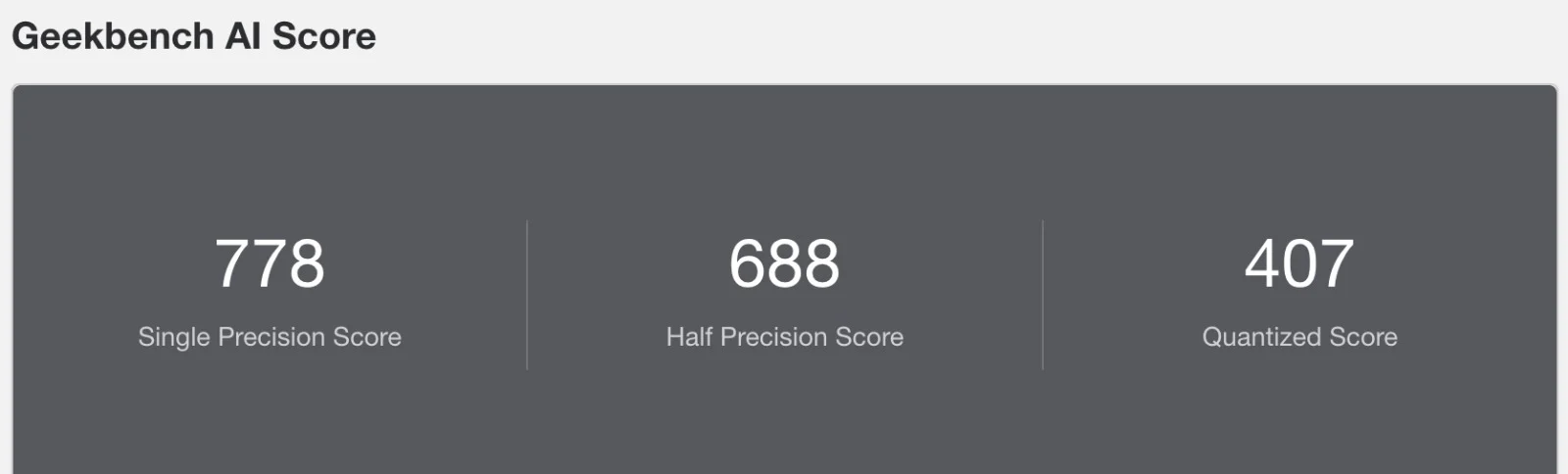
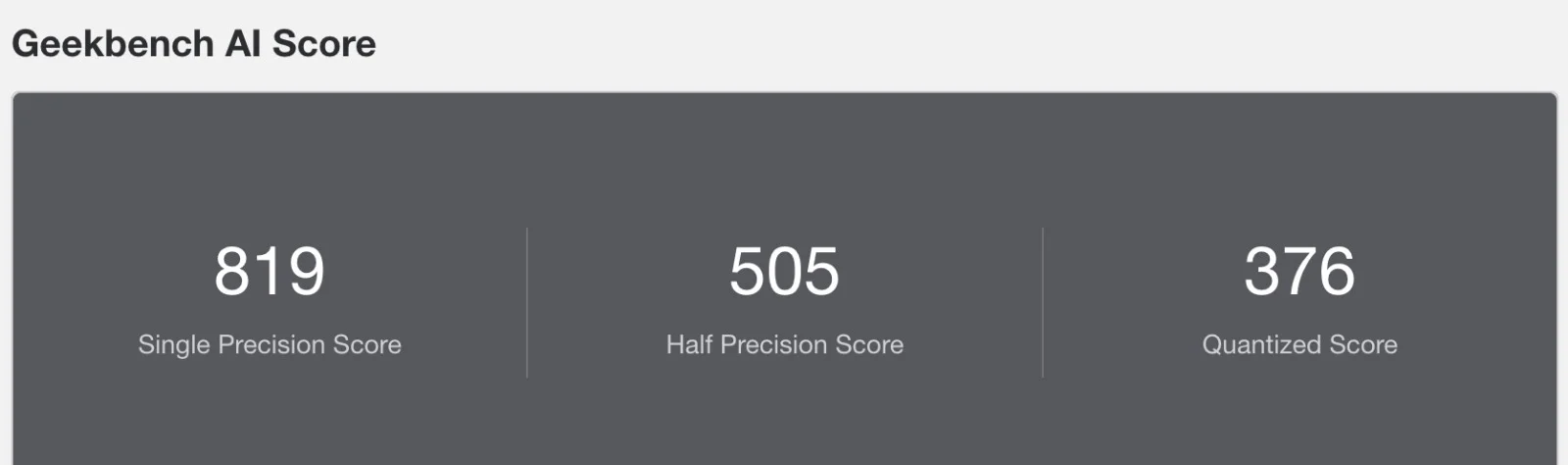
Geekbench AI
Geekbench AI, which measures on-device machine-learning inference, returned Single Precision scores of 819 and 778 across two separate runs (with Half Precision at 505/688 and quantized at 376/407). The run-to-run spread is typical of CPU/GPU-based inference without a dedicated neural engine. This Intel-based Mac has no Apple Neural Engine to lean on, so all AI workloads fall back to the CPU and integrated GPU, and scores land well below what any Apple Silicon Mac released after it can manage.
Geekbench AI scores across two separate runs
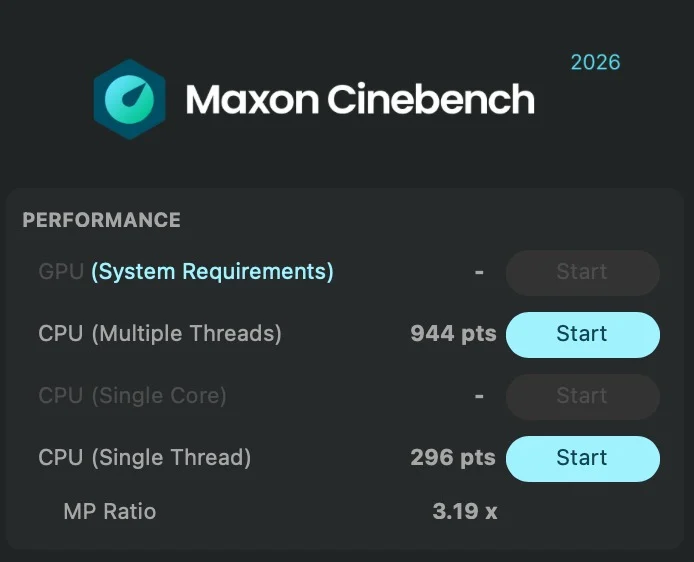
Maxon Cinebench 2026
Multi-threaded CPU performance scored 944 pts, with a single-thread score of 296 pts (an MP ratio of 3.19x). The GPU test is greyed out, as the integrated graphics don't meet Cinebench 2026's minimum system requirements, a clear reminder of how far a 2020-era integrated GPU sits below current standards.
Maxon Cinebench 2026 — CPU multi-thread and single-thread scores
Blender Benchmark (CPU Rendering)
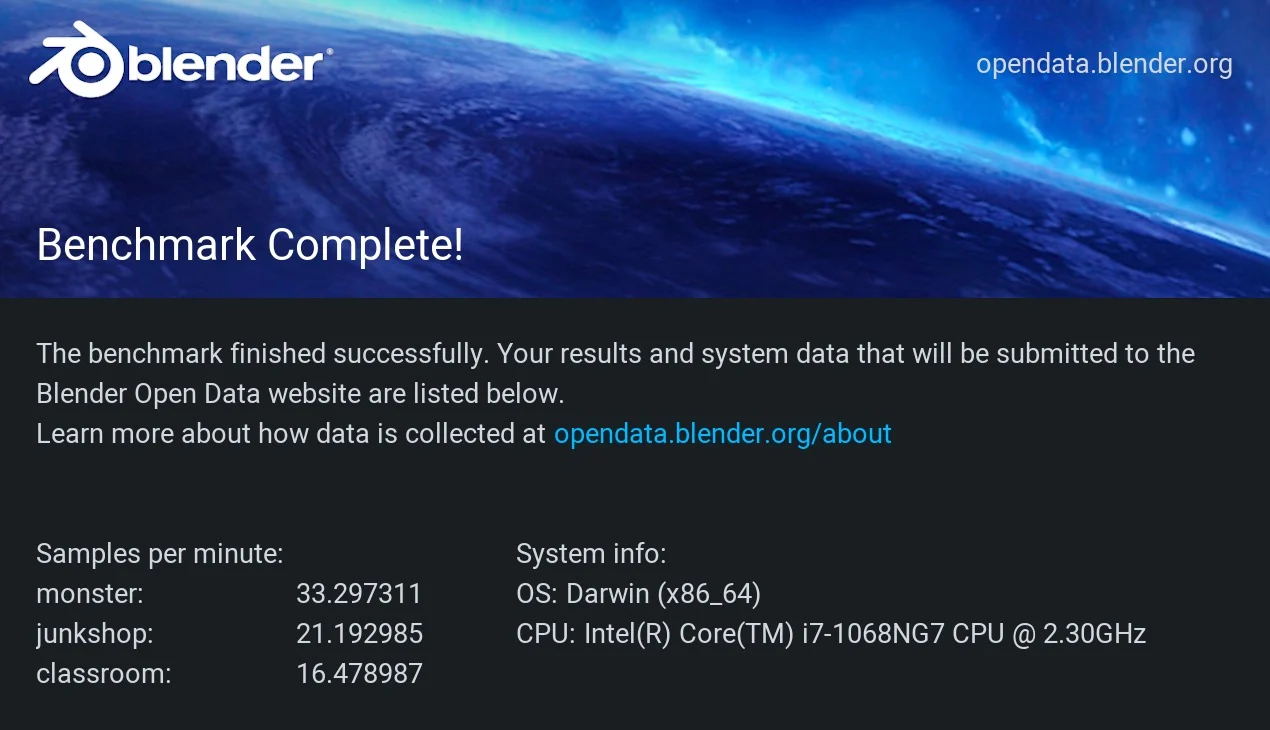
Samples per minute came in at 33.30 for the Monster scene, 21.19 for Junkshop, and 16.48 for Classroom, all rendered on the CPU since there's no discrete GPU to offload to. These are usable numbers for previewing simple scenes or short test renders, but production-length Blender work will be slow going compared to a current-generation machine with GPU acceleration.
Blender Benchmark results — rendered on CPU only
PassMark Performance Test (Mac)
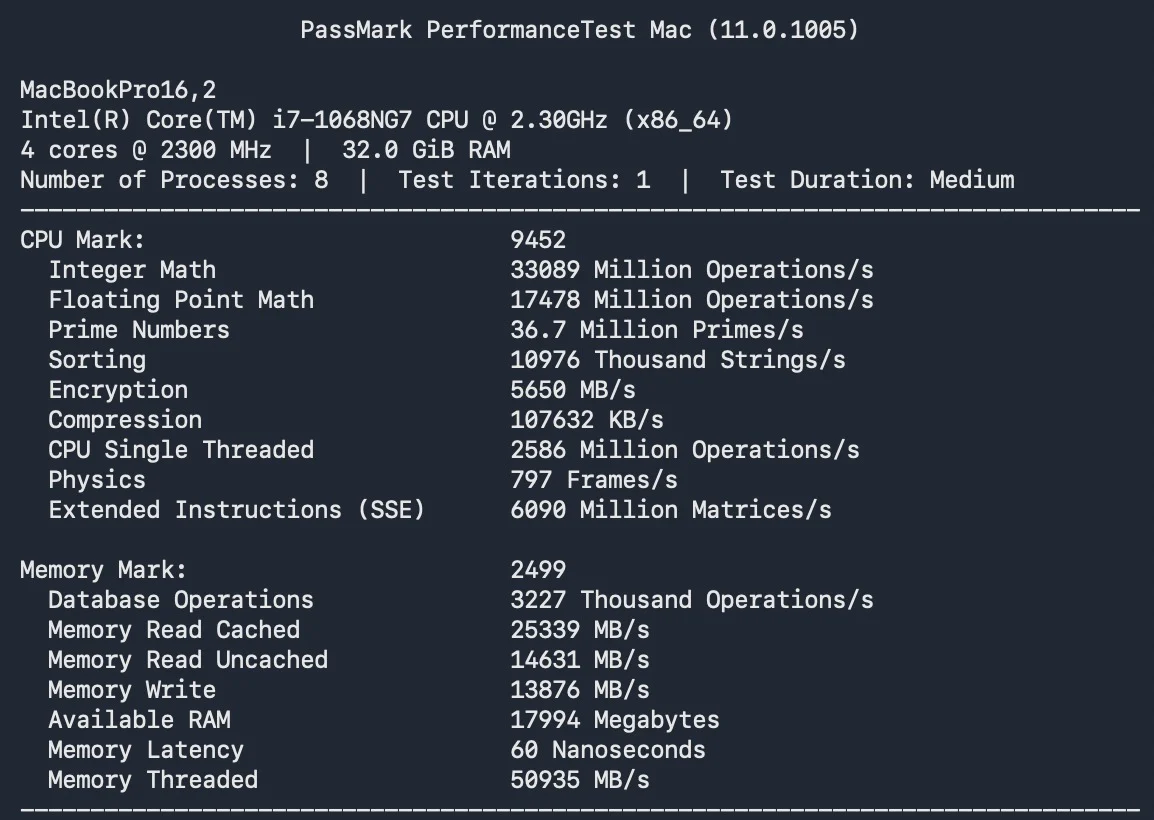
The PassMark suite gives a more granular look at the hardware. CPU Score of 9452 is a solid result for a quad-core ultraportable chip, backed by 33089 Mbps/s integer math, 17478 Mops/s floating point, and 36.7M primes/s. Physics scored 797 frames/s. This is comfortably ahead of the dual-core chips used in the entry-level 13-inch models from a few years prior, and confirms the chip handles day-to-day and moderately demanding productivity work without issue. Memory Score of 2499 reflects the 32GB of 3733MHz LPDDR4X, which shows strong read/write throughput (25339 MB/s cached read, 13876 MB/s write). 32GB is generous for this class of machine and comfortably covers heavy multitasking, dozens of browser tabs, and running a couple of memory-hungry apps side by side.
Battery Back-up
This 13-inch model carries a 58.2Wh battery. What matters more on a refurbished unit is the condition of that battery, and this one holds up well: the cycle count is low, and battery health still sits at roughly 80-90% of original capacity. That means plenty of usable life left before a replacement is worth considering, and it holds a charge much like a lightly used machine rather than a worn-out one. When shopping refurbished, always check the cycle count and health figure in System Settings before buying. Those two numbers tell you far more about the battery than the age of the machine does.
Connectivity
The Apple MacBook Pro (13-inch, 2020) follows the same streamlined, dongle-dependent approach as the rest of the late-2010s/early-2020s lineup: four Thunderbolt 3 (USB-C) ports and a 3.5mm headphone jack, with no card reader, USB-A, or HDMI built in.
Left Side
Right Side
Storage Upgradability
Storage on this model is soldered directly to the logic board and cannot be upgraded or swapped after purchase, unlike the removable SSD modules found on some earlier MacBook Pro generations. Buyers should choose their storage tier carefully at the point of purchase (or when shopping the refurbished market), since there is no path to add capacity later. No one wants to dangle around an external hard disk.
Keyboard and Touchpad
This generation replaced the divisive butterfly-switch keyboard with Apple's redesigned scissor-switch "Magic Keyboard," bringing back more key travel and a noticeably more reliable, comfortable typing experience, widely regarded as one of the best decisions Apple made in this era of MacBook Pro design. A Touch Bar and Touch ID sensor sit above the keyboard, replacing the physical function-key row and adding fingerprint unlock and Apple Pay support.
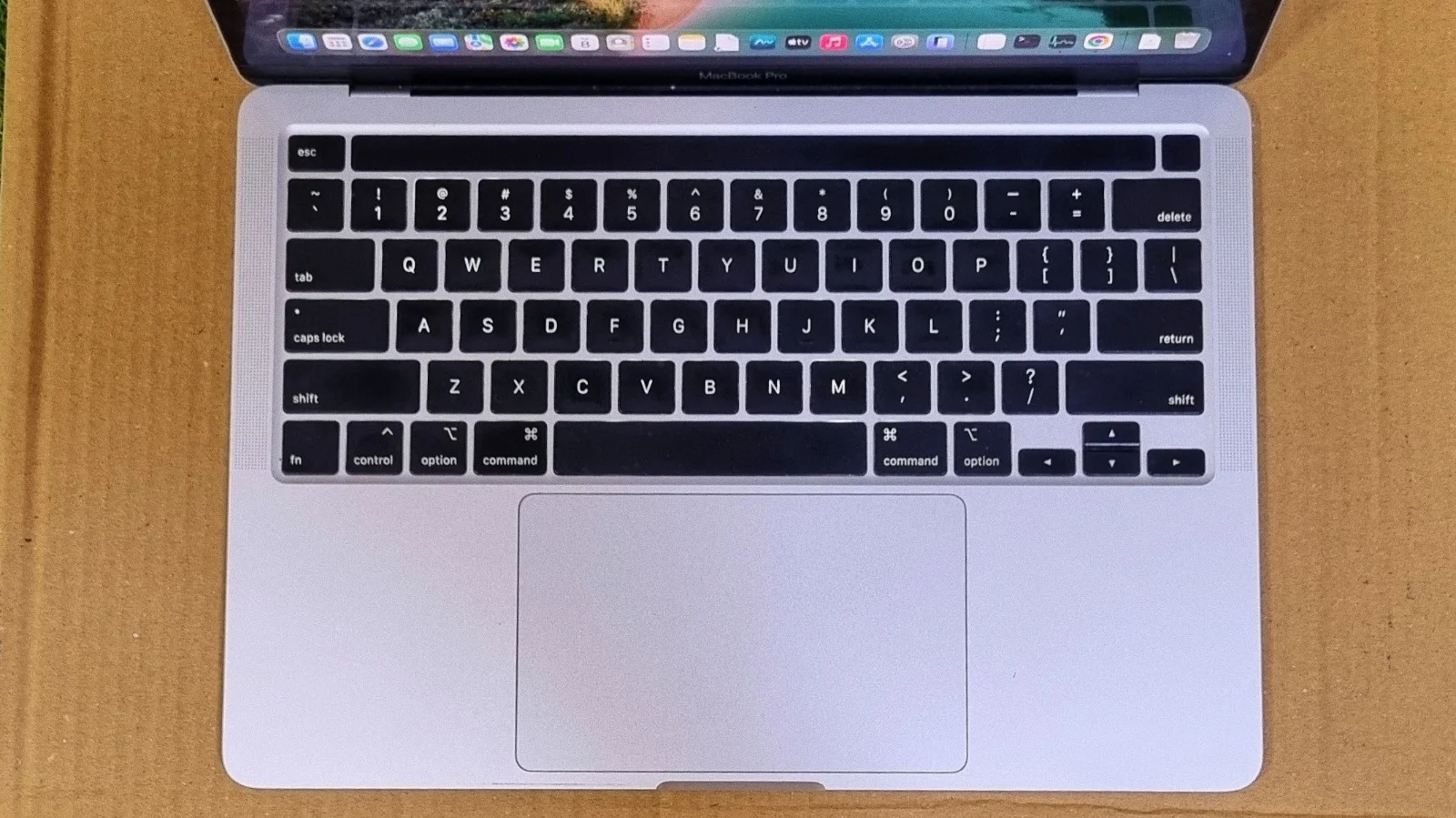
Scissor-switch Magic Keyboard with Touch Bar and Touch ID
The Force Touch trackpad is large, accurate, and responsive, with haptic "force-press" feedback that takes a little getting used to but works reliably once you're used to it.
Bottom Line
Verdict
The 13-inch MacBook Pro (2020, four Thunderbolt 3 ports) is a well-built, dependable machine that still handles everyday productivity comfortably years after release. The 10th-gen i7-1068NG7 delivers a strong single-core Geekbench score of 1539 and a competent multi-core score of 4858, and the redesigned scissor-switch keyboard fixes the biggest complaint of earlier models. You get a sharp 2880x1800 Retina display, 32GB of RAM on this configuration, a reliable Touch Bar/Touch ID setup, and four flexible Thunderbolt 3 ports.
The trade-offs are familiar for this era of MacBook Pro: dongle-dependent connectivity, soldered and non-upgradable RAM and storage, and integrated-only graphics that will bottleneck GPU-heavy or 3D work, as the Cinebench and Blender results above make clear. For students, developers, and everyday users who want a compact, well-built Mac with solid CPU performance and don't need discrete graphics, this remains a sensible pick in the refurbished market. And with Apple pushing new Mac prices higher with every generation, buying refurbished makes more sense now than ever, since you get genuine Apple build quality and a machine that still runs the latest macOS for a fraction of what a new model costs.
Frequently Asked Questions
Yes, for everyday productivity, web browsing, word processing, email, streaming, and moderate multitasking, this quad-core Intel model remains a capable, affordable choice. It will struggle with GPU-heavy tasks like modern 3D rendering, as the Cinebench and Blender benchmarks above show, and it lacks the efficiency and Neural Engine performance of Apple Silicon Macs released after it.
No. Both the 32GB of RAM and the SSD are soldered to the logic board on this generation and cannot be upgraded after purchase, unlike some earlier MacBook Pro models that used a removable SSD module.
The test unit in this review was running macOS Tahoe (26.5.2), showing this model continues to receive current macOS updates well beyond its release, which is unusually long software support for an Intel-based Mac of this age.
Yes. This generation includes both the Touch Bar, which replaces the physical function-key row, and a Touch ID fingerprint sensor for unlocking the Mac and authorizing Apple Pay.
Roughly 6-8 hours of mixed everyday use from its 58.2Wh battery on a refurbished unit. That drops noticeably under sustained multi-core loads such as video exports or long compiles.
The test unit scored 1539 in Geekbench single-core and 4858 in multi-core, with an OpenCL score of 6823 on the integrated Intel Iris Plus Graphics.
It can handle light video editing and short test renders, but not heavy work. There is no discrete GPU, so Cinebench 2026 cannot even run its GPU test on this machine, and Blender renders fall back to CPU-only at 16-33 samples per minute.
Five in total: four Thunderbolt 3 (USB-C) ports, two on each side, plus a 3.5mm headphone jack. There is no HDMI, USB-A, or SD card reader, so a hub or dongle is needed for older peripherals.
Yes. This generation replaced the failure-prone butterfly-switch keyboard with the scissor-switch Magic Keyboard, which offers more key travel and is widely considered far more reliable.
Choose Apple Silicon if you need long battery life, GPU performance, or on-device AI, since this Intel model has no Apple Neural Engine. The 2020 Intel model makes sense mainly as a budget refurbished buy for browsing, writing, coding, and office work.