




Blogs
How to Truly Evaluate a Gaming Laptop “Beyond the Spec Sheet”

Shopping for a high-spec gaming rig is a daunting task in deciphering a wall of numbers. you see the shiny stickers advertising the latest intel core ultra or AMD Ryzen processors, alongside Nvidia RTX 50 series GPUs. It’s easy to assume that a bigger number automatically equals a better gaming experience.
But here’s the cold, harsh truth of gaming hardware, on paper, specs lie. Because laptops are constrained by tight chassis spaces and limited power delivery, two laptops with the exact same processor and graphics card can have variation in their performance. To find out what a machine is actually capable of, you have to look at benchmarks.
If you want to evaluate a gaming laptop like a pro, then you need to understand the standard benchmarks used to test high-performance rigs.
1. Synthetic Benchmarks: Testing the Raw Power
Synthetic benchmarks are standardized programs that push specific components to their absolute limits. Think of them as a dyno test for a sports car, they won’t tell you how the car handles a racetrack, but they will show you exactly how much horsepower the engine can generate
- 3DMark (Time Spy & Fire Strike): This is the undisputed king of gaming benchmarks for a long time. 3DMark renders highly complex graphical scenes to test how your GPU handles heavy rendering. A higher score means your laptop has the capability to handle modern visual demands.
- Cinebench (R23 or 2024): While gaming is primarily a GPU-bound activity, the processor (CPU) acts as the controller, telling the GPU what to do. Cinebench forces the CPU to render a photorealistic 3D image. It gives you two crucial scores: Single-Core (vital for gaming frame rates) and multi-core (essential if you plan to stream, edit videos, or multitask).
2. In-Game Benchmarks
While the synthetic scores are great for showing off the number scores, you don’t buy a laptop to watch 3DMark test loops; you buy it to play games. In-game benchmarks measure actual performance in frames per second (FPS).
When evaluating a laptop, look for benchmarks from two distinct categories of games:
- AAA Heavy Hitters (e.g., Cyberpunk 2077, Alan Wake 2, Black Myth: Wukong): These games feature cutting-edge graphical tech like Ray Tracing and AI upscaling (DLSS/FSR). If a laptop can maintain a stable 60+ FPS on high settings here, it can handle almost anything you throw at it.

- Competitive Esports (e.g., Valorant, Counter-Strike 2): These games aren’t graphically intense, but they require insanely fast reaction times. Here, you are looking for scores well north of 144 FPS or 240 FPS to perfectly match the high-refresh-rate screens built into modern gaming laptops.

3. The Thermal Torture Test: Sustained Performance
Anyone can sprint for 100 meters, but can you maintain that pace for a whole marathon? This is where cheap gaming laptops fail and premium ones shine.
When a laptop gets too hot, the internal components start to thermal throttle which intentionally slows down its components to keep from melting itself. A laptop that Performs perfectly for the first five minutes of the game drop 15% of its frame after half an hour because of poor cooling.
- How reviewers test this: They run a loop of a heavy benchmark (like 3DMark or Cinebench) continuously for 30 to 60 minutes.
How to evaluate it: Analyze the performance drops. A stellar gaming laptop will show less than a 5% decline in performance between the first and final run. If the frame rates plummet significantly over time, the laptop’s cooling system (fans, vapor chambers, or liquid metal) isn’t up to par or it needs a deep cleaning and servicing.
4. TGP (Total Graphics Power)
If there is one metric you should hunt down in review articles, it’s TGP.
Nvidia and AMD allow Laptop manufacturers to adjust the amount of electrical power sent to the graphics card. For example, a manufacturer can configure an RTX 5060 chip to run at a modest 60 Watts (to keep a thin laptop cool), or crank it up to 115 Watts in a thicker chassis.
Because of this tuning, a fully powered, high-TGP lower-tier card will often outperform an underpowered, low-TGP higher-tier card. Always check the wattage in the laptop’s spec sheet or benchmark reviews. More wattage equals more frames.
5. TDP (Thermal Design Power)
TDP is most commonly used to describe the base power drawn by the processor (CPU).
- If you see an Intel Core i5 or an AMD Ryzen 5 with a “45W TDP,” it means the chip is designed to consume 45 watts of power under a normal, heavy workload.
- Higher TDP means the CPU can run at higher clock speeds for longer, but it will generate significantly more heat.
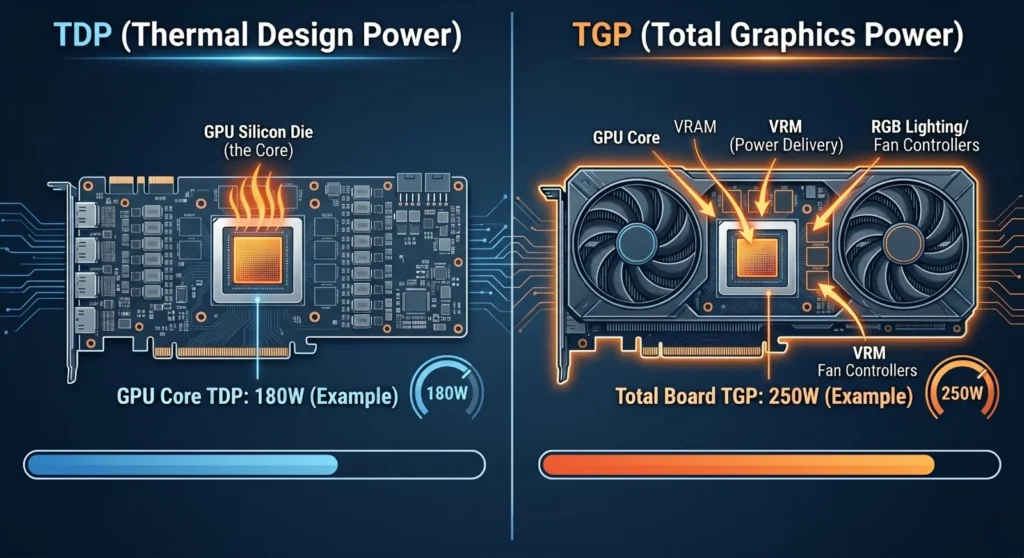
How TDP and TGP Interact →
Here is where the magic of gaming laptops happens because of the limited space and cooling capacity in a laptop chassis, you cannot run both the CPU at its maximum TDP and the GPU at its maximum TGP simultaneously. If you did, the laptop would overheat and crash.
Instead, modern laptops use smart power-shifting technologies (like Nvidia Dynamic Boost or AMD Smart Shift) to share a single “Total System Power” pool. When you evaluate a laptop’s specs, don’t look at the CPU’s TDP and the GPU’s TGP in isolation. Look for the Maximum System Power or Combined Wattage.
A manufacturer might advertise a “130W GPU,” but if you read the fine print, you might discover it only hits 130W when the CPU is completely starved of power. The best gaming laptops have big enough cooling systems (vapor chambers, liquid metal thermal paste) to sustain high power limits for both the TDP and TGP simultaneously, keeping your games running perfectly without breaking a sweat.
6. Conclusion
Evaluating a gaming laptop comes down to balancing the raw power of the components with the laptop’s ability to feed those components enough wattage and keep them cool. By looking past the marketing buzzwords and focusing on sustained, real-world benchmarks, you’ll ensure you get a machine that keeps your games running buttery smooth for years to come.

About Aryamann Saini
Avid tech enthusiast with a focus on strategic problem-solving. Always looking to tackle the next big challenge or learning milestone. Outside of work and studies, I enjoy traveling to historical sites and exploring the open road.
View all posts by Aryamann Saini
