




Blogs
Is a Refurbished Lenovo ThinkPad L490 Still Worth Your Money? [Review]

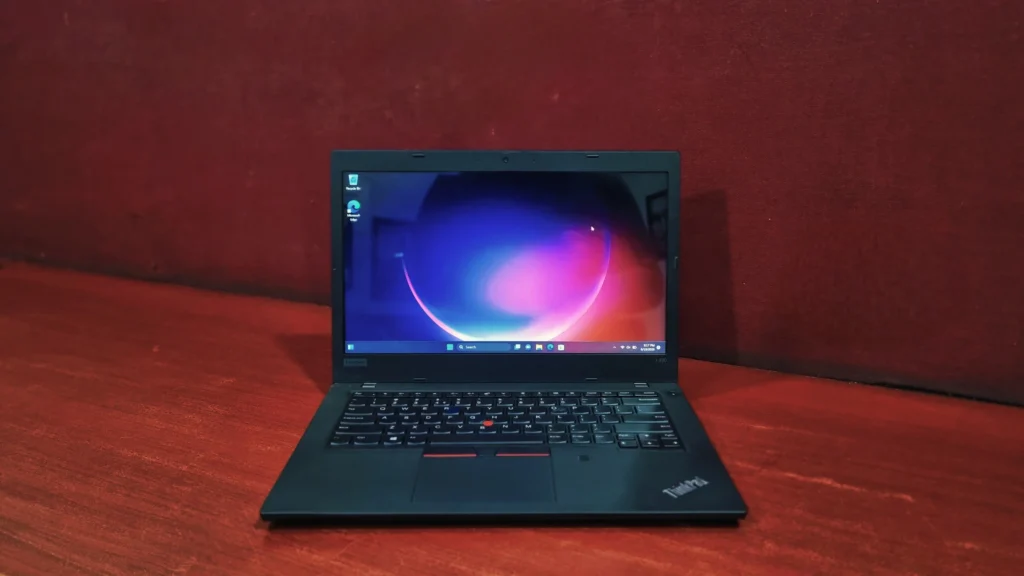
Specifications –
- 8th Generation Intel Core i5-8265U
- Intel® UHD Graphics 620
- 8GB DDR4 (up to 64GB)
- 14” HD (1366 x 768) Anti-Glare
- Up to 512 GB PCIe SSD and Up to 1 TB HDD
- 2 x 2 802.11 a/c Wi-Fi & Bluetooth 4.2
- Weight – 1.65 kg
Ever wonder when the Lenovo ThinkPad L490 actually launched? It first hit the market in June 2019, The Lenovo ThinkPad L490 fits right in between the budget-friendly E-Series and the premium, flagship T-Series. When it first hit the market, it drew some eyes, But the laptop market moves fast. Now that the L490 is widely available as a refurbished unit, the price-to-performance ratio has completely shifted. What might have been a compromise at retail price can often be a steal on the secondhand market.
Let’s break down the facts based on Lenovo’s official specifications and rigorous independent testing to see if a refurbished ThinkPad L490 is the right fit for your desk.
Lenovo ThinkPad L490 Design & Build Quality
Lorem ipsum dolor sit amet, consectetur adipiscing elit. Ut elit tellus, luctus nec ullamcorper mattis, pulvinar dapibus leo.
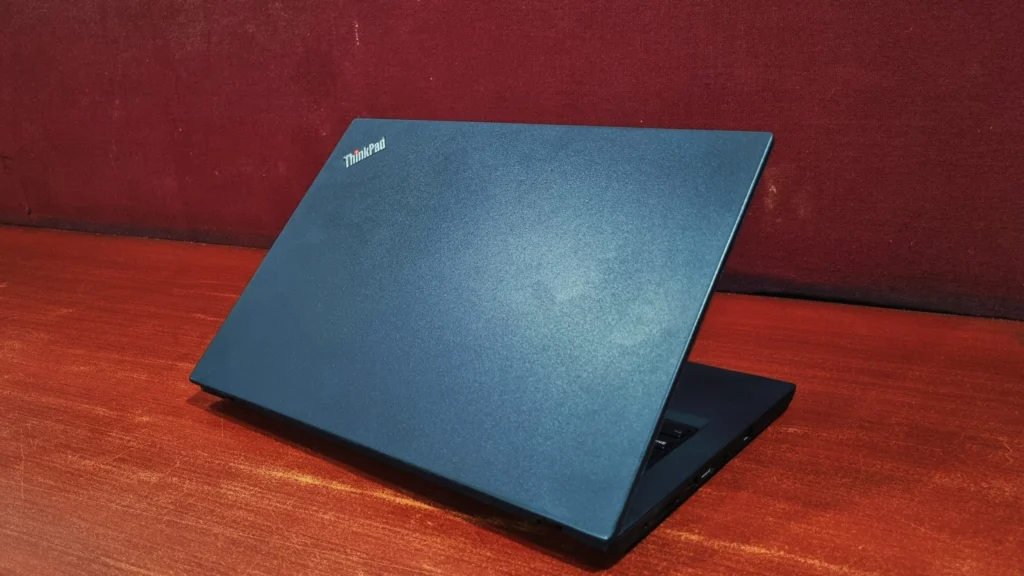
The ThinkPad aesthetic is iconic for a reason: it prioritizes function over form. Constructed from thick polycarbonate and ABS plastic, the chassis feels incredibly rigid. Lenovo have put these laptops through 12 military-grade tests, upon passing these tests the laptops get certified for MIL-STD-810G military-grade rating with 200 quality checks. If you are buying refurbished, this is a massive plus these machines are engineered to survive drops and bumps pf a daily commute without breaking a sweat.
Lenovo ThinkPad L490 review: Display
This laptop comes with a 14-inch screen (1366 x 768) which is quite basic. While the higher-tier IPS models look decent, this specific HD panel uses TN (Twisted Nematic) technology.
- The Pros: The anti-glare matte coating is genuinely excellent. It diffuses harsh office lighting and sunlight beautifully, making it very easy on the eyes during long typing sessions.
- The Cons: because it is a TN panel, the viewing angles are quite narrow, meaning the screen will wash out if you look at it from the side. At 1366 x 768, text won’t look perfectly crisp, and the color accuracy is far too low for photo editing or graphic design. It is perfectly fine for working on spreadsheets, writing emails, and basic web browsing, but it is not a media-consumption screen.
Performance & System Benchmark
Analyzing actual benchmark logs provides an objective, real-world look at how this specific unit performs compared to factory baselines and sister configurations. The results across PC-Mark 10, Geekbench, OpenCL, and CrystalDiskMark paint a clear picture of a highly optimized, stable office machine that maximizes its quad-core architecture while encountering standard integrated graphics and storage boundaries.
Storage Performance (CrystalDiskMark)
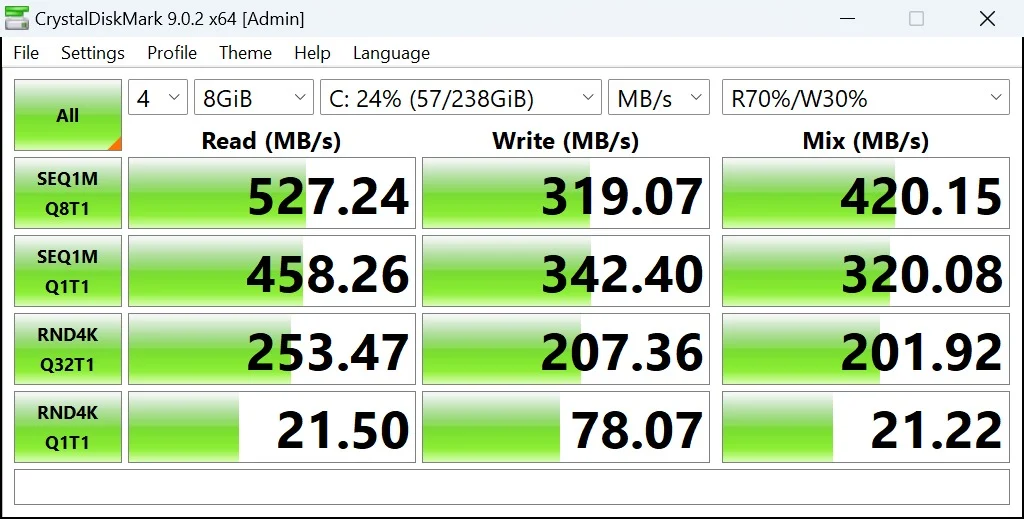
The speeds maxing out around 527 MB/s confirm this is a standard SATA SSD, which is still good considering the age of the laptop.
- Sequential Read (527.24 MB/s): Excellent for a SATA drive. It is hitting the maximum speed limit for this technology. Loading large files or opening bulky applications will be reasonably fast.
- Sequential Write (319.07 MB/s): Noticeably low. This indicates it is likely a budget-tier SSD without a DRAM cache. Saving massive files or installing large programs will take a bit longer.
- Real-World Impact: Perfectly adequate for a budget or refurbished office laptop. It will handle emails, web browsing, and Microsoft Office just fine, but lacks the instant, lightning-fast response of modern premium laptops.
Storage Speed & System Responsiveness
Everyday Processing: (Geekbench)
Geekbench 6
- Single-Core Score: 941
- Multi-Core Score: 2005
The Intel Core i5 processor excels at keeping the system snappy during single, immediate tasks like opening applications. The multi-core score demonstrates a solid capability for constant background processing. You will have no problem keeping dozens of active chrome tabs running alongside multiple excels while monitoring live stock market and fast-moving without experiencing system lag or abrupt shutdowns.

Overall System & Productivity (PC-Mark 10)
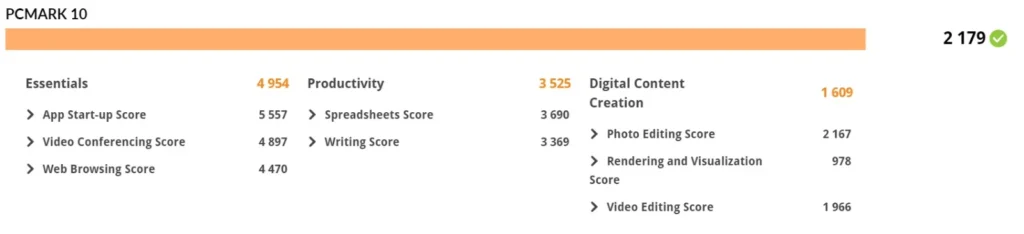
The PCMark 10 Overall Performance (Score: 2,179) It indicates that the laptop is heavily bottlenecked, likely due to thermal throttling, a low-end processor, or strict battery-saving limits.
- Everyday Basics (Essentials: 4,954): It will handle basic web browsing, video calls, and opening simple apps decently well, but you will likely notice a slight delay when launching heavier applications compared to a modern laptop.
- Office Work (Productivity: 3,525): It is perfectly fine for writing simple documents or reading PDFs. However, if you open Excel spreadsheets with heavy data or macros, the system will handle it smoothly.
- Creative Tasks (Content Creation: 1,609): This is strictly off-limits for this machine. With a rendering score of just 978, attempting to edit video, render 3D graphics, or run heavy design software will cause extreme slowdowns or crashes.
CPU details
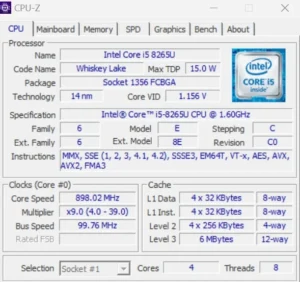
The Lenovo ThinkPad L490 is powered by an intel core 15-8265U processor, built on the 14-nanometer whiskey Lake architecture. It is an ultra-low-voltage chip with TDP (Thermal Design Power) of 15W, architecture, which is engineered specifically to balance power efficiency with efficiency with battery optimization in business laptops. The processor features 4 physical cores and 8 threads, making it highly capable at handling office applications and daily multitasking.
Battery Back-up
When buying refurbished, you must factor in battery degradation. In real-world, everyday use (Wi-Fi on, screen brightness at 70%, web browsing), you should realistically expect up to 2 hours of screen-on time, depending on the health of the specific battery you receive. The saving grace is Lenovo’s Rapid Charge technology, which allows the 65W USB-C charger to juice the battery back up to 80% in just 60 minutes.
Connectivity
The L490 shines in its connectivity, meaning you won’t feel the need to carry those extra dongles around.
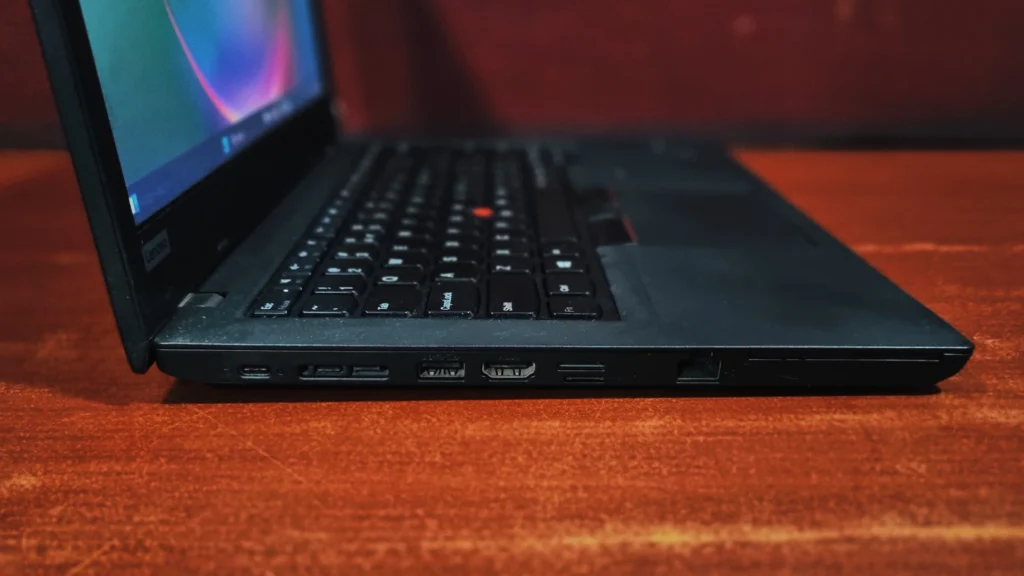
On the left side, USB-C 3.1 Gen 2, docking port (USB-C 3.1, network), USB-A 3.0, HDMI, microSD, RJ45 LAN
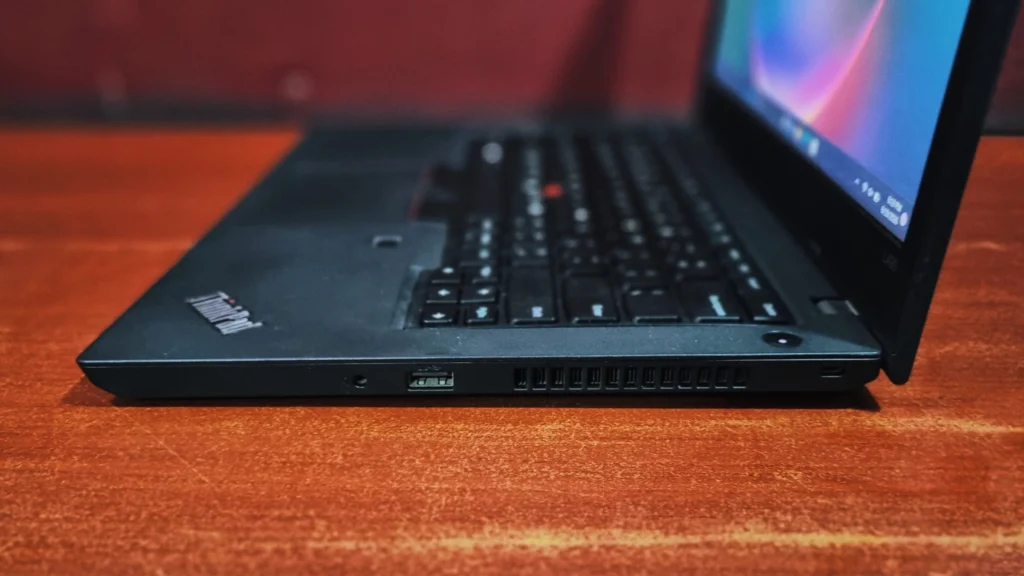
- On the right side, combined audio port (plug), USB-A 3.0, Kensington
Lenovo ThinkPad L490 review: Keyboard and touchpad
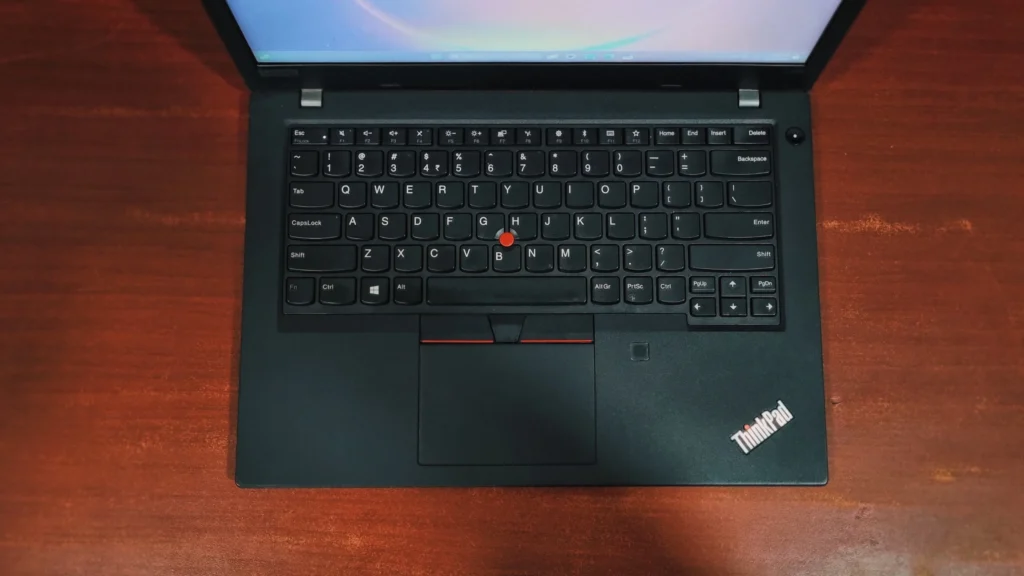
This is the main reason you buy a ThinkPad; its keyboard is much appreciated by corporate industry and computer geeks. It is tactile, offers deep key travel, and is completely spill-resistant (it even features drainage holes on the bottom of the chassis).
The classic red TrackPoint nub sits in the center of the keyboard for those who prefer not to move their hands from the home row. Below it, the precision touchpad is smooth, accurate, and features dedicated physical left, right, and center click buttons that are incredibly satisfying to use.
Bottom Line
The Lenovo ThinkPad L490 is exactly what it claims to be: highly reliable and practical. The benchmarks show that while you should skip it for gaming or heavy media production, its fast SSD storage, smooth web browsing and spreadsheet handling make it a fantastic, budget-friendly comparison for school, remote office work, or administrative tasks. However, if you are buying it refurbished on a tight budget.it gets things -get thing done machine built for professionals and students who prioritize function over form.
Frequently Asked Questions (FAQs)
Q. Is the Lenovo ThinkPad L490 good for gaming?
The Lenovo ThinkPad L490 is not designed for gaming it is a business focused laptop equipped Primarily with intel UHD graphics 620, which is suitable for basic media consumption but struggles with modern 3D titles.
Q. Is the RAM in the Lenovo ThinkPad L490 upgradeable?
Yes, The ThinkPad L490 features two accessible SO-DIMM slots. This means you can easily open up the bottom panel and upgrade the RAM (supporting up to 64GB) to give the machine a longer lifespan
Q. Is the ThinkPad L490 still worth buying today?
Yes, the ThinkPad L490 remains an excellent, cost-effective choice for students, writers, and business professionals. Because it features a highly durable chassis, an industry-leading keyboard, and a great selection of ports, it holds up exceptionally well as a refurbished or second-hand purchase for everyday productivity and office-style workloads.
Q. Does the ThinkPad L490 charge via USB-C?
Yes, it does. Lenovo moved away from their older proprietary square chargers for this model. The L490 charges via either of the two USB-C ports on the left side of the laptop using a standard 45W or 65W Type-C adapter.

About Aryamann Saini
Avid tech enthusiast with a focus on strategic problem-solving. Always looking to tackle the next big challenge or learning milestone. Outside of work and studies, I enjoy traveling to historical sites and exploring the open road.
View all posts by Aryamann Saini
