




Blogs
Dell Latitude 5530 vs 5430 (i5-1245U vs i7-1255U): Which Refurbished Business Laptop Should You Buy?

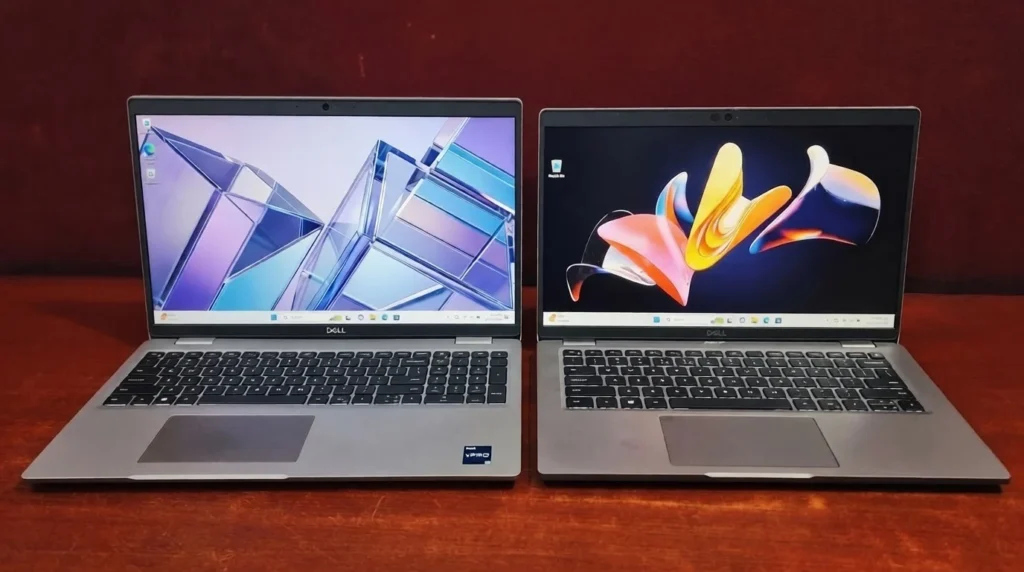
Two refurbished 12th Gen business laptops, one generation, one big question, does the i7 actually earn its price tag over the i5?
This article compares two refurbished 12th Gen Intel business laptops, the Dell Latitude 5530 (Core i5-1245U) and the Dell Latitude 5430 (Core i7-1255U), across design, display, performance, keyboard, ports, and battery life to answer one question: is the i7 upgrade worth it?
- Performance: Nearly a tie. The i7 leads in Geekbench, but the i5 wins the Cinebench 2024 multi-core test (257 vs. 242), and both score around the 41st percentile in PCMark 10.
- Design and portability: The 5430 is lighter (1.525 kg vs. 1.782 kg). The 5530's lid uses bioplastic, recycled plastic, and reclaimed carbon fiber.
- Display: The 5530 has a larger 15.6-inch flicker-free (non-PWM) IPS panel. The 5430 has a more compact 14-inch, 250-nit panel.
- Battery life: The 5430 lasts longer, at about 3–4 hours of active use versus 2–3 hours for the 5530.
- Keyboard and ports: A draw. The 5530 adds a numeric keypad, and both have identical ports, including 2x Thunderbolt 4 and HDMI 2.0.
- Upgradability: Both support up to 64GB of RAM and M.2 NVMe SSD upgrades.
- Overall rating: Dell Latitude 5430: 3.9/5 | Dell Latitude 5530: 3.7/5. Choose the 5430 for portability and battery life, or the 5530 for a bigger screen and lower cost.
Specs Comparison
Here is the side-by-side hardware comparison of the Dell Latitude 5530 (Intel Core i5-1245U) and the Dell Latitude 5430 (Intel Core i7-1255U), as tested.
| Spec | Dell Latitude 5530 | Dell Latitude 5430 |
|---|---|---|
| Processor | Intel Core i5-1245U (12th Gen, Alder Lake) | Intel Core i7-1255U (12th Gen, Alder Lake, vPro) |
| Cores / Threads | 2P + 8E cores / 12 threads | 2P + 8E cores / 12 threads |
| Max Turbo Clock | Up to 4.40 GHz | Up to 4.70 GHz |
| TDP | 15W | 15W |
| Graphics | Integrated Intel Iris Xe | Integrated Intel Iris Xe |
| RAM (as tested) | 16GB DDR4 (2x8GB, dual-channel) (Up to 64GB) | 32GB DDR4 (2x16GB, dual-channel) (Up to 64GB) |
| Storage (as tested) | 256GB NVMe SSD (Gen 4 capable) | 512GB NVMe SSD (Gen 3) |
| Max Storage | Up to 2TB | Expandable via dual M.2 slots |
| Display | 15.6" FHD (1920x1080), IPS WVA, anti-glare, non-touch, non-PWM | 14" FHD (1920x1080), anti-glare, 250 nits, 16:9 |
| Wireless | Wi-Fi 6E, Bluetooth 5.2 | Wi-Fi 6E, Bluetooth 5.2 |
| Weight | 1.782 kg | 1.525 kg |
If you've spent any time browsing refurbished laptop listings, you've probably run into Dell's Latitude 5000 series more than once. They're the quiet workhorses of corporate IT departments everywhere. They are not flashy, but built to survive a five-day workweek without complaint. Two models that keep popping up side by side are the Dell Latitude 5530 with a 12th Gen Intel Core i5-1245U and the Dell Latitude 5430 with a 12th Gen Intel Core i7-1255U. Same generation of processor that naturally raises the question everyone asks before buying: is the i7 actually worth chasing, or is the i5 quietly doing just as well?
Design and Build Quality
The Dell Latitude 5430 is the more portable build at 1.525 kg, while the heavier Dell Latitude 5530 (1.782 kg) uses more sustainable materials. The 5530 takes a noticeably greener approach to its construction. Its lid is made from a mix of 21% bioplastic, 30% recycled plastic, and 20% reclaimed carbon fiber, wrapped in a smudge-resistant metallic gray finish. It's a thoughtful touch, but it comes at a cost: at 1.782 kg, it's on the heavier side for a 15.6-inch laptop, and the hinges take a bit of muscle to pry open. The 5430, by contrast, skips the sustainability story in favor of a more traditional, time-tested chassis. At 1.525 kg, it's noticeably easier to live with on a daily commute, even if it won't turn any heads with its design language. Neither laptop is trying to be a fashion statement, and neither needs to be, but if you're the type who carries your laptop everywhere, the 5430's lighter frame gives it a small practical edge.
Display
The Dell Latitude 5530's 15.6-inch flicker-free screen is better for multitasking, while the Dell Latitude 5430's 14-inch panel is better for portability. Here's where screen size becomes a genuine trade-off rather than just a spec sheet number. The 5530's 15.6-inch IPS WVA panel is non-touch and skips PWM dimming entirely, so there's no flicker to tire your eyes out during long sessions, a small but meaningful detail if you're staring at this thing for eight hours a day. The 5430 goes smaller at 14 inches, sticking to a traditional 16:9 anti-glare panel rated at 250 nits. Both panels tell the same honest story: colors are fine for spreadsheets and code, but neither is going to satisfy anyone doing serious photo or video color work. If you want more screen real estate for multitasking, the 5530 wins; if you want something a little more compact and portable, the 5430 takes it.
Performance and Upgradability
CPU, Productivity & Storage Capacity
The Core i7-1255U in the Dell Latitude 5430 is only marginally faster than the Core i5-1245U in the Dell Latitude 5530, and the i5 even wins some multi-core tests. The i7-1255U pulls ahead on paper and in Geekbench (2255/7226 vs. the i5-1245U's 1908/5146), thanks to its higher 4.70 GHz boost clock. But Cinebench 2024 tells a different story: single-core scores tie at 79 apiece, and the 5530's i5 actually beats the 5430's i7 on multi-core (257 vs. 242), proof that spec-sheet numbers don't always hold up under sustained load on thin 15W chips.
PCMark 10 backs up that "too close to call" verdict: both land around the 41st percentile overall, with the 5530 ahead on Essentials (9724 vs. 9133) and the 5430 nudging ahead on Productivity (6648 vs. 6529) and DCC (5399 vs. 5164).
Memory and storage capacity is the one clear gap, but it's down to configuration, not platform limits. Our 5430 unit came with 32GB RAM and a 512GB SSD versus the 5530's 16GB and 256GB. Both top out at 64GB RAM and support M.2 storage upgrades.
Keyboard & Touchpad
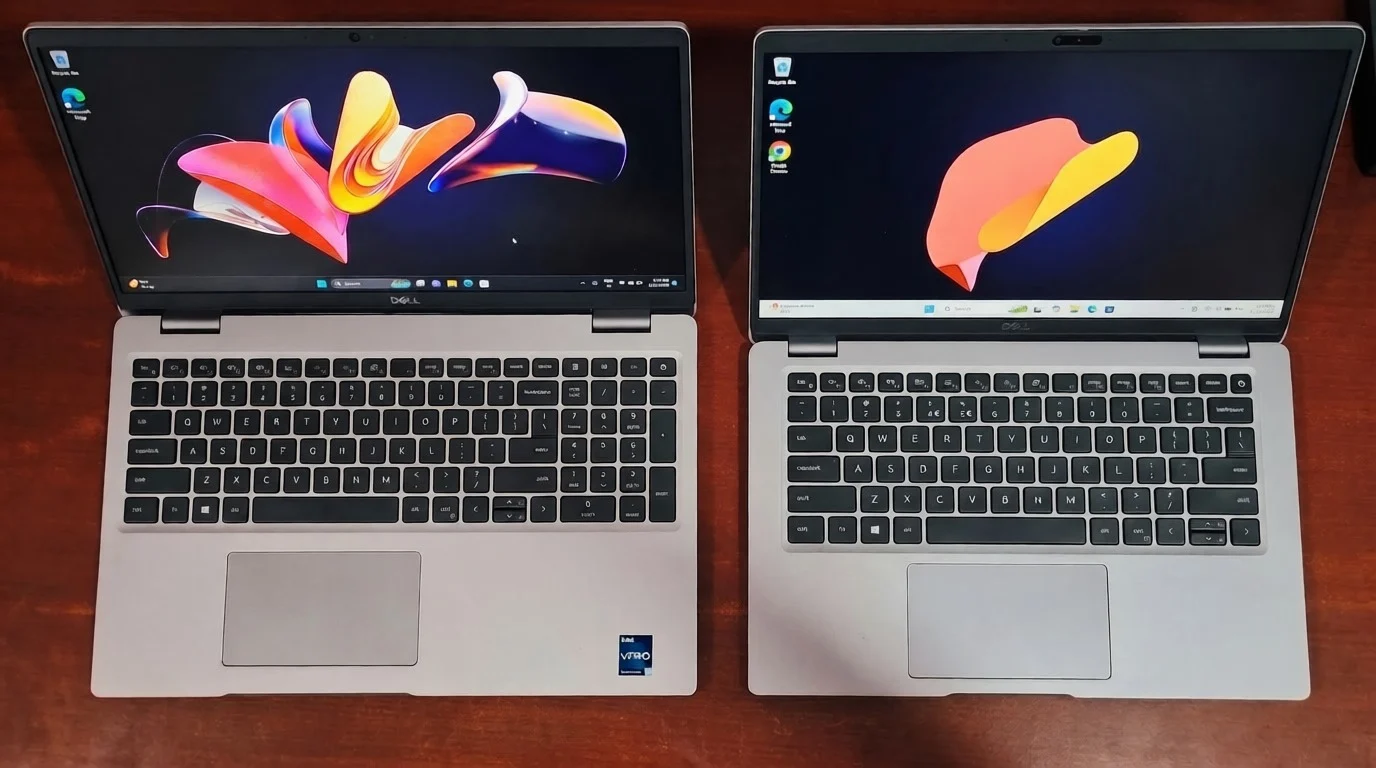
Both keyboards are excellent for typing: the Dell Latitude 5530 adds a numeric keypad, while the Dell Latitude 5430 offers a more compact layout with optional backlighting. Both laptops share Dell's familiar 5000-series typing experience: long key travel, satisfying tactile feedback, and a layout that makes hours of writing or coding genuinely comfortable. The 5530's extra width gives it room for a full numeric pad, which data-entry-heavy users will appreciate, though it skips spill-proof keys that some rival business laptops include. The 5430 drops the numpad in favor of a more compact chiclet layout, and its backlighting option is worth picking if you ever work in dim rooms. Touchpad-wise, they're nearly twins: both are responsive and handle multi-touch gestures well, but both share the same minor annoyance: a plastic-feeling surface with no physical click near the top corners.
Connectivity
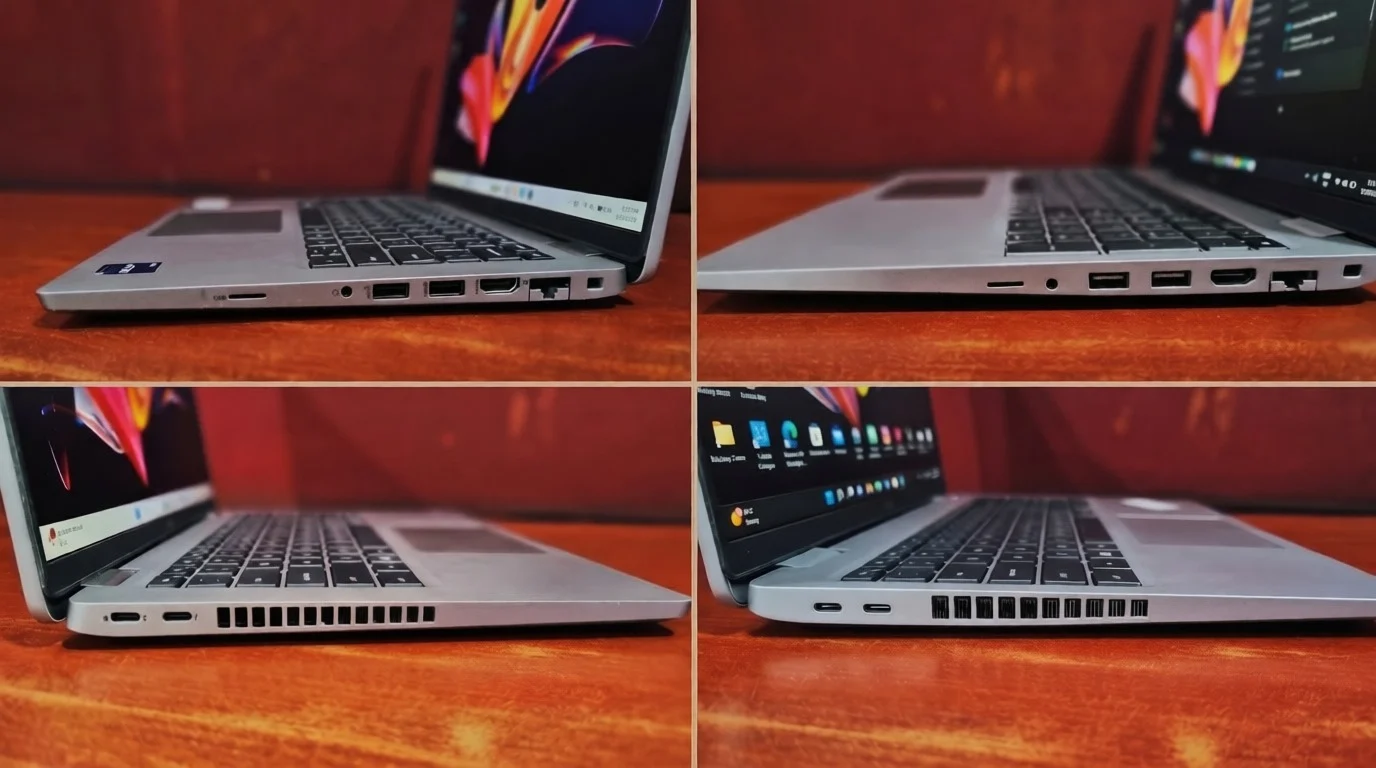
Overall Verdict: It's a draw. The Dell Latitude 5530 and 5430 provide a comprehensive selection of ports, delivering the same dongle-free experience.
Shared Features (Both Models)
Model-Specific Differences
Battery Life
The Dell Latitude 5430 lasts longer: about 3–4 hours of active use versus 2–3 hours for the Dell Latitude 5530 (refurbished units). Neither of these refurbished units is going to win an endurance award, and that's worth being upfront about. The 5530 realistically delivers 2 to 3 hours of active use on a charge, while the 5430 stretches a little further to 3 to 4 hours. It's a modest but noticeable gap, and if you're someone who works untethered from an outlet for long stretches, it's worth factoring in though both machines will want their charger nearby for anything beyond a half-day.
Final Verdict
Final Verdict
So, after all that reading, does upgrading from a 12th-Gen i5 to an i7 actually matter? Honestly, not as much as you'd think. While the i7 powered 5430 offers better battery life, extra memory, and a lighter chassis, the i5-powered 5530 holds its own beautifully, even beating the i7 in multi-core Cinebench and storage speed (may vary by configuration). Ultimately, both are reliable, everyday machines built for Office and coding rather than heavy gaming. Dodge the hype and choose based on your requirements and usage: grab the 5430 if you need a portable, long-lasting travel buddy, or save some cash with the 5530 if you prefer a bigger display and sustainable design.
✅ Choose the Dell Latitude 5430 if:
You want a lighter, more portable machine with slightly better battery life and out-of-the-box speed.
💡 Choose the Dell Latitude 5530 if:
You want a bigger 15.6-inch flicker-free display, a numeric keypad, and a lower price.
Frequently Asked Questions
Choose the 5430 (i7) for portability, slightly better battery life, and out-of-the-box speed. Pick the 5530 (i5) for a larger 15.6-inch screen, flicker-free display, and a slightly lower price.
Not dramatically. The i7 wins in heavy multitasking, but the i5 occasionally beats it in benchmark tests. For everyday office tasks, you won't notice a difference.
The 5430 lasts slightly longer (about 3–4 hours on refurbished models vs. 2–3 hours on the 5530). You'll want to keep the charger handy for both.
Yes. Both feature two RAM slots (expandable up to 64GB) and easily upgradeable M.2 NVMe SSD slots.
The main differences are screen size (15.6" vs. 14"), weight, and the processor tier. The 5430 is lighter and has the higher-tier i7 processor, while the 5530 offers a larger workspace.
No. Both use integrated Intel graphics meant for business productivity and light photo editing, not heavy rendering or demanding games.
Yes. Both handle IDEs, local development servers, and many browser tabs comfortably. The 5430's 32GB configuration is better for running containers or virtual machines, while the 5530's larger screen and numeric keypad suit data-heavy work.
Yes. Both use 12th Gen Intel Core processors, which meet Microsoft's Windows 11 processor requirements.


