Refurbished Laptop

Dell Latitude 5420 (i7 11th gen) Review

dell latitude 5420 i7 11th gen

Specifications –

  • Processor: Intel Core i7-1185G7
  • Graphics: Integrated Intel Iris Xe Graphics
  • Memory: 32GB (16X2) dual channel (expandable upto 64GB)
  • Storage: 512GB SSD (expandable)
  • Display: 14-inch 1920 x 1080 non-touch matte display
  • Wireless: Wi-Fi 6, Bluetooth 5.1
  • Weight: 1.525kg

Looking past above the standard spec sheet, the Dell Latitude 5420 hides several advanced features tailored for modern professionals. The Dell Latitude 5420 i7 11th Gen model looks like a prime candidate on paper. But does it live up to its reputation? Let’s know 

Design And Build Quality

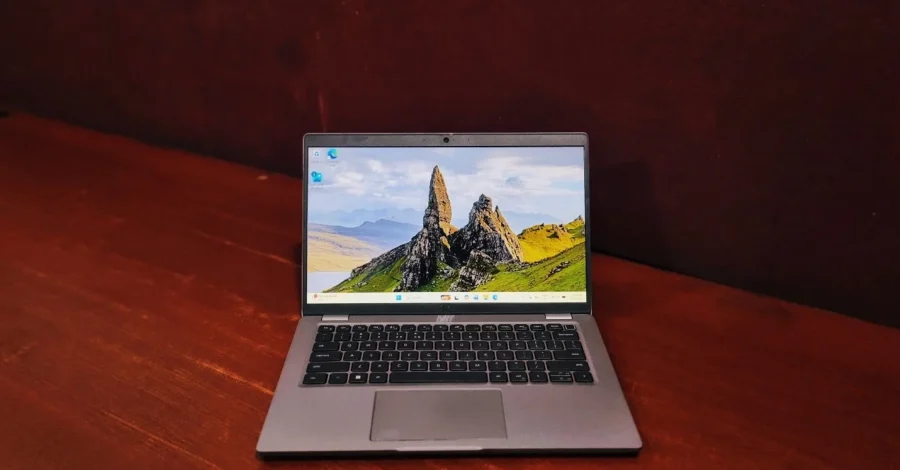
From outside, the Dell Latitude 5420 doesn’t try to be the coolest kid in the town, the looks are distinguishably similar to its siblings Latitude 5410. The same looks are carried even in Latitude 5430. The carbon fiber and magnesium reinforced chassis is highly resistant to any blends. It is a little heavy but feels reliable when you hold it in your hands. It’s not the thinnest machine on the market, but it slides into a backpack easily enough. While it’s mostly plastic, there isn’t much flex when you press down on the lid or the keyboard deck.

The Display

The 14-inch Full HD panel is perfectly adequate for spreadsheets, emails, and word processing. The anti-glare coating is excellent for working under bright office lights. However, colors feel a bit “thin” or washed out.

Keyboard & Touchpad

This is where the Latitude 5420 truly shines as a productivity machine.

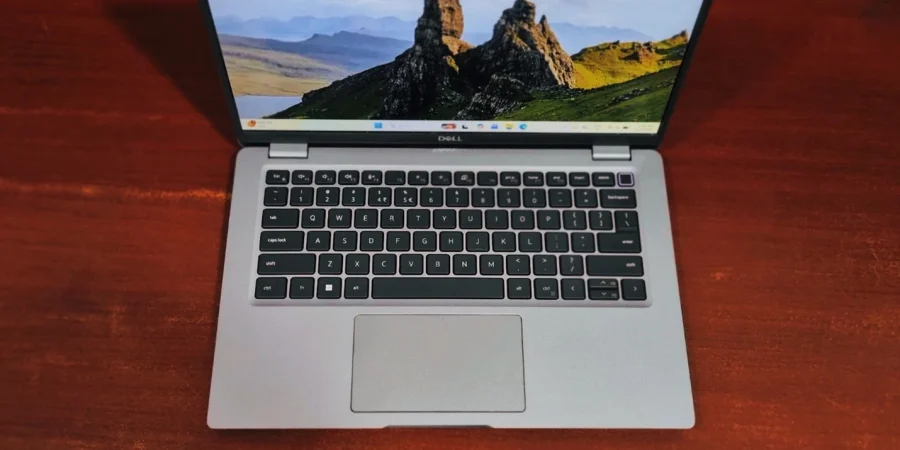
The Keyboard: Dell consistently makes the “typing feel” increasingly amazing.  The keys have a fast travel distance and a tactility in clicks that makes long-form writing feel effortless. The layout is spacious, and the dedicated home/end keys are a nice touch for power users.

The Touchpad: Unlike the premium glass trackpads on the XPS line, this one is plastic. For people who always have sweaty palms (like me), it can feel a bit “sticky” or sluggish sometimes. However, most users will find it quite usable, and those who don’t can always reach for a wireless mouse.

dell latitude 5420 i7 11th gen

Performance & Benchmarks

To give you a clear picture of how the Dell Latitude 5420 performs in the real world, we ran it through a few popular benchmark tests: CrystalDiskMark, Geekbench, and PCMark 10.

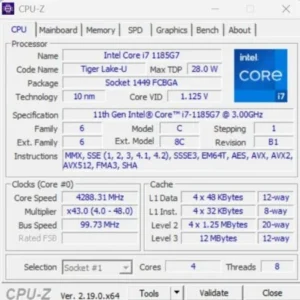
Based on our testing of the Intel Core i7-1185G7 which clocks at 3GHz, this laptop is more than just a spreadsheet maker, it’s a snappy, responsive machine for heavy multitasking. It features a quad-core setup (4 Cores) with hyper-threading enabled (8 Threads), allowing it to handle multiple background applications and heavy multitasking smoothly.

dell latitude 5420 i7 11th gen
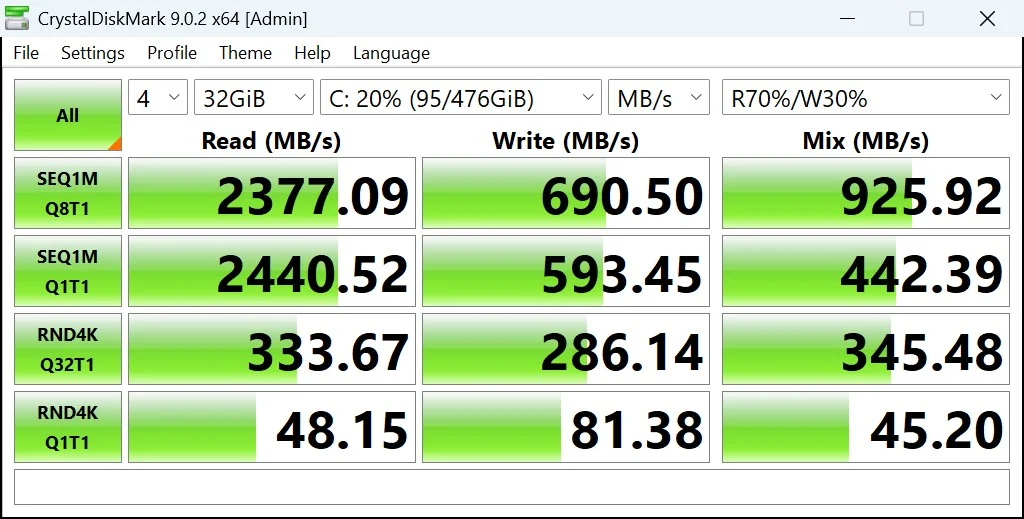
  1. Storage Performance (CrystalDiskMark) A slow hard drive can make even the fastest processor feel sluggish. Thankfully, the NVMe SSD in this unit keeps things moving at a fast pace.
  • Sequential Read: 2377.09 MB/s
  • Sequential Write: 690.50 MB/s

This means your Windows boot times and large file loads happen in the blink of an eye. In a world where lag is considered the ultimate productivity killer, the Dell Latitude 5420 stays out of your way. Whether you are crunching numbers or managing a complex project, the performance remains consistently smooth and predictable.

dell latitude 5420 i7 11th gen
  1. Daily Workflow: PCMark 10

We used PCMark 10 to simulate a realistic workday, including video conferencing, writing, and data entry.

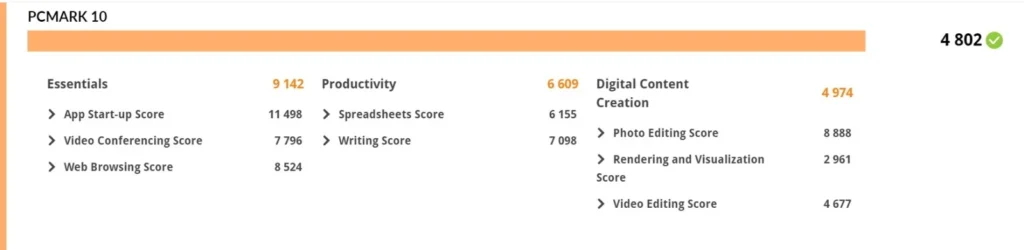
  • Overall Score: The machine hit a solid – 4802.
  • The Breakdown: It excelled in Essentials – 9142, meaning web browsing and app start-up times are lightning-fast. It also showed strong results in Productivity – 6609, confirming its status as a top-tier office tool.
dell latitude 5420 i7 11th gen
  1. CPU Performance: Reliable Snappiness

In everyday terms, a high single-core score means your apps open instantly and your web browser doesn’t stutter. The Dell Latitude 5420 delivers exactly that.

  • Geekbench: The system posted a Single-Core Score of 1497 and a Multi-Core Score of 4146. This puts it in a great position for workloads like switching between many open apps. During our browser testing, it effortlessly handled over 25 open tabs without a hint of lag.
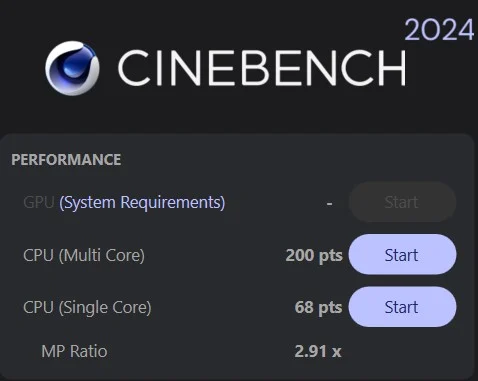
  • Cinebench 2024: Under more sustained pressure, it achieved 200 pts (Multi Core) and 68 pts (Single Core) While it’s not a dedicated video rendering machine, it handles some computational tasks Like CAD, or blender with steady reliability.
dell latitude 5420 i7 11th gen

Battery life

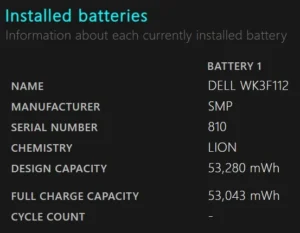
A refurbished laptop’s battery health is essentially its current capacity to hold a charge compared to its original factory design. This laptop can get you somewhere around 3-4 hrs. of battery backup but the actual battery runtime will depend heavily on the laptop’s previous life. A battery naturally degrades based on its history of charge cycles, exposure to heat, and the charging habits of its user.

dell latitude 5420 i7 11th gen

Ports and Connectivity

Dell made a great move by ditching the old proprietary barrel charger. The I/O is thoroughly modern:

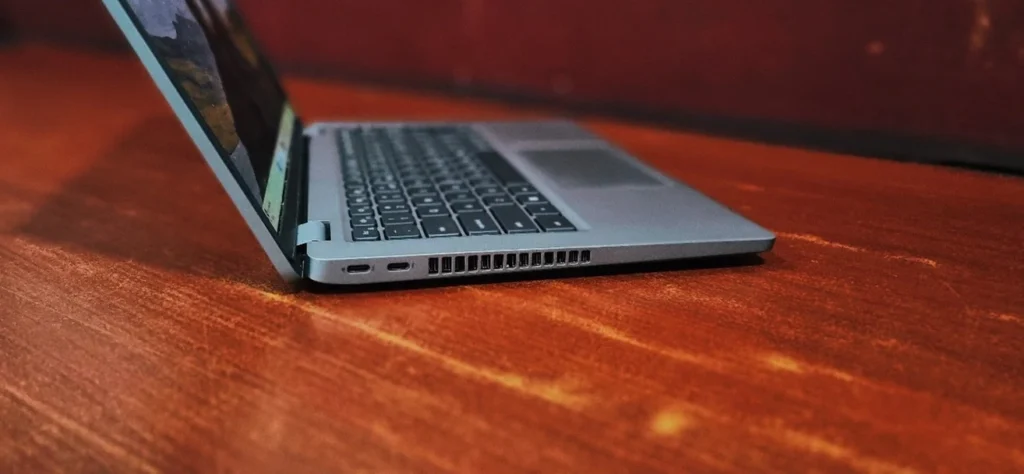
left side: the Dell Latitude 5420 features two Thunderbolt 4 USB-C ports for fast charging, display output, and high-speed connectivity.

dell latitude 5420 i7 11th gen

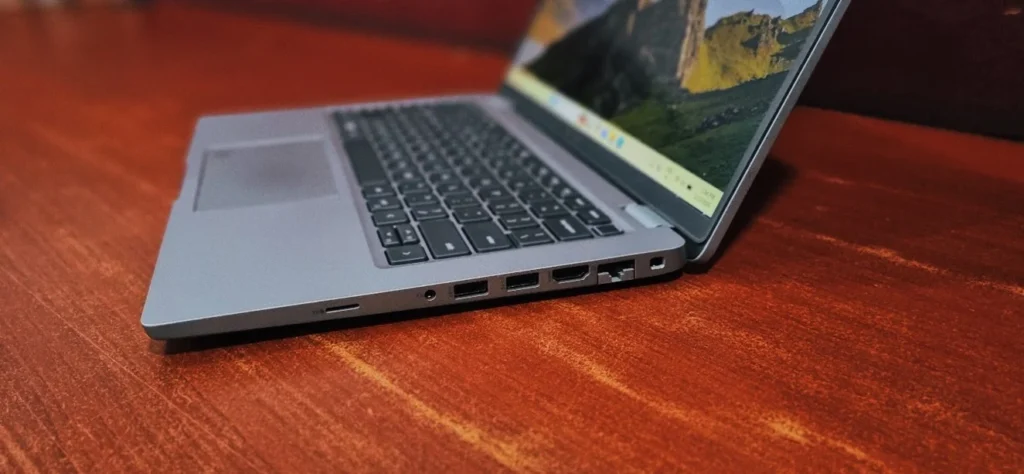
Right Side: Kensington slot, an RJ-45 connector, followed by an HDMI 2.0 connector, two USB Type-A 3.2 (Gen. 1) ports, an audio jack, and a MicroSD card reader.

dell latitude 5420 i7 11th gen

Final Verdict

The Dell Latitude 5420 is a reliable option out of many laptops launched alongside this. It isn’t particularly fast-looking, or has ultra-thin aesthetics, but it starts every morning and does exactly what it’s supposed to do. If you need a great typing experience, and the ability to plug in your peripherals without carrying a plethora of dongles. Also, it’s modular so upgrading RAM or SSD will be fairly easy.

Frequently Asked Questions (FAQs)

Yes, upgradeability is one of this laptop’s strongest points. It features two easily accessible slots that allow you to configure the DDR4 3200 MHz RAM up to 64 GB. For storage, it utilizes M.2 NVMe SSDs, which can also be accessed and swapped out easily. 

No, the Latitude 5420 is strictly built as a business and productivity laptop. It relies on integrated graphics—either Intel UHD Graphics or Intel Iris Xe Graphics, depending on your processor configuration. While it can handle light, casual games, it will not run heavy, demanding titles like PUBG, Apex Legends, or GTA V smoothly.

Dell offers the Latitude 5420 in several different 14-inch display configurations. While the base models feature non-touch, anti-glare screens, there is an optional touchscreen configuration available (FHD 1920 x 1080 resolution) if you prefer touch navigation.

Yes, the laptop is equipped with two modern Thunderbolt 4 ports. Because of this high-speed connectivity, the Latitude 5420 can comfortably support up to two external 4K displays. It is also fully compatible with Thunderbolt docking stations (like the Dell WD19), allowing you to connect all your peripherals with a single cable.

Yes, for professionals who are frequently away from Wi-Fi, the Latitude 5420 does include a SIM card slot for LTE connectivity. The slot is located under the display and can be accessed from the back of the device.

Leave a Reply

Your email address will not be published. Required fields are marked *