Blogs
Dell Latitude 5280 Review (2026): Is This 12.5-Inch Business Laptop Still Worth Buying?

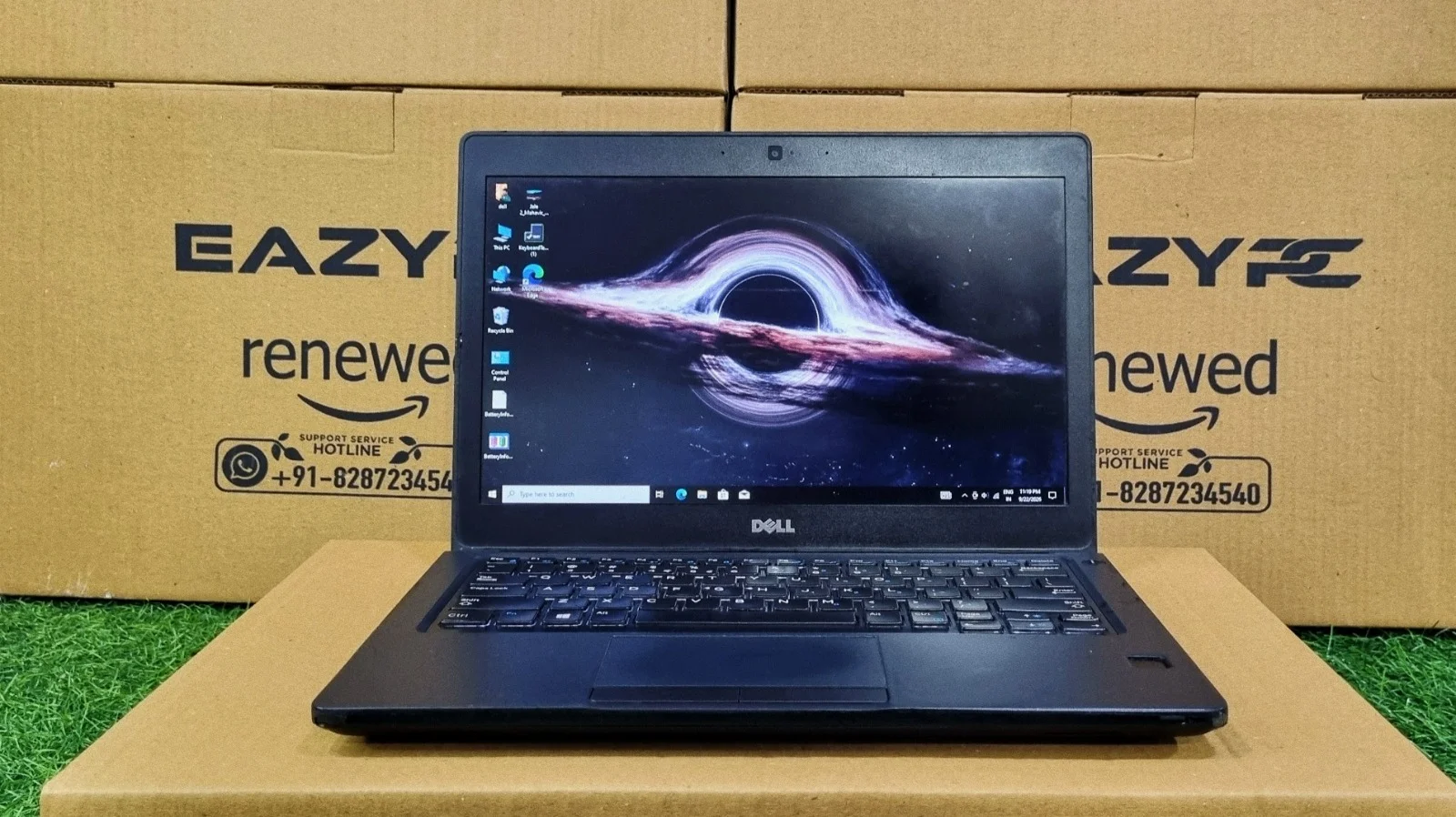
A light, tough 12.5-inch business laptop for Office work, study, and travel, with an honest look at where it falls short.
Yes, the Dell Latitude 5280 is still worth buying in 2026 as a refurbished laptop if you need a light, tough machine for Microsoft Office, browsing, video calls and study. Our Core i7-7600U unit scored 3346 in PCMark 10 (Essentials 6488, Productivity 6220) and read files at 547 MB/s. It is not suited to gaming, video editing or heavy multitasking, since it has two CPU cores and Intel HD Graphics 620.
Key Takeaways
Best for
Students, office staff, accountants and frequent travelers who want a compact laptop.
Weight and size
About 1.36 kg with a 12.5-inch screen.
Everyday speed
PCMark 10 Essentials 6488 and Productivity 6220 point to smooth office use.
Storage
547.50 MB/s sequential read, 509.32 MB/s write.
Main weaknesses
Dual-core CPU, basic graphics (Time Spy 388) and a standard 1366 x 768 display.
Not for
Gaming, video editing, rendering or official Windows 11 support.
What Is the Dell Latitude 5280 Specifications?
The Dell Latitude 5280 is a 12.5-inch business laptop from Dell’s Latitude 5000 series, built around a 7th generation Intel Core processor. Here are the specs of the unit we tested.
Processor
Intel Core i7-7600U (Kaby Lake, 2 cores, 4 threads, 2.8 GHz base, up to 3.9 GHz Turbo, 15W TDP)
Graphics
Integrated Intel HD Graphics 620
Memory
DDR4, two SODIMM slots (user-upgradeable)
Storage
256GB SSD (238GiB usable), M.2 slot
Display
12.5-inch HD (1366 x 768) standard; Full HD on select configurations
Wireless
Wi-Fi 802.11ac, Bluetooth 4.1
Weight
Around 1.36 kg
Ports
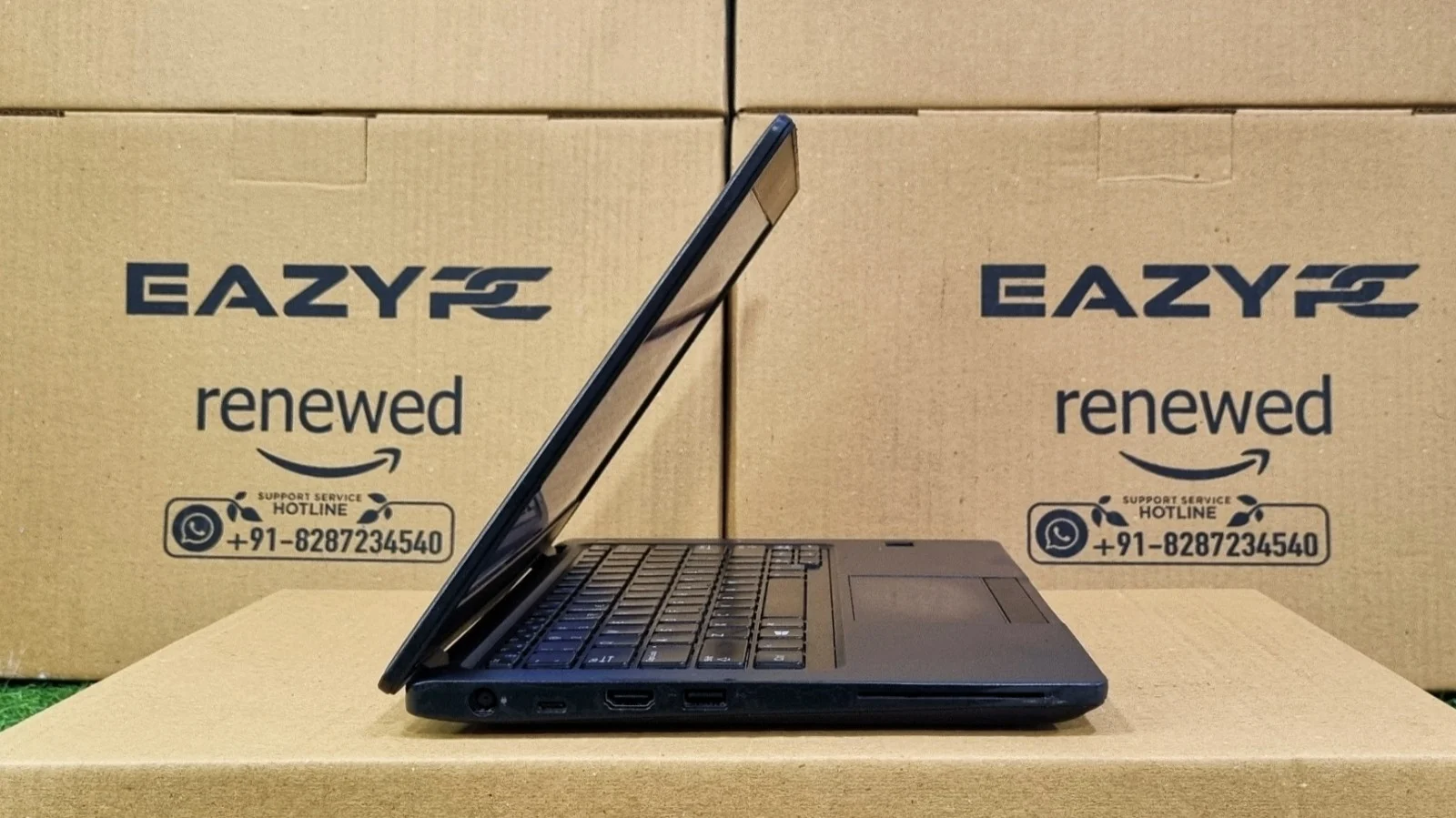
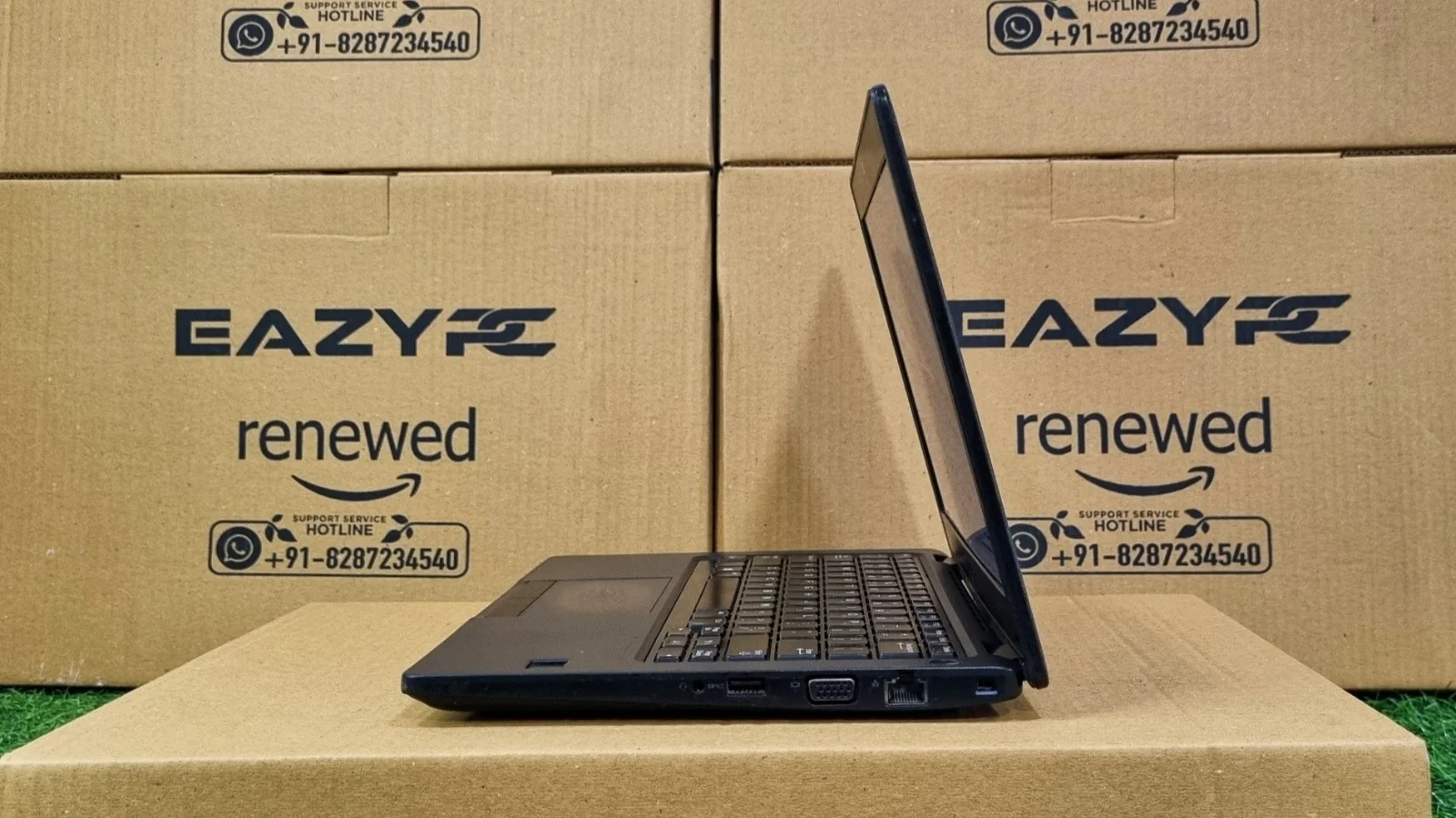
HDMI, 2 x USB Type-A 3.0, USB Type-C, Ethernet, SD card reader, headphone/mic jack
Not every laptop needs to be thin-and-flashy or big-and-powerful. The Latitude 5280 is one of the quiet, compact workhorses that sits in a bag all day and never complains, and it was built for people who are constantly on the move and would rather carry less.
How Well Is the Dell Latitude 5280 Built?
It is solid, light and made for daily carrying. The chassis weighs about 1.36 kg and follows Dell’s business-class durability approach, including MIL-STD testing.
The 5280 keeps Dell’s no-nonsense look: a matte black finish, clean lines and nothing that exists just to look pretty. The 12.5-inch footprint is the real story. It is easy to use on a crowded train seat, a small desk or a lecture-hall table.
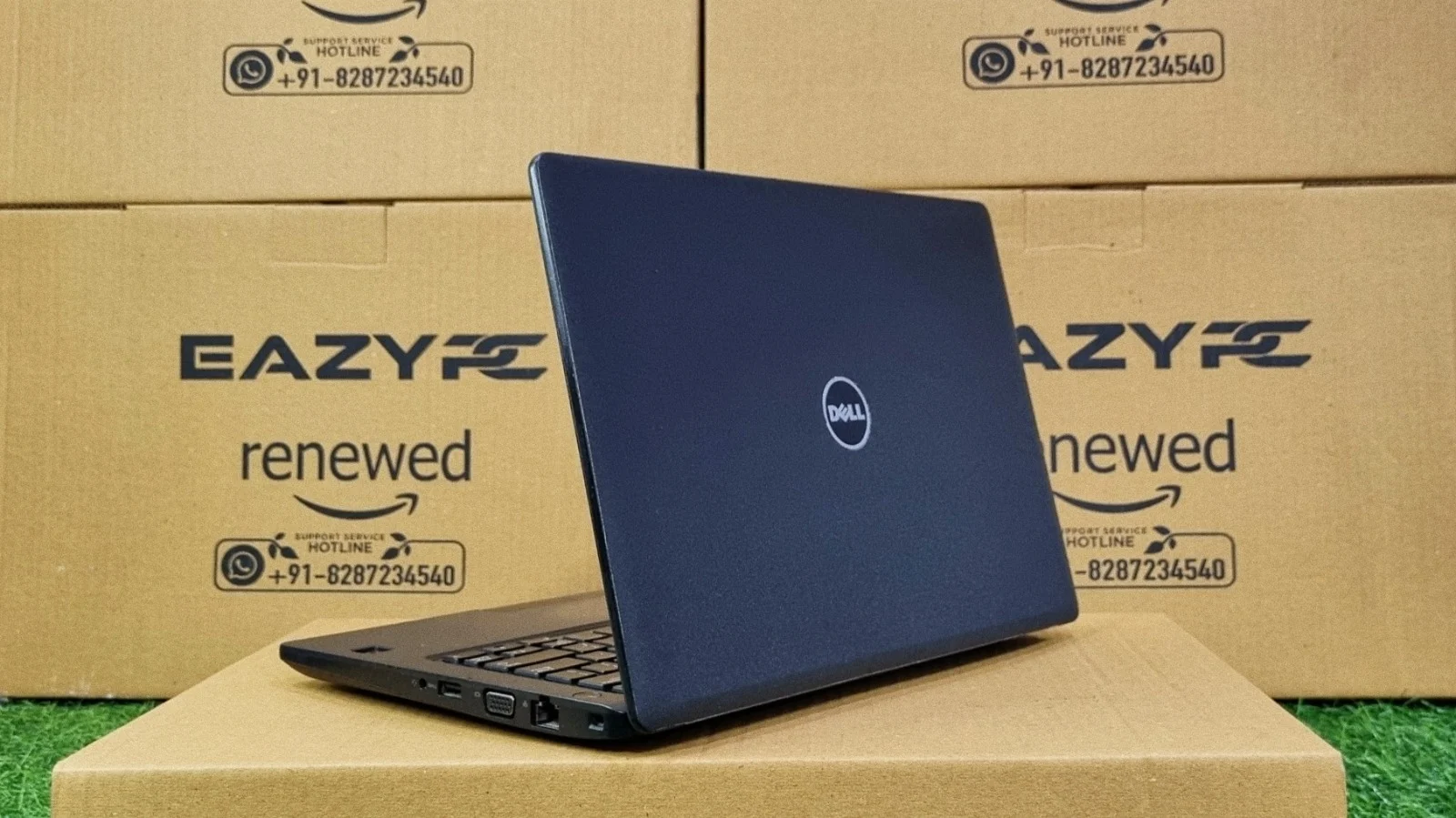
Because this is a refurbished-market laptop, small cosmetic marks are normal. Judge the condition of the individual unit, but the underlying build is the kind that survives years of daily carrying.
Is the Dell Latitude 5280 Display Good Enough?
It is fine for documents and spreadsheets but basic for anything visual. The standard panel is 1366 x 768, and a Full HD option exists on some units.
Text is not as crisp as on a Full HD screen and you get less room for side-by-side windows. On the plus side, the matte finish keeps reflections in check, so working near a window or under office lights is comfortable. It will not impress for photo work or movies.
Is the Dell Latitude 5280 Keyboard Good for Typing?
Yes. Dell’s business keyboards have a strong reputation, and the 5280 keeps a firm, consistent key press in a compact body.
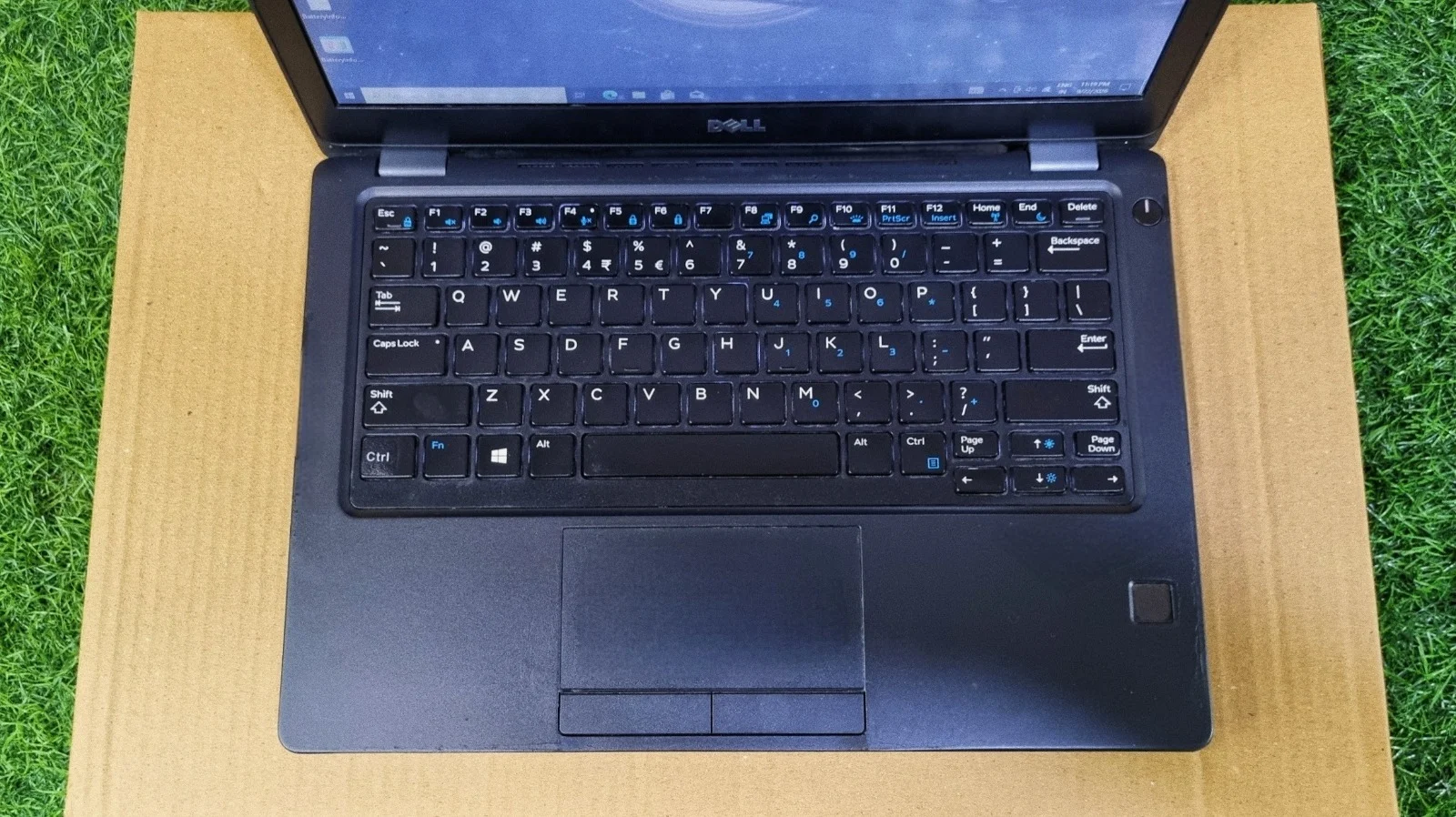
Keyboard
The layout is sensible, and the backlight (where fitted) helps in dim rooms. The keyboard feels slightly tighter than on a 14-inch model, but most people adjust within a day or two.
Touchpad and pointing stick
The touchpad is responsive and supports standard Windows gestures. Models with the red pointing stick let you move the cursor without leaving the home row.
How Fast Is the Dell Latitude 5280? Benchmark Results
| Benchmark | Score | What it means |
|---|---|---|
| CrystalDiskMark (sequential) | 547.50 MB/s read / 509.32 MB/s write | Typical SATA SSD; quick boot and app launches |
| Cinebench R23 | 991 single / 1602 multi | Good single-core response, limited multi-core power |
| Geekbench | 1254 single / 1890 multi | Snappy for bursty tasks; modest multi-core gain |
| Geekbench OpenCL | 3706 | Basic graphics compute; fine for video playback |
| 3DMark Time Spy | 388 | Not a gaming laptop; matches average for HD 620 |
| PCMark 10 (overall) | 3346 | Better than 15% of results; below 5848 office-laptop average |
How Fast Is the SSD? (CrystalDiskMark)
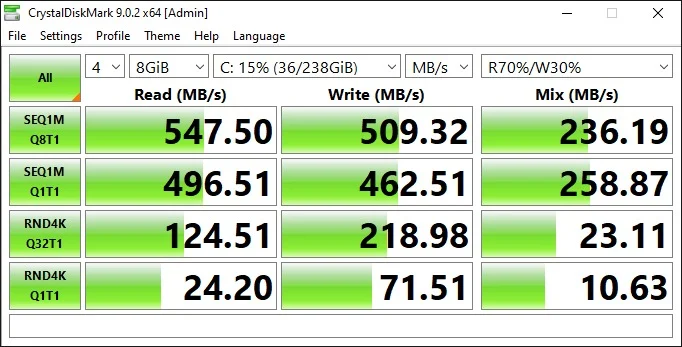
These are typical numbers for a SATA-class SSD, and a big upgrade over any old mechanical hard drive. Sequential speeds of roughly 500 MB/s mean Windows boots quickly and large files copy without a long wait. The random 4K results are what you feel in everyday use, and they are adequate for opening apps and files. The test drive was only 15% full, so results on a fuller drive may dip slightly.
How Powerful Is the CPU? (Cinebench R23)
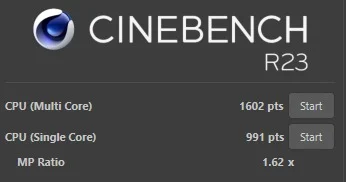
The single-core score of 991 is what you feel when browsing, switching apps and working in documents, and it is respectable for a low-power chip. The multi-core score of 1602 shows the two-core design at work: the 1.62x ratio means both cores together give a decent boost, but well short of a quad-core laptop. Background tasks like antivirus scans and cloud sync are fine; heavy rendering or compiling is not this laptop’s job.
CPU Benchmark (Geekbench)
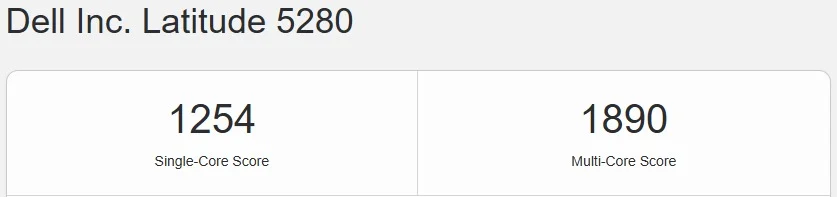
A single-core score above 1200 confirms the i7-7600U’s high boost clocks are doing their job, giving snappy responses for everyday tasks. The multi-core figure of 1890 is a modest gain, consistent with a two-core, four-thread processor. This chip is strong at quick, bursty work and weaker when many things demand power at once.
How Good Are the Graphics? (OpenCL and Time Spy)

An OpenCL score of 3706 is what you would expect from Intel HD Graphics 620. It is enough for smooth 1080p video playback, presentations and an external monitor, but it will not meaningfully accelerate photo or video editing.
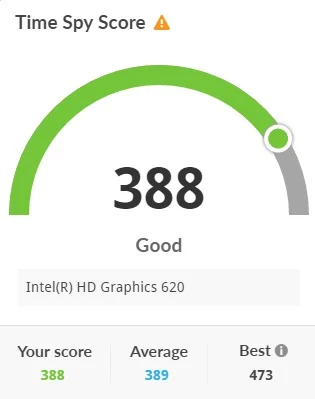
A Time Spy score of 388 lands almost exactly on the average for Intel HD Graphics 620, so our unit is performing as it should. It also shows clearly that this is not a gaming machine. Casual and older 2D games are fine; modern 3D titles are out of reach.
How Does It Handle Everyday Work? (PCMark 10)
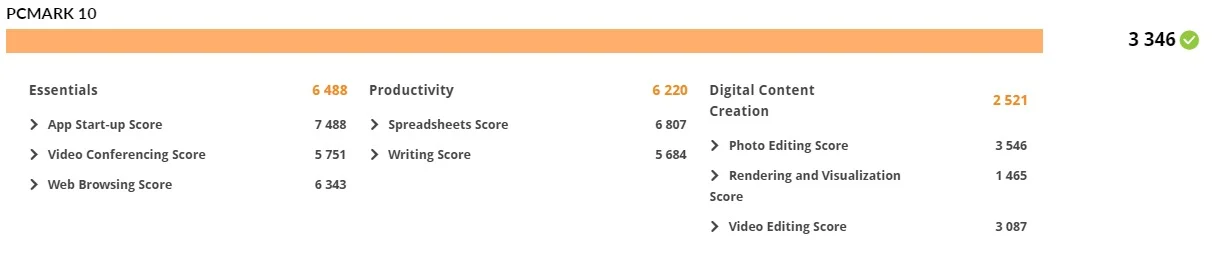
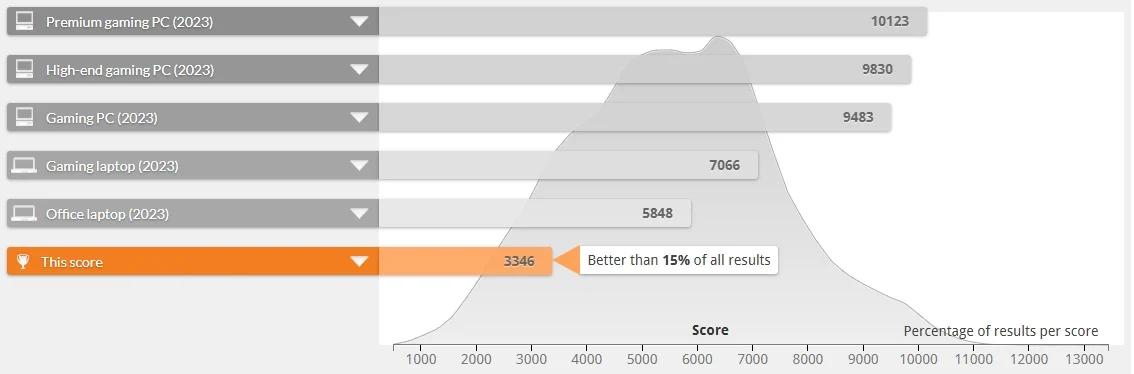
The overall score of 3346 beats about 15% of all results and sits below the 2023 average for an office laptop (5848) and a gaming laptop (7066). That gap is normal for a platform this age.
The breakdown matters more. Essentials (6488) and Productivity (6220) are strong, and that is where most business users live: apps, browsing, video calls, spreadsheets and writing. Spreadsheets score best at 6807. The weak spot is Digital Content Creation at 2521, with rendering at 1465. In plain language, this is a capable office laptop and a poor creative one.
Everyday app checks
What Hardware Does the Dell Latitude 5280 Use?
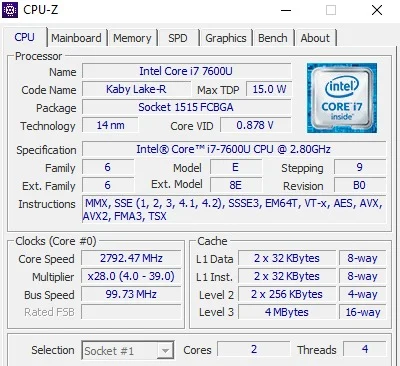
CPU-Z confirms our unit uses an Intel Core i7-7600U, a 14nm Kaby Lake part rated at 15 watts. It has two cores and four threads, a 2.8 GHz base clock (2792 MHz on our reading), Turbo Boost up to 3.9 GHz and 4MB of L3 cache. It is tuned for efficiency and quick bursts of work, which suits a compact laptop where battery life and heat matter.
The trade-off is that only two physical cores are on offer, so it will not keep up with the quad-core chips found in newer or larger Latitudes.
How Long Does the Dell Latitude 5280 Battery Last?
The 5280 was a battery-life star at launch, and its low-power processor and small screen help it sip energy. Dell offered 3-cell and larger 4-cell batteries. On a refurbished unit the actual result depends on the battery’s condition and your screen brightness. If a unit needs a fresh battery, it is a straightforward swap, and it is worth asking the seller about battery health before you buy.
What Ports Does the Dell Latitude 5280 Have?
Left Side
Right Side
Optional Extras
Port layouts can vary slightly between configurations, so check the exact unit you are buying.
How Does the Dell Latitude 5280 Compare with the Latitude 7490?
| Feature | Latitude 5280 (i7-7600U) | Latitude 7490 (i7-8650U) |
|---|---|---|
| CPU cores / threads | 2 / 4 | 4 / 8 |
| Cinebench R23 single-core | 991 | 829 |
| Cinebench R23 multi-core | 1602 | 2612 |
| PCMark 10 overall | 3346 | 3435 |
| Screen size | 12.5-inch | 14-inch |
| Weight | About 1.36 kg | About 1.4 kg |
| Best for | Portability, light office work | Multitasking, larger screen |
The 5280 actually posted a higher single-core Cinebench score in our tests, so it feels just as quick for simple tasks. The 7490 pulls ahead when several apps run at once thanks to its quad-core processor. If you mostly work on one thing at a time and value a smaller body, the 5280 is the smarter pick. For the full picture on the 14-inch model, read our Dell Latitude 7490 review.
Should You Buy the Dell Latitude 5280?
Buy it if you...
- Use Microsoft Office, browsing, video calls or Tally
- Carry your laptop all day
- Want an SSD-fast machine on a tight budget
- Prefer a small, light 12.5-inch body
Skip it if you...
- Play modern games
- Edit video or render 3D work
- Run many demanding apps at once
- Need official Windows 11 support
Final Verdict
The Dell Latitude 5280 is proof that a small laptop can still be a serious tool. It is light, tough and comfortable to type on, and the SSD-backed Core i7-7600U makes everyday tasks feel quick. Our benchmarks give an honest picture: strong in Essentials and Productivity, average graphics, and clearly limited in creative and gaming work.
Accept the limits up front: the dual-core processor caps heavy multitasking, the standard 1366 x 768 display is basic, and battery life depends on the unit you get. For students, office staff, accountants and anyone who wants a compact, dependable machine at a budget price, the refurbished Latitude 5280 is still a sensible buy in 2026.
Frequently Asked Questions (FAQs) About the Dell Latitude 5280
Yes, for light office work, study and travel. The refurbished Dell Latitude 5280 has a Core i7-7600U, an SSD scoring about 547 MB/s read, and a tough 1.36 kg body. It is not suitable for gaming, video editing or heavy multitasking because it has only two CPU cores and basic Intel HD Graphics 620.
Our test unit has an Intel Core i7-7600U, a 7th generation dual-core, four-thread processor with a 2.8 GHz base clock, up to 3.9 GHz Turbo Boost, 4MB cache and a 15W TDP. Other configurations use Core i3, i5 or i7 U-series chips.
Our unit scored 991 single-core and 1602 multi-core in Cinebench R23, 1254 and 1890 in Geekbench, and 3346 overall in PCMark 10. That is strong for office tasks, average for photo work, and weak for rendering, video editing and gaming.
Yes. It weighs about 1.36 kg, has a compact 12.5-inch body, and runs Microsoft Office, web browsing and video calls smoothly. Its PCMark 10 Essentials score of 6488 shows it handles everyday student tasks well. Avoid it for design, coding-heavy or video projects.
Not modern games. Its Intel HD Graphics 620 scored just 388 in 3DMark Time Spy, right at the average for that GPU. It handles video playback, presentations and older or light 2D games, but modern 3D titles will not run acceptably.
In CrystalDiskMark, our unit reached 547.50 MB/s sequential read and 509.32 MB/s sequential write. Random 4K read and write at queue depth 1 were 24.20 MB/s and 71.51 MB/s. These are typical SATA-class SSD numbers that give quick boot times and app launches.
Expect roughly 4 to 6 hours of mixed use on a typical refurbished unit, depending on battery health and screen brightness. New units could last much longer. If the battery is worn, replacing it is a simple and affordable job.
Yes. The 5280 uses standard SODIMM memory and an M.2 SSD, both reachable by removing the bottom panel. Check the maximum supported RAM for your exact configuration and confirm the SSD type before buying an upgrade.
Not officially. The 7th generation Core i7-7600U is not on Microsoft’s official Windows 11 processor list, although Windows 11 can be installed without official support. Microsoft also ended regular Windows 10 support in October 2025, so ask the seller about update options.
Both are 12.5-inch Latitudes with 7th generation Intel processors. The 5280 is a traditional clamshell laptop, while the 5289 is a 2-in-1 convertible with a Full HD touchscreen that costs more. The 5280 is the simpler, more affordable choice for typing-focused work. If you want a newer 12.5-inch convertible, see our Dell Latitude 5290 2-in-1 review.