Blogs
Dell Latitude 5330 Review: Core i5-1245U Performance, Battery Life & Benchmarks

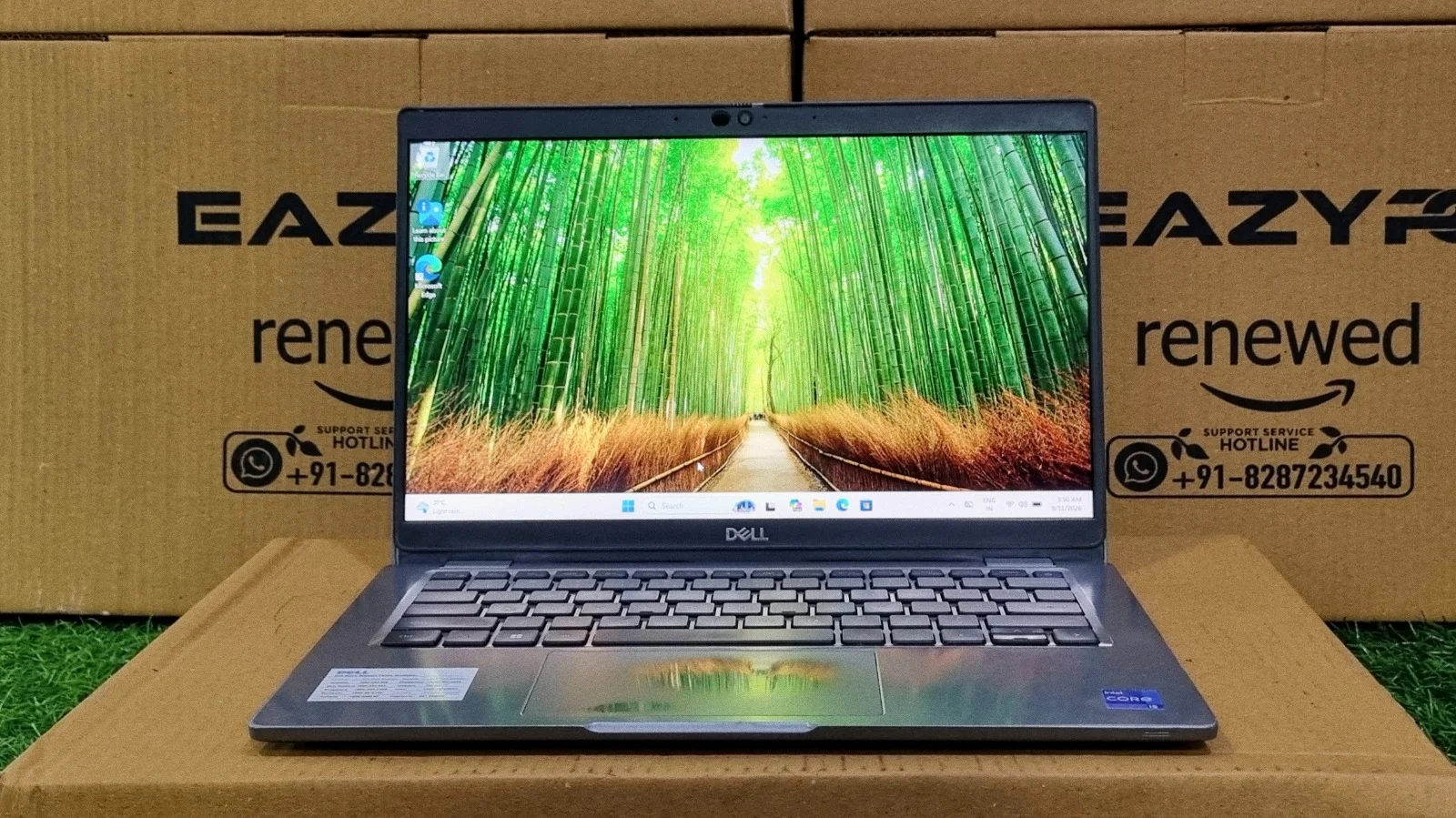
Small enough to disappear into a bag, but built around a 12th Gen chip with real multi-threaded muscle. Here's our full breakdown.
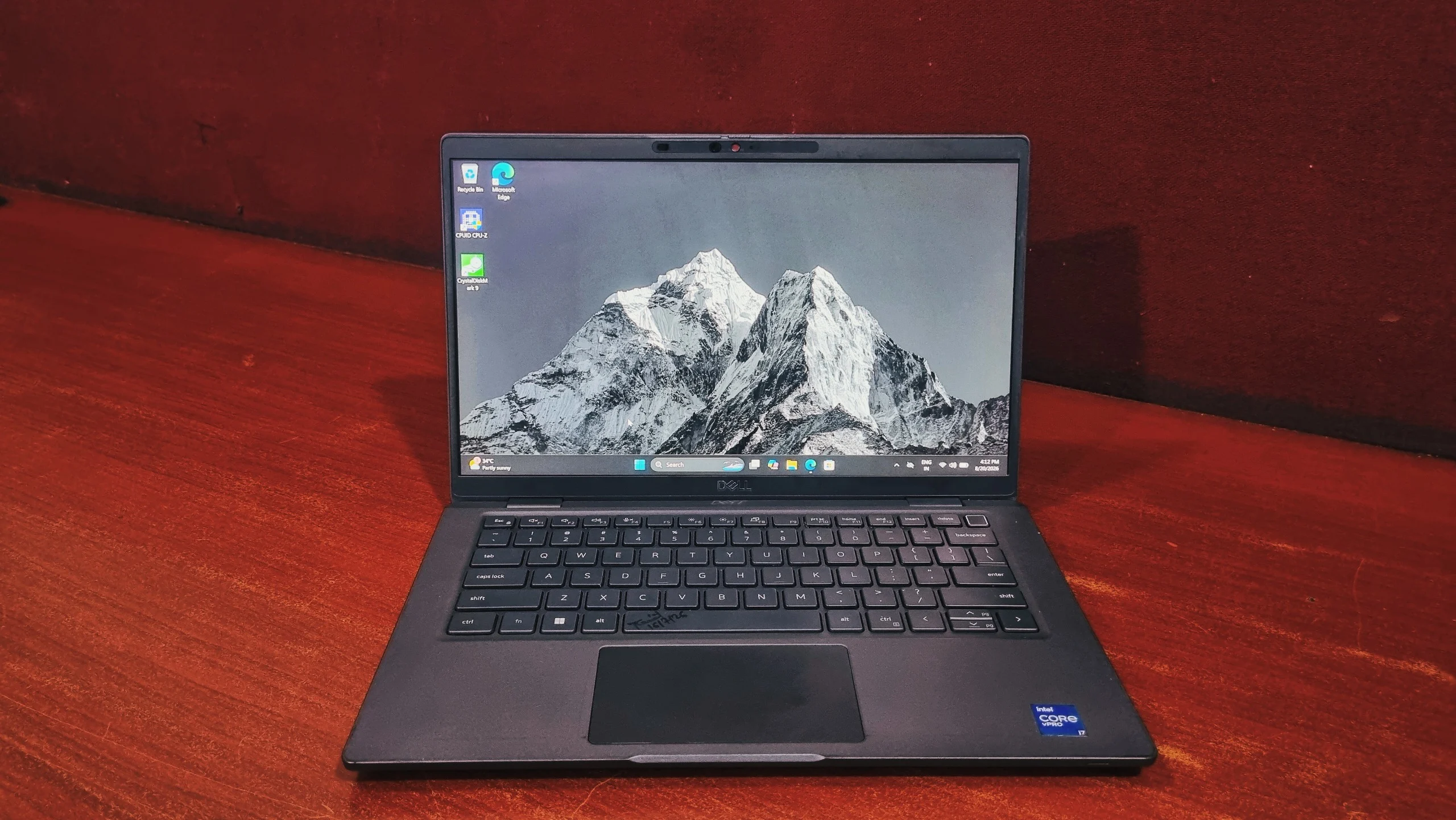
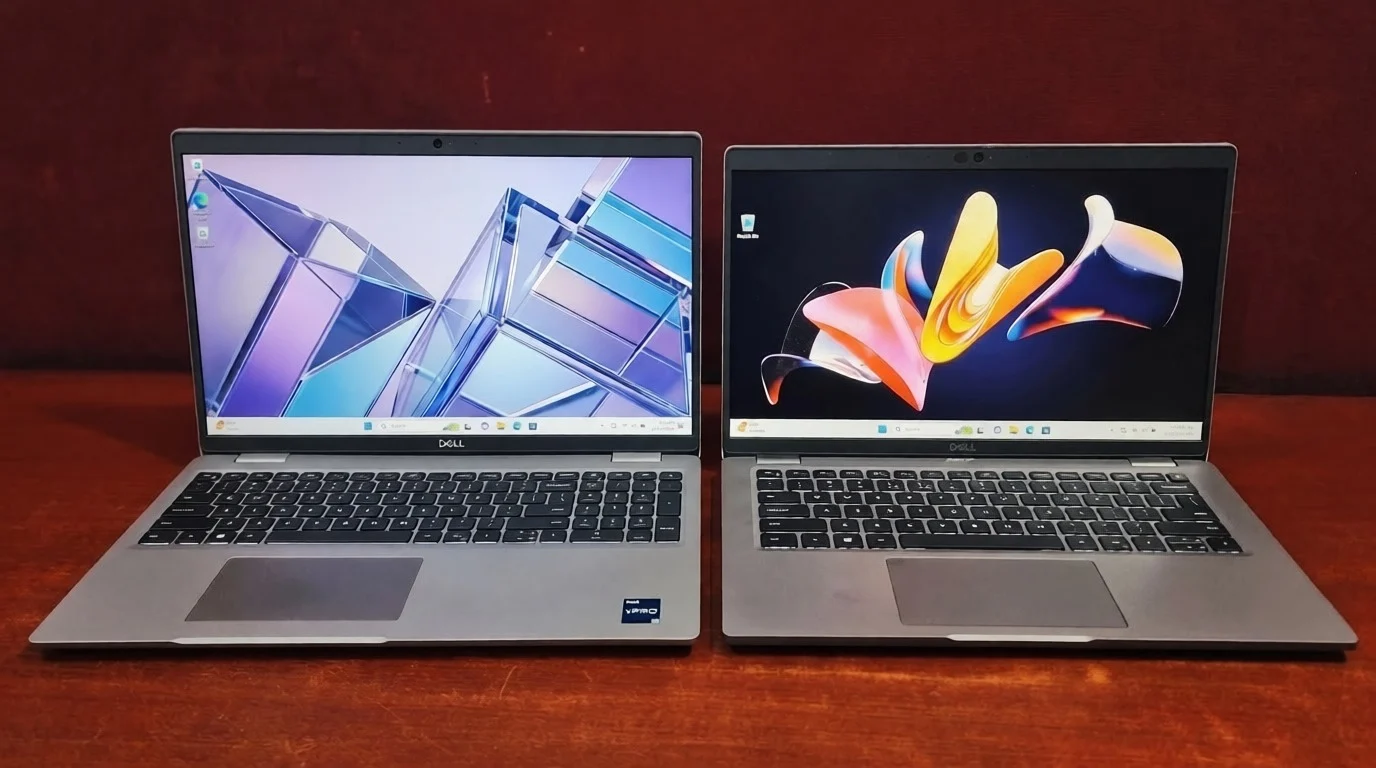
The Dell Latitude 5330 is a 13.3" business laptop built around 12th Gen Intel Core U-series silicon, with our review unit carrying a Core i5-1245U, 12MB of L3 cache, and a fast PCIe NVMe SSD. It's aimed at the everyday corporate crowd rather than power users: think spreadsheets, video calls, and a dozen browser tabs, not video rendering. Benchmarks show a chip that handles that workload with room to spare, backed by storage that keeps the whole system feeling snappy. Verdict: a sensible, well-rounded pick for office and hybrid work, held back only by the usual soldered-RAM ceiling business laptops in this class tend to have.
Specifications
Processor
Intel Core i5-1245U (2 Performance + 8 Efficient cores, 12 threads, up to 4.4 GHz Turbo)
Graphics
Integrated Intel Iris Xe Graphics
Memory
16GB DDR4 3200 MHz (soldered, non-upgradeable)
Storage
512GB PCIe NVMe SSD (M.2, configurable up to 2TB)
Display
13.3", Full HD (1920 x 1080), anti-glare WVA panel
Wireless
Wi-Fi 6E, Bluetooth 5.2, optional 4G LTE
Weight
Starting at 1.60 kg
The Latitude 5330 sits in an odd but useful spot in Dell's lineup: small enough to disappear into a bag, but built around a 12th Gen chip with real multi-threaded muscle rather than the bare-minimum silicon you'd expect at this size. It's not chasing headlines the way the 7000-series does, but for a company handing out laptops to a few hundred employees, that's often exactly the point.
We spent time with a Core i5-1245U configuration, ran it through the usual suite of benchmarks, and came away with a clear picture of where this machine earns its keep and where it doesn't. Here's the full breakdown.
Design & Build Quality
Dell keeps the 5330's shell fairly restrained: a magnesium-alloy chassis under a soft-touch finish, with none of the visual flourishes you'd find on a consumer Ultrabook. It's a laptop designed to look identical across an entire office floor, and it succeeds at that without feeling cheap. Flex is minimal across the keyboard deck, and the hinge holds the lid in place at whatever angle you set it, rather than drifting shut on its own.
Dell also runs the 5330 through MIL-STD 810H testing, the same durability standard used across the Latitude range, covering drops, dust, humidity, and temperature extremes. It won't survive being run over by a car, but it's built with the assumption that it'll spend a few years being shoved into bags, left in overhead bins, and generally treated the way office hardware actually gets treated.
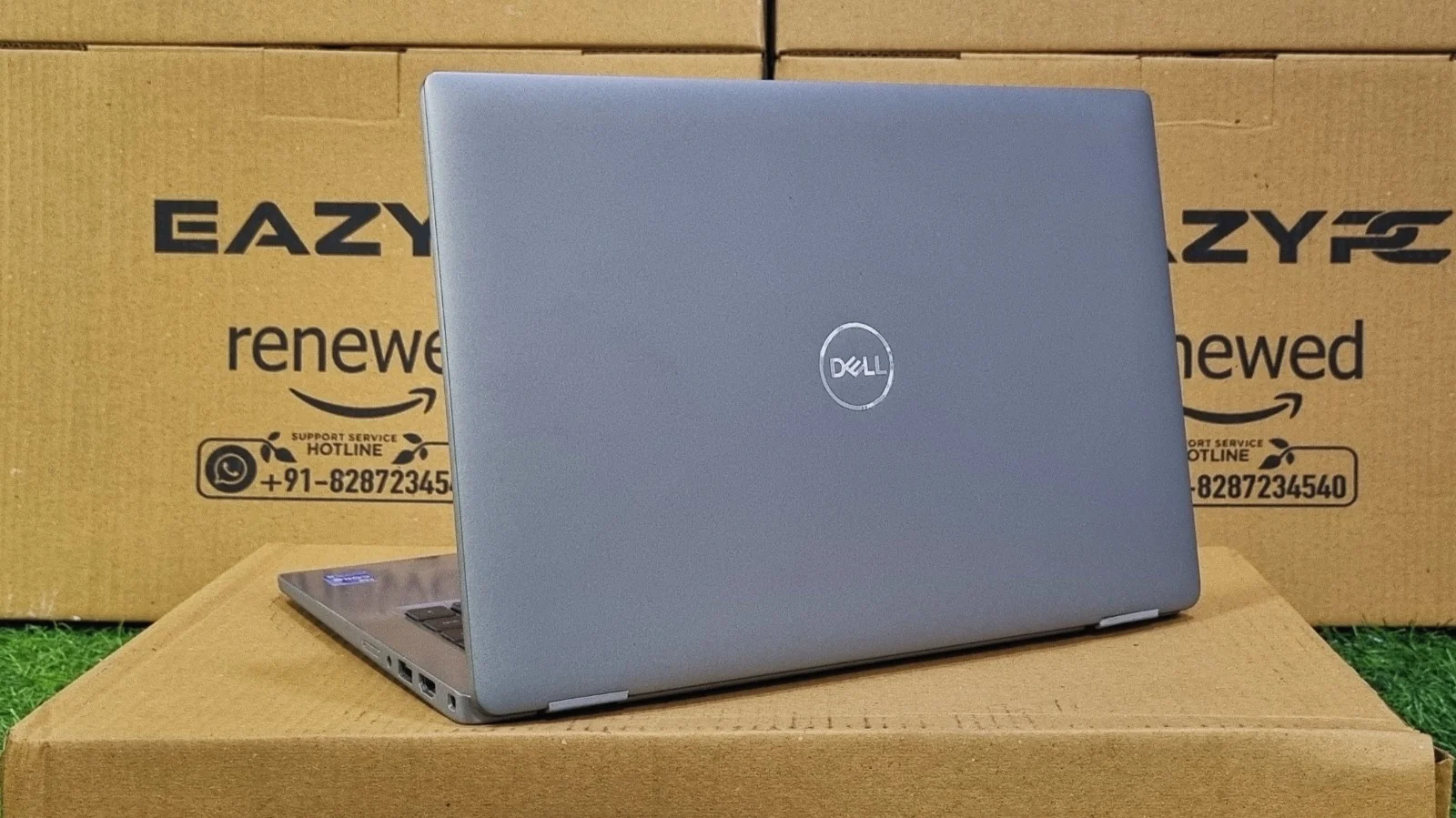
At just over 1.2 kg, it's light enough to carry all day without noticing it, and the 13.3-inch footprint means it fits into bags and bag pockets that wouldn't take a 14-inch machine. It's not the thinnest laptop in this class, but the trade-off buys a bit more rigidity and a keyboard deck that doesn't feel hollow.
The Display
The 13.3-inch Full HD panel is unremarkable in the best possible sense: sharp enough for text, evenly lit, and finished with an anti-glare coating that actually earns its name. Under office lighting or near a window, reflections stay well under control, which matters far more than peak brightness for a screen that's mostly going to show spreadsheets, email, and video calls all day.
Colour accuracy is fine for general use but won't turn heads doing photo work, and viewing angles are wide enough that a colleague glancing over your shoulder isn't looking at a washed-out mess. This is a screen built for long reading and typing sessions rather than for showing off, which is exactly the brief for a laptop like this.
Keyboard & Touchpad
Keyboard
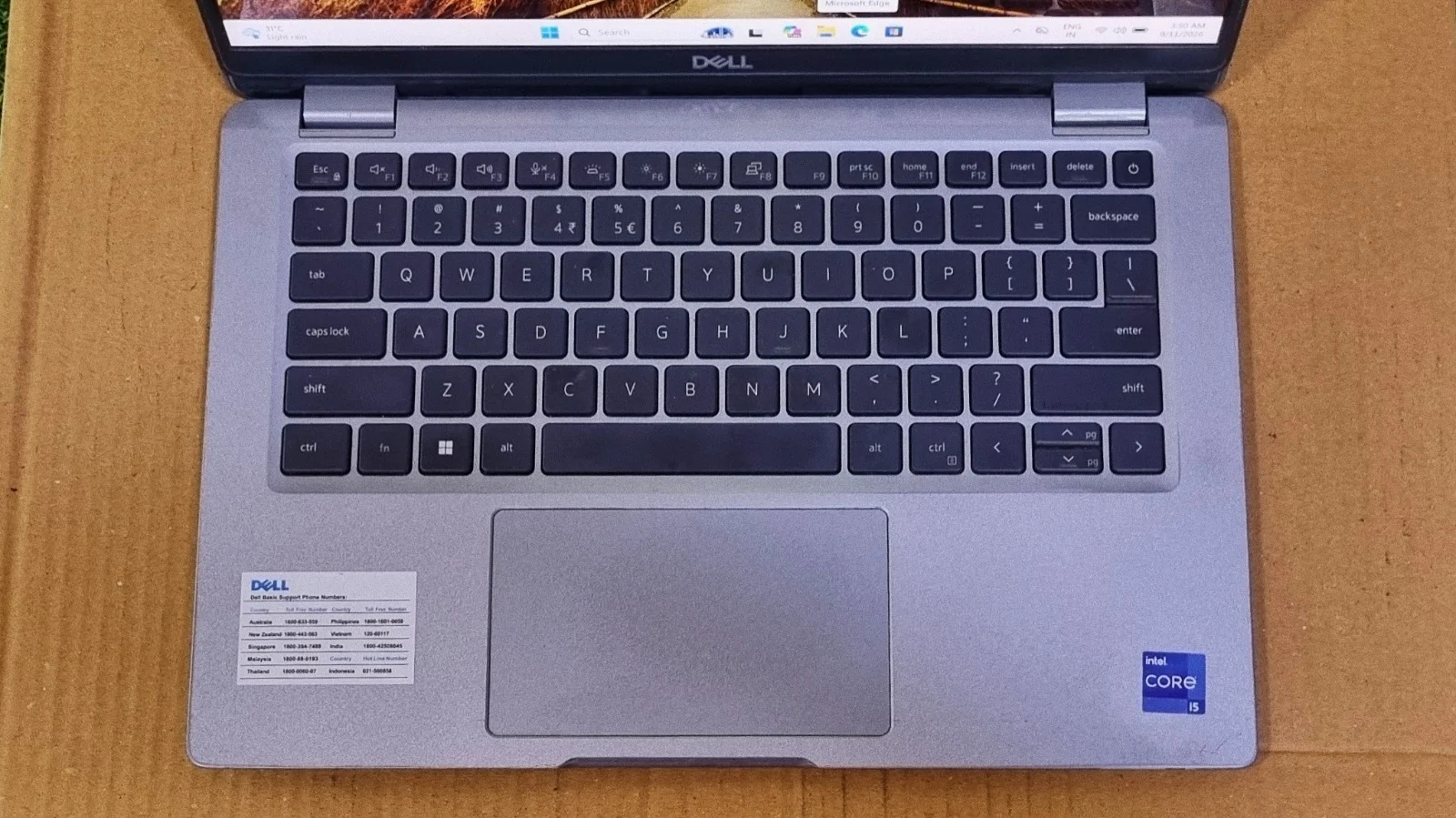
The backlit keyboard carries over Dell's usual business-laptop feel: firm, well-defined key travel with a crisp bottom-out, and a deck that doesn't give under fast typing. Key spacing is comfortable even at this smaller chassis size, and anyone stepping up from a larger Latitude will feel at home within a few minutes.
Touchpad
The glass touchpad is smooth and accurate, with full support for Windows Precision gestures, so three- and four-finger swipes register reliably rather than needing a second attempt. A fingerprint reader is built into the power button, which is a small but genuinely convenient touch for a machine that's going to get picked up and unlocked dozens of times a day.
Performance & Benchmarks
Specs on a page only tell part of the story, so we put the review unit through a full run of benchmarks to see how it actually behaves under load.
CPU Details (CPU-Z)
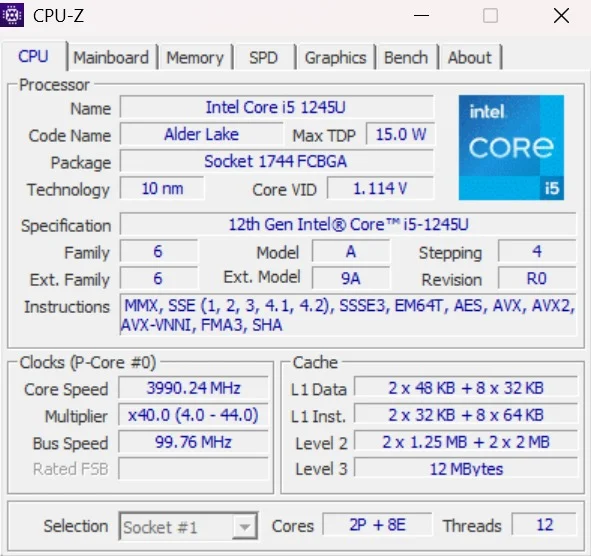
CPU-Z confirms the chip inside our unit: an Intel Core i5-1245U, codenamed Alder Lake, built on Intel's 10nm process. It's a hybrid design with 2 Performance cores and 8 Efficient cores for 12 threads total, running at a 15W max TDP with a core speed that ramped up to 3990 MHz during testing. Backed by 12MB of L3 cache, this hybrid architecture is the same core-and-thread philosophy Intel introduced with Alder Lake on desktop, scaled down to sip power in a thin business laptop rather than chase raw clock speed.
CPU Performance (Cinebench R23)
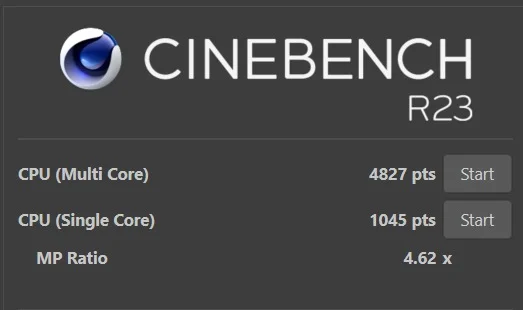
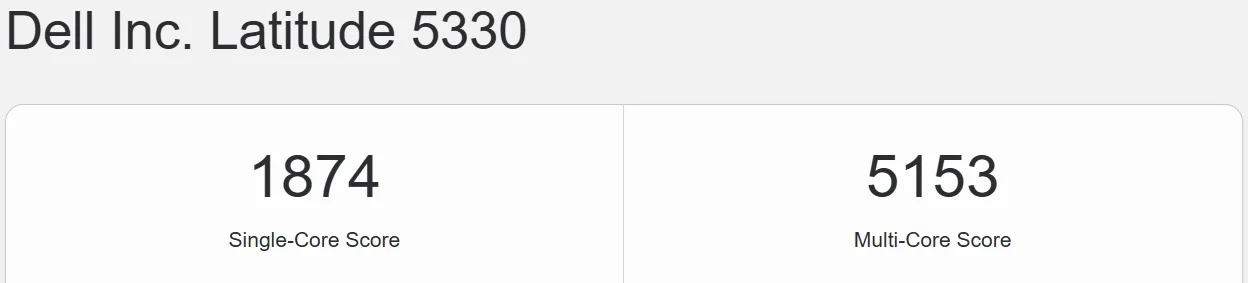
It's not a chip built for rendering, but for juggling a dozen open apps at once, this is a comfortable step up from older quad-core Latitudes.
CPU Benchmark (Geekbench 5)
Graphics Performance (Geekbench OpenCL)

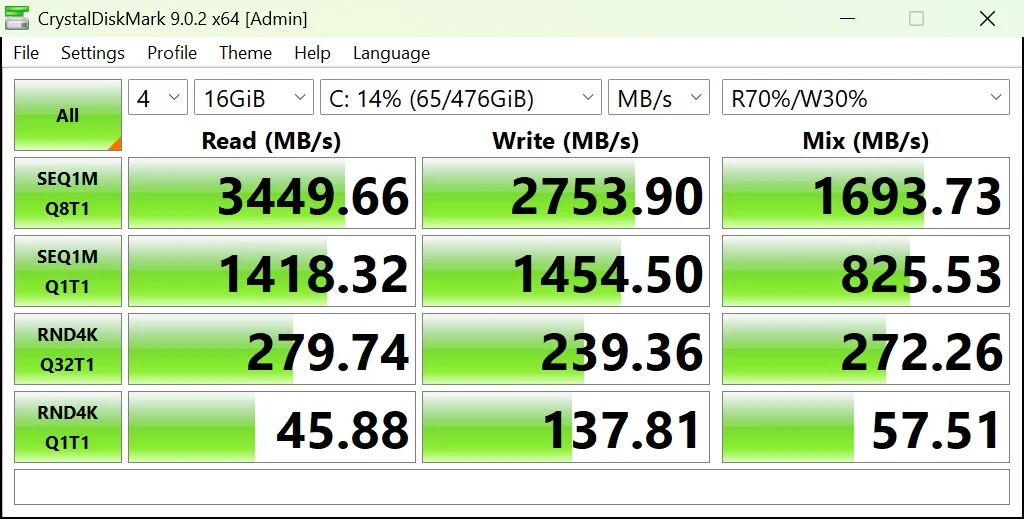
Storage Performance (CrystalDiskMark)
Overall System Performance (PCMark 10)
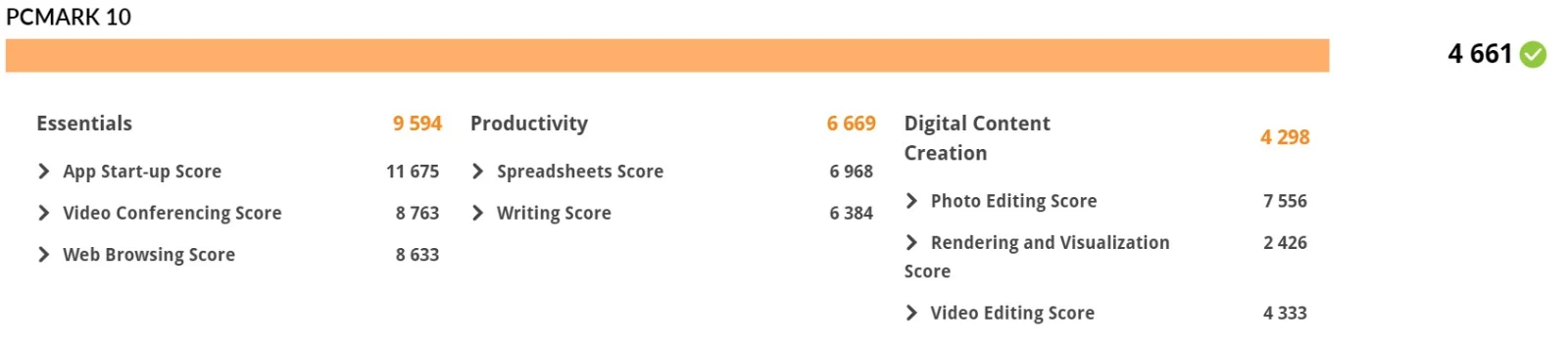
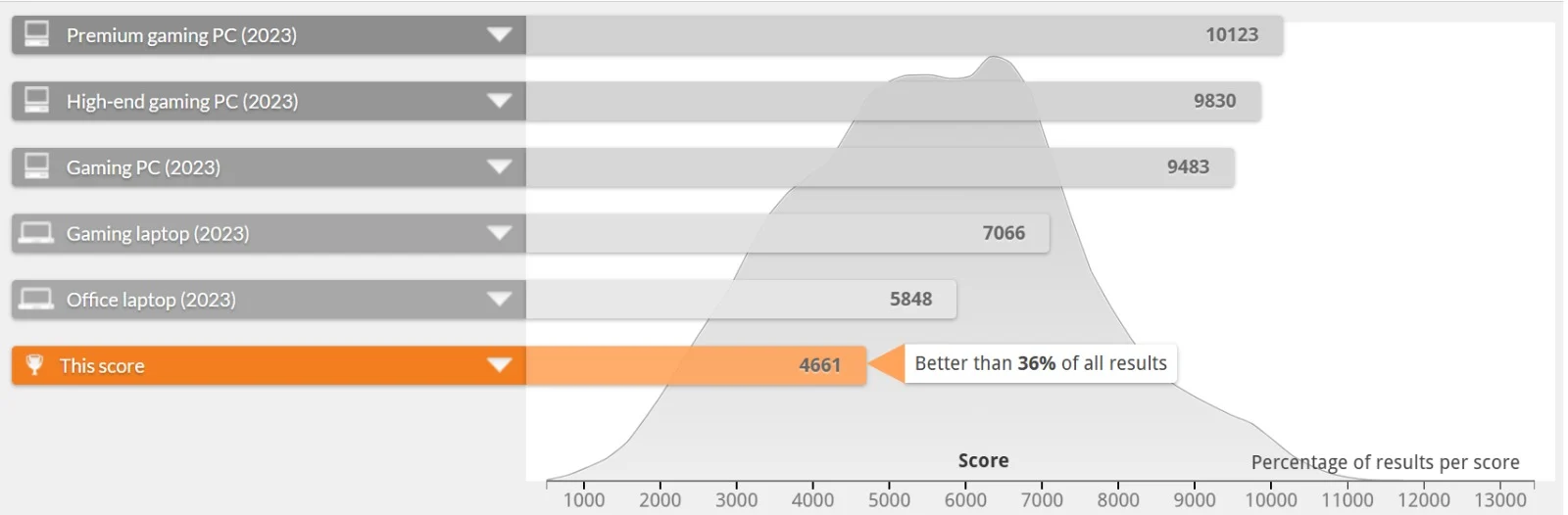
That gap to the 2023 office-laptop average tracks with what the specs suggest: this is a 15W chip tuned for battery life first, not a machine chasing the top of the leaderboard. What matters more is where it lands in practice: comfortably ahead of the point where a laptop starts to feel sluggish, and squarely in the zone needed for spreadsheets, web browsing, video calls, and everyday multitasking.
Everyday App Checks
- Microsoft Office: Opens and saves large files with no visible delay, helped along by the NVMe drive.
- Google Chrome: Comfortably handles 20+ tabs; push toward 30 during a video call and the soldered 16GB starts to feel like the ceiling it is.
- Video Conferencing: Smooth for 1080p calls with a handful of background apps open, with the Efficient cores keeping the video pipeline steady without spiking fan noise.
Hardware Details
The Latitude 5330 runs on a 12th Gen Intel Core i5-1245U, part of Intel's Alder Lake-U family and built on a 10nm process, confirmed directly from our test unit via CPU-Z. It's a hybrid design, pairing 2 Performance cores with 8 Efficient cores for 12 threads in total, a meaningfully different approach from the uniform quad-core chips found in older Latitude generations.
It carries a 15W max TDP, so Dell has tuned it firmly toward efficiency and battery life rather than sustained peak performance. Paired with 12MB of L3 cache and Iris Xe graphics on the same die, it's a chip built for fast, fluid office computing and video conferencing rather than anything demanding like gaming or heavy rendering, and the benchmark numbers above back that positioning up consistently.
Battery Life
The Latitude 5330 ships with either a 41Wh or 58Wh battery depending on configuration, and Dell rates the larger option for a full working day of mixed use. In practice, realistic day-to-day use lands somewhere in the 8-to-10-hour range on the bigger battery, helped along by the 15W chip's efficient Alder Lake-U design, which is tuned to spend most of its time on the low-power Efficient cores rather than the two Performance cores.
As with the rest of the Latitude line, Dell hasn't made servicing the battery a headache. The base panel comes off with a standard set of screws, so a worn-out cell down the line is a straightforward swap rather than a trip to a repair shop.
Ports and Connectivity
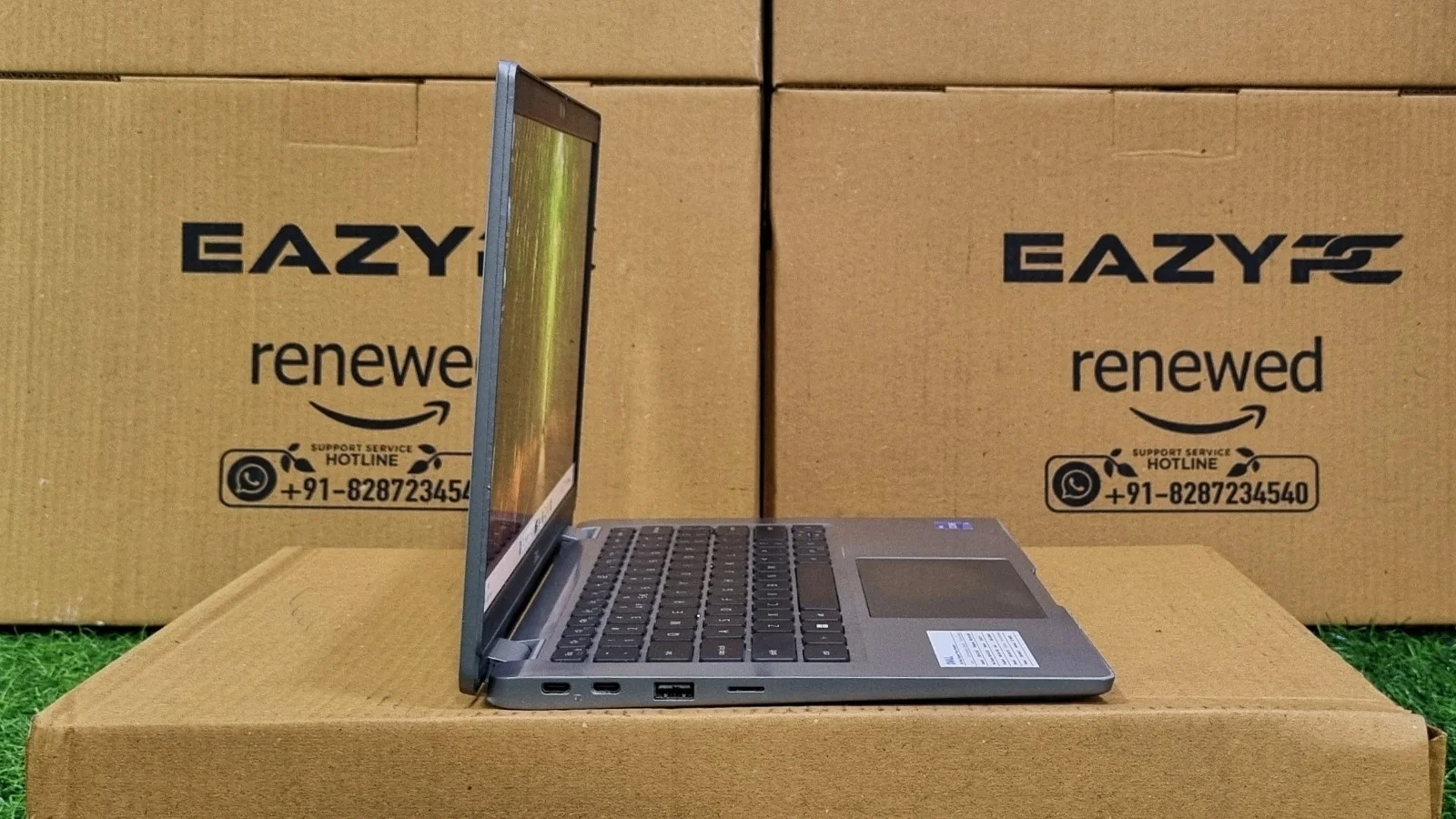
Dell spreads the ports across both sides of the chassis, which keeps cables from bunching up no matter which hand you favor.
Left Side
Right Side
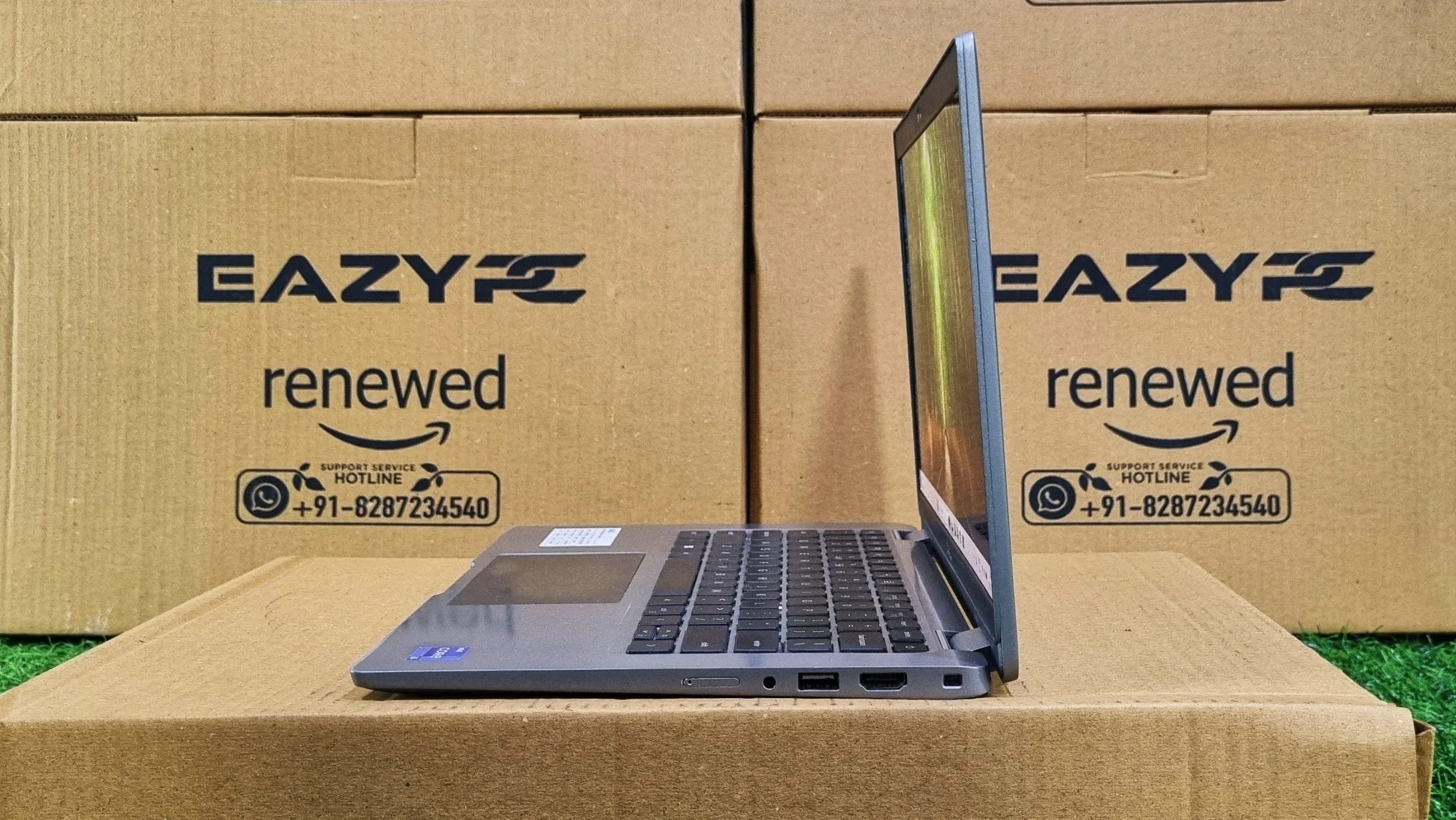
Two Thunderbolt 4 ports is a genuine step up over the single port found on some competing ultraportables, meaning you can charge, drive an external display, and transfer data all through one dock without contention. Combined with Wi-Fi 6E for a faster, less congested wireless connection, this is a laptop that plugs into a modern office setup without any awkward dongles.
Final Verdict
Final Verdict
The Dell Latitude 5330 does exactly what a mid-tier business laptop needs to do: it boots fast, stays quiet, and keeps up with the kind of workload most office employees actually throw at a machine all day. The 12th Gen Core i5-1245U's hybrid core design and the NVMe drive's storage speed do most of the heavy lifting here, and PCMark 10's Essentials and Productivity scores reflect a laptop that feels current rather than merely adequate.
The anti-glare Full HD display holds up well for long stretches of reading and typing, Dell's keyboard reputation remains intact, and two Thunderbolt 4 ports cover essentially every modern docking scenario. The trade-offs are the usual ones for this class: 16GB of soldered RAM is a hard ceiling with no upgrade path, and the graphics performance, while solid for Iris Xe, was never meant for anything beyond light creative work. For a company laptop or a professional who wants dependable, well-rounded performance without extra bulk, the 5330 is a smart, unglamorous pick.
Related Reads
Frequently Asked Questions
Yes. The Latitude 5330 handles everyday office work comfortably. Its Core i5-1245U hybrid processor, 512GB PCIe NVMe SSD, and PCMark 10 scores of 9594 (Essentials) and 6669 (Productivity) confirm it manages spreadsheets, video calls, and 20+ browser tabs without slowdown.
No. The RAM on the Latitude 5330 is soldered to the motherboard and cannot be upgraded after purchase. Our review unit shipped with 16GB of DDR4 3200 MHz memory, so buyers should choose their configuration carefully up front. The M.2 NVMe SSD can be swapped for a larger drive, up to 2TB.
The Latitude 5330 uses a 12th Gen Intel Core i5-1245U, part of Intel's Alder Lake-U family on a 10nm process. It is a hybrid chip with 2 Performance cores and 8 Efficient cores for 12 threads total, 12MB of L3 cache, a 15W max TDP, and Turbo up to 4.4 GHz.
The Latitude 5330 lasts roughly 8 to 10 hours in realistic mixed use on the 58Wh battery. Dell offers either a 41Wh or 58Wh cell depending on configuration, and the 15W Alder Lake-U chip's efficiency cores help stretch runtime across a full working day.
Yes. The Latitude 5330 includes two Thunderbolt 4 / USB-C ports with DisplayPort Alt Mode and Power Delivery. A single dock can therefore handle charging, external displays, and high-speed data transfer at the same time.
The Latitude 5330 has two Thunderbolt 4 / USB-C ports, one HDMI 2.0 port, and a 3.5mm audio combo jack on the left side. On the right side it has two USB-A 3.2 ports (one with Power Share), a microSD card reader, and a wedge-shaped lock slot, plus an optional SIM tray on LTE configurations.
The Latitude 5330 scored 4661 in PCMark 10, which is below the 2023 average office-laptop benchmark of 5848 but ahead of 36% of all submitted results. The gap reflects its 15W efficiency-first design rather than a performance shortfall for everyday productivity work.
Not really. The Latitude 5330 relies on integrated Intel Iris Xe graphics, which scored 9338 in Geekbench OpenCL. That is enough for 4K video playback, light photo editing, and driving an external monitor, but not for modern gaming or sustained video rendering.
Yes. The Latitude 5330 is tested to the MIL-STD 810H durability standard, covering drops, dust, humidity, and temperature extremes. Its magnesium-alloy chassis weighs from 1.60 kg and shows minimal flex across the keyboard deck.