Blogs
HP ZBook Studio G7 Mobile Workstation Review: Intel Core i9 10th Gen, 15.6″ FHD – Benchmarks, Specs & Who It’s For

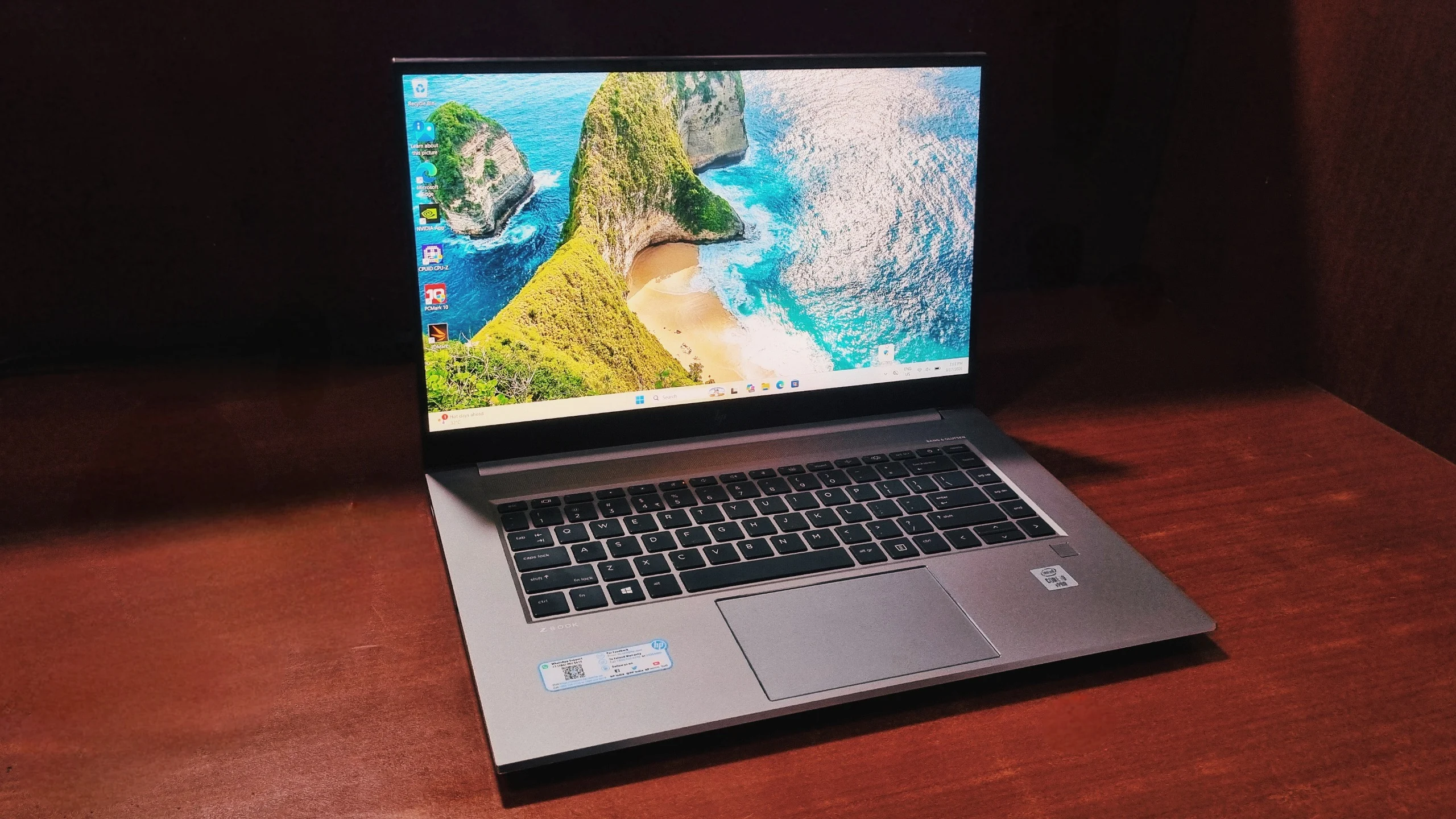
A compact mobile workstation for CAD, code, and light creative work, with i9-10885H power and ISV-certified Quadro graphics.
The HP ZBook Studio G7 is a 15.6" mobile workstation laptop built for engineers, developers, and creative professionals. This configuration pairs a 10th Gen Intel Core i9-10885H processor (8 cores, 16 threads) with an NVIDIA Quadro T2000 Max-Q GPU (4GB GDDR6), 32GB of DDR4 RAM, and a 15.6" Full HD (1920 x 1080) IPS anti-glare display. In benchmark testing it scored 5,149 in PCMark 10, 1,546/6,755 in Geekbench single/multi-core, and 3,492 in 3DMark Time Spy, reflecting strong CPU-driven productivity performance and ISV-certified (rather than gaming-grade) graphics.
✅ Pros
8-core i9-10885H with strong multi-core performance; ISV-certified Quadro T2000 graphics; 32GB dual-channel RAM; light at about 1.79 kg with MIL-STD 810G testing; two Thunderbolt 3 ports, HDMI 2.0, and an SD card reader; fingerprint reader.
⚠️ Cons
Real-world battery life of roughly 5–7 hours; not a gaming laptop; the FHD panel isn't ideal for colour-critical work; no dedicated number pad; 10th Gen chip is no longer Intel's newest.
Key Specifications at a Glance
Processor
Intel Core i9-10885H, 10th Gen (8 cores / 16 threads, 2.40GHz base, up to 5.3GHz boost)
Graphics
NVIDIA Quadro T2000 Max-Q, 4GB GDDR6 + Intel UHD Graphics (integrated)
Memory (RAM)
32GB DDR4, Dual Channel
Storage
512GB / 1TB PCIe NVMe M.2 SSD
Display
15.6" FHD (1920 x 1080), IPS, Anti-glare
Wireless
Wi-Fi 6 (802.11ax), Bluetooth 5.1
Weight
Approx. 1.79 kg
Battery (real-world)
Roughly 5-7 hours of mixed productivity use
Best for
CAD, engineering, software development, data work, light content creation
Not every professional needs a machine that's built to look flashy on a store shelf. Sometimes you just need something that can chew through CAD files, render previews, and heavy spreadsheets without breaking a sweat, and then still fit into a backpack. That's exactly the pitch behind the HP ZBook Studio G7, HP's compact mobile workstation aimed at engineers, developers, and creative professionals.
This particular unit runs on a 10th Gen Intel Core i9-10885H paired with an NVIDIA Quadro T2000 Max-Q GPU, a combination that leans heavily towards workstation-class reliability rather than gaming-grade flash. Let's get into what this machine is actually capable of, and who should be considering it.
What Is the Design and Build Quality Like?
The HP ZBook Studio G7 has a quieter, more business-like design than typical gaming laptops, built from brushed aluminum with a muted silver or space grey finish and tested to MIL-STD 810G durability standards.
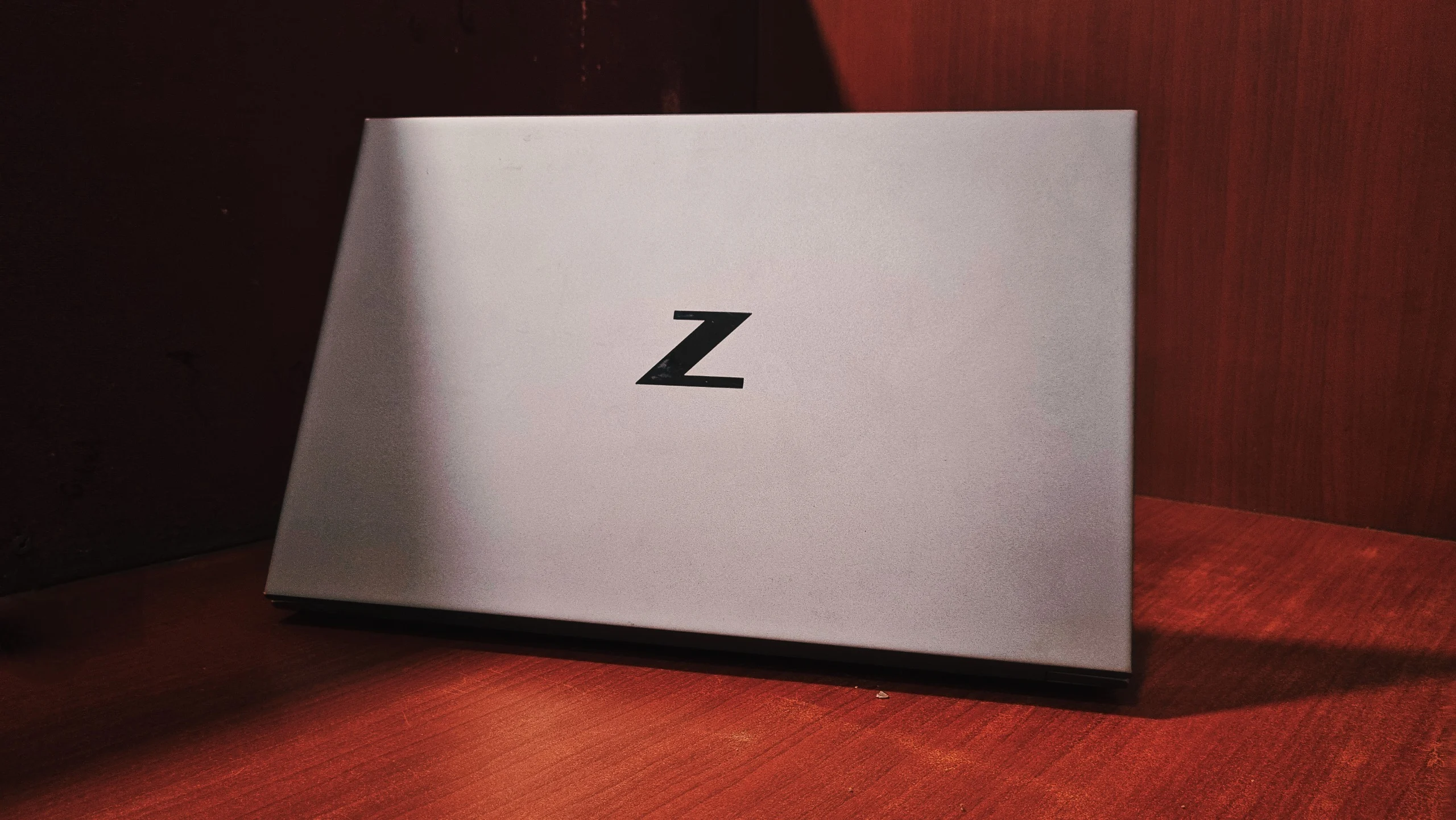
HP's ZBook line has always gone for a look you could open in a client meeting without anyone assuming you're about to boot up a first-person shooter. At under 1.8 kg, the HP ZBook Studio G7 is noticeably lighter than most 15-inch machines packing an H-series processor and dedicated graphics. MIL-STD 810G testing means it's rated to handle drops, dust, vibration, and temperature swings a lot better than a typical Ultrabook. The hinge feels tight and doesn't wobble, though like most slim workstations, you'll want both hands to open it comfortably.
What Kind of Display Does It Have?
This configuration uses a 15.6" Full HD (1920 x 1080) IPS panel with an anti-glare coating, a more practical choice for spreadsheets, code editors, and CAD software than the optional 4K Dream Color panel.
It won't wow you with HDR punch the way HP's optional 4K Dream Color panel does, but it's easier on the eyes for long sessions and considerably friendlier on battery life. Viewing angles are wide thanks to the IPS (In-Plane Switching) panel, colours look accurate enough for everyday design and layout work, and the matte finish keeps reflections from becoming a distraction when working near a window. If your work genuinely depends on colour-critical output, the 4K Dream Color variant is the better pick; for general productivity, this FHD panel does the job without fuss.
How Good Are the Keyboard and Touchpad?
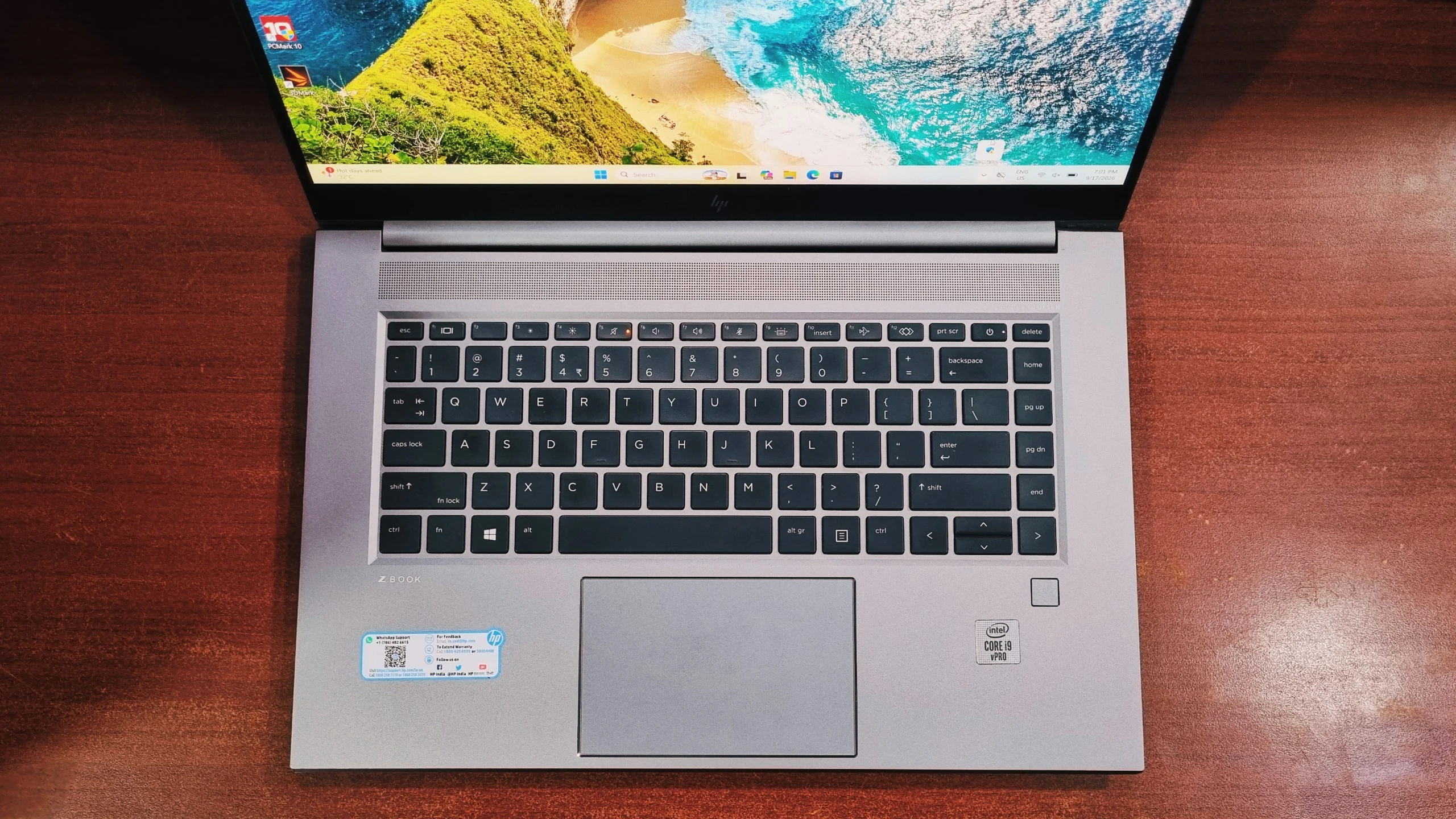
The HP ZBook Studio G7's keyboard is backlit with tactile, well-travelled keys, and its touchpad is roomy and accurate, with a fingerprint reader built into the deck for quick logins.
HP tends to get key travel right on its workstation line, and typing for hours doesn't feel fatiguing. There's no dedicated number pad given the compact 15.6" chassis, but the layout is sensible and doesn't feel cramped. The touchpad tracks accurately and includes integrated precision drivers, so gestures like pinch-to-zoom and three-finger swipes feel smooth rather than laggy.
How Does It Perform? (Benchmarks)
Benchmark testing shows the HP ZBook Studio G7's i9-10885H and Quadro T2000 combination is strongest at CPU-driven productivity work, scoring 5,149 in PCMark 10 and 3,492 in 3DMark Time Spy, with the CPU carrying most of that graphics score.
Numbers are more useful than marketing copy, so we ran this exact configuration through a set of standard benchmarking tools to see how the i9-10885H and Quadro T2000 combination actually behaves under load.
1. General Productivity & Daily Tasks
The HP ZBook Studio G7 scores 5,149 overall in PCMark 10, just under the typical office laptop average of 5,848, which still makes it comfortably fast for daily driver use in office work, browser-heavy multitasking, or engineering coursework.
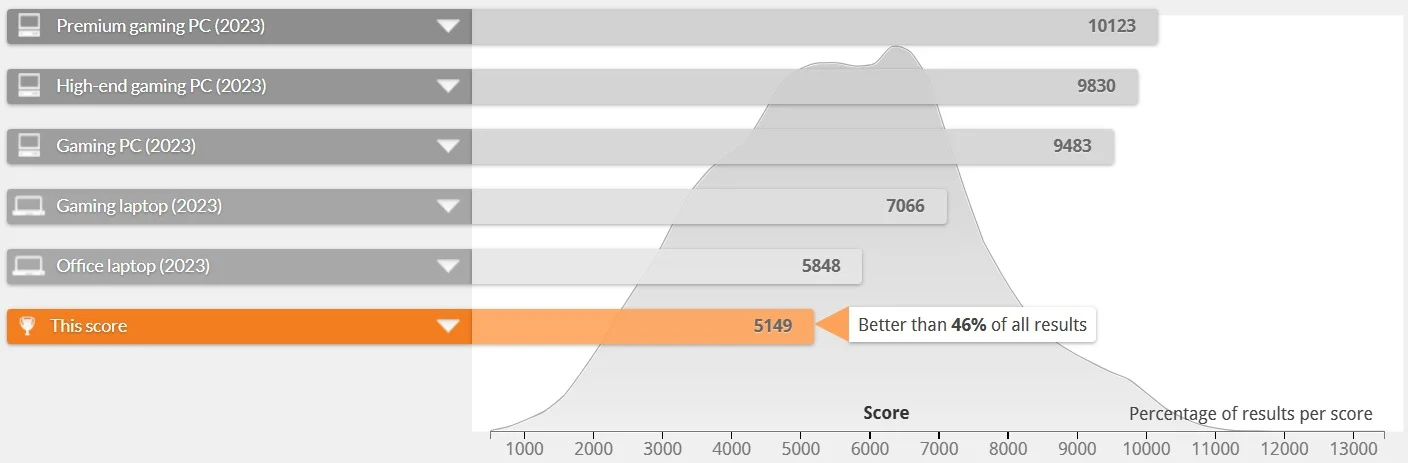
PCMark 10: the laptop posts an overall score of 5,149, built on an 8,227 in Essentials (app start-up, web browsing, and video calls), a 7,321 in Productivity (spreadsheets and writing), and a 6,151 in Digital Content Creation (photo editing, rendering, and video editing). That last figure is notably strong for a 4GB GPU, and it's the clearest sign that this machine was built with light creative work in mind, not just spreadsheets.
Set against HP's own benchmark database, this score lands better than 46% of all results submitted for similar systems, sitting a little below the typical office laptop average of 5,848 and not too far behind entry-level gaming machines. For a workstation that's optimized for stability over raw speed, that's a solid showing.
2. Processing Power
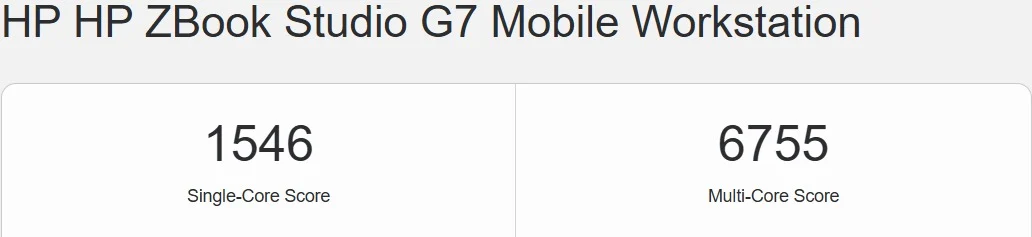
Geekbench: the i9-10885H returns a Single-Core score of 1,546 and a multi-core score of 6,755. With 8 cores and 16 threads on tap, this chip is built to plough through multi-threaded workloads like compiling code, running virtual machines, or exporting large project files without stuttering.
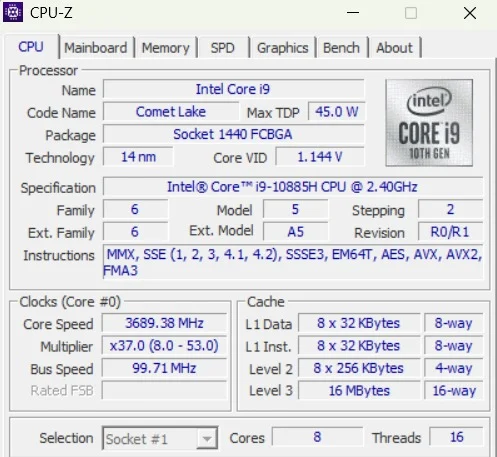
CPU-Z confirms the fine print: this is the Comet Lake i9-10885H running at a base 2.40GHz with boost clocks reaching up to 5.3GHz, backed by 16MB of L3 cache and a 45W TDP. It's not the newest silicon on the market anymore, but for compile times, data crunching, and background multitasking, it still holds up well.
3. Graphics & Rendering Performance
The NVIDIA Quadro T2000 Max-Q isn't a gaming card, and it was never meant to be one. It's a certified professional GPU designed for CAD, 3D modelling, and light rendering work, where stability and driver certification matter more than raw frame rates.
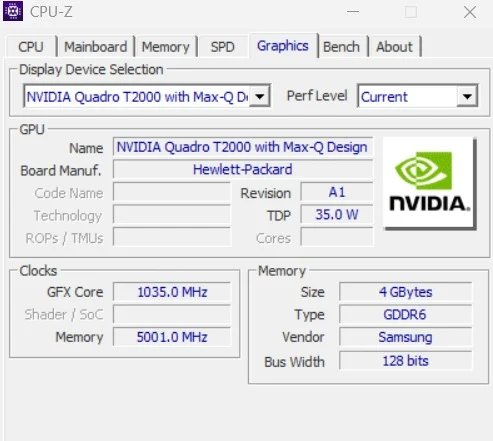
CPU-Z (Graphics): CPU-Z identifies the GPU as an NVIDIA Quadro T2000 with Max-Q Design (Hewlett-Packard board, revision A1), running a 1,035MHz core clock with 4GB of Samsung GDDR6 memory at 5,001MHz on a 128-bit bus, all inside a 35W TDP. That tight power envelope is what lets HP fit a discrete workstation GPU into such a slim chassis, and it's also why the T2000 favors cool, consistent behavior under sustained load over peak frame rates.
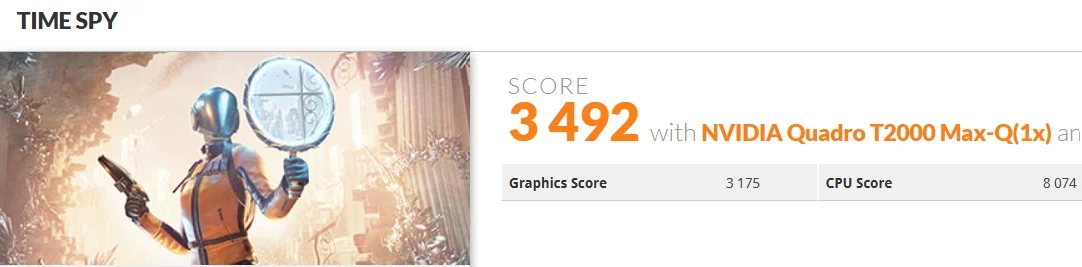
3DMark Time Spy: the system scores 3,492 overall, made up of a Graphics Score of 3,175 and a CPU Score of 8,074. That CPU figure is genuinely strong, it's the processor doing the heavy lifting here, while the modest graphics number is simply a reflection of the T2000's focus on workstation certification rather than gaming muscle.
Compared against gaming-focused machines, this places the ZBook better than 13% of all submitted results, which sounds low until you remember it's being measured against laptops with dedicated gaming GPUs several tiers above the T2000. It's not the machine to buy for AAA gaming, and HP never marketed it that way, but it will run older or lighter titles at reduced settings without complaint.

OpenCL (GPU Compute): the Quadro T2000 posts a score of 34,079, a genuinely useful number for anyone doing GPU-accelerated work in tools like Adobe Premiere, DaVinci Resolve, or CAD software that leans on OpenCL/CUDA acceleration. It's a significant step up from relying on integrated graphics alone.
Is the HP ZBook Studio G7 Good for Gaming?
No, the HP ZBook Studio G7 is not a gaming laptop. Its NVIDIA Quadro T2000 GPU is tuned for ISV-certified professional applications, not gaming frame rates, so treat any gaming performance as a bonus, not the main use case.
The Quadro T2000 is tuned for ISV-certified professional applications (SolidWorks, AutoCAD, Revit, and similar), where driver stability matters far more than gaming frame rates. If you do want to unwind after work, expect esports titles and older games to run comfortably at 1080p on medium settings, but demanding modern AAA titles will need settings turned well down. Buyers picking this laptop up should be doing so for the workstation credentials, not the gaming ones.
How Long Does the Battery Last?
The HP ZBook Studio G7 realistically delivers 5 to 7 hours of battery life under mixed productivity use, and less during rendering or heavy multitasking, despite HP's official rating of up to a full working day under light use.
Mobile workstations rarely lead the pack on battery life, and the ZBook Studio G7 is a case of trading endurance for horsepower. With the i9 and dedicated GPU active, expect real-world battery life to land somewhere in the 5-to-7-hour range for mixed productivity work, and considerably less if you're pushing rendering or heavy multitasking. If your workflow includes demanding tasks, keeping the 150W charger within reach is a sensible habit.
What Ports Does It Have?
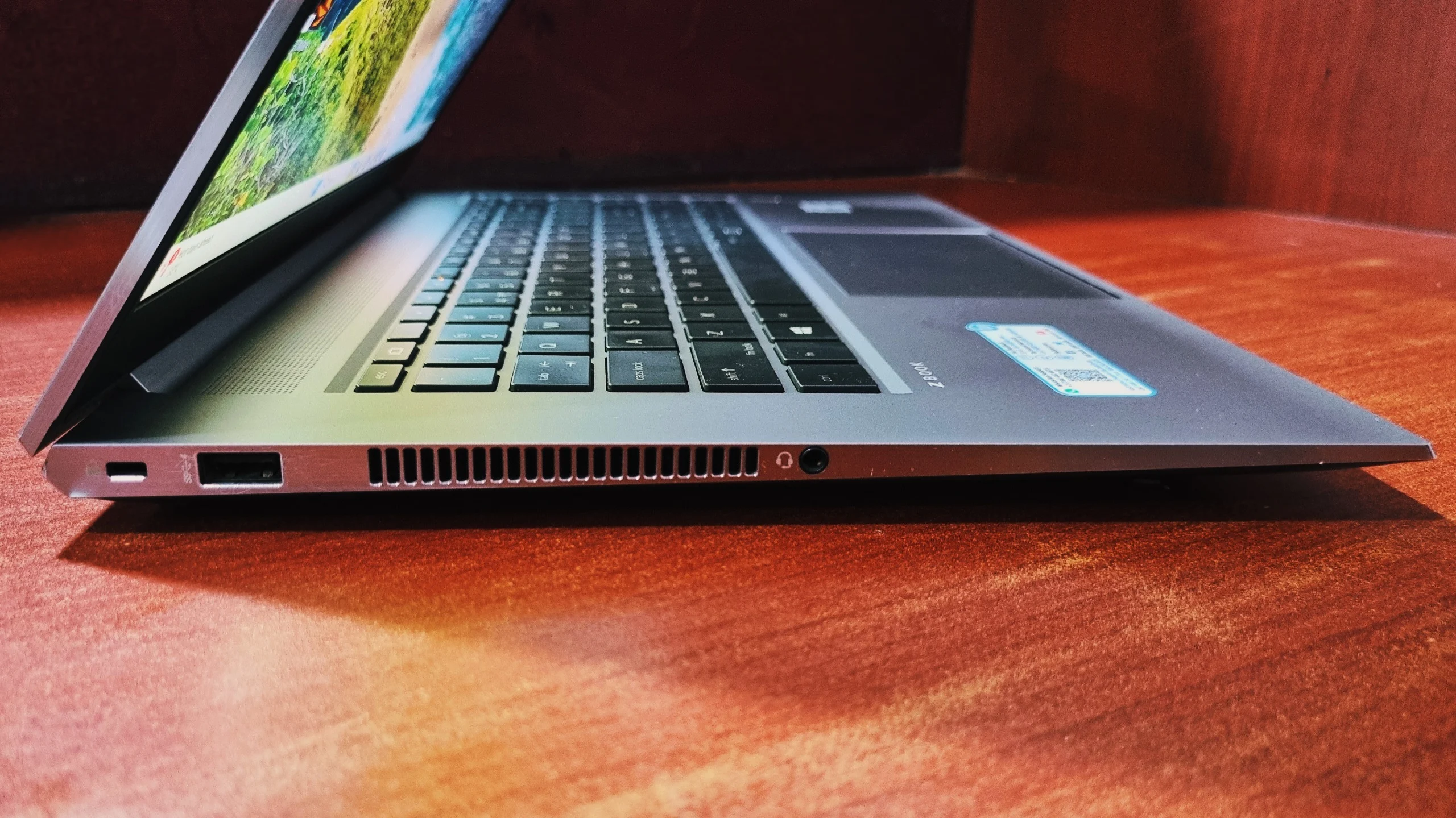
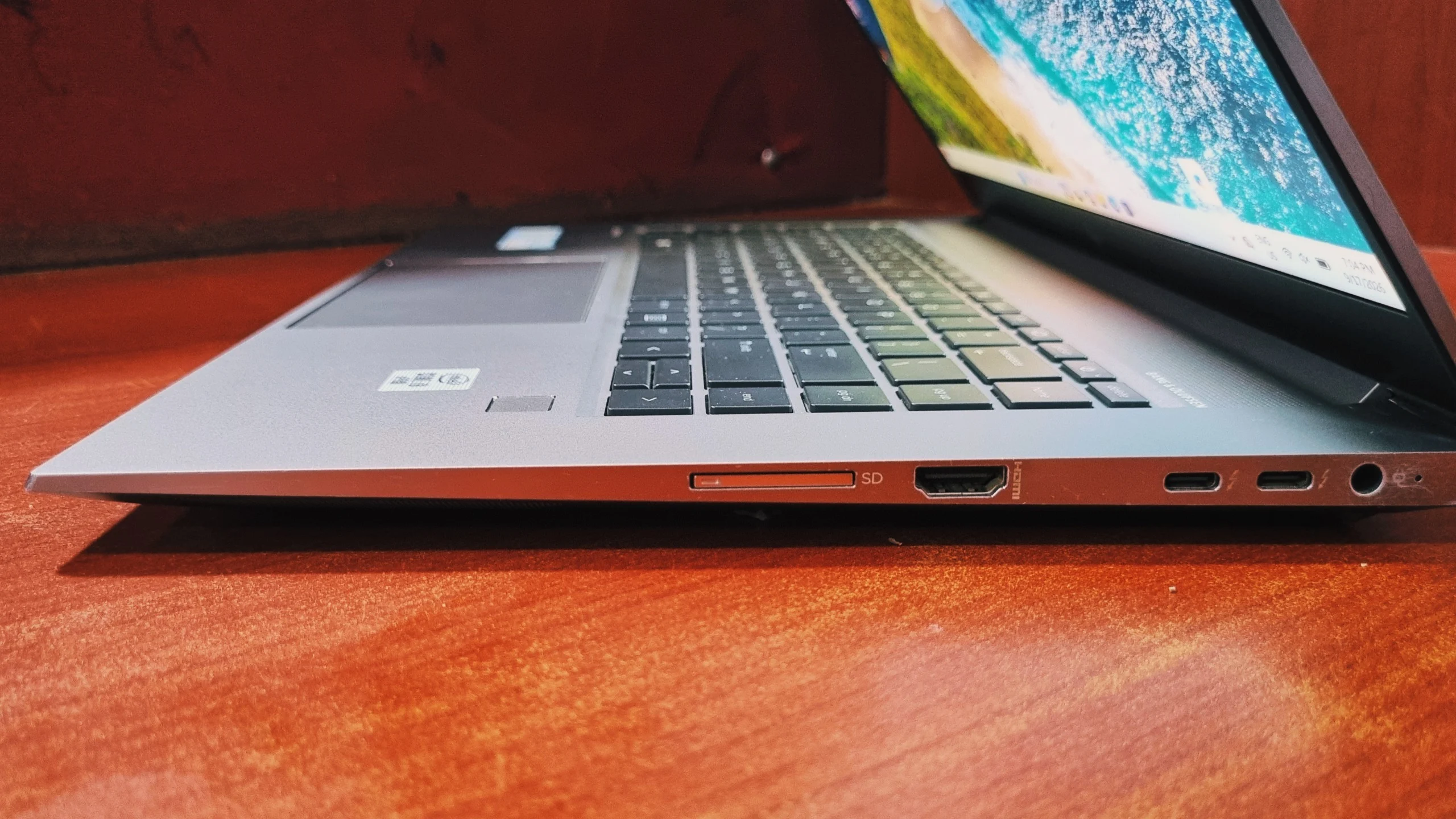
The HP ZBook Studio G7 includes two Thunderbolt 3 USB-C ports, one USB 3.1 Gen 1 Type-A port, full-size HDMI 2.0, a 3.5mm audio jack, an SD card reader, a 4.5mm power connector, Wi-Fi 6, and Bluetooth 5.1.
HP kept the port selection genuinely useful rather than trimming it down for the sake of thinness. The two Thunderbolt 3 USB-C ports support fast data transfer and external displays, while the SD card reader is a welcome inclusion for content creators pulling footage off cameras. A fingerprint reader is also built into the touchpad for quick logins.
Left Side
Right Side
Verdict: Should You Buy the HP ZBook Studio G7?
Final Verdict
The HP ZBook Studio G7 is best suited to engineers, developers, and creative professionals who need certified CPU-heavy performance in a portable 15.6" chassis, not to gamers or buyers prioritizing all-day battery life.
The i9-10885H handles multi-threaded workloads with ease, the Quadro T2000 brings certified stability for professional software, and the FHD display keeps things practical for long work sessions. It's not going to turn heads as a gaming rig, and the battery life won't outlast a full flight, but if your day revolves around CAD, development, data work, or light content creation, this is a dependable, well-built companion that's earned its "workstation" badge rather than just wearing it.
Frequently Asked Questions
The HP ZBook Studio G7 is best used for CAD and 3D design, software development, data analysis, and light content creation, all workloads that benefit from its 8-core i9-10885H processor and ISV-certified Quadro T2000 graphics.
Yes. The HP ZBook Studio G7's NVIDIA Quadro T2000 GPU is ISV-certified for professional design software like AutoCAD, SolidWorks, and Revit, which matters more for stability in these programs than raw gaming performance.
The HP ZBook Studio G7 can run esports titles and older or lighter games reasonably well at 1080p on medium settings, but it isn't built or marketed for modern AAA gaming.
The HP ZBook Studio G7 (i9-10885H, Quadro T2000, 32GB RAM) scores 5,149 overall in PCMark 10, with 8,227 in Essentials, 7,321 in Productivity, and 6,151 in Digital Content Creation.
The HP ZBook Studio G7 scores 3,492 overall in 3DMark Time Spy, made up of a 3,175 Graphics Score and an 8,074 CPU Score, placing it better than 13% of all submitted results (most of which come from gaming-focused laptops).
The HP ZBook Studio G7 typically delivers 5 to 7 hours of real-world battery life during mixed productivity work, and drops noticeably once the i9-10885H and Quadro T2000 are both under sustained load.
Yes. The HP ZBook Studio G7 includes two Thunderbolt 3 USB-C ports, which support high-speed data transfer and driving external displays.
Yes. With 8 cores and 16 threads and a boost clock up to 5.3GHz, the Intel Core i9-10885H inside the HP ZBook Studio G7 remains strong for compiling code, multitasking, and data-heavy workflows, even though it's no longer Intel's newest generation.
The HP ZBook Studio G7 is best suited for engineers, developers, architects, and creative professionals who need certified graphics performance and strong CPU power in a genuinely portable chassis, rather than gamers or users who prioritize battery life.
The FHD (1920 x 1080) version of the HP ZBook Studio G7 covered in this article offers better battery life and easier long-session viewing, while the 4K Dream Color version trades battery efficiency for higher resolution and wider color accuracy suited to color-critical creative work.