
Blogs
Ray Tracing, DLSS, FSR and Frame Generation, Explained Simply

Summary
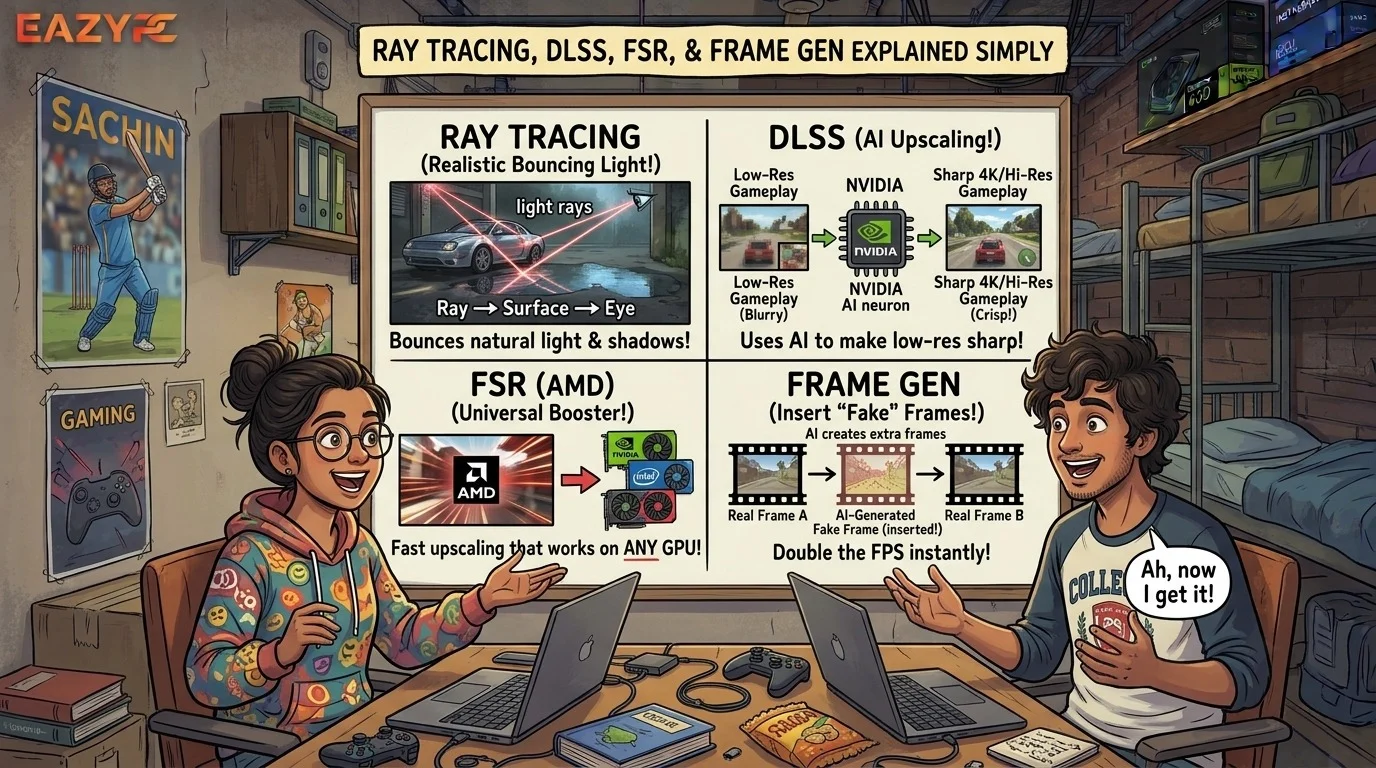
Ray tracing is a lighting technique that simulates real light, so games look more realistic, but it is demanding on your GPU. DLSS (NVIDIA), FSR (AMD) and XeSS (Intel) are upscalers that render a game at a lower resolution and rebuild a sharper image to raise frame rates. Frame generation inserts AI-made frames between real ones for smoother motion, but it can add a little input lag.
If you've ever opened a game's graphics menu and stared at words like "Ray Reconstruction," "Frame Gen," and "Quality vs. Performance," you're not alone. These features are some of the most useful things to happen to PC gaming in years, but they're usually explained in a way that makes your eyes glaze over.
So, let's slow down and go through them one at a time, like a friend explaining it over a cup of chai.
At a glance
| Technology | What it does | Main trade-off | Who makes it |
|---|---|---|---|
| Ray tracing | Realistic reflections, shadows and lighting | Large drop in fps | Supported by NVIDIA, AMD and Intel GPUs |
| Upscaling | Renders fewer pixels, rebuilds a sharp image | Small chance of artifacts | DLSS (NVIDIA), FSR (AMD), XeSS (Intel) |
| Frame generation | Adds AI-made frames for smoother motion | Extra input latency | DLSS (NVIDIA), FSR (AMD) |
| Ray Reconstruction / Ray Regeneration | AI denoising of ray-traced lighting | Needs game and GPU support | NVIDIA / AMD |
What is ray tracing, DLSS, FSR and frame generation?
Modern games are gorgeous, and gorgeous is expensive. Realistic lighting takes enormous computing power, and rendering millions of pixels 60, 120 or 240 times per second takes even more.
No graphics card can do all of that the old-fashioned way. So the industry found clever shortcuts:
Makes lighting look more real (but costs performance).
Renders the game at a lower resolution and smartly scales it up, so you get performance back.
Invents extra frames between the real ones, so motion looks smoother.
That's it. Everything else is detailed. Let's get into the details anyway.
What is ray tracing in games?
Traditional game lighting is mostly faked. Developers use tricks like pre-baked shadows, fake reflections and cheat-sheet lighting to make scenes look believable. It works, but it has limits. Reflections might only show what's on screen, and shadows can look flat or oddly sharp.
Ray tracing takes a different approach: it simulates how light actually travels. The game calculates rays of light bouncing around the scene, so reflections show things that are off-screen, shadows soften naturally, and sunlight bleeds warmly through a window and onto a wall.
You'll usually see it listed in a few flavours:
- Ray-traced reflections and shadows: the lighter versions, often a modest hit to performance.
- Ray-traced global illumination: how light bounces and colours the whole scene.
- Path tracing: the full, heavy-duty version where almost all lighting is simulated. It looks stunning and can bring even a top-tier GPU to its knees.
The catch: ray tracing is brutally demanding, and the raw result is noisy. Because a GPU can only fire a limited number of rays per pixel, the image comes out grainy, and the game has to clean it up using a denoiser. This is where AI steps in, which we'll get to shortly.
What is upscaling (DLSS, FSR and XeSS)?
Here's the core idea. Instead of rendering a game at full 4K (about 8.3 million pixels), the GPU renders at something like 1440p or 1080p and then uses an algorithm to rebuild a sharp 4K picture. Fewer pixels to draw means much higher frame rates.
Old-school upscaling just stretched the picture and looked blurry. Modern upscaling uses motion data, previous frames and AI to reconstruct detail, and often looks astonishingly close to native, sometimes even cleaner than the game's built-in anti-aliasing.
You'll see quality presets like these:
| Preset | What it means | Best for |
|---|---|---|
| Quality | Renders at a fairly high internal resolution | Best image, modest speed boost |
| Balanced | The middle ground | Most people |
| Performance | Renders at a much lower internal resolution | Big boost, good at 4K |
| Ultra Performance | Lowest internal resolution | Very demanding games or weak GPUs |
What is DLSS?
DLSS runs on the dedicated AI hardware (Tensor cores) in GeForce RTX cards, which is one reason it tends to look so good.
The current generation is DLSS 4.5. According to coverage of NVIDIA's announcement, it brought a second-generation transformer model for Super Resolution, available to all GeForce RTX GPUs, with the biggest improvements in the Performance and Ultra Performance modes. In plain terms: less ghosting, cleaner edges and a more stable picture, even when you're rendering at a low internal resolution.
That's good news if you own an older RTX card, because you don't need the newest GPU to get the improved upscaling.
What is FSR?
Early versions were a clever software trick that worked on almost any graphics card, including NVIDIA's, but the image quality was a step behind DLSS.
Things changed with FSR 4, which uses machine learning and is built for Radeon RX 9000-series cards. The result is a big jump in image quality. AMD then announced FSR Redstone, a bundle that pairs FSR upscaling with ML-powered frame generation, ray regeneration and radiance caching. Redstone was set to debut in December 2025, initially for Radeon RX 9000 GPUs.
If you're on an older Radeon or a non-AMD card, you can still use the older FSR versions in many games. They're less pretty, but they work, and they've saved a lot of ageing GPUs.
What is XeSS?
Intel has its own upscaler, XeSS, which runs best on Intel Arc cards but also works on other GPUs in many games. If a game offers it and you don't have DLSS or FSR 4, it's worth a try.
What is frame generation, and does it add lag?
Upscaling gives you real extra frames, because the GPU does less work per frame. Frame generation is different. It creates new frames that the game never actually rendered.
The GPU looks at two real frames, works out how things are moving, and slips an AI-made frame in between. Your fps counter goes up, and on a high-refresh monitor the motion looks silky.
Sounds like magic, and it mostly is, but there are two things to understand.
Frame generation smooths out a game that already runs reasonably well. If you're sitting at 20 fps and turn it on, you'll get a higher number, but the game will still feel sluggish and it will look worse. A good rule of thumb is to have around 40 to 60 real fps first.
Generated frames don't react to your mouse or controller. The game still only responds to your input on the real frames, and the technique has to hold back a frame to work, which adds a little latency. For a single-player cinematic game, you'll barely notice. For a competitive shooter, it's usually not worth it.
What is new in DLSS 4.5 multi frame generation?
NVIDIA's original frame generation inserted one fake frame between real ones (2x). With the RTX 50 series, multi frame generation made it possible to generate up to three (4x).
With DLSS 4.5, NVIDIA went further. According to reports, it now offers:
- 6x Multi Frame Generation: one real frame followed by up to five generated ones, exclusive to RTX 50-series cards.
- Dynamic Multi Frame Generation: an "automatic transmission" for frame gen. It keeps an eye on the gap between what your GPU can render and your monitor's refresh rate, then raises or lowers the multiplier in real time. It also avoids pushing frames past your monitor's refresh rate, so you won't waste effort generating 240 fps on a 120Hz screen.
- A better frame generation model for both RTX 40 and 50 series, aimed at cleaner, clearer generated frames.
The new modes landed via the NVIDIA app beta in spring 2026 and need a recent Game Ready driver.
Meanwhile, AMD's FSR Frame Generation moved from the older FSR 3 approach to a machine-learning model with Redstone. AMD's version is a classic 2x doubling rather than multi-frame, at least for now.
The chart below shows how each setting changes what you see and how the game feels, using an illustrative 4K example. Each step down the list raises the frame rate on screen. Upscaling also lowers input latency, while frame generation adds AI-made frames (light green) and nudges latency back up slightly.
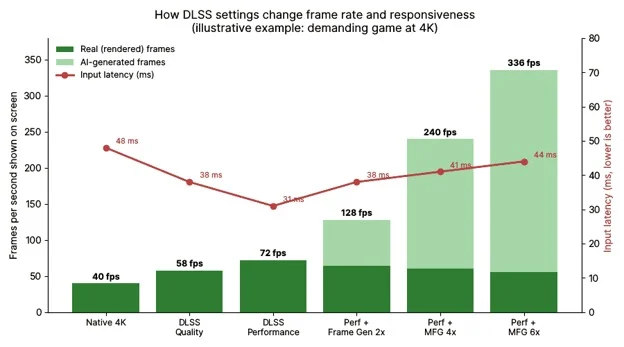
Illustrative figures only; real results vary by game, GPU, resolution and settings.
What are Ray Reconstruction and Ray Regeneration?
Remember how ray tracing produces a noisy image? Traditionally, game engines use hand-tuned denoisers to smooth it out, and they can leave lighting looking smeared, laggy or blurry.
NVIDIA's Ray Reconstruction replaces those with an AI model trained to clean up the noise while keeping fine detail. AMD's answer is FSR Ray Regeneration, which does a similar job on Radeon RX 9000 cards by restoring ray-traced detail from sparse samples. Call of Duty: Black Ops 7 was an early showcase for it.
If a game has these options, they usually make ray-traced and path-traced scenes look noticeably sharper.
Which one should you use for your GPU?
Here's the simple version, based on what you own.
- RTX 50 series: use DLSS 4.5 Super Resolution first, then consider Dynamic Multi Frame Generation if you have a high-refresh monitor and a healthy base frame rate.
- RTX 40 series: use DLSS Super Resolution and standard Frame Generation. You get the improved upscaling model and the newer frame generation model, but not the 6x and dynamic modes.
- RTX 20 and 30 series: DLSS Super Resolution works great. Frame generation from NVIDIA isn't available, but FSR frame generation options are in some games.
- Radeon RX 9000 series: FSR 4 and Redstone features are your best bet where games support them.
- Older Radeon, GTX, or integrated graphics: older FSR versions or XeSS (where offered) are your friend.
How do you get the best settings? Nine practical tips
- Turn on upscaling before anything else. It's the biggest, cleanest performance win, and Quality or Balanced is a safe default at 1440p. At 4K, Performance mode often still looks great.
- Add frame generation last. Get your base frame rate comfortable with upscaling and sensible settings, then layer frame gen on top.
- Match frame gen to your monitor. If your screen is 60Hz, frame generation is much less useful. It really shines at 120Hz and above.
- Skip frame gen in competitive games. If every millisecond matters, keep latency low and don't use it.
- Use ray tracing selectively. Often reflections and global illumination make a big visual difference, while extra shadow options cost performance for little gain. Try one setting at a time.
- Watch your VRAM. Ray tracing and frame generation both use video memory. If a card is short on VRAM, performance can fall apart in demanding games.
- Keep your drivers and apps updated. DLSS and FSR improvements often arrive through driver updates, the NVIDIA app or the AMD software, and sometimes you can override a game's older version.
- Don't trust the fps number blindly. A generated-frame counter says how smooth a game looks, not how it feels. Trust your hands as well as your eyes.
- Fix weird artifacts by changing one thing. Ghosting, shimmering or odd UI flicker? Try a higher quality preset, a different upscaler version or turning off frame generation to find the culprit.
Common myths about DLSS, FSR and frame generation
Not really. It's a tool. It doesn't make a game faster to respond, but it can make it look dramatically smoother.
Not anymore. At sensible settings, modern AI upscalers can match or beat native resolution with traditional anti-aliasing.
Lighter ray tracing is playable on mid-range GPUs now, especially with upscaling. Full path tracing is still the heavyweight.
Only up to a point. Higher multipliers can introduce more artifacts, and they only make sense if your monitor can show the extra frames.
The bottom line
Think of it like this: ray tracing makes the picture more beautiful, upscaling pays for that beauty by rendering less, and frame generation smooths out the motion on top. AI cleanup tools like Ray Reconstruction and Ray Regeneration keep the lighting looking crisp.
You don't need to memorise version numbers. Start with upscaling, add ray tracing where it visibly improves the game, try frame generation if you have a high-refresh display, and always trust what feels good to play.
This area moves fast. Features, supported GPUs and game lists change often, so check NVIDIA's and AMD's official pages for the current state before buying hardware based on any one feature.
Planning to buy? Explore the best gaming laptop models, browse refurbished desktops, or read more in our laptop buying guides.
Frequently asked questions
(Hover over a question to see the answer)
Is DLSS better than FSR?
DLSS is generally considered the more mature technology and runs on NVIDIA RTX GPUs. FSR 4 closed much of the quality gap by adopting machine learning, but it targets Radeon RX 9000-series cards. The better choice is simply the one your GPU supports.
Does frame generation increase input lag?
Yes, slightly. Generated frames do not respond to your input, and the technique holds back a frame to work, which adds latency. It is fine for single-player games and usually not recommended for competitive shooters.
What is 6x Multi Frame Generation?
It is a DLSS 4.5 mode for RTX 50-series GPUs that follows each real frame with up to five AI-generated frames. NVIDIA says it can raise 4K frame rates by up to 35 percent with minimal impact to responsiveness.
What is Dynamic Multi Frame Generation?
It automatically raises or lowers the number of generated frames to match your monitor's refresh rate. It also avoids generating more frames than your display can show, so a 120Hz monitor will not be pushed to 240 fps.
Do RTX 40-series cards get DLSS 4.5?
Partly. RTX 40-series cards can use the improved Super Resolution model and the newer frame generation model, but 6x and Dynamic Multi Frame Generation are exclusive to RTX 50-series cards.
Does FSR work on NVIDIA cards?
Older FSR versions work on many GPUs, including NVIDIA's. FSR 4 and the Redstone features are built for Radeon RX 9000-series cards.
How much base fps do I need for frame generation?
Aim for roughly 40 to 60 real fps before turning it on. Below that, the game can still feel sluggish even if the fps counter looks high.
Is ray tracing worth it?
Often yes, especially for reflections and global illumination, which make a visible difference. Heavier options such as path tracing can cost a lot of performance, so enable them one at a time and use upscaling to compensate.
Which driver do I need for DLSS 4.5 frame generation?
One report states that full functionality needs GeForce Game Ready Driver 595.79 WHQL or newer, along with the NVIDIA app beta update. Check NVIDIA's site for the current requirement.