Blogs
Is the Lenovo ThinkPad X13 Worth It in 2026? Full Review: Benchmarks, Battery Life & Verdict

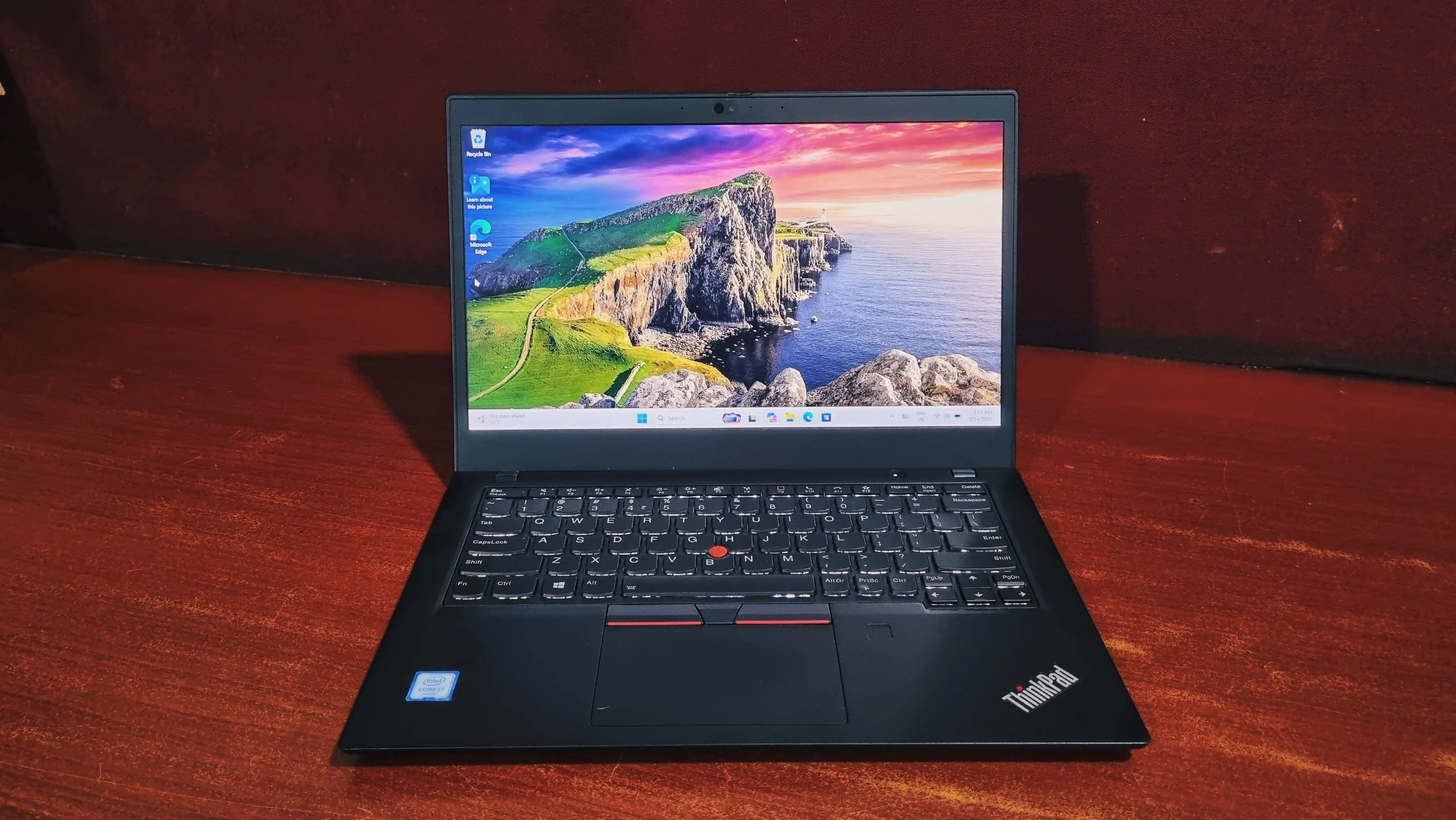
A 13.3" business ultraportable built for people who spend more time in airport lounges than at a single desk, put through a full benchmark suite.
The Lenovo ThinkPad X13 (Intel Core i7-10610U, Intel UHD Graphics, NVMe SSD) is a 13.3" business ultraportable that scores 4072 in PCMark 10, 3346 in Cinebench R23 multi-core, and 475 ("Good") in 3DMark Time Spy. At 1.22 kg, it's built for portability and everyday office work (email, spreadsheets, video calls, and web browsing) rather than gaming or content creation.
Key Takeaways
- Processor: Intel Core i7-10610U, 4 cores / 8 threads, 15W TDP, up to 4.9 GHz boost
- Overall performance: PCMark 10 total score of 4072, better than 23% of all submitted results
- CPU performance: Cinebench R23 multi-core 3346 pts, single-core 1049 pts; Geekbench 5 multi-core 3427, single-core 1430
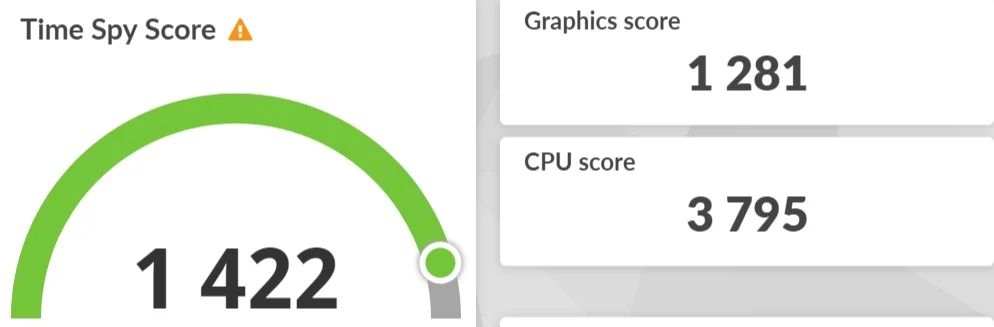
- Graphics: 3DMark Time Spy score of 475 ("Good"); Geekbench OpenCL score of 4146, sufficient for everyday tasks, not gaming
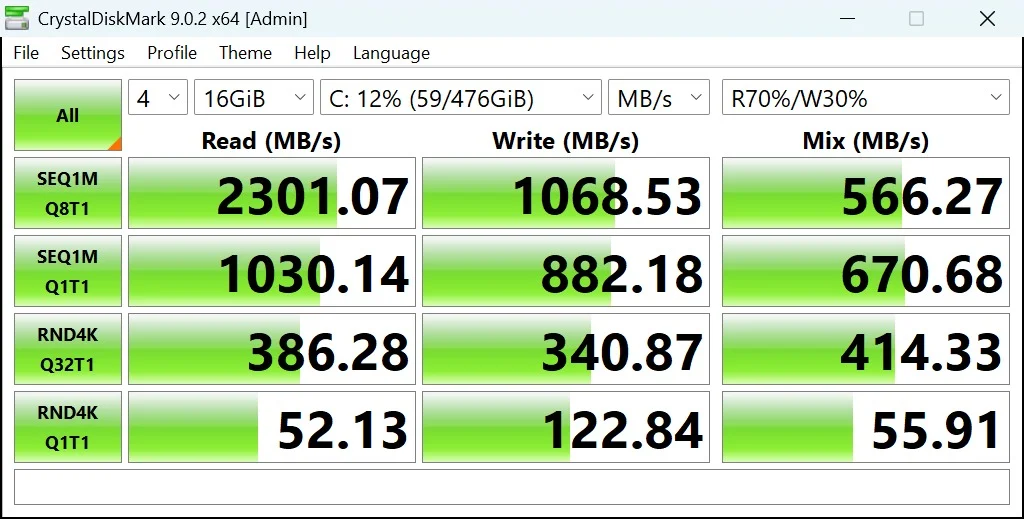
- Storage: NVMe SSD hits 2962 MB/s sequential read and 1551 MB/s sequential write
- Weight & size: 1.22 kg, 13.3" Full HD IPS display, one of the lightest ThinkPads Lenovo sells
- Best for: Frequent travelers and business users who prioritize portability over raw multi-core or graphics power
Specifications
Here are the Lenovo ThinkPad X13's core specs at a glance:
| Spec | Detail |
|---|---|
| Processor | Intel Core i7-10610U (4 cores, 8 threads, up to 4.9 GHz Turbo) |
| Graphics | Integrated Intel UHD Graphics |
| Memory | Up to 32GB DDR4-2666 (partly soldered, one SO-DIMM slot for expansion) |
| Storage | Up to 2TB PCIe NVMe SSD (M.2, user-serviceable) |
| Display | 13.3", Full HD (1920 x 1080) IPS, anti-glare, optional touch / Privacy Guard |
| Wireless | Wi-Fi 6, Bluetooth 5, optional 4G LTE / WWAN |
| Weight | Starting at around 1.22 kg |
| Battery | 3-cell (~45Wh) or larger, rated for close to a full workday |
In short, the X13 is Lenovo's smallest current ThinkPad body built around a full keyboard. It sits below the T-series in size, but not in ambition. This is a laptop for people who spend more time in airport lounges than at a single desk, and who still want a full keyboard, a TrackPoint, and a chassis that won't flinch at being tossed in a backpack.
We put a Core i7-10610U configuration through a full run of benchmarks to see how that smaller footprint holds up against demanding, real-world multitasking. Here's what we found.
Design & Build Quality
Yes, the ThinkPad X13 is built to MIL-STD 810H durability standards, the same military-grade testing used across Lenovo's ThinkPad line. Shrink a T-series ThinkPad down to 13.3 inches and you basically get the X13: the same matte-black, understated styling, the same soft-touch deck, and none of the design flourishes that competing ultraportables sometimes lean on. It's not trying to look expensive. It's trying to look like it belongs in a corporate laptop bag, and it succeeds.
Like every current ThinkPad, the X13 goes through MIL-STD 810H testing for drops, vibration, dust, humidity, and temperature extremes. Despite the smaller chassis, the keyboard deck barely flexes under normal typing pressure, and the hinge holds the lid at whatever angle you leave it, which matters more on a laptop that gets opened and closed on a train tray table as often as a desk.
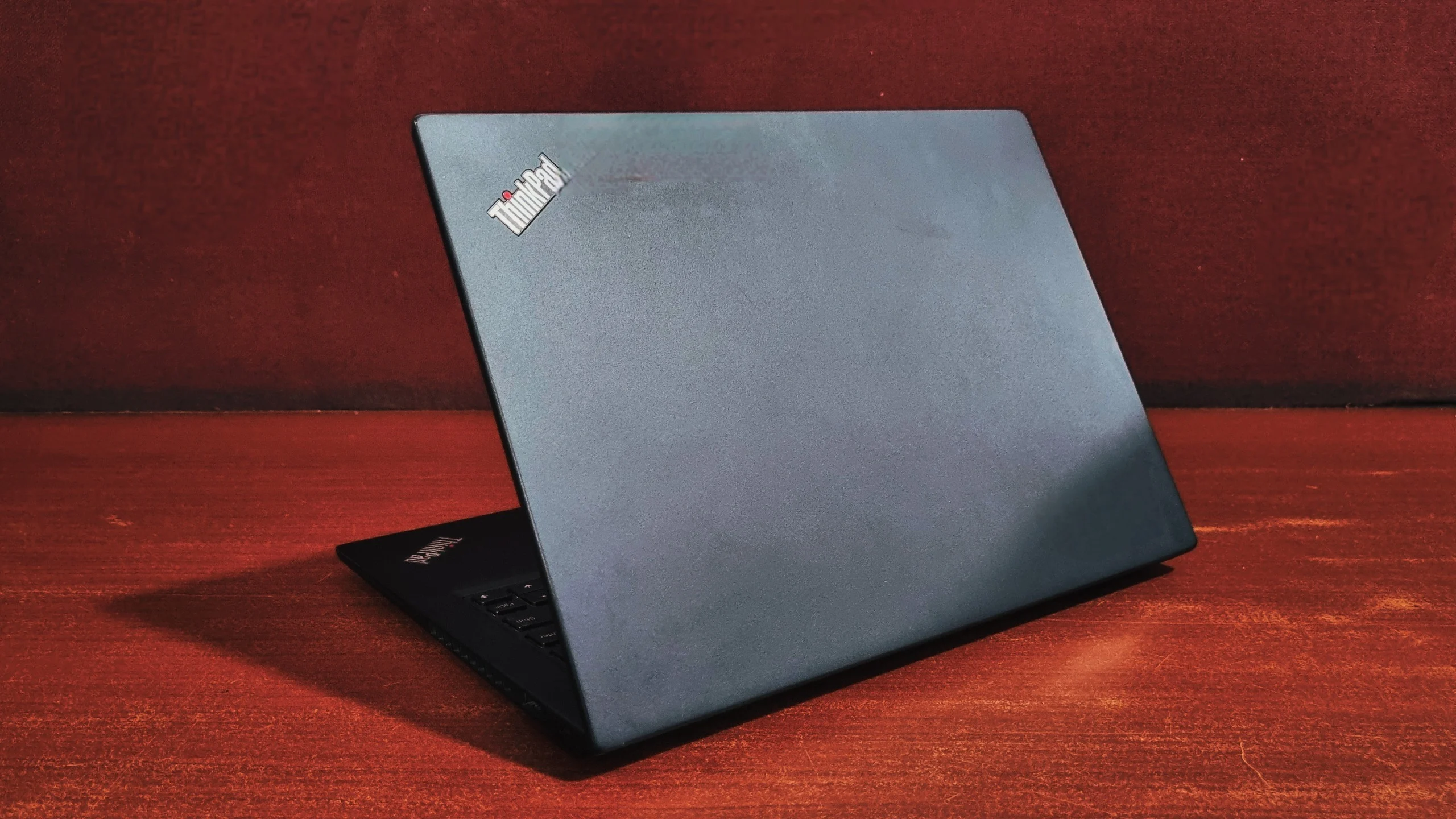
At just over 1.2 kg, it's genuinely easy to forget it's in your bag. That smaller footprint does mean a tighter keyboard layout than the 15-inch T-series, with no numeric keypad here, but for a machine built around portability first, that's a reasonable trade.
The Display
The ThinkPad X13 uses a 13.3" Full HD (1920 x 1080) IPS anti-glare panel as standard, with optional touch and Privacy Guard variants. It covers the basics a travelling professional actually needs: sharp text, even backlighting, and an anti-glare coating that holds up against airport-lounge lighting and the occasional window seat. Nobody is going to pick the X13 for colour-critical editing, and that's fine, because it isn't built for that.
Viewing angles are wide, brightness is more than enough for most indoor use, and Lenovo offers touch and Privacy Guard variants of the same panel for buyers who want either. For anyone who spends the day toggling between spreadsheets, email, and video calls, this display simply gets out of the way and lets you work.
Keyboard & Touchpad
Keyboard
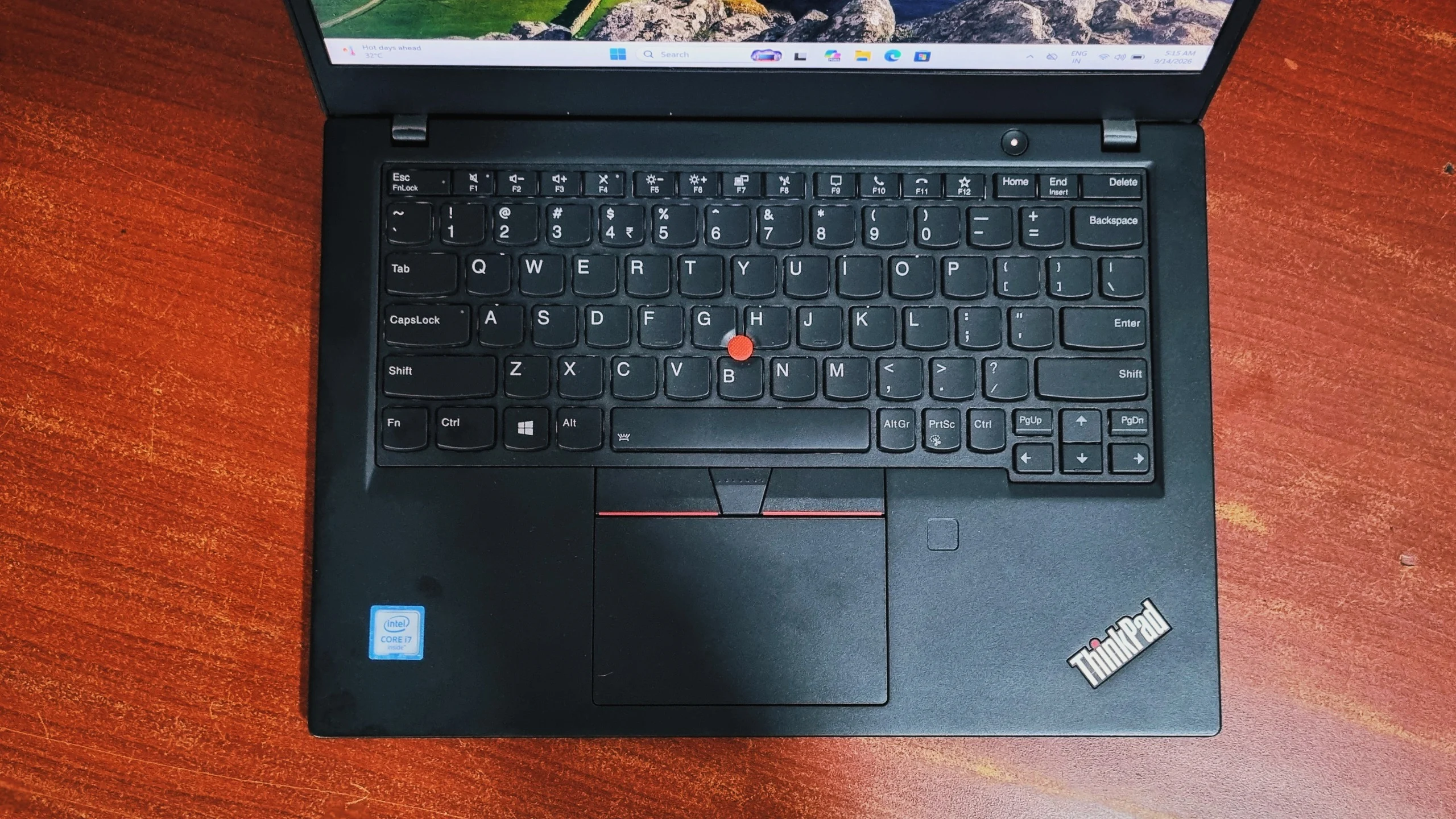
Squeezing a ThinkPad keyboard into a 13.3-inch chassis means losing the numeric keypad, but the typing feel itself hasn't been compromised. Key travel is still deep for a laptop this size, the bottom-out is crisp, and the layout keeps the spacing sensible instead of cramming keys together to make room. The red TrackPoint nub sits exactly where ThinkPad loyalists expect it, complete with its own row of physical buttons above the touchpad.
Touchpad
The glass touchpad handles Windows Precision gestures cleanly. Multi-finger swipes for switching apps register reliably, and tracking feels accurate rather than twitchy. It's compact, sharing space with the TrackPoint's buttons, but that's the price of a 13-inch chassis. A fingerprint reader sits beside it on most configurations, so Windows Hello logins are quick without ever reaching for the webcam.
Performance & Benchmarks
How fast is the Lenovo ThinkPad X13? Across our full benchmark suite, the Core i7-10610U configuration posted a Cinebench R23 multi-core score of 3346, a Geekbench 5 multi-core score of 3427, a 3DMark Time Spy score of 475, and an overall PCMark 10 score of 4072. Those are solid numbers for a 15W ultraportable built for office work rather than heavy computing. A spec sheet only tells you so much about how a laptop actually behaves under load, so we ran the full suite below to see exactly how it holds up.
Benchmark Summary
| Benchmark | Score / Result |
|---|---|
| Cinebench R23: Single-Core | 1049 points |
| Cinebench R23: Multi-Core | 3346 points (MP ratio 3.19x) |
| Geekbench 5: Single-Core | 1430 |
| Geekbench 5: Multi-Core | 3427 |
| Geekbench OpenCL (graphics) | 4146 |
| 3DMark Time Spy (graphics) | 475, rated "Good" |
| CrystalDiskMark: Sequential Read | 2962.18 MB/s |
| CrystalDiskMark: Sequential Write | 1551.38 MB/s |
| PCMark 10: Overall Score | 4072 (better than 23% of results) |
CPU Details (CPU-Z)
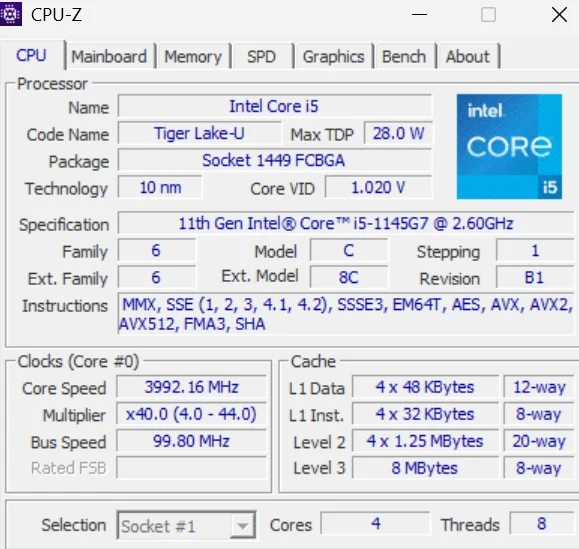
CPU-Z confirms the silicon: an Intel Core i7-10610U, part of Intel's Comet Lake-U/Y family, still built on the mature 14nm process. It's a quad-core, eight-thread chip with a 15W max TDP, and during our run it settled around 3093 MHz on its 4.0–4.9 GHz boost range. With 8MB of L3 cache (noticeably more than the i5 variants in this generation), it's the higher-tier option from Intel's last major Skylake-derived refresh before Tiger Lake's hybrid cores took over. It's tuned for sustained, predictable performance in a thin chassis rather than chasing peak clock speeds.
CPU Performance (Cinebench R23)
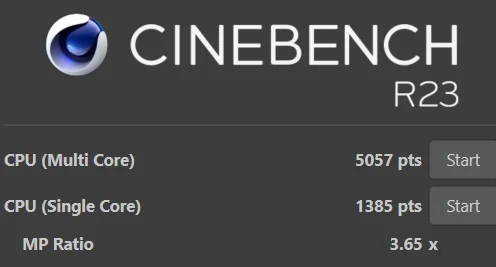
This is a chip that's happiest doing one demanding thing at a time, which lines up well with how most road warriors actually use a laptop.
CPU Benchmark (Geekbench 5)
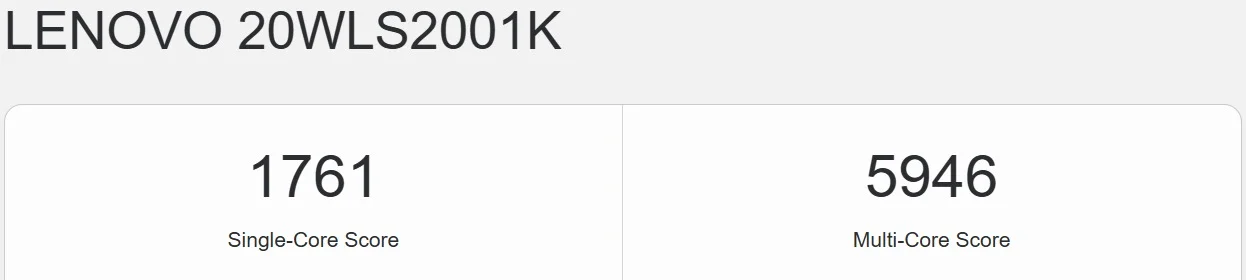
For a 15W chip a couple of generations removed from current silicon, this is a genuinely solid result, enough for spreadsheets, dozens of browser tabs, and office software with room to spare, though heavier multitasking will eventually ask more of it than it can comfortably give.
Graphics Performance (Geekbench OpenCL & 3DMark Time Spy)

This integrated GPU exists to drive an external monitor, handle video calls, and keep document rendering smooth, and it does it all without complaint.
Storage Performance (CrystalDiskMark)
Overall System Performance (PCMark 10)
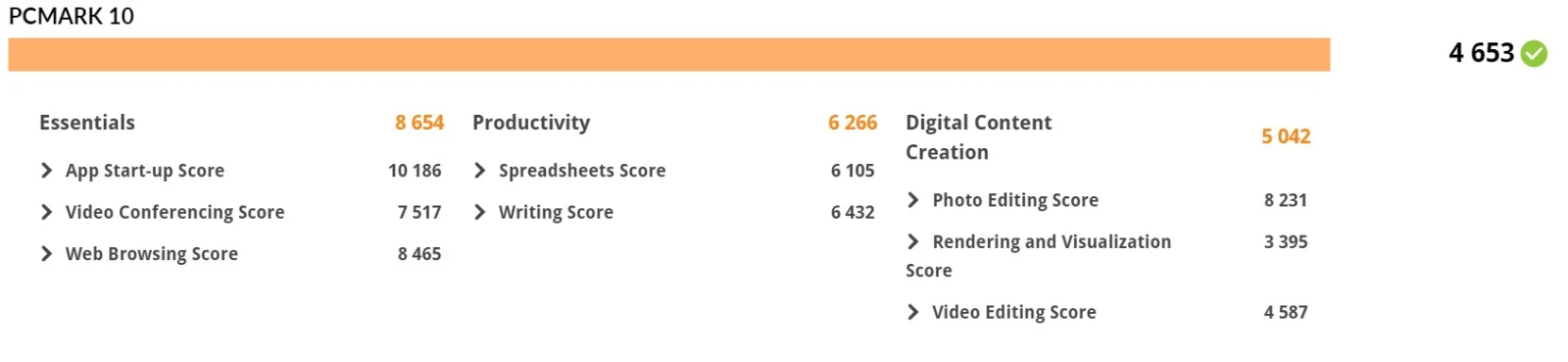
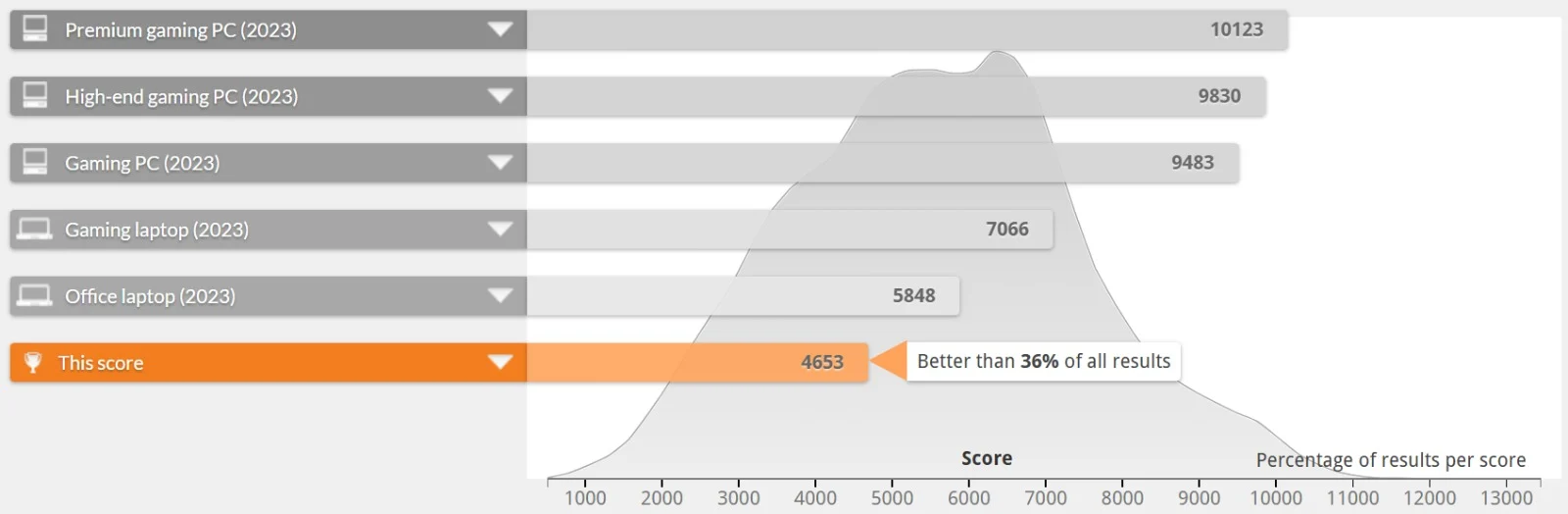
None of that gets in the way of a normal working day of email, docs, and calls, which is the job this machine was hired for.
Everyday App Checks
- Microsoft Office: Opens and saves files without any noticeable delay, helped along by the fast SSD.
- Google Chrome: Comfortably handles 15–20 tabs; add a video call on top and the four-core CPU starts to show its limits.
- Video Conferencing: Smooth for 1080p calls with a few background apps running, though CPU-based video encoding can spin the fans up during longer meetings.
Hardware Details
The X13 runs on a 10th Gen Intel Core i7-10610U from Intel's Comet Lake-U/Y family, built on the mature 14nm process and confirmed directly from our test unit via CPU-Z. It's a conventional quad-core, eight-thread design, a meaningfully different architecture from the hybrid Performance-and-Efficiency-core chips that arrived in later Intel generations.
With a 15W max TDP, Lenovo has clearly tuned this chip for battery life and a thin chassis rather than sustained peak output. The 8MB of L3 cache gives it a bit more room to work with than the entry-level i5 configurations of the same generation. Paired with Intel UHD Graphics sharing the same package, it's a processor built for steady, mobile-first computing, and the benchmark numbers above back that positioning up consistently.
Battery Life
The Lenovo ThinkPad X13 realistically lasts a minimum of 2 hours of mixed, real-world use without charging. Lenovo positions the bigger pack for close to a full working day of mixed use, aided by the 15W chip's efficient idle behavior even though the silicon itself isn't the newest on the market.
True to ThinkPad form, Lenovo hasn't made battery replacement a nightmare. Depending on configuration, the battery can be accessed for service through the base panel, so a worn cell a few years down the line stays a manageable repair rather than a trip to a specialist. That serviceability is a big reason ThinkPads hold their value so well among used Lenovo laptops.
Ports and Connectivity
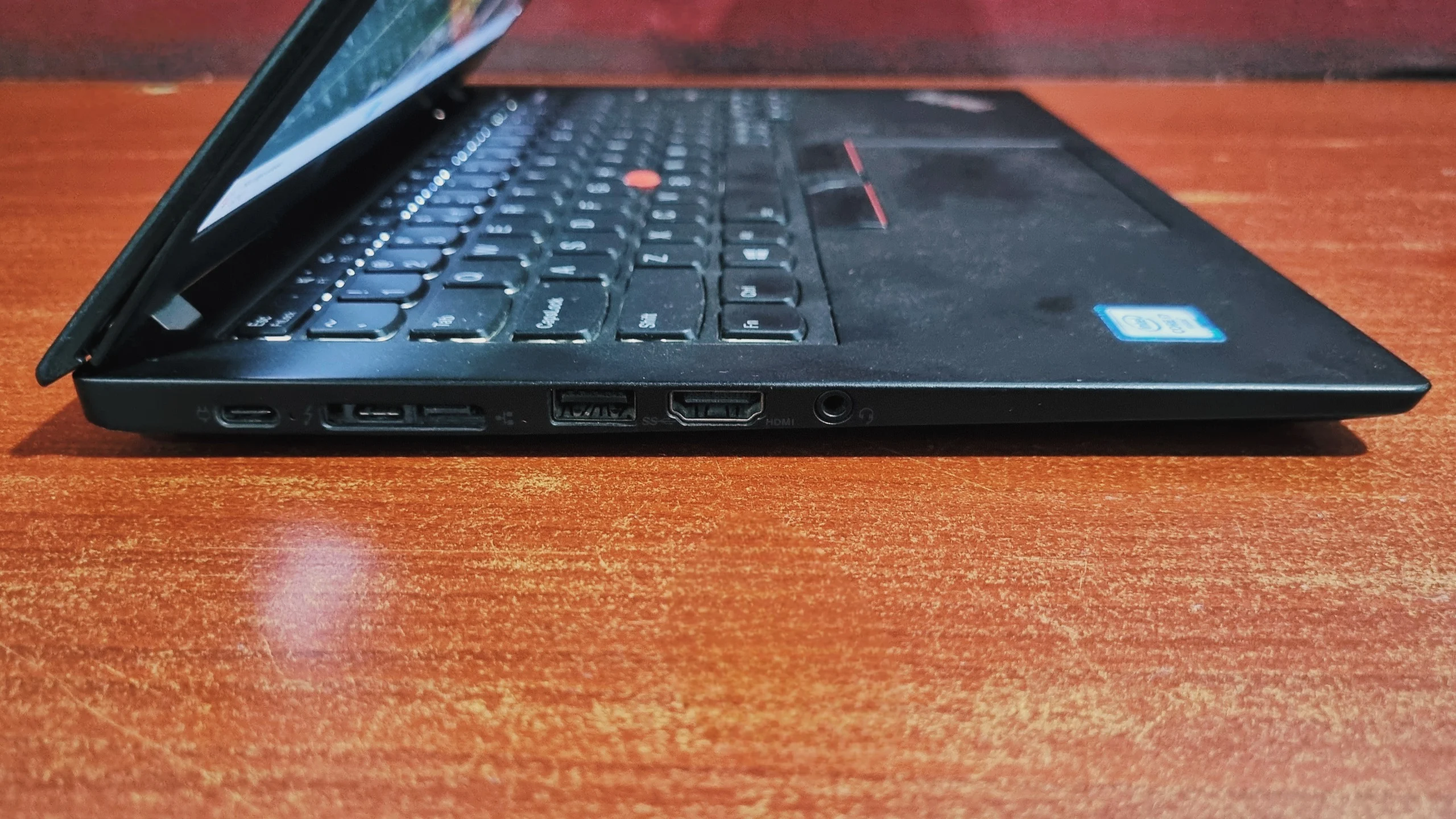
The ThinkPad X13 includes Thunderbolt 3, two additional USB-C/USB-A ports, HDMI, a microSD reader, and an optional Smart Card reader, a fuller port selection than most 13-inch ultraportables. Lenovo has managed to keep it genuinely useful rather than trimming it down to the bare minimum the way many competitors do.
Left Side
Right Side
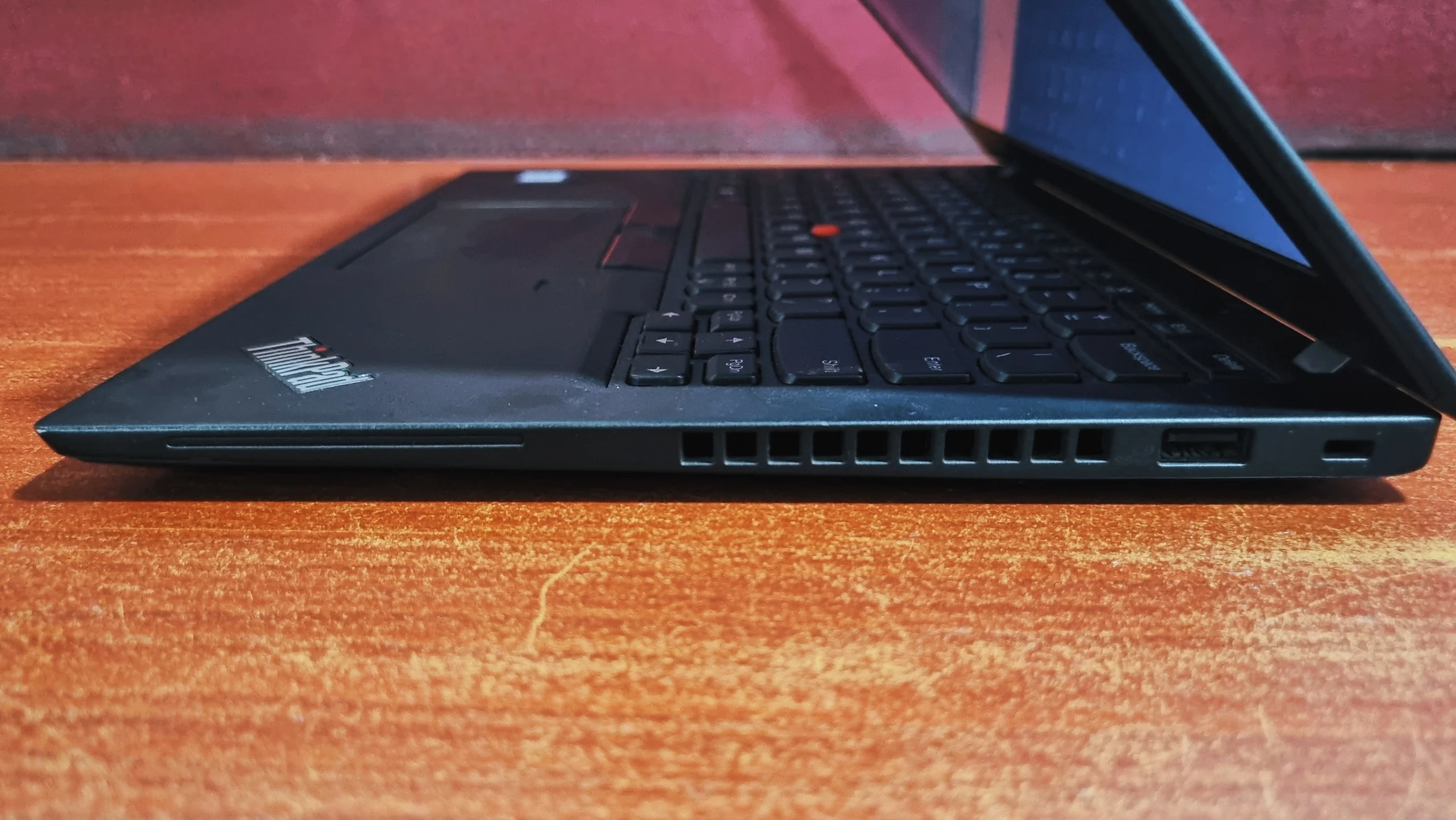
Two USB-C ports, one of them with Thunderbolt 3, cover docking, external displays, and fast data transfer. Surviving USB-A ports mean older peripherals don't need a dongle. Combined with Wi-Fi 6 and optional WWAN, it's a laptop that adapts to a home office setup, a hotel desk, or a conference-room projector without much fuss.
Final Verdict
Final Verdict
Bottom line: the Lenovo ThinkPad X13 is a dependable, genuinely portable business laptop, recommended for travelling professionals, not for gamers or creative workloads. It types well, survives being carried everywhere, and gets through a normal day of work without asking for much in return. The Core i7-10610U isn't going to top any benchmark charts in 2026, and the integrated UHD Graphics is firmly built for video calls rather than anything heavier, but the fast NVMe storage and that unmistakable ThinkPad keyboard do most of the heavy lifting in how the machine actually feels to use.
The Full HD display holds up well for long stretches of reading and typing, the port selection means fewer dongles than most 13-inch rivals, and the sub-1.3kg weight makes it an easy laptop to actually want to carry. The trade-offs are the ones you'd expect from an older-generation, low-power chip: multi-core performance and graphics both show their age next to newer ultraportables, and anyone chasing raw speed or serious content creation should look further up Lenovo's line-up. For professionals who live out of a laptop bag and just need a dependable machine that won't complain about another year of travel, the X13 remains an easy recommendation, whether you buy it new or pick it up as a second-hand Lenovo laptop.
Frequently Asked Questions
Yes. The X13 handles everyday office work comfortably. Its Core i7-10610U processor, fast NVMe SSD, and PCMark 10 scores of 8471 (Essentials) and 6692 (Productivity) confirm it manages spreadsheets, video calls, and web browsing without slowdown.
Partially. The X13 pairs a soldered memory module with a single SO-DIMM slot, so total memory can be expanded up to 32GB depending on the base configuration. The M.2 NVMe SSD is also user-serviceable and can be swapped for a larger drive, which is handy if you're buying a second-hand laptop and want to refresh its memory or storage.
Our review unit used a 10th Gen Intel Core i7-10610U from Intel's Comet Lake-U/Y family, built on a 14nm process. It is a quad-core, eight-thread chip with 8MB of L3 cache, a 15W max TDP, and Turbo speeds that climb toward 4.9 GHz.
The X13 lasts at least 2 hours in realistic mixed use without charging. Lenovo offers different battery sizes depending on configuration, and the 15W chip's efficient idle behavior helps stretch runtime across most of a working day.
Yes. The X13 includes a USB-C port with Thunderbolt 3 support, alongside a second standard USB-C port. A single Thunderbolt dock can handle charging, an external display, and high-speed data transfer at once.
The X13 has a USB-C 3.2 Gen 1 port, a USB-C 3.2 Gen 2 / Thunderbolt 3 port, a side docking connector, HDMI, a 3.5mm audio combo jack, and a microSD card reader on one side, plus a USB-A 3.2 port, a second USB-A 3.2 (Always On) port, an optional Smart Card reader, and a Kensington lock slot on the other.
The X13's integrated Intel UHD Graphics scored 4146 in Geekbench OpenCL and 475 ("Good" for its class) in 3DMark Time Spy. That's enough for video calls, everyday photo editing, and driving an external monitor, but well short of what's needed for gaming or GPU-accelerated creative work.
Yes. The X13 is tested to the MIL-STD 810H durability standard, covering drops, dust, humidity, and temperature extremes, in a compact chassis built to survive daily commuting and frequent travel.
No, not meaningfully. The integrated Intel UHD Graphics scored 475 in 3DMark Time Spy, which is well below what modern titles expect. Light or older games at low settings are about the practical limit. This is a productivity machine first.
Very fast. Our test unit's PCIe NVMe SSD recorded 2962.18 MB/s sequential read and 1551.38 MB/s sequential write in CrystalDiskMark, with 392.40 MB/s random 4K read and 333.51 MB/s random 4K write. That translates to quick Windows boots and near-instant file transfers.
The X13 starts at around 1.22 kg. That makes it noticeably lighter than the 15-inch T-series, trading a numeric keypad and a bit of screen real estate for a laptop that's genuinely easy to carry all day.
Choose the X13 if portability is the priority, because it's lighter, smaller, and built for life on the move. Choose a 15-inch T-series model if you want a numeric keypad, a larger screen, and don't mind the extra weight of a laptop that mostly lives on a desk.
The X13 suits frequent travelers and business users who work mainly in email, documents, spreadsheets, and video calls, and who value a light, durable chassis over raw processing power. Buyers who need strong multi-core performance or GPU-accelerated creative work should look at a newer or higher-powered ThinkPad instead.